-
Written By Vikas Bajpai
-
Updated on June 8th, 2026
How to Migrate Titan Mail to Gmail Without Data Loss
I need to migrate 6 enterprise Titan Mail accounts to Gmail Workspace, but I am unable to locate a direct migration pathway. My organization has over 3,500 emails, 12 folders, and multiple contact entries that require simplified transfer without any data loss. Can someone guide me through a reliable migration process to migrate Titan Mail to Gmail?
~ Jamiel Carlone, Lyon
Organizations operating on Titan Mail are progressively transitioning toward Gmail, a robust & enterprise-grade communication platform developed by Google. Gmail is offering superior scalability & smooth integration, which is why professionals are prioritizing this migration for enhanced productivity. This guide presents a comprehensive approach for business users seeking a reliable and zero-data-loss conversion experience. Here, we included a scalable solution called MailConverterTools IMAP Email Backup Tool to import Titan Mail into Gmail.
Where Titan Mail Lacks Compared to Gmail
|
Feature |
Titan Mail |
Gmail |
|
Storage Capacity |
Limited storage per account |
15GB free, expandable via Google One |
|
Third Party Integration |
Restricted application support |
6,000+ Google Workspace integrations |
|
Collaboration Tools |
Basic collaboration features |
Advanced Meet, Docs, Drive integration |
|
Security Protocols |
Standard encryption support |
Enterprise-grade OAuth 2.0 and AI threat detection |
|
Search Functionality |
Basic keyword search |
Advanced AI-powered search across all mailbox data |
|
Scalability |
Suitable for small businesses |
Designed for enterprise-level scalability |
Points to Consider Before Migration
There are some points that you should consider before beginning the transfer Titan Mail to Gmail.
- Verify sufficient storage capacity on the destination Gmail account.
- Ensure IMAP protocol is activated on the Titan Mail account.
- Keep server addresses and authentication credentials readily accessible.
- Notify all enterprise stakeholders about the scheduled migration window.
- Generate a full Titan Mail data backup before initiating migration.
- Additionally, evaluate and select the most suitable migration method according to your requirements.
Enterprise-Level Solution to Migrate Titan Mail to Gmail
The MailConverterTools IMAP Mail Backup Tool is a professional-grade migration solution to migrate emails with complete data integrity. The tool preserves the original folder hierarchy and maintains all metadata. It follows the secure OAuth 2.0 modern authentication protocol to protect data transmission. This utility is equipped with advanced filtering capabilities and cross-platform compatibility across Windows, Mac, and Linux operating systems. This tool delivers a technically superior and operationally efficient migration experience for all users.
Steps to Migrate Titan Email to Gmail
- Download the tool and log in with Titan Mail.
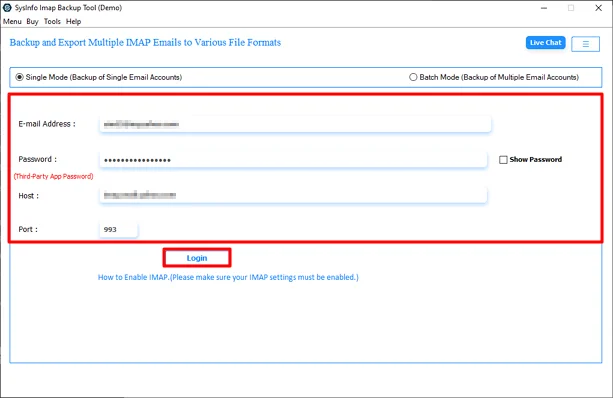
- Then, select and preview files and click the Next button.
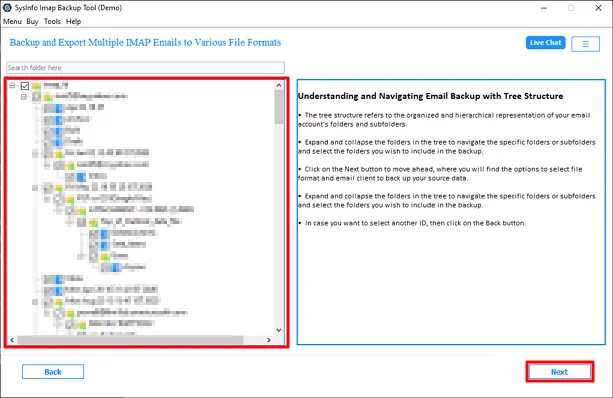
- After that, choose Gmail and click the Next button.
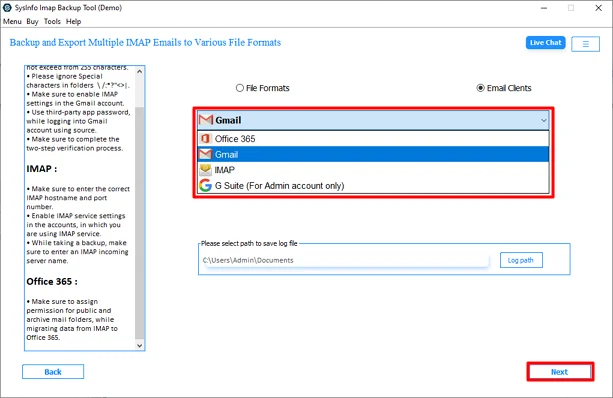
- Further, log in with your Gmail credentials.
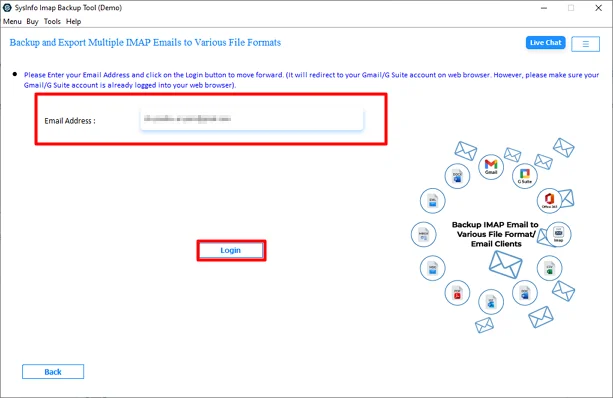
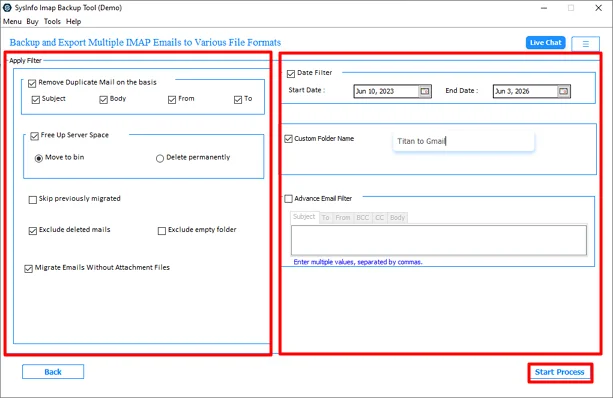
- Lastly, use the filters and options and click Start Process.
Free Manual Approach to Migrate Titan Mail to Gmail
Users seeking a no-cost migration pathway can utilize the IMAP bridge approach via Mozilla Thunderbird, a third-party email client supporting dual account configuration. However, this method is recommended strictly for small-scale migrations due to its operational limitations.
Steps to Move Titan Email to Gmail via IMAP Bridge
- Launch Mozilla Thunderbird and navigate to the Account Configuration window from the application menu.
- Enter the Titan Mail credentials and complete the IMAP-based account configuration within Thunderbird.
- Proceed to add the destination Gmail account by entering the respective credentials and completing its configuration.
- Once both source and destination accounts are successfully configured, verify the folder structure of each account.
- Select the required emails from the Titan Mail account and transfer them to the Gmail account using the drag-and-drop functionality within Thunderbird.
Drawbacks of the Manual Approach
- IMAP configuration errors can interrupt or terminate the migration process.
- Folder hierarchy and metadata integrity are not guaranteed during transfer.
- Attachments may fail to transfer correctly in certain IMAP configurations.
- No progress tracking or migration status report is available.
- Time-consuming process for mailboxes containing large volumes of email data.
- Incompatible with bulk or simultaneous multi-account migration requirements.
- No built-in error recovery mechanism in case of migration failure.
Why Users Choose Our Tool Over a Free Approach?
IT administrators and enterprise users managing large-scale email migrations consistently prioritize the MailConverterTools IMAP Backup Tool over manual free approaches due to its technically superior performance and operational reliability.
Unlike the manual IMAP bridge method, this professional tool delivers automated migration execution, eliminating the requirement for continuous manual intervention. It preserves complete folder hierarchy, metadata integrity, and attachment accuracy throughout the entire migration process. The integrated OAuth 2.0 authentication protocol ensures every data transmission remains encrypted and fully secured.
Wrapping Up
To successfully migrate Titan Mail to Gmail, selecting the right migration approach is essential for ensuring complete data integrity. While the manual IMAP method serves small-scale requirements, enterprise deployments demand a more technically reliable solution. The MailConverterTools IMAP Email Backup Software delivers a secure, automated, and zero data loss migration experience. For IT administrators and business users prioritizing accuracy and efficiency, this professional tool remains the most technically superior way.
Frequently Asked Questions
Q1. What is the best way to migrate 3,500+ emails from Titan Mail to Gmail?
Ans: For large mailboxes containing thousands of emails, folders, and contacts, a professional migration solution such as the MailConverterTools IMAP Email Backup Tool can help automate the migration process, reduce manual effort, and improve migration accuracy.
Q2. Is Gmail better than Titan Mail for business use?
Ans: For many organizations, Gmail offers broader collaboration capabilities through Google Workspace, advanced search functionality, stronger ecosystem integration, and easier scalability for growing businesses.
Q3. What is the biggest challenge when migrating Titan Mail to Gmail?
Ans: The most common challenges include preserving folder hierarchy, transferring large mailboxes, maintaining data integrity, avoiding downtime, and handling multiple accounts efficiently.
Q4. Is it possible to migrate multiple Titan Mail accounts at the same time?
Ans: Yes. The MailConverterTools IMAP Email Backup Tool is particularly useful for businesses that need to migrate several mailboxes without performing repetitive manual tasks.
Q5. How long does it take to migrate Titan Mail to Gmail?
Ans: Migration time depends on mailbox size, email volume, internet speed, and the migration method used. Automated solutions generally complete migrations more efficiently than manual methods, especially when dealing with large enterprise mailboxes.
Q6. Is the manual Thunderbird method suitable for enterprise migration?
Ans: Not usually. While Thunderbird can help migrate smaller mailboxes, enterprise environments with multiple accounts and large email volumes often require a more scalable solution. Professional tools offer automation, progress tracking, and better handling of large-scale migrations.
About The Author:

Vikas Bajpai is a results-driven SEO expert and content strategist with a strong passion for building impactful digital experiences. He specializes in crafting data-backed content plans that boost visibility, engage audiences, and drive measurable growth. With deep expertise in search engine optimization, keyword strategy, and content marketing, Vikas helps brands strengthen their online presence and achieve long-term success.
Related Post