-
Written By Amit Chandel
-
Updated on March 12th, 2026
How to Import MSG to Yandex Mail Easily – Step-by-Step Guide
User Query: I have a bunch of Outlook MSG files saved on my system, but the problem is that I can only open them properly in Outlook. I want to move those emails into my Yandex Mail without going through a complicated setup.”
MSG files are created by Microsoft Outlook when you save individual emails. Many users prefer moving their emails to services like Yandex Mail so they can open them easily from different devices. That’s why this blog walks you through a simple manual approach to import MSG to Yandex Mail. Also, by using the MailConverterTools MSG Converter Tool. It helps move your emails without disturbing attachments, formatting, or other important details.
Common Reasons to Import MSG File to Yandex Mail
- Many users move their MSG email to Yandex Mail so they can check messages easily from any device.
- Outlook MSG files are hard to access without Outlook, which makes daily email management inconvenient.
- Importing MSG emails to Yandex Mail helps keep everything in one place instead of scattered files.
- Some people prefer Yandex Mail because it allows quick web access without opening Outlook every time.
- It also helps create a safer backup of important emails stored earlier as separate MSG files.
- Users often switch email services and want to move their old Outlook messages to Yandex Mail.
- Managing emails inside a mailbox feels easier than opening each MSG file one by one.
- Importing them to Yandex Mail keeps attachments and email formatting available in a normal inbox view.
Import MSG to Yandex Mail Using Manual Method
You can try a simple manual workaround if you have access to Microsoft Outlook. The idea is to connect your Yandex Mail account in Outlook and then move the MSG emails into that mailbox so they sync online.
Steps to Move MSG Emails to Yandex Mail
- Open Microsoft Outlook, go to File, and click Add Account.
- Then, sign in with your Yandex Mail email details.
- Outlook can load and show your Yandex folders.
- Find the folder on your computer where the MSG files are saved.
- Double-click any MSG file, and it will open in Microsoft Outlook.
- Now drag that email and drop it into the Inbox or another Yandex folder in Outlook.
- Outlook will upload to the Yandex Mail automatically.
Limitations
- You must have Microsoft Outlook installed; MSG files will not open properly.
- The process becomes very slow if you have many MSG files to move.
- Sometimes attachments or formatting may not appear the same after syncing.
- A stable internet connection is required while Outlook uploads emails to Yandex Mail.
- There is no bulk option in this method, so managing large email collections becomes difficult.
- If Outlook stops syncing, some emails may fail to appear in your Yandex mailbox.
Comprehensive Solution to Import MSG to Yandex Mail
Many people use the MailConverterTools MSG Converter when the manual method starts taking too much time. It helps move MSG files directly into a Yandex Mail account without going through the drag-and-drop process again and again. The tool transfers emails along with their attachments and keeps the basic email layout the same. The interface is simple, so most users can understand it without much effort. You just load the MSG files and choose where you want to send them; you can convert MSG to OFT and many more file formats. There are also a few small options that help while importing emails. At last, read this if you want to import MSG to iCloud.
Steps to Open MSG Files in Yandex Mail
- Download the MSG Converter Tool.
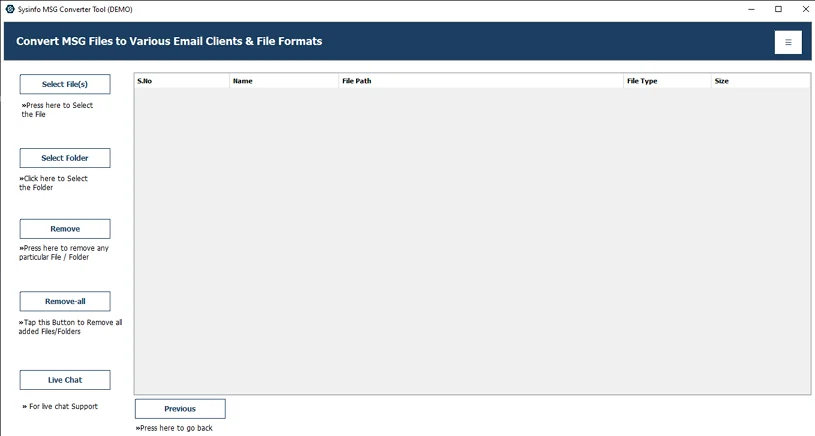
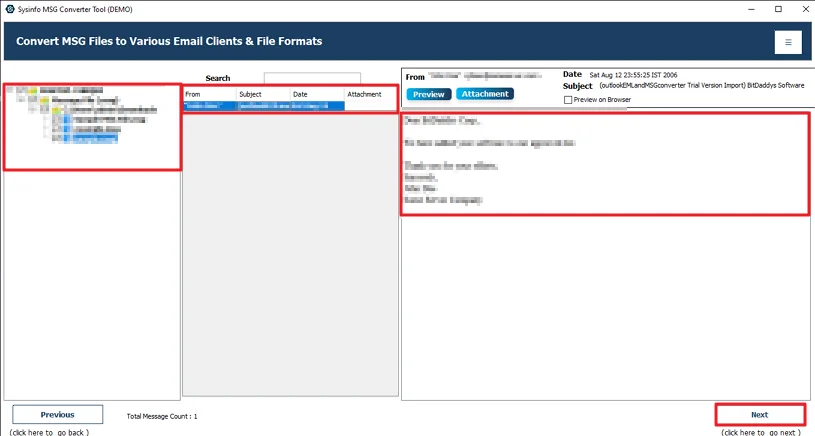
- Then, add the MSG files/folder and hit Next.
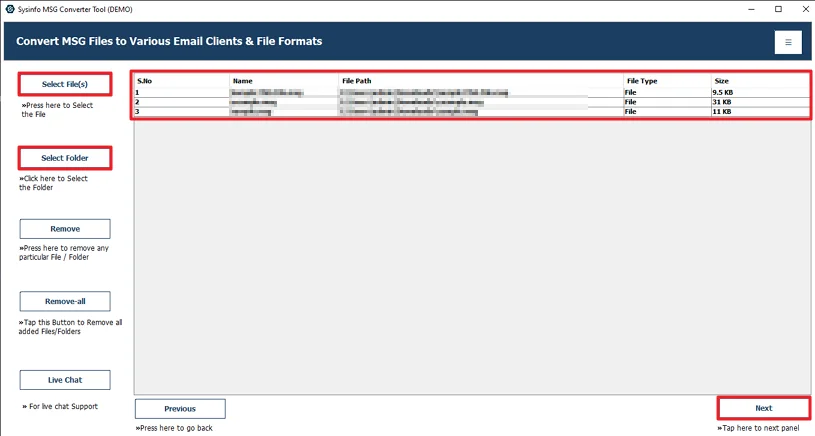
- Preview and select files, and click Next.
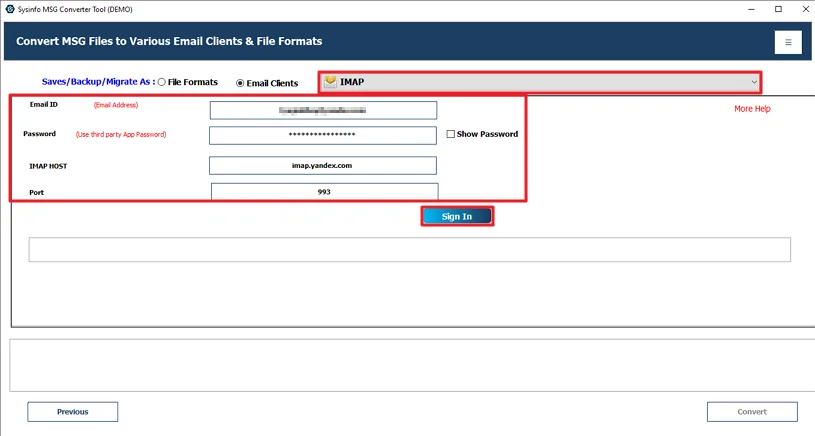
- Further, choose IMAP and log in with your Yandex credentials.
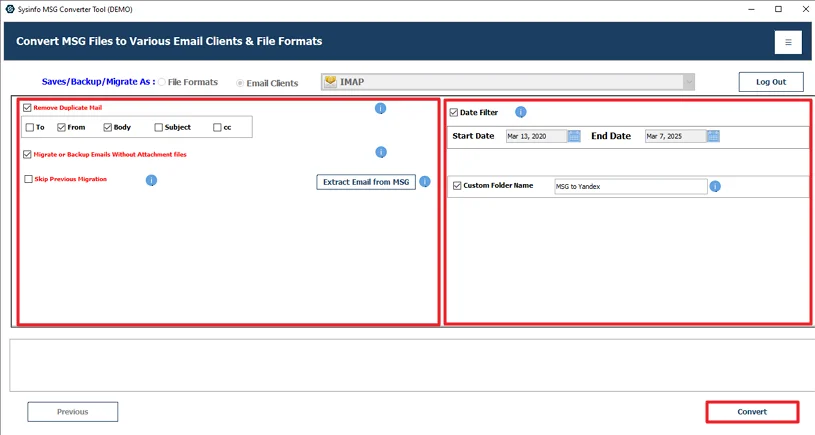
- Finally, apply filters and click Convert.
Successful User Case:-
A user named Daniel had many old email records saved as MSG files on his computer from Microsoft Outlook. After some time, he stopped using Outlook and started using Yandex Mail for daily communication. The problem was that those MSG files were just sitting on his system, and he could not easily check them from other devices.
At first, he tried the manual method using Outlook, but moving emails one by one took too much time. It also became difficult to manage because there were hundreds of MSG files.
Later, he used the MailConverterTools MSG Converter Tool to solve the issue. He added the MSG files into the software, selected IMAP, and logged in with his Yandex Mail account. After running the process, his emails were imported into Yandex Mail along with attachments and basic formatting.
In the end, Daniel was able to open his old emails directly from his Yandex mailbox without depending on Outlook anymore.
Conclusion
Keeping MSG files only on a computer can make them harder to access later. Moving them to Yandex Mail makes it easier to check emails from different devices and also works as a backup. In this blog, we looked at a simple way to import MSG to Yandex Mail. The tool can move many MSG files at once, so you don’t have to handle each email separately. Just go through the steps carefully while doing the process. That helps avoid missing emails or other small issues during the import.
Frequently Asked Questions
Q.1 Which software can easily import MSG to Yandex Mail?
Ans: You can use the MailConverterTools MSG Converter Tool to import MSG files into Yandex Mail. It allows you to add MSG files and move them directly to your email account without a long manual process.
Q.2 How can I import MSG files to Yandex Mail?
Ans: First, install the MailConverterTools MSG Converter Tool on your system. Add your MSG files, preview the emails, and choose IMAP as the saving option. After that, sign in with your Yandex Mail account and start the conversion process.
Q.3 Can I import multiple MSG files to Yandex Mail at once?
Ans: Yes, the MailConverterTools MSG Converter Tool allows you to upload and import multiple MSG files at the same time to Yandex Mail without handling them one by one.
Q.4 Can I upload MSG files to Yandex Mail without technical knowledge?
Ans: Yes, the MailConverterTools MSG Converter Tool has a simple interface, so even beginners can import MSG files into Yandex Mail by following the basic steps mentioned in the blog.
About The Author:

Meet Amit, an experienced SEO expert and content planner. He uses his creativity and strategy to create content that grabs attention and helps brands reach their goals. With solid skills in digital marketing and content planning, Amit helps businesses succeed online.
Related Post