-
Written By Vikas Bajpai
-
Updated on August 7th, 2026
Migrate Rackspace to Gmail: Step-by-Step Guide (2026)
Migrating Rackspace to Gmail is a common step for teams leaving hosted email behind. Rackspace emails often hold years of client history, contracts, and shared folders that must transfer safely in Gmail. The manual ways to move emails from a Rackspace mailbox to Gmail are slow, messy, and easy to misconfigure. This guide shows both simple free methods and a reliable MailConverterTools IMAP Migration tool-based path to migrate Rackspace to Gmail cleanly and completely.
User Query: We are moving from Rackspace to Gmail and need to transfer all emails without losing folders or data. The manual import keeps failing or breaks the folder structure. Is there any reliable method to transfer inboxes smoothly?
Prerequisites
- Enable IMAP/POP3 on Rackspace accounts.
- Have active Gmail or Google Workspace accounts ready.
- Keep both passwords and 2‑factor codes handy.
- Ensure enough Gmail storage for all emails.
- Turn off forwarding and auto‑replies during migration.
What Challenges Come Up When You Migrate Rackspace to Gmail?
- Emails don’t sync properly when IMAP or authentication is set up incorrectly.
- Wrong passwords, 2‑factor locks, or app‑block settings stop the migration midway.
- Large mailboxes take forever to move and often time out or crash the tool.
- Folders and sub‑folder structure from Rackspace may not match Gmail’s labels and tabs.
- Some messages get skipped if they are on the cloud side only or stored offline.
- Users keep sending and deleting emails in Rackspace while the transfer runs, causing gaps.
- Free tools sometimes fail silently, leaving you with no clear error or log to fix.
Transfer Rackspace Emails to Gmail Using Native Approach
This method suits individuals with small mailboxes and full POP3 access. If you’re not confident with IMAP or migration tools, use this only when you can double‑check each step. These are the steps to move emails from the Rackspace mailbox to Gmail:
- First, sign in to Gmail, click Settings, then choose See all settings.
- After that, go to the Accounts and Import tab, and open Check mail from other accounts.
- Further, click Add a mail account and type your Rackspace email address in the box.
- Now, click Next and then select Import emails from my other account (POP3).
- Tap Next again, enter your full Rackspace password and the POP3 server address.
- Meanwhile, choose your options for labels, whether to keep a copy on the server, and other settings.
- Click Add Account, follow the prompts, and confirm which data to import.
- In the end, let the import run and keep an eye on it until all messages appear in Gmail.
This method works okay for a single user with a small mailbox and stable POP3 settings. It is simple, free, and does not need extra software, so it’s a decent starting point only if you are moving very little data. Although this method comes with some limitations that we have covered below.
Loopholes of This POP3 Method:
- Only moves recent or limited batches of emails, not full folder history by default.
- Fails silently if the POP3 server is slow, busy, or not fully supported.
- Does not preserve Rackspace folder structure; messages land in flat labels or the inbox.
- Risk of duplicate emails if you run the import more than once by mistake.
How to Migrate Rackspace to Gmail Using IMAP Backup Tool?
Now you can stop juggling around manual POP3 imports and move to a proper tool‑driven way to migrate Rackspace emails to Gmail. The MailConverterTools IMAP Migration Tool is designed for this exact job. It moves IMAP‑hosted emails, such as Rackspace, into Gmail or Google Workspace in a clean, repeatable, and structured way. The tool is suitable for enterprise-level data migration with complete data safety. Moreover, this utility gives some advantages over manual methods to make it a prominent choice for the businesses listed below.
- Allows users to move emails from Rackspace to Gmail, even in bulk quantities, in a single run.
- Connects directly to Rackspace IMAP and Gmail, eliminating dependence on POP3.
- Preserves folder structure and labels similar to the source Rackspace layout.
- It supports filters and selective migration (by date, folder, or user) so you can control what lands in Gmail.
Follow The Procedure to Migrate Rackspace Email to Gmail
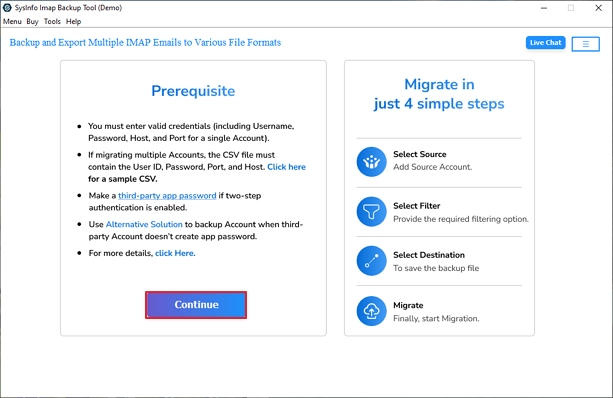
- Start by downloading IMAP Migration software and running it as an administrator on your system. Tap on Continue.
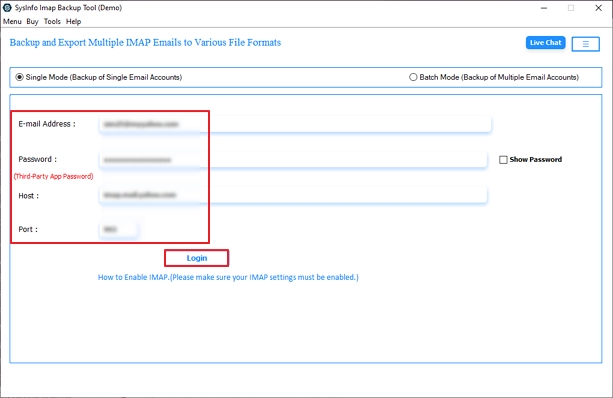
- On the next screen, enter your Rackspace credentials and click on Login.
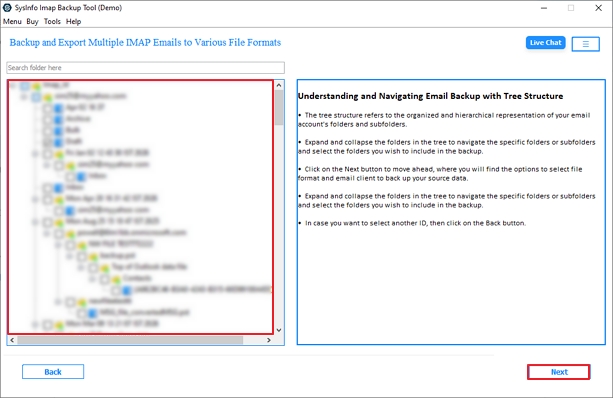
- Next, select the folders from the tree hierarchy in the left panel and hit Next to continue.
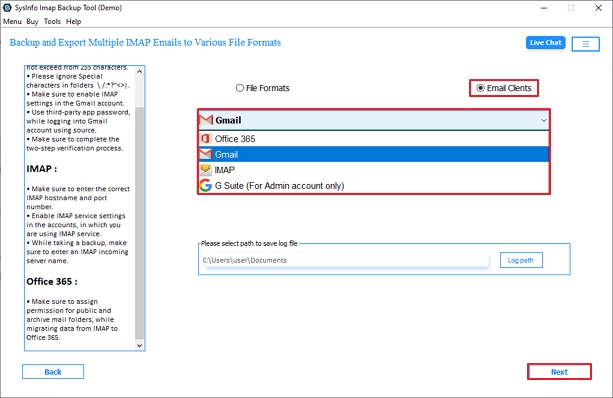
- Further, choose Gmail from the Email clients option and log in with the correct credentials on the next panel.
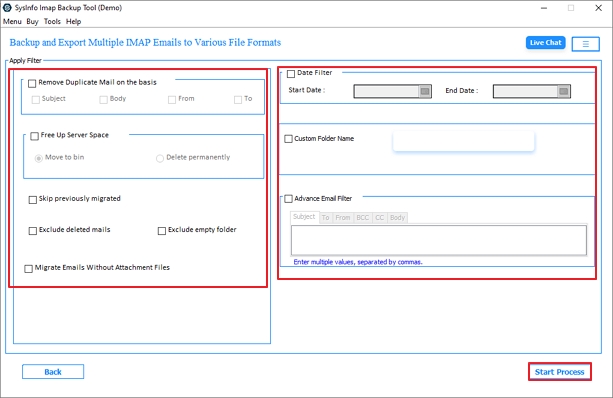
- As the last step, choose basic or advanced filters to apply if required, and then click on Start Process to migrate.
Real Case Scenario
An IT department in a mid‑size company had to shift 30 Rackspace mailboxes before a data‑center cutoff. POP3 imports were slow and unstable, dropping messages. They used the MailConverterTools IMAP Migration Tool to sync all accounts in parallel. Folder structure, sent items, and case threads reached Gmail intact, with no manual rework.
Final Words
Migrating Rackspace to Gmail takes planning and the right help. Manual methods are too slow and fragile for any serious Rackspace to Gmail migration. The MailConverterTools IMAP Migration Tool makes this migration task more manageable. It moves data in a clean and repeatable way without constant manual work. The utility helps you migrate Rackspace to Gmail while keeping folder structure and labels close to the original.
Frequently Asked Questions
Q.1 How to forward Rackspace email to Gmail using the tool?
Ans. Use the MailConverterTools IMAP Migration Tool, enter Rackspace IMAP credentials, choose Gmail as the destination, and start the process to transfer emails directly without manual configuration.
Q.2 Is Rackspace to Gmail migration compatible with Windows and Mac?
Ans. Yes, the MailConverterTools IMAP Migration Software supports both Windows and Mac systems, allowing users to migrate Rackspace emails to Gmail smoothly across platforms.
Q.3 How to forward Rackspace email to Gmail in bulk?
Ans. The MailConverterTools IMAP Backup Tool allows bulk migration by selecting entire mailbox folders and transferring multiple Rackspace emails to Gmail in a single process.
Q.4 Is it safe to move emails from Rackspace to Gmail without data loss?
Ans. Yes, the MailConverterTools IMAP Migrator preserves email data, attachments, and folder structure during migration, ensuring no data loss or modification throughout the process.
About The Author:

Vikas Bajpai is a results-driven SEO expert and content strategist with a strong passion for building impactful digital experiences. He specializes in crafting data-backed content plans that boost visibility, engage audiences, and drive measurable growth. With deep expertise in search engine optimization, keyword strategy, and content marketing, Vikas helps brands strengthen their online presence and achieve long-term success.
Related Post