-
Written By Vikas Bajpai
-
Updated on June 15th, 2026
Move Claws Mail to Office 365 Without Data Loss: Easy Guide
Our enterprise team has been using Claws Mail for internal communication for several years. All email data is stored locally, and we now need to migrate the complete mailbox to Office 365 for better collaboration and cloud accessibility. I cannot find a reliable method to move Claws Mail to Office 365 without risking data loss or folder structure issues. What is the most accurate approach to complete this migration at scale?
¬ Emma Fontaine, Germany
Claws Mail stores email data in MBOX format, which Office 365 does not support natively. This format incompatibility creates significant challenges when attempting direct migration. Manual approaches require multiple intermediate steps, technical configuration, and carry risks of metadata loss and folder disruption. Enterprise teams managing large mailboxes cannot rely on manual methods for accurate and complete migration. The MailConverterTools MBOX Converter Tool provides a structured solution to convert and import Claws Mail to Office 365 with full preservation of attachments, folder hierarchy, and email metadata throughout the process.
Quick Answer to Move Claws Mail to Office 365
Export Claws Mail data as MBOX files using the built-in MBOX plugin, then use the MailConverterTools MBOX Converter Software to migrate directly to Office 365. The tool processes bulk MBOX files in a single run while preserving folder structure, attachments, and metadata throughout the migration process.
When Do Users Need to Migrate Claws Mail to Office 365?
- An enterprise team expanding across multiple office locations needs centralized cloud email access through Office 365.
- The IT administrator is retiring legacy desktop email clients across the organization initiates migration to Office 365.
- Business operating in a regulated industry requires compliance and audit features available only in Office 365.
- The company standardizing its tools moves to Office 365 for a unified email and collaboration platform.
- An enterprise facing local data loss risks due to hardware failure requires cloud-based email storage in Office 365.
- The IT team upgrading security protocols requires multi-factor authentication and threat protection available in Office 365.
- Professional shifting from a Linux-based environment to a Windows enterprise setup migrates Claws Mail to Office 365.
- User archiving years of Claws Mail correspondence requires a reliable platform to store and access historical emails.
Claws Mail vs Office 365: Key Differences
|
Feature |
Claws Mail |
Office 365 |
|
Platform Type |
Desktop-based email client |
Cloud-based enterprise platform |
|
Operating System |
Linux, Windows, BSD |
Windows, macOS, iOS, Android, Web |
|
Security Features |
Basic SSL and TLS encryption |
MFA, threat protection, advanced encryption |
|
Admin Management |
No centralized admin console |
Full admin console for enterprise control |
|
Storage Capacity |
Depends on local disk space |
50GB to unlimited cloud storage per user |
|
Spam Filtering |
Plugin-based spam filtering |
Built-in advanced spam and threat filtering |
|
Integration |
Limited third-party integrations |
Integrates with 1000+ enterprise applications |
Professional-Grade Solution to Move Claws Mail to Office 365
The MailConverterTools MBOX File Converter Tool is a professional solution built for enterprise users who need to migrate with complete data accuracy. The tool handles bulk migration of large MBOX mailboxes in a single process, removing the need for manual configuration or technical expertise. Moreover, it provides many advanced features to customize results according to the specific date range. Also, there is a feature to skip previously migrated emails and remove duplicate items.
Steps to Migrate Claws Mail Emails to Office 365
- Download the MBOX File Converter Tool.
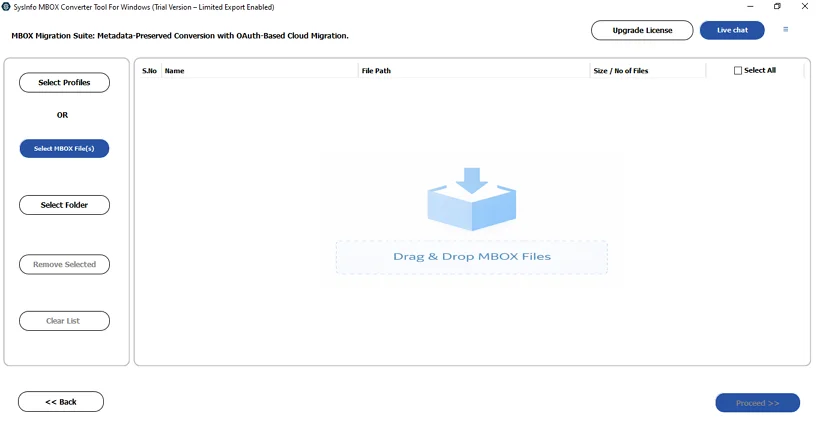
- Then, choose the MBOX file or folder and click Next.
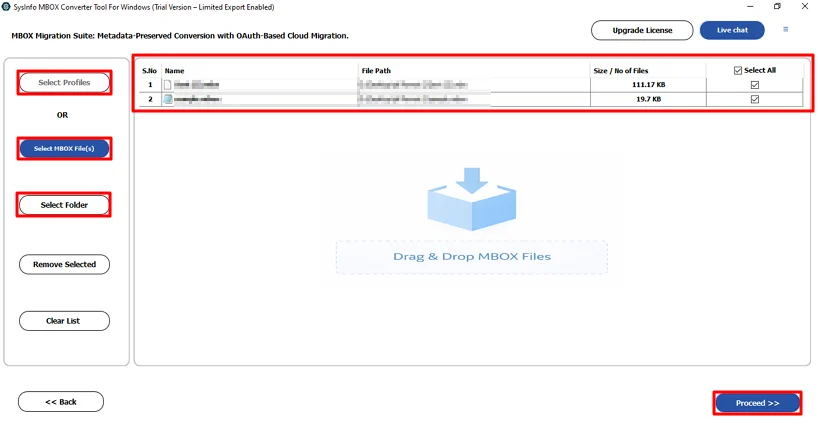
- After that, preview and select the files and click Proceed.
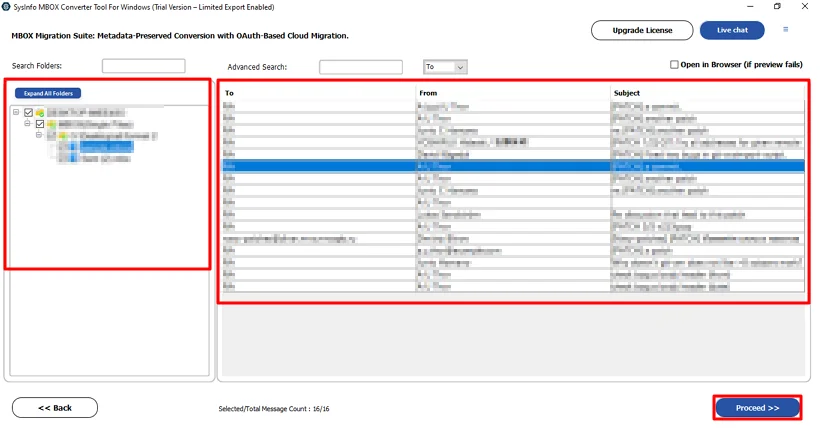
- Thereafter, choose Microsoft 365 and click Authenticate.
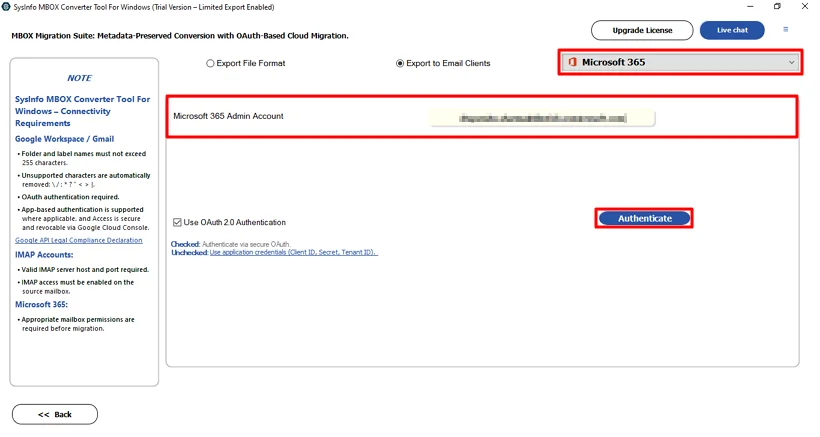
- Finally, use the filters and options and click Start Export.
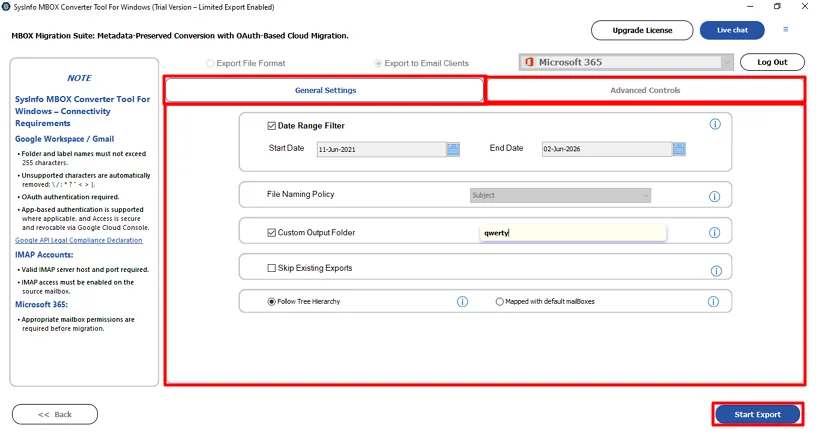
Real Case Study
Thomas Becker, an IT administrator at a legal consultancy firm in Munich, needed to migrate Claws Mail data from 12 department accounts to Office 365. Each MBOX file contained critical client correspondence and compliance records requiring full integrity during migration. Manual IMAP configuration was too complex to complete within the firm’s two-week transition deadline. Thomas used the MailConverterTools MBOX Converter Tool to convert Claws Mail to Office 365 and initiate direct migration to Office 365. The tool preserved folder structure, attachments, timestamps, and metadata, allowing the firm to complete its enterprise migration with zero data loss.
Conclusion
Organizations planning to move Claws Mail to Office 365 require a structured and reliable approach to complete the migration without data loss. Manual methods involve complex IMAP configurations, format compatibility issues, and significant risks for enterprise mailboxes. The MailConverterTools MBOX Converter Tool eliminates these challenges by providing a direct, accurate, and efficient migration path. It supports bulk processing, preserves folder structure, metadata, and attachments.
Frequently Asked Questions
Q.1 What is the best tool to migrate Claws Mail to Office 365?
Ans: The MailConverterTools MBOX Converter Tool is a reliable solution for migrating Claws Mail to Office 365. It supports direct migration from MBOX files to Microsoft 365 while preserving folder hierarchy, email metadata, attachments, and message integrity throughout the process.
Q.2 Can I migrate multiple Claws Mail accounts simultaneously?
Ans: Yes, the MailConverterTools MBOX Converter Tool supports bulk migration, allowing users to process multiple MBOX files and mailboxes in a single operation.
Q.3 Is it safe to move Claws Mail to Office 365?
Ans: Yes, the migration is safe when performed using a trusted migration tool. The software preserves emails, attachments, timestamps, sender and recipient details, and folder structure, minimizing the risk of data loss or corruption during the transfer.
Q.4 Can I move Claws Mail to Office 365 without technical skills?
Ans: Yes, you can. While manual migration methods often require technical expertise and complex configurations, the MailConverterTools MBOX Converter Tool provides a user-friendly interface that simplifies the entire migration process for both technical and non-technical users.
Q.5 Does the migration tool have an easy-to-use interface?
Ans: Yes, the tool is designed with a simple and intuitive interface. Users can add MBOX files, preview mailbox content, select Office 365 as the destination, and start the migration with just a few steps.
Q.6 Is Claws Mail to Office 365 migration supported on Windows and Mac?
Ans: Yes, the MailConverterTools MBOX Converter Tool is available for both Windows and Mac operating systems.
About The Author:

Vikas Bajpai is a results-driven SEO expert and content strategist with a strong passion for building impactful digital experiences. He specializes in crafting data-backed content plans that boost visibility, engage audiences, and drive measurable growth. With deep expertise in search engine optimization, keyword strategy, and content marketing, Vikas helps brands strengthen their online presence and achieve long-term success.
Related Post