-
Written By Amit Chandel
-
Updated on January 27th, 2026
Convert CDR to BMP Without CorelDRAW | Simple Guide
Joel’s Query: I need a simple way to convert CDR files to BMP to open them outside CorelDRAW. Because I always get errors when I try to open my CDR files without using CorelDRAW, or you can say, outside of it.
BMP is a basic image format that opens almost anywhere without trouble. As a result, many designers and regular users choose to convert their CDR files to BMP images. In this blog, we’ll walk through an easy way to convert CDR to BMP without messing up the design or losing data. We’ll use a few simple methods and the MailConverterTools CDR Converter Tool that can save time and effort.
How Convert CorelDRAW CDR file to BMP is Helpful?
- It lets you open the file in tools that don’t support CorelDRAW.
- BMP files work on almost any system without extra software.
- It avoids compatibility errors when opening CDR files elsewhere.
- The design stays visible exactly as an image, without layout issues.
- It’s useful for printing, previews, or basic edits.
Difference Table Between CDR and BMP
|
Point |
CDR File |
BMP File |
|
File type |
CDR is a vector file format used in CorelDRAW |
Whereas BMP is a raster image format |
|
Software support |
Works mainly inside CorelDRAW |
On the other hand, BMP opens in almost any image viewer |
|
Editing |
Files can be edited layer by layer |
In contrast, BMP files are not easy to edit once saved |
|
Compatibility |
CDR has limited compatibility outside CorelDRAW |
However, BMP is widely supported across systems |
|
File usage |
CDR is used for design and artwork creation |
Meanwhile, BMP is used for viewing, sharing, and printing |
|
File size |
Files are usually smaller due to vector data |
As a result, BMP files are often larger in size |
|
Sharing |
Harder to share with non-designers |
Therefore, BMP files are easier to share with anyone |
|
Dependency |
Depends on CorelDRAW to open properly |
Whereas BMP does not depend on any specific software |
How to Convert CDR to BMP Using the DIY Method?
You can convert a CDR file to BMP using the built-in export option. This method is good for a few files. But make sure, before the process, that you have the CorelDRAW application in your system.
Steps to Convert CDR file to BMP
- Firstly, open CorelDRAW and open the CDR file you want to convert.
- Then, click on File and select Export, or simply press Ctrl + E.
- After that, choose BMP from the list of file formats.
- Thereafter, give the file a name and pick the location where you want to save it.
- Finally, click Save to complete the process.
Limitations
- It takes time if you have many CDR files to convert.
- Not practical for bulk or large files.
- Export settings need to be adjusted every time.
- There is a chance of quality loss if the settings are wrong.
- Not useful if the CDR file is damaged or won’t open.
Professional Method to Convert CDR to BMP In Simple Steps
The dedicated MailConverterTools CDR Converter makes the process easier and more stable. The software converts CDR files to BMP without changing the design quality. This tool is designed in such a way that it helps it to work faster and converts multiple files at the same time. Additionally, the tools doesnot requires to have any technical knowledge, it is easy to use by both beginners and professionals. It handles the conversion safely and avoids common errors.
Steps to Convert CorelDRAW CDR to BMP
- Firstly, download the CDR Converter Tool.
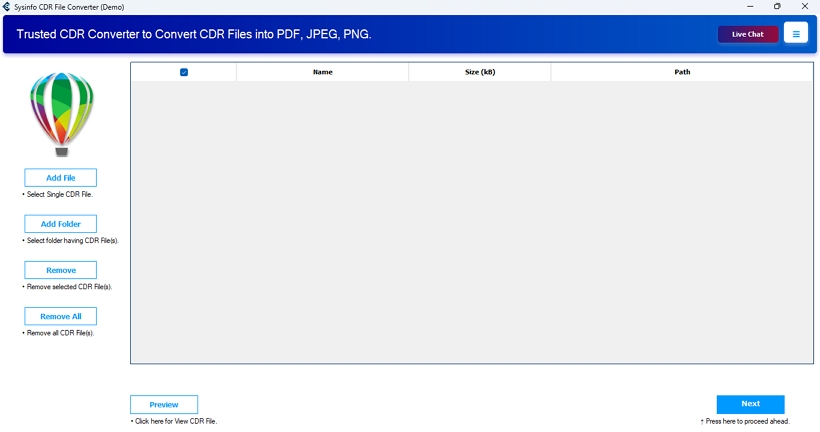
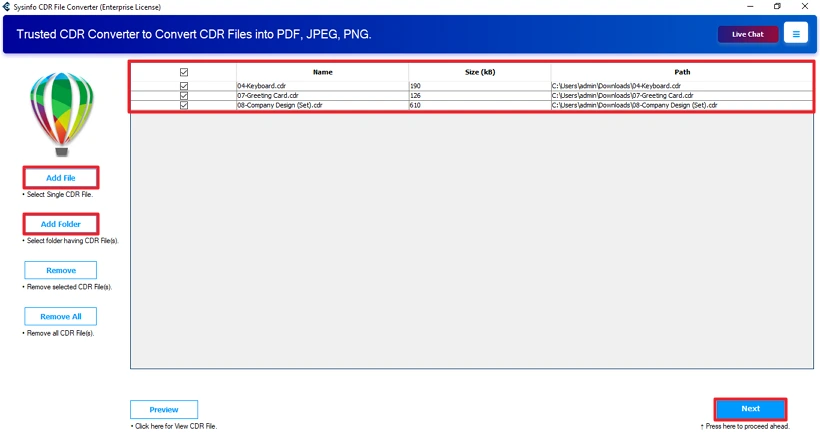
- Then, add CDR files and click Next.
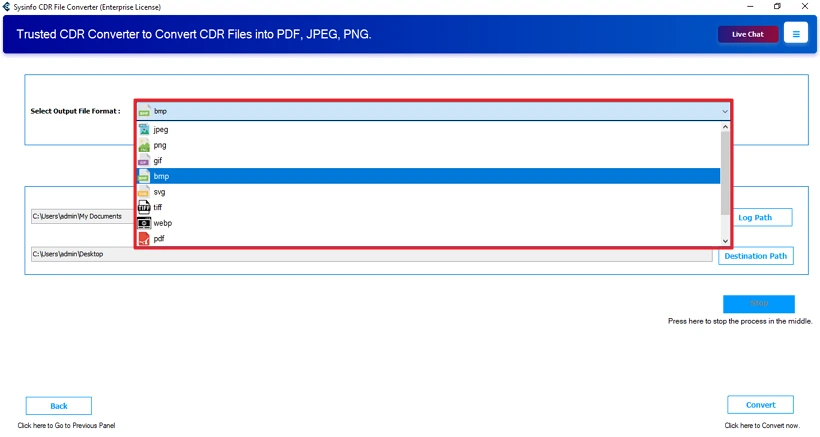
- Further, choose the BMP file format.
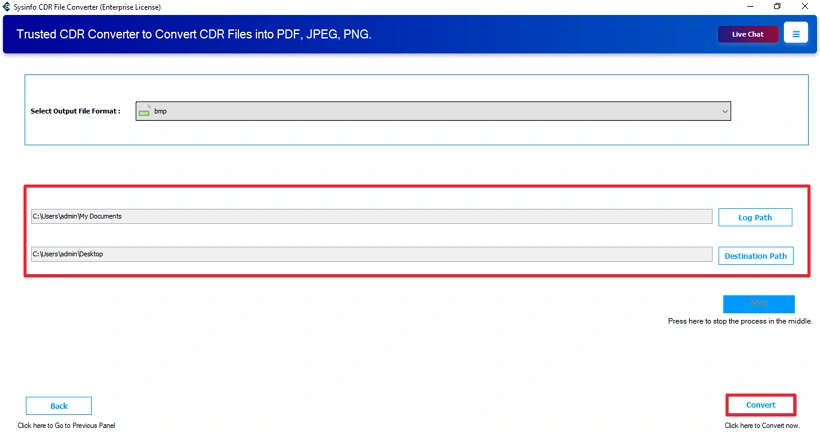
- Lastly, set the path to save and click the Convert button.
Successful User Case :
Leo works with design files but doesn’t always have access to CorelDRAW. He decided to convert Corel to BMP. But exporting files one by one through CorelDRAW was taking too much time and slowing down his work. Later, he used the MailConverterTools CDR Converter Tool for batch processing and accuracy. Leo converted all his files at once instead of handling them individually. The BMP files opened normally on his system, and the designs looked the same as before. This made his work easier and saved him from depending on CorelDRAW just to view or share files.
Conclusion
In this blog, we covered an easy way to convert CDR to BMP images. Manual methods can work sometimes, but they’re not always reliable for important files. That’s why using a proper converter makes more sense. A dedicated CDR Converter Tool lets you do the job done with less effort. Moreover, you can reach out to the support team if you find any difficulties and need help anytime.
Frequently Asked Questions
Q1: Can I convert CDR to BMP without installing CorelDRAW?
Ans: Yes, by using the MailConverterTools CDR Converter Tool, you can convert your CDR files into the BMP format without needing CorelDRAW.
Q2: Does converting CDR to BMP reduce image quality?
Ans: With the manual methods, you may lose the image quality or pixels of the image. But using a professional tool like MailConverterTools CDR Converter, you can retain the same image quality.
Q3: Will colors remain accurate after converting CDR to BMP?
Ans: The MailConverterTools CDR Converter does not harm your image, quality, formatting, or colors. Additionally, it provides 100% accuracy in your results.
Q4: Is it possible to convert CDR to BMP on Windows and Mac?
Ans: The MailConverterTools CDR Converter Tools are available for both Windows and Mac users. It works well in both OS environments.
About The Author:

Meet Amit, an experienced SEO expert and content planner. He uses his creativity and strategy to create content that grabs attention and helps brands reach their goals. With solid skills in digital marketing and content planning, Amit helps businesses succeed online.
Related Post