-
Written By Amit Chandel
-
Updated on January 26th, 2026
Best Solutions to Convert CDR to GIF Format Easily
“I am a project manager and have recently received CDR files from our project’s designer team. However, I don’t have CorelDRAW installed to access them. I want to convert them to GIF format for the website and easy access without losing transparency and drawing quality. Moreover, if I can convert CorelDRAW images to GIF in bulk, it’ll be best. Is there any solution available?”
-Jeenifer Galpin
CDR files are of great use for all designers and print professionals, but they are restrictive. They are only accessible with CorelDRAW and are used for images, designs, logos, and other layered vector graphics. The problem is when users need them on web platforms, email clients, in chats, or for other purposes. To ensure CDR files are accessible everywhere, the ideal solution is to convert CDR to GIF image format. This guide explains the best methods, including MailConverterTools CDR Converter Tool for scalable and error-free conversions.
Convert CDR File to GIF: Difference and Reasons
|
Basis |
CDR Files |
GIF Files |
|
Development & Type |
CorelDRAW is a vector-image format developed by Corel Corporation |
Graphics Interchange Format is a raster image format developed by CompuServe |
|
Features |
Fully editable with millions of colours and advanced transparency |
Limited editing after creation, with 256 colors and basic transparency |
|
Compatibility |
Only accessible with CorelDRAW or a compatible tool |
Accessible on all devices and web browsers with no difficulty |
|
Image Quality and Size |
Larger and design-heavy and scales without loss |
Lightweight and quality depend on resolution (pixels) |
|
Use |
Logos, graphic & print designs, and illustrations |
Icons, banners, web graphics, and animations |
With this comparison table, you may be quite clear about how GIF differs from CDR. Now, let’s check the reasons for the conversion.
Why CDR to GIF Conversion Matters?
- To share CDR designs on the web
- Use graphics for presentations and emails
- Reducing size for fast performance
- For cross-platform accessibility
- No CorelDRAW dependency
- Importing images to CMS platforms
Methods to Convert CDR to GIF at Small and Large Scales
Though CDR and GIF formats differ in their properties, it is not a challenging task to make the conversion. Especially when you have appropriate methods to do so. In this section, go through free solutions and a reliable professional tool to convert CDR files with ease.
Native Ways to Export CDR File to GIF
These methods are useful only at a small scale and when you have a few CorelDRAW files for conversion. These are:
1) Using CorelDRAW Application
- Open CorelDRAW on your PC and from the File menu, click Open.
- Then, choose the .cdr file from the system and upload it.
- Further, from File, click Export and select the GIF(*.gif) file format.
- Next, pick the settings for your resultant file as:
- 72 DPI Web Resolution
- 8-bit RGB Color Mode
- Optimized Palette
- At last, select a location and click Export to make the conversion.
2) By Online Converter Tools
Another way to change CDR file to GIF is by using online converters like convertio, fileconverter, etc. Simply:
- Open a converter tool online on the browser of your choice.
- Then, click Add Files to upload your CDR files.
- Lastly, click Convert to convert and download them as a GIF file on the PC.
Loopholes of the Manual Method
- You need CorelDRAW for conversion, and it saves only one file at a time.
- Online converter tools are not safe specifically with sensitive data.
- Time-consuming, requires effort and repetition for multiple files.
- No guarantee that the graphics are preserved accurately.
Advanced Way to Convert CDR to GIF
The easiest way for CDR conversion is with the use of MailConverterTools CDR Converter. It allows users to instantly convert their CDR files with precision into GIF, PDF, JPG, and many other file formats. Additionally, it allows you to preserve the image quality during and after the conversion. Moreover, you can use this self-explanatory tool on any Windows or Mac version and convert images with 100% accuracy.
Working Steps to Convert CDR File to GIF
- Launch the CDR to GIF Converter Tool as an administrator.
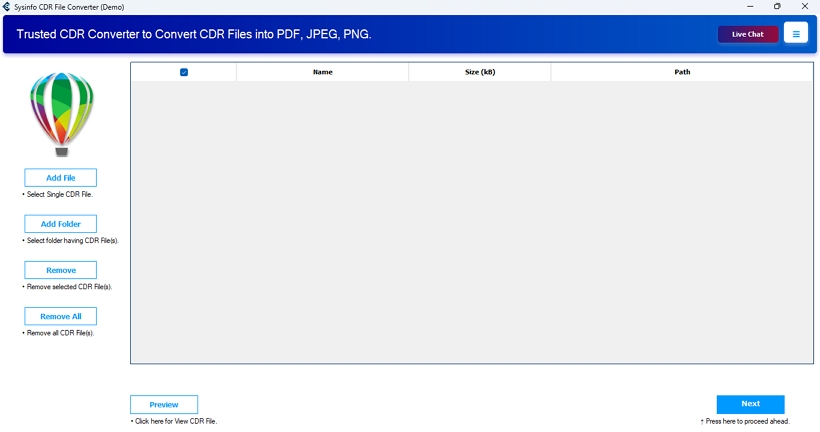
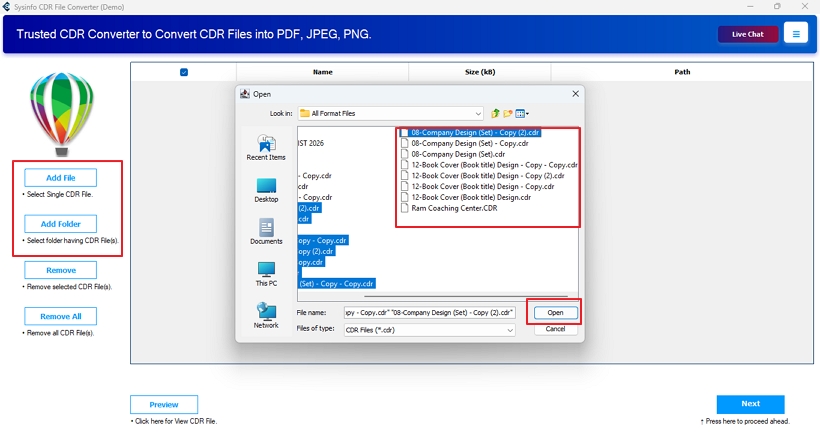
- Then, upload CDR files to the software with Add.
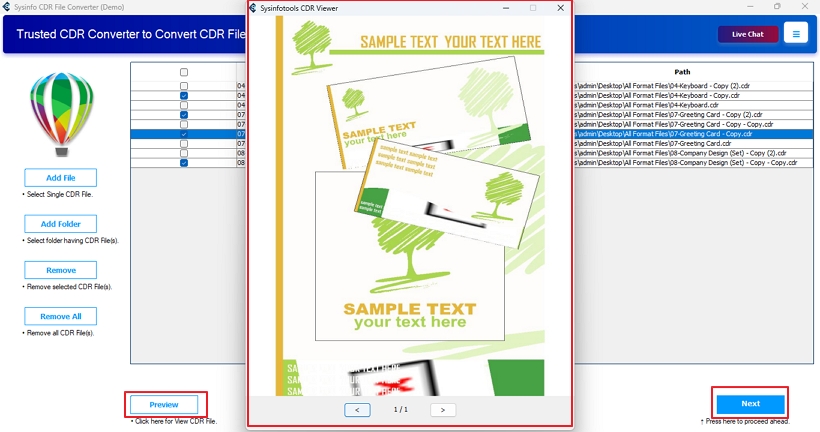
- Further, click Preview to check, select files, and tap Next.
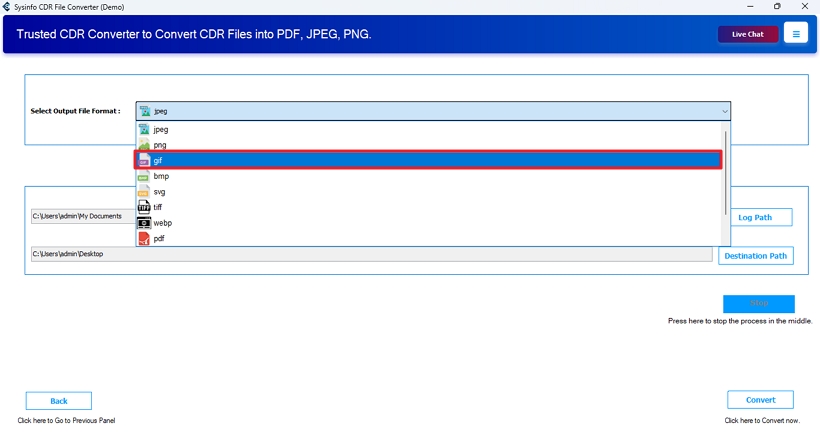
- Afterward, pick the GIF format from the saving formats list.
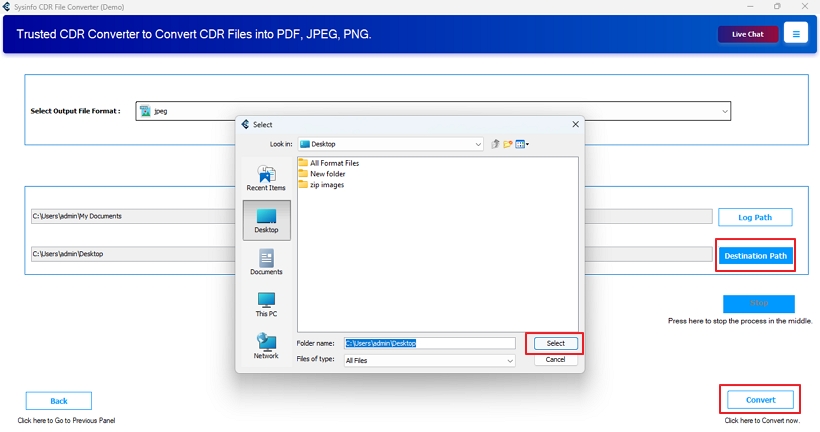
- Finally, select Destination Path and click Convert.
Real World Scenario :
A marketing agency had more than 600+ CDR logos and print files from a former designer. They needed to upload the logo to the web, which only supported the GIF format. Manually exporting this many files through CorelDRAW was absolutely impractical, and thus, they got the CDR File Converter Tool. Using it, they completed bulk conversion in minimal time with guaranteed accuracy and preserved image quality.
Conclusion
When a user plans to convert CDR to GIF, it is probably to access images on the web and for wide accessibility. The manual method is available but unsuitable for multiple exports and can result in several issues. This includes transparency loss, incorrect color mapping, pixelation issues, incomplete rendering, or unsupported CDR versions. To overcome them and ensure an error-free and effortless conversion, MailConverterTools CDR Converter is the optimal solution.
Frequently Asked Questions
Q1. Can I convert CDR to GIF without losing image quality?
Ans. Yes, to convert files without losing the image quality, use CDR to GIF Converter by MailConverterTools.
Q2. Is CorelDRAW required to export CDR files to GIF?
Ans. If you convert manually, then CorelDRAW is a must. However, with the automated converter tool, you do not require CorelDRAW for CDR file to GIF conversion.
Q3. Can I convert multiple CDR files to GIF at once?
Ans. Yes, using the smart CDR Conversion Tool, convert multiple CDRs into GIFs in one go.
Q4. Is it possible to convert CDR to GIF on Windows and Mac?
Ans. Use CDR to GIF Image Converter by MailConverterTools to change CDR file to GIF on any version of Windows or Mac.
About The Author:

Meet Amit, an experienced SEO expert and content planner. He uses his creativity and strategy to create content that grabs attention and helps brands reach their goals. With solid skills in digital marketing and content planning, Amit helps businesses succeed online.
Related Post