-
Written By Amit Chandel
-
Updated on February 2nd, 2026
Simple Guide to Convert CDR to HTML Files
User Query: I am creating a website for my newly opened store. My designers send me lots of designs to upload on the web, but these are in CDR format. I want to convert them into HTML to upload it in my project.
It becomes more difficult when the website has many images and graphics. Designs are mostly in CDR format, but web browsers do not support CDR files directly; you need to convert CDR to HTML. That’s why we came up with the easy solution to convert your file to web HTML format. In addition, we will use the MailConverterTools CDR Converter Tool to make the process smoother and simpler.
Common Reasons to Convert CDR File to HTML
- Web browsers do not support CDR files directly.
- HTML files can be easily uploaded to any website.
- Converted files load properly on different devices and browsers.
- HTML makes it easier to display CorelDRAW designs online.
- No need for CorelDRAW software to view the design.
- Helps maintain layout and structure for web use.
- Makes sharing designs through webpages more convenient.
CDR vs HTML Comparison Table
|
Feature |
CDR File |
HTML File |
|
File purpose |
Mainly used for graphic design, whereas it is not meant for web display |
Used to create and display web pages directly |
|
Browser support |
Not supported by web browsers, which makes online use difficult |
Supported by all modern browsers, so it opens easily |
|
Software requirement |
Requires CorelDRAW to open; it won’t work |
Can be opened in any web browser, without extra software |
|
Web usage |
Not suitable for direct web upload; therefore, conversion is needed |
Ready for website use, so no extra steps are required |
|
Editing |
Edited inside CorelDRAW only, which limits flexibility |
Can be edited using simple code editors, making changes easier |
|
Accessibility |
Limited to specific systems, as a result, access is restricted |
Accessible across devices, including mobile and desktop |
|
File sharing |
Needs special software to share, which slows the process |
Easy to share via links, making it more convenient |
Simple Manual Method to Convert CDR to HTML
CorelDRAW allows you to export files to HTML, but the results aren’t always great. Once the design gets complicated, things usually start breaking.
Steps to Convert CorelDRAW to HTML
- First, open the CorelDRAW application on your computer.
- Next, load the .CDR file you want to convert.
- Thereafter, move to the File menu and click on Export.
- In the export window, choose HTML as the output format.
- Then, select the export settings you need, such as images, table layout, or other available options.
- Finally, choose the destination folder, click Export, and save the generated HTML file.
Limitations
- Advanced design elements are usually converted into static images.
- The output HTML code is not clean or developer-friendly.
- Responsive design support is very limited or missing.
- Large designs can result in heavy files and slow-loading pages.
- Editing the exported HTML later becomes confusing and time-consuming.
Quick Method to Convert CDR to HTML File Format
We switched to MailConverterTools CDR File Converter because working with manual methods was taking too much time. After using it, the conversion process became faster and more manageable. The tool helps save CDR files into HTML without messing up the layout. It also supports other formats, from here you can take references to convert CDR to TIFF, and also to a portable document format to convert CDR file to PDF. The tool keeps the design clear since it preserves vector quality and layers.
Steps to Convert CorelDRAW CDR File into HTML
- Firstly, download the CDR Converter Tool.
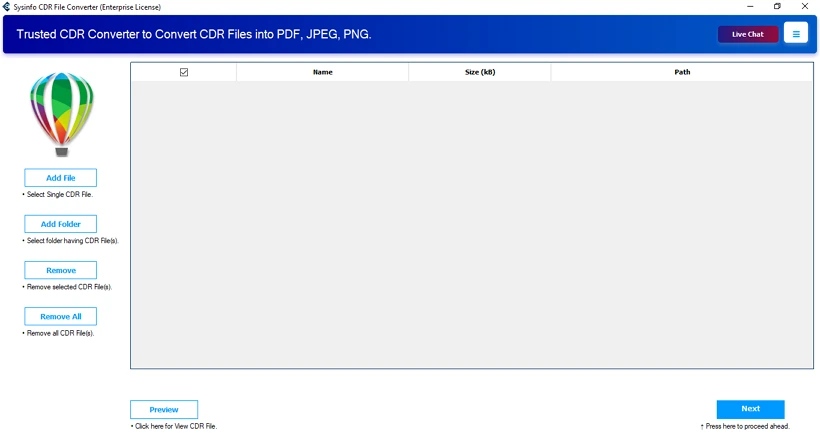
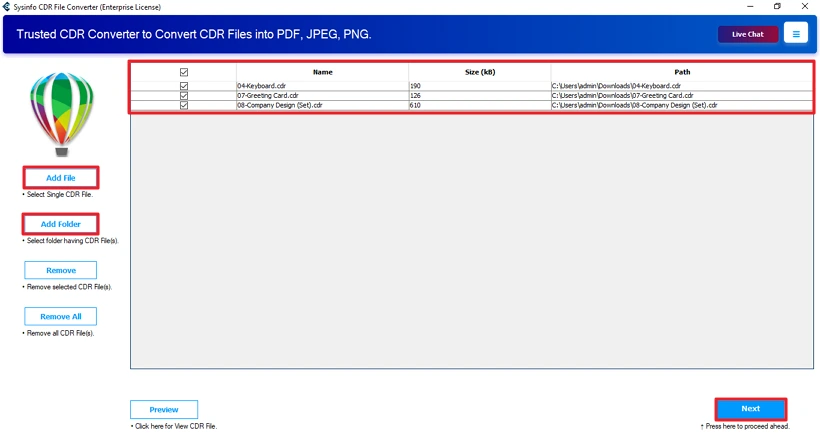
- Thereafter, add CDR files and click Next.
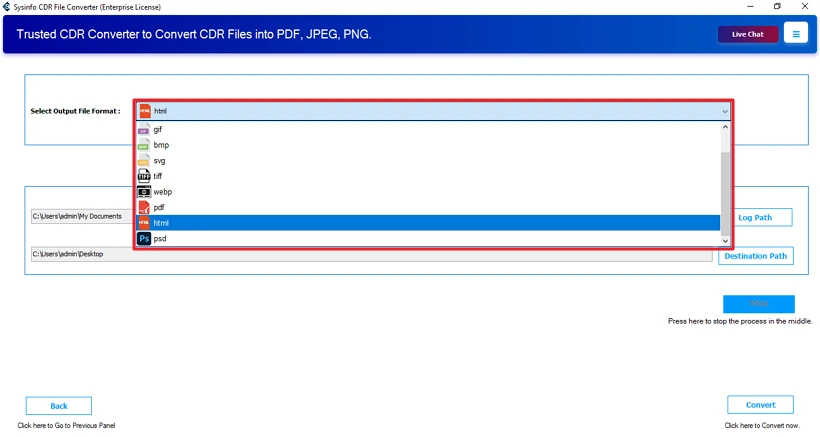
- After that, choose the HTML file format.
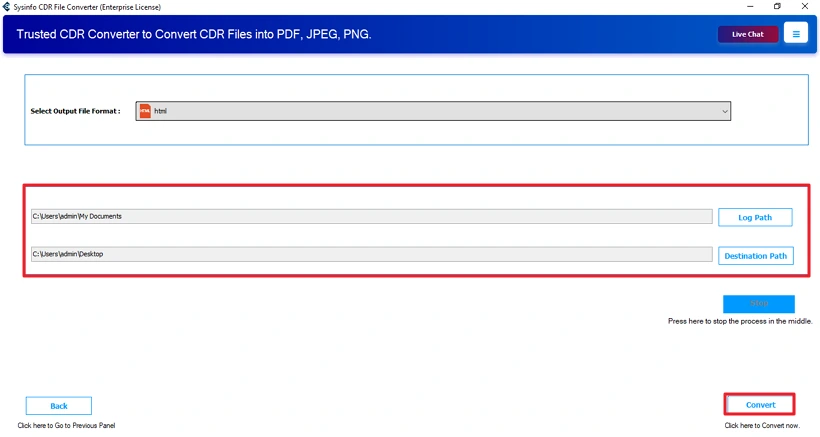
- Lastly, save the path and click Convert.
Successful User Case:
One of our users runs a small retail business and recently launched a new website. Their design team shared all website visuals in CDR format, which created problems during upload. Converting each file manually was slow, and the layouts often broke after export.
They started using the MailConverterTools CDR Converter Tool to handle the task. With the tool, they convert CorelDRAW File to HTML in one go without changing the original design structure.
Conclusion
If you need to use CDR files on different devices, converting them to HTML is the practical choice. CorelDRAW works fine for small and simple exports, but it has limits. When the work involves many files or important client data, a dedicated conversion tool makes things easier. It helps keep the layout accurate and ready for the web without extra fixes. This is more useful when you’re handling large batches to convert CDR to HTML and need consistent results.
Frequently Asked Questions
Q1: How to convert CorelDRAW CDR files to HTML without CorelDRAW installed?
Ans: Using MailConverterTools CDR File Converter, you can easily convert your CDR file to HTML format without CorelDRAW. This smart utility does not require any extra application for CDR file conversion.
Q2: Does CDR to HTML conversion preserve the original design layout?
Ans: The manual method may lose the design layout during the conversion, and you will get a changed design. But by using the professional tool, you can preserve your design layout. Moreover, it stands out for its capability of batch processing.
Q3: What elements are included in the HTML output?
Ans: The HTML output usually includes the main layout of the design, images created from the CDR file, basic text content, and simple formatting.
Q4: Can I edit HTML files after converting from CDR?
Ans: Yes, after converting the CDR to HTML file format, you can edit it easily without any hassle.
Q5: Can I convert CDR to HTML on both Windows and Mac?
Ans: The MailConverterTools CDR Converter Tools are available for both operating systems. You can easily convert your file on Mac & Windows.
About The Author:

Meet Amit, an experienced SEO expert and content planner. He uses his creativity and strategy to create content that grabs attention and helps brands reach their goals. With solid skills in digital marketing and content planning, Amit helps businesses succeed online.
Related Post