-
Written By Amit Chandel
-
Updated on February 12th, 2026
How to Convert EML to DOC or DOCX: Manual & Automated Guide!
User Question: “I have stored a large number of EML files with important attachments. I need to convert them to Word format to edit those files. How can I change my EML file format to an editable DOC?”
EML files are great for emails, but they aren’t really made for editing or sharing easily. If you convert EML to DOC or DOCX, you can open them in Word, tweak the content, save, or print them without any hassle. In this blog, we’ll show a couple of ways to do it, manually or with the MailConverterTools EML Converter Tool if you want it done fast.
Benefits to Open EML File in DOC Format
- You can edit the email content easily in Word without worrying about email software.
- Makes it simple to add notes, highlight important parts, or change formatting.
- Helps print or archive emails in a clean, readable format.
- Keeps attachments visible and organized while working in Word.
EML vs DOC Comparison
| Feature | EML File | DOC/DOCX File |
| Purpose | Primarily stores emails along with attachments. Meanwhile, DOC files are made for editing and creating documents. | An editable Word document, which, on the other hand, is easier to work with outside email programs. |
| Editability | Hard to edit directly because it’s meant for email storage. | Easy to edit in Word, so you can add notes or make changes quickly. |
| Sharing | Needs email software to open; sharing can be tricky. | Can be opened by anyone with Word, making it simpler to share. |
| Attachments | Embedded in the email, however, they may not be easily accessible. | Can include attachments in the document or save separately, thus keeping everything organized. |
| Use Case | Good for backup or moving emails, but not ideal for editing or reporting. | Perfect for documentation, reports, or archiving, therefore suitable for professional use. |
Manual Methods to Convert EML to DOC or DOCX File Format
There are a few ways to turn EML files into Word documents. Two are manual methods, good if you only have a few emails. The third is an automated tool, which works best if you have lots of files.
Method 1: Change EML to DOC Through Copy-Paste
- Firstly, locate the EML file on your computer.
- Then, right-click it and select Open with > Notepad.
- After that, select the text and press Ctrl + C to copy.
- Thereafter, open Word and create a Blank Document, then press Ctrl+V to paste.
- Further, edit or format the content as needed.
- Finally, go to File > Save As and choose Word (.doc or .docx).
Method 2: Save EML as HTML and Convert EML File to DOC
- Firstly, open your EML file in an email program.
- Then, click File > Save As and choose HTML format.
- Afterwards, open Word, go to File > Open, and select the HTML file you saved.
- Thereafter, make any edits you need in Word.
- Finally, go to File > Save As > Word Document (.doc or .docx).
Limitations
- You may lose the formatting during this process
- It takes more time to convert bulk files.
- The complex layouts or images may not appear.
- You need an email client installed to open EML files.
- There’s always a chance of missing part of the content while copying.
- Not practical if you’re dealing with a large number of emails.
Automated Approach to Convert EML to DOC or DOCX Format
The MailConverterTools EML to Word Converter Tool changes EML files into Word format. It lets you save files as DOC or DOCX. There are a few other format options too. You can upload one file or select many at the same time. Also, you can take referencer to convert EML to MBOX in bulk. The emails, attachments, and layout stayed mostly the same after conversion. There’s also a date filter and more such filters to optimize result. For a legal or portable use case, you can use it to convert EML to PDF as well.
Steps to Export EML Files into DOC
- Firstly, download the EML Converter Tool.
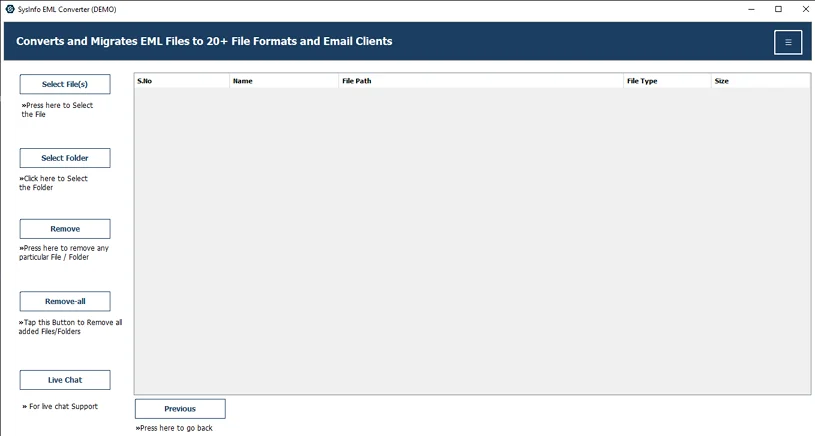
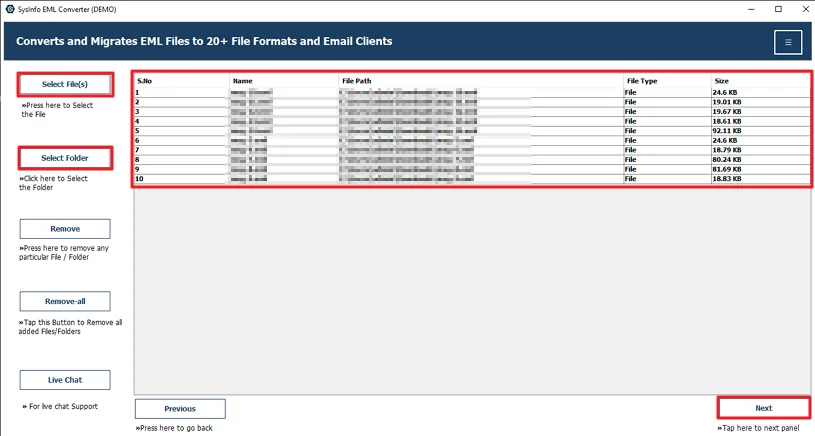
- Then, add the EML files and click Next.
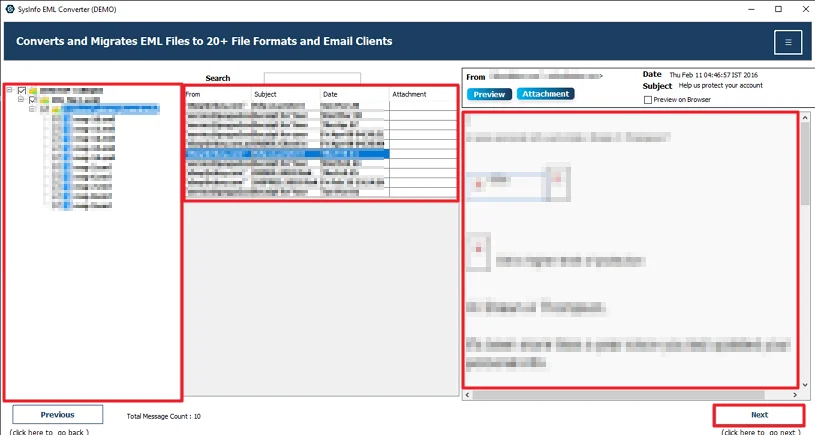
- Afterwards, choose and preview EML files and hit Next.
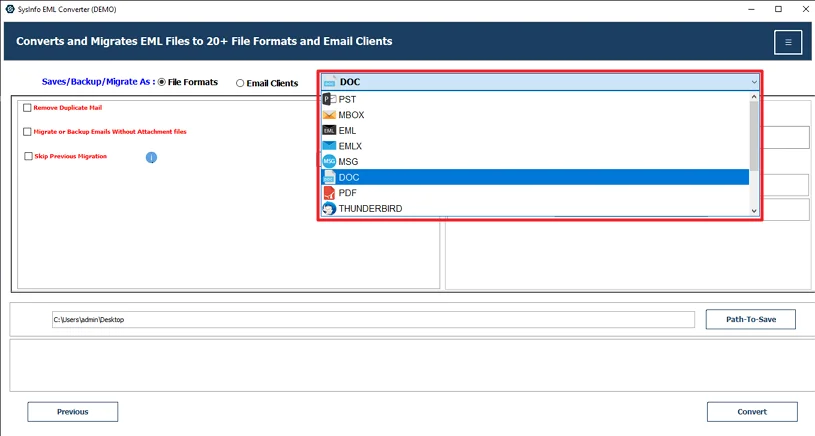
- Further, choose the DOC file format.
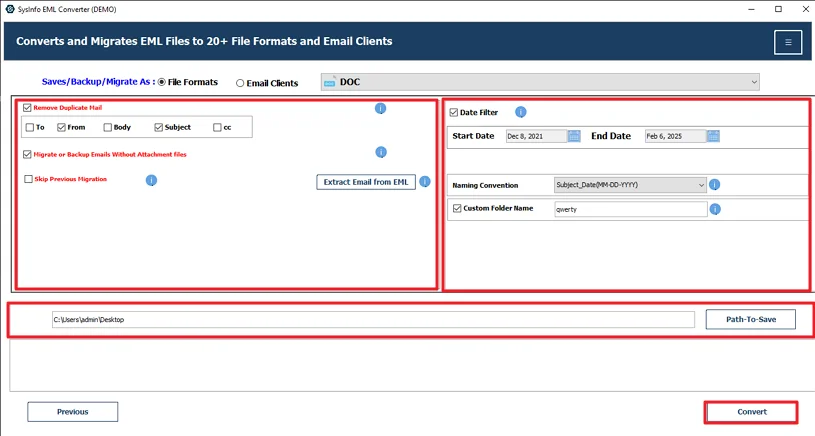
- At last, apply filters, set the path, and click Convert.
Successful User Case:-
An HR executive needed to submit email conversations as part of an internal review. Since EML files are not easy to edit, she converted them into DOC files using the MailConverterTools EML Converter Tool. After conversion, she was able to highlight sections, add comments, and organize everything properly in Word.
Conclusion
To conclude, you can convert EML to DOC by using manual methods or with a professional tool. The right option always depends on some factors like time, number of files, size of files, etc. Manual methods are good for small files, but these methods are time-consuming and not accurate all the time. For fast, secure, and accurate results, using the professional tool is a good and reliable choice.
Frequently Asked Questions
Q.1 How can I convert EML to DOC format without losing email formatting?
Ans: If you want to keep the original layout as much as possible, using the MailConverterTools EML Converter Tool is the better option. Manual methods like copy-paste may disturb formatting.
Q.2 Does the option to convert EML file to DOC work on Windows 11 and macOS?
Ans: Yes, the MailConverterTools EML Converter Tool supports Windows and macOS systems, including Windows 11.
Q.3 Is it possible to batch Export EML files into DOC format?
Ans: Yes, the tool allows you to add multiple EML files at once. You can convert them in bulk instead of processing each file individually,
Q.4 Can I convert EML files to Word DOC with attachments included?
Ans: Yes, the tool keeps the email attachments during the conversion process. This helps ensure that important files linked with the email are not lost while exporting to DOC format.
About The Author:

Meet Amit, an experienced SEO expert and content planner. He uses his creativity and strategy to create content that grabs attention and helps brands reach their goals. With solid skills in digital marketing and content planning, Amit helps businesses succeed online.
Related Post