-
Written By Amit Chandel
-
Updated on February 13th, 2026
How to Convert EML to WDSEML Without Data Loss (2026)
User Query: I’ve emails saved as EML files from my old email client. Now I need them in another app that supports only WDSEML files. What is the best way for me so that I can see my EML files in that supported format without any corruption?
If you deal with email files often, you’ve probably seen formats like EML and WDSEML. The problem is, not every app supports both. So when you need to convert EML to WDSEML, things can get confusing very fast. In this blog, we’ll go over a manual way to try it yourself and also talk about the MailConverterTools EML Converter Tool. And honestly, if you’ve got a lot of files, the second option usually saves a lot of time.
What are the Reasons to Convert EML File to WDSEML?
- Application compatibility – Some programs only recognize WDSEML files. If your software doesn’t open EML directly, conversion becomes necessary.
- System requirements – Certain Windows-based applications or indexing tools work better with the WDSEML format.
- Data migration – When switching to a different email client or platform that supports WDSEML instead of EML, conversion helps keep everything accessible.
- Better integration – WDSEML files may integrate more smoothly with specific search or archive systems.
- Bulk email handling – If you have hundreds or thousands of EML files, converting them ensures they all work properly in your new setup.
Convert EML to WDSEML Manually via Windows Search Indexing
The manual method below only makes emails searchable and doesn’t create separate WDSEML files.
Steps to Change EML to WDSEML
- Firstly, move EML files to a folder that Windows indexes (e.g., Documents, Mail, or the user profile).
- Then, enable indexing for that folder via Control Panel > Indexing Options > Modify.
- After that, wait for Windows to finish indexing the emails.
- Finally, search using Windows Search; emails will appear in the results.
Limitations
- It does not create real WDSEML files that you can export or move.
- Indexing can take a long time if you have many EML files.
- No control over file conversion settings.
- If indexing is disabled or corrupted, emails won’t appear properly.
- Not suitable when an application strictly demands actual WDSEML files.
Quick Way to Convert EML to WDSEML Without Data Loss
If you have a lot of EML files, using a dedicated MailConverterTools EML to WDSEML Converter is usually easier. The tool lets you add multiple EML files at once and convert them all together. You don’t need to open the files in another email program before converting. Everything is done inside the tool itself. It also supports converting EML files to other formats, like to convert EML to MBOX and some email client formats. This tool also helps you to convert EML to PDF, which is a universal format.
Steps to Save EML as WDSEML
- Firstly, download the EML Converter Tool.
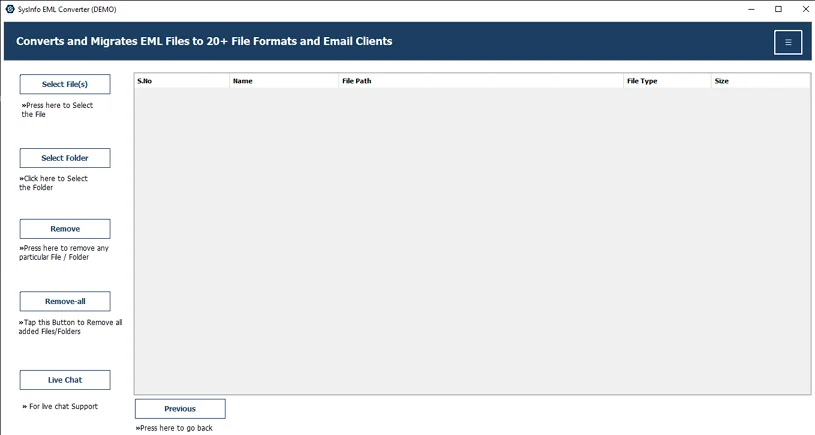
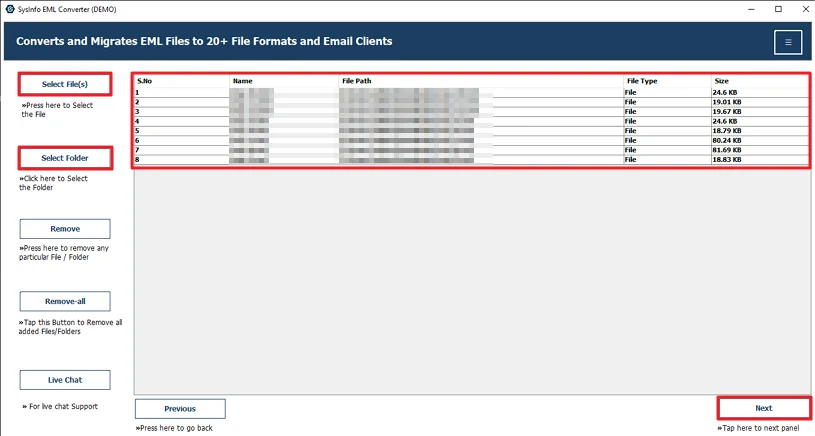
- Further, add the EML files and click Next.
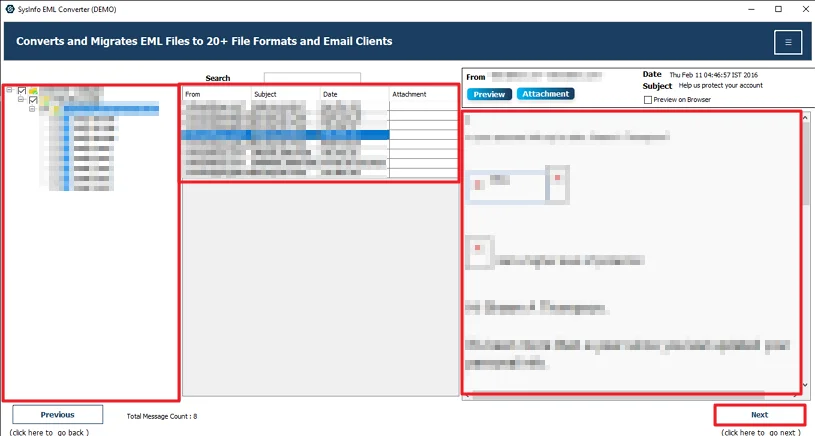
- After that, preview and choose the file and hit Next.
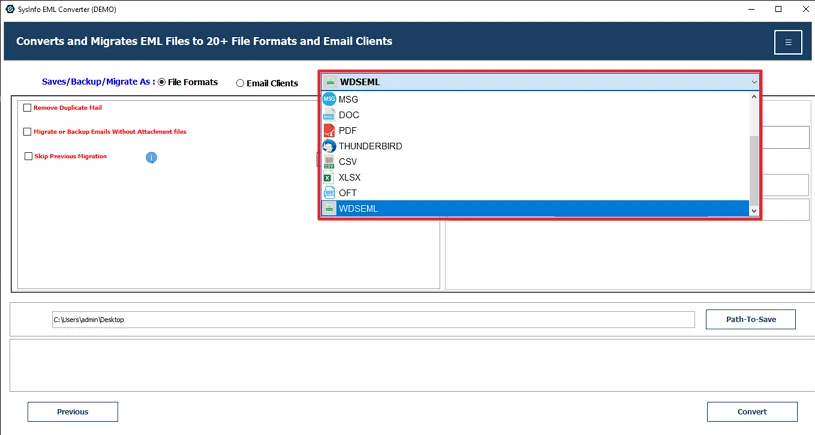
- Thereafter, select the WDSEML file format.
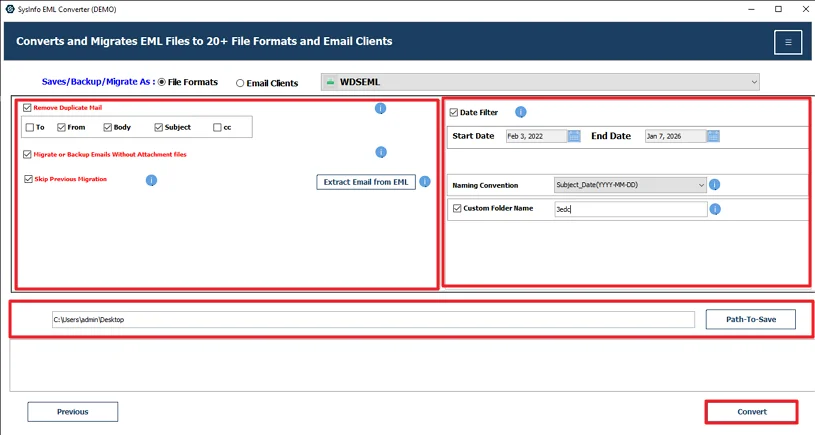
- At last, use filters, set the path to save, and hit the Convert button
Successful User Case:-
A user had 1,800 EML files but needed WDSEML for a new app. The manual indexing method didn’t create real files. He then used the MailConverterTools EML Converter Tool to export EML to WDSEML in bulk. All emails converted properly, with attachments and details intact. It saved time and avoided manual hassle.
Conclusion
In this blog, we looked at two ways to convert EML to WDSEML. One is the manual method, and the other is using a converter tool. The manual way can work, but only in limited situations. It’s fine if you have just a few files. Still, it comes with some restrictions and doesn’t really help with large numbers of emails. If you’re dealing with many EML files, a dedicated tool makes the job easier. It handles bulk files and avoids the issues you might face with the manual method.
Frequently Asked Questions
Q.1 Which tool is best for Convert EML to WDSEML?
Ans: The MailConverterTools EML Converter is a suitable option. It allows you to convert EML files to WDSEML and also supports other formats like MBOX and PDF.
Q.2 Is it possible to convert EML files to WDSEML in bulk?
Ans: Yes. With the MailConverterTools EML to WDSEML Converter, you can add multiple EML files at once and convert them together. This is helpful if you have hundreds or thousands of emails.
Q.3 Are there any risks in changing EML to WDSEML?
Ans: If you use the manual indexing method, it does not actually create WDSEML files, so it may not work for all applications. When using the converter tool mentioned in this blog, the email content, attachments, and formatting remain unchanged during the process.
Q.4 Do I need technical knowledge to save EML as WDSEML?
Ans: No. The tool has a simple interface. You just add files, choose the WDSEML format, select the save location, and click Convert.
About The Author:

Meet Amit, an experienced SEO expert and content planner. He uses his creativity and strategy to create content that grabs attention and helps brands reach their goals. With solid skills in digital marketing and content planning, Amit helps businesses succeed online.
Related Post