-
Written By Amit Chandel
-
Updated on February 9th, 2026
Convert ICS to HTML: Secure Step Guide for Beginners
User Query:- “Hi, Mirinda Benett here. I’m trying to export my calendar from Google account ICS into the html version. However, I cannot access entire calendar data. How can I safely convert iCalendar to HTML for easy view on bowsers without any lost or missed details?”
Calendars are the checkpoints of individuals and businesses day to day schedules, events, meetings, and appointments. It is a complete storage for all such data including reminders in ICS format and is of great importance. However, ICS files are not very portable and scalable and are often platform dependent. Therefore, when users need to access calendar data over the web or for secure external sharing, they prefer HTML. This guide focuses how you can conveniently convert ICS to HTML, either free or with a dedicated MailConverterTools ICS File Converter Tool. Deep dive in here to find out all about the formats, needs, and the conversion methods.
What Motivates Users to Convert ICS File to HTML?
ICS (iCalendar) files are beneficial but are opaque. Whether you are using Google Calendar, Outlook, or Apple Calendar, ICS files from them are only suitable for scheduling purposes and share data internally in a universal format. But when you need visibility, auditability, external access, and display over webpages, HTML (HyperText Markup Launguage) format is the optimal choice.
Some significant reasons for the ICS to HTML conversion are specified below:
- Open ICS files on any web browser, device, or system without calendar application, i.e., universal accessibility.
- No dependency and audit readiness for compliance, legal, and governance teams.
- Secure sharing of calendar data with view-only access and no editable options.
- Clarity in presentations with executive timelines instead of raw metadata.
- Improved readability with structured format and absolute layouts.
- Option to view, store, share, or print data for personal or professional use.
Convert ICS to HTML: Real World Use Cases
|
Scenario |
Use |
|
Leadership and Reporting to Board |
HTML format is suitable to embed calendars in the internal portals or shared as timelines in read-only mode to the board for review. |
|
Compliance and Legal Audits |
Regulatory teams often needs evidence trails of scheduling and HTML are a perfect fit as they are timestamped and immutable. |
|
Mergers and Acquisitions |
During joints, legal discovery, and divestitures, HTMLs are a great evidence and simplify review without granting access to all. |
|
Collaboration |
External and non-tech users can easily understand HTML format and share data between teams with ease. |
Therefore, using HTML format as an alternative to view calendar data is a smart option for accountability.
Possible Methods to Export Calendar Files to HTML
There is a simple manual method that offers full control to the users and is free but comes along with some limitations. On the other hand, a professional software is available for a smooth and simplified conversion, ensuring data security and accuracy.
Manual Solution to Convert ICS to HTML
Users who are not interested in downloading any third-party softwares and want complete control over conversion can use manual methods. Some calendar applications doesn’t offer direct conversion options. Still, you can use the methods mentioned below.
1) By Google Calendar
- Initially, import your ICS file in Google Calendar and open it.
- Then, go to Settings and click o Integrate Calendar.
- Next, copy the public URL that appears after the click.
- Finally, paste the URL on the web to access calendar.
- Export ICS to HTML file from the web browser.
2) Through Online Converter
- First, locate a reliable online ICS to HTML Converter.
- Then, upload your ICS file into it.
- After that, select HTML format for the save and tap Download.
- An HTML file gets saved on your system.
Though these methods are quite useful, they aren’t built for bulk conversions. Also, users need technical skill and it even has high risk of data theft or loss. Online tools compromise privacy, and a stable internet is essential as well. Still, you have no guarantee that the formatting will remain preserved.
Smart Solution to Convert ICS to HTML
Since the manual method has so many shortfalls, it is ideal to use MailConverterTools ICS File Converter. It allows users to quickly and securely convert ICS files into HTML or any other desired format. Also, you can import ICS to Google Workspace, Office 365, or IMAP. It retains the original data integrity, metadata, and structure and ensures no data loss occurs during the conversion. Moreover, it has various advanced filter options for successful conversion as per the user’s choice.
Simple Guide to Convert ICS File to HTML
- Open the trusted ICS Converter Tool as an admin on any desired OS.
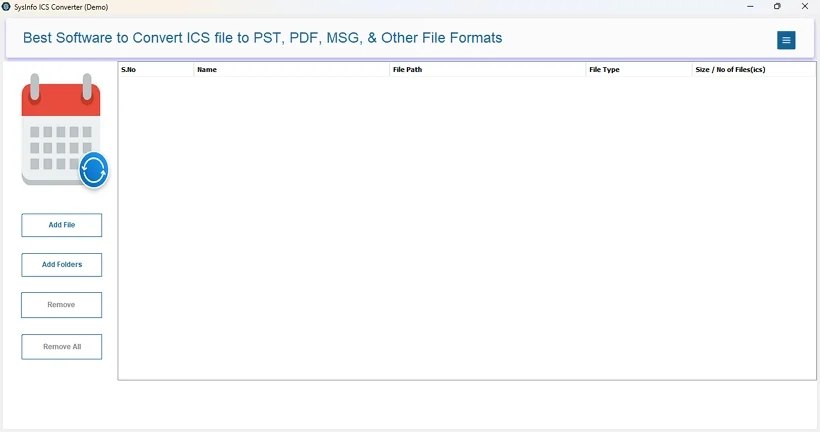
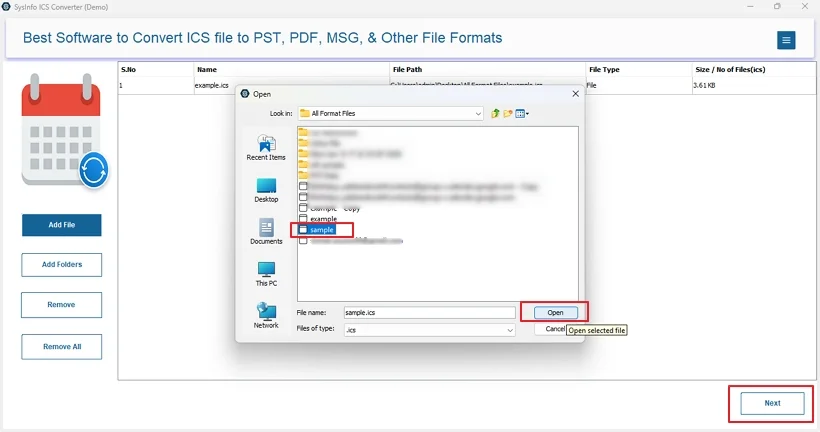
- Then, with Add File or Add Folder, upload ICS files and click Next.
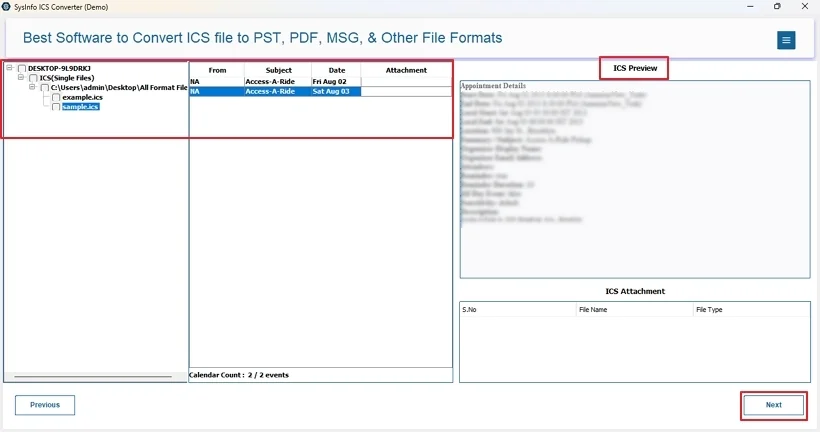
- Afterward, preview the data within it and select from the tree. Tap Next.
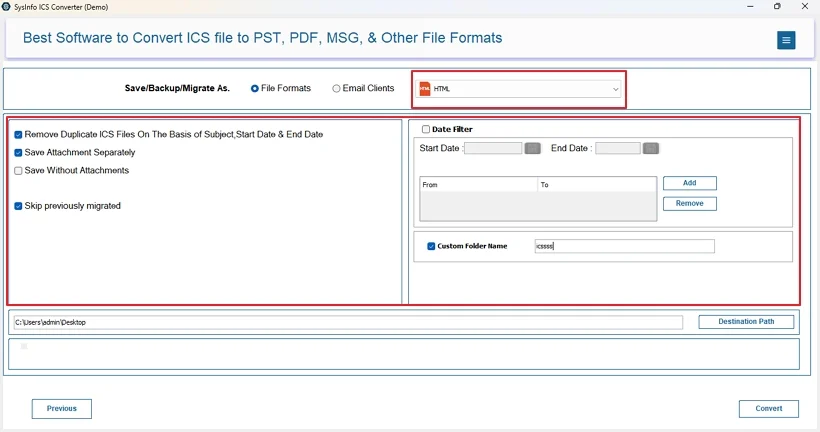
- Furthermore, select the HTML format and apply relevant filters.
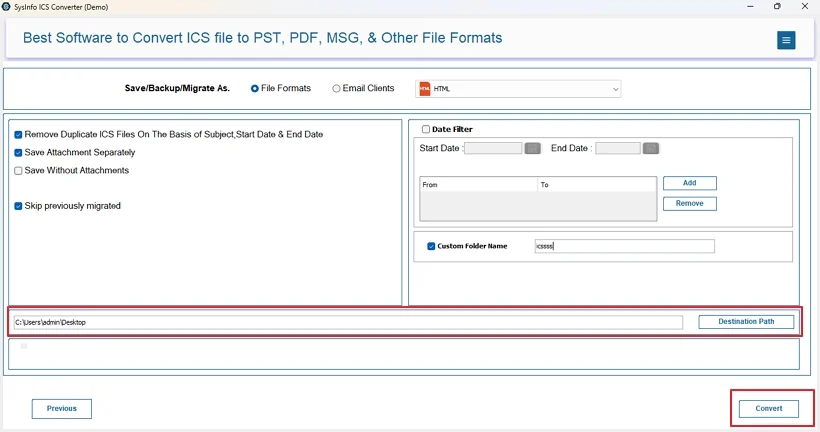
- Finally, set a Destination Path of your own choice and click Convert to save.
Real World Scenario:-
A digital marketing firm has multiple calendars from different applications extracted into ICS files. However, they needed the data in HTML format to share it across other teams and clients for review. Since the ICS file data was large and bulky, manual conversion wasn’t a feasible solution. So, they decided and got the ICS to HTML Converter Tool by MailConverterTools and rapidly converted all their calendar files. Within some time, they were accessing calendars on the web without any data alterations and continued their operations with ease.
Conclusion
ICS to HTML conversion seems like a simple task, but it is very important for data preservation and wide accessibility across browsers. It helps turn your scheduling into transparent and auditable data useful for various purposes. Here we learned all about the formats, their conversion need, use cases, and the available methods. While you can convert ICS to HTML manually, it is not a perfect solution for data security and bulk conversions. Download the ICS Converter Software to ensure scalability, accuracy, precision, reliability, and flawless conversions within minimal time.
Frequently Asked Questions
Q1: Will recurring events be displayed correctly in the HTML output?
Ans: If you have converted ICS files with the dedicated converter tool, then yes. Recurring events will be displayed in the same way in HTML as in the original ICS file.
Q2: Which is the best method to convert ICS to HTML without losing event details?
Ans: The best method to export ICS to HTML without losing event details is using the MailConverterTools ICS File Exporter.
Q3: Is ICS to HTML conversion secure for sensitive calendar data?
Ans: Yes. It is absolutely secure to perform the conversion for sensitive calendar data, but use the specialized ICS Exporter for this task.
Q4: Can I selectively export events from ICS to HTML?
Ans: To selectively export calendar files to HTML, use the ICS File Conversion Tool by MailConverterTools. You can use the preview panel to select a folder from the tree or use its Date Range filter for selective conversion for a particular period.
About The Author:

Meet Amit, an experienced SEO expert and content planner. He uses his creativity and strategy to create content that grabs attention and helps brands reach their goals. With solid skills in digital marketing and content planning, Amit helps businesses succeed online.
Related Post