-
Written By Amit Chandel
-
Updated on January 12th, 2026
How to Convert ICS to MSG Easily: A Complete Guide
Zoey Query: Do you know I am frustrated to find the solution to convert the ICS files into the MSG file format? I need it for my recording and sharing purposes, and I want an immediate solution.
This is a very common problem with all, but you can convert ICS to MSG easily. You can do it with the manual method, and also with the MailConverterTools ICS Converter Tool. We will learn every step to achieve the conversion goal with full efficiency. Also, this blog helps you to find out the best method that suits your requirements. Let’s start with the difference in the format.
Difference between ICS and MSG
|
Feature |
ICS File |
MSG File |
|
File Type |
Calendar data format |
Outlook email/message format |
|
Contains |
Event details like date, time, and location |
Full email content or appointment details with attachments |
|
Conversion Need |
Convert ICS file to MSG to open calendar events as Outlook messages |
N/A |
|
Usage |
Sharing calendar invites or events |
Saving or sharing Outlook emails/appointments |
|
File Extension |
.ics |
.msg |
|
Editing |
Can be edited in calendar apps |
Edited in Outlook |
Need for ICS to MSG Conversion
- First, ICS files mainly hold calendar events, but sometimes you need them as MSG files to work smoothly in Outlook.
- MSG files can hold things like attachments and formatting that ICS files don’t have.
- Changing ICS files to MSG makes it simpler to save and share calendar events right inside Outlook.
- With MSG files, you can open calendar items just like regular emails, which makes them easier to use day-to-day.
- Finally, converting helps maintain all the important information without losing anything during the transfer.
DIY Method to Convert ICS to MSG Easily
With the help of MS Outlook, you can change an ICS file into MSG. This method is useful when you only have one or two files to convert.
Simple Steps to Convert iCalendar File to MSG
- Firstly, open Microsoft Outlook.
- Then, open the ICS file by double-clicking it or opening it from your computer.
- When the calendar event opens, click Save & Close. This adds it to your calendar.
- After that, open the same event from the Outlook calendar.
- Thereafter, click File, then choose Save As.
- Further, select Outlook Message Format (MSG) and choose Unicode.
- Finally, pick a folder on your computer and save the file to export ICS to MSG.
Limitations
- It is not suitable if you have many calendar files to convert.
- Attachments or extra information may not always convert correctly.
- The method offers no error message or report if something goes wrong.
- It is not practical for users who want a quick or bulk conversion.
Automated Method to Convert ICS to MSG Easily
The best way is to use the MailConverterTools ICS Converter Tool for the conversion of an ICS file. This utility simplifies the process and removes the limitations of manual methods. It helps to save you time and effort, and manages your bulk files with efficiency.
Steps to Convert iCalendar to MSG
- Firstly, download and run the ICS Converter Tool.
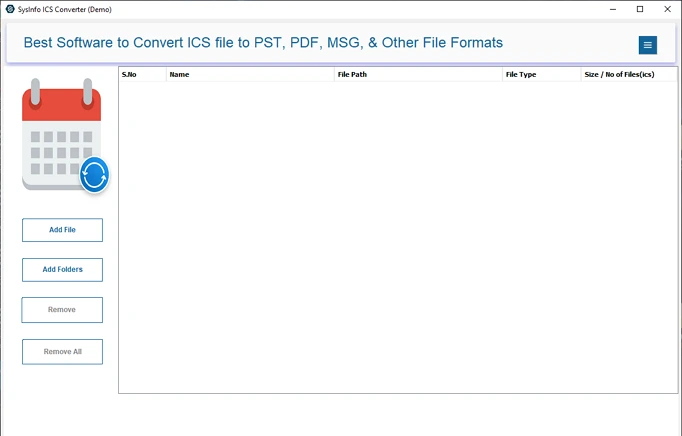
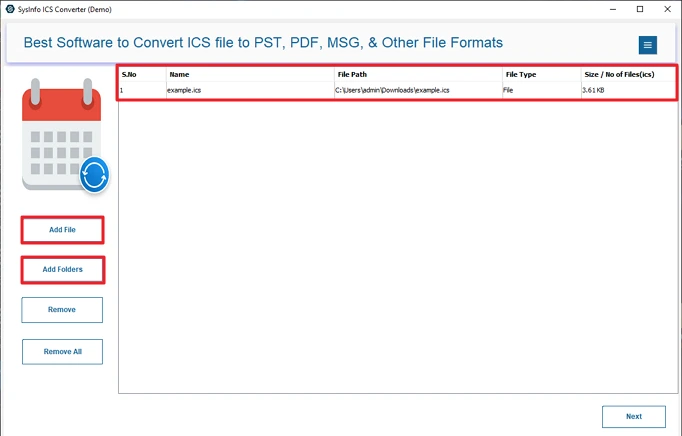
- Then, add the ICS file or folder and click Next.
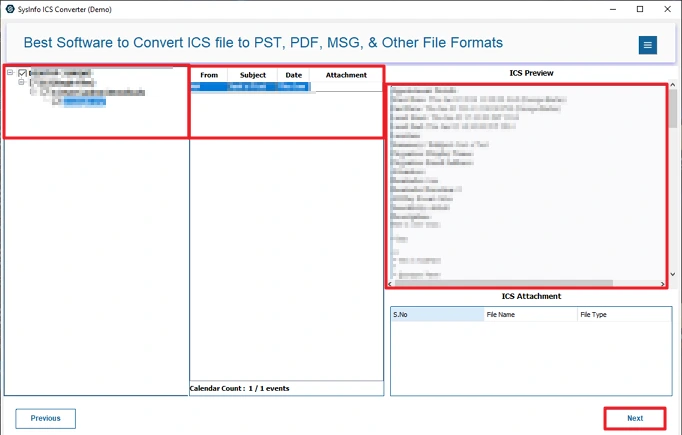
- Afterward, select and preview files to convert and click Next.
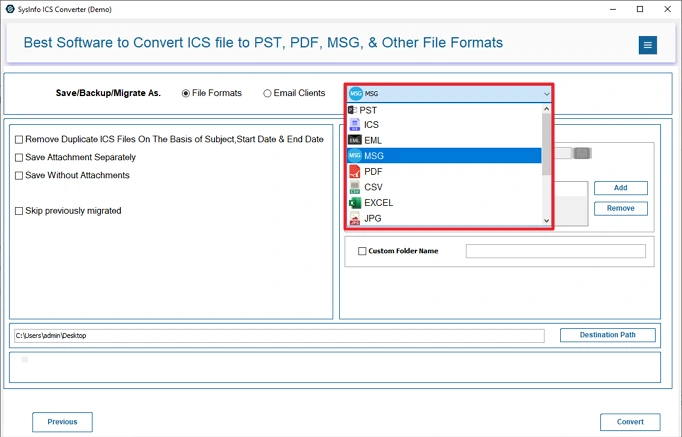
- Further, choose MSG as the file format.
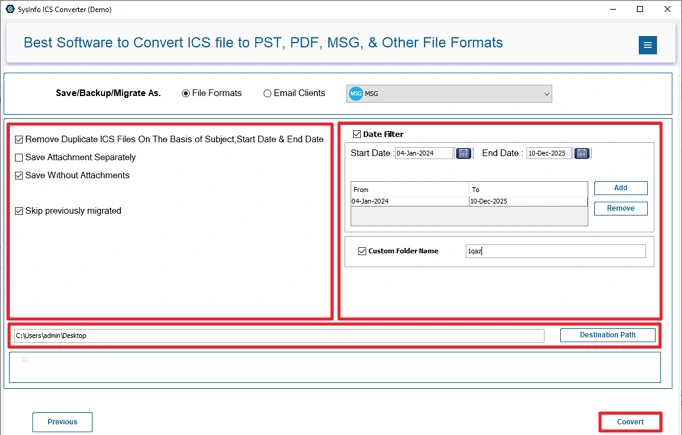
- Finally, apply the filters and set the path to save, then click Convert.
Successful User Case:
Marria had multiple ICS files that she wanted to convert into MSG format so she could save and share them in Outlook. She tried the manual method, but it became slow once the number of files increased. She then used the MailConverterTools ICS Converter Tool and completed the conversion in just a few steps. All her calendar details and attachments were saved correctly, and she was able to access and share the files in Outlook without any issues.
Conclusion
To conclude, at the end of the blog, converting ICS files to MSG makes calendar management much easier. You can try manual methods to convert the ICS file to MSG, but they come with limits. That’s why many users prefer using a dedicated ICS Converter Tool to convert ICS to MSG. It saves time and keeps all event details exactly as they were.
Frequently Asked Questions
Q1: How can I convert ICS to MSG easily?
Ans: Both manual and professional ways are available, but it all depends on your needs. If you have a small file size, you can go with the manual method, but for a large number of file MailConverterTools ICS Converter is best.
Q2: Does converting ICS to MSG preserve event details?
Ans: With manual methods, you can’t preserve all the details. The professional tool provides you with the feature to preserve your event details and more.
Q3: How to export ICS to MSG without Microsoft Outlook installed?
Ans: Using the MailConverterTools ICS Converter Tool, you can export your file to MSG without Outlook. This tool does not require any other software or application to be installed.
Q4: Which is the best tool to convert iCalendar to MSG format?
Ans: Many Experts recommends the MailConverterTools ICS Converter Tool is the best. It converts ICS files into the MSG format without any data loss and error. Additionally, it offers multiple useful features to apply.
About The Author:

Meet Amit, an experienced SEO expert and content planner. He uses his creativity and strategy to create content that grabs attention and helps brands reach their goals. With solid skills in digital marketing and content planning, Amit helps businesses succeed online.
Related Post