-
Written By Amit Chandel
-
Updated on February 23rd, 2026
How to Convert OLM to ICS File? Step-by-Step Guide
Mike’s Query:
How can I convert my Outlook for Mac OLM calendar file into ICS format? So I can import my events into Google Calendar, and which method works best for bulk conversion?
If you are switching from Outlook for Mac to another calendar app like Google Calendar. It can be confusing, especially when it comes to moving your calendar events. Outlook for Mac stores calendar data in an OLM file, but the problem is that most calendar applications don’t support this format. In this blog, we’ll walk through a simple manual way to convert OLM to ICS. Additionally, we will discuss a professional OLM Converter Tool that makes bulk conversion easier and more reliable.
Moreover, MailConverterTools OLM Converter is an efficient utility to convert your OLM files into various file formats and email clients. For instance, you can convert OLM to CSV format to view your data in a structured format.
Understand the Need to Convert OLM Files to ICS
- The OLM files contain multiple data types, but many users only need to extract calendar information.
- Converting OLM to ICS helps separate calendar data from emails, contacts, and other items.
- The ICS file size is smaller because it stores only calendar-related details.
- After you convert Mac OLM to ICS, the ICS file can be imported into various email and calendar clients. Such as Gmail, Yahoo, Office 365, Outlook, Thunderbird, and more.
DIY Approach for Users to Convert OLM to ICS
If you’re using Outlook for Mac, you can export your calendar without installing any extra tools. Follow these simple steps:
Steps to Transfer Outlook OLM to ICS:
- To begin with, open Outlook for Mac and sign in to the correct account.
- Then, click on the Calendar option from the navigation pane to view your events.
- After that, choose the calendar you want to export, such as Work or Personal.
- Go to File and select Export.
- In the export window, choose Calendar as the item type.
- Select a specific date range if needed.
- Finally, click Continue, choose a location, and save the file in .ics format.
Limitations:
- This method lets you export only one calendar at a time, so handling multiple calendars can take a lot of time.
- There is no option for bulk export, which makes it impractical for users with a large number of calendar entries.
- Some advanced calendar details, such as attachments, reminders, or custom settings, may not be exported correctly.
- The entire process is manual, so there is a higher chance of mistakes if steps are missed or selections are made incorrectly.
- It works only on macOS with Outlook for Mac installed, meaning Windows users cannot rely on this approach.
Automated Approach to Convert OLM to ICS Easily
If you’re dealing with OLM files that won’t open properly or you have several Outlook for Mac calendars to export at the same time, doing everything manually can become frustrating. In such situations, an automated OLM Converter is often the easier option. It lets you extract calendar data straight into ICS format without needing Outlook installed on your system.
The tool can also convert OLM to MSG and convert OLM to PST, which is helpful if you plan to move data to other email platforms. It keeps the original folder structure and data intact, offers useful filters for selective conversion, and works smoothly on both Mac and Windows, making the whole process simpler and more reliable.
Steps to Import OLM to iCal quickly:
- Download and run the OLM Converter Tool.
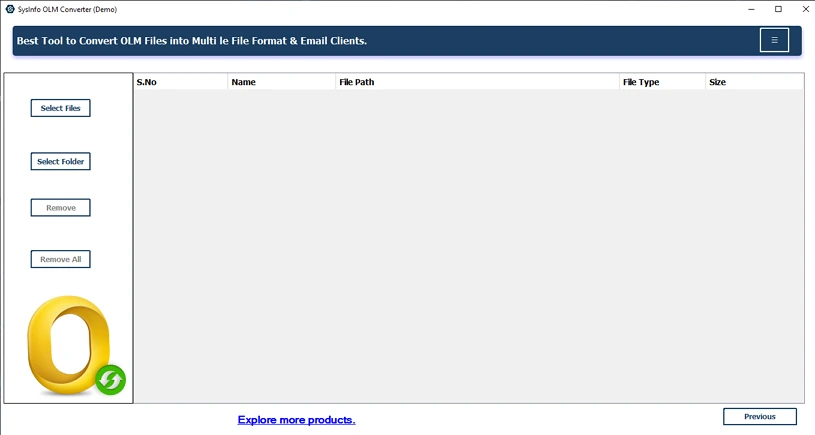
- Then add OLM files or a folder and click Next.
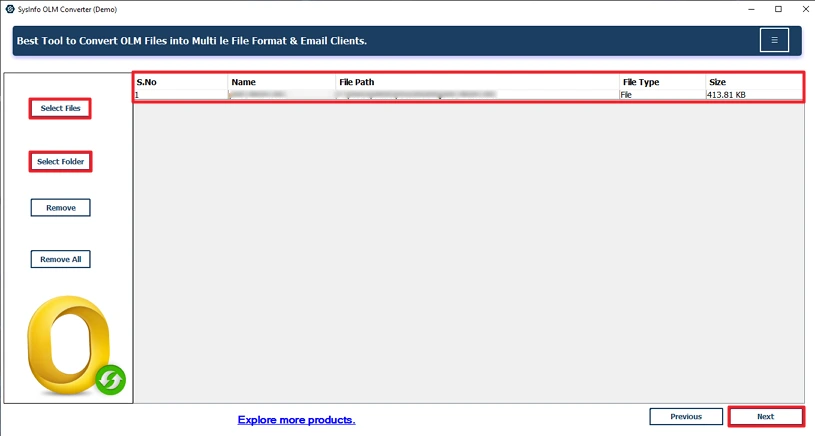
- Preview and select files, and click Next.
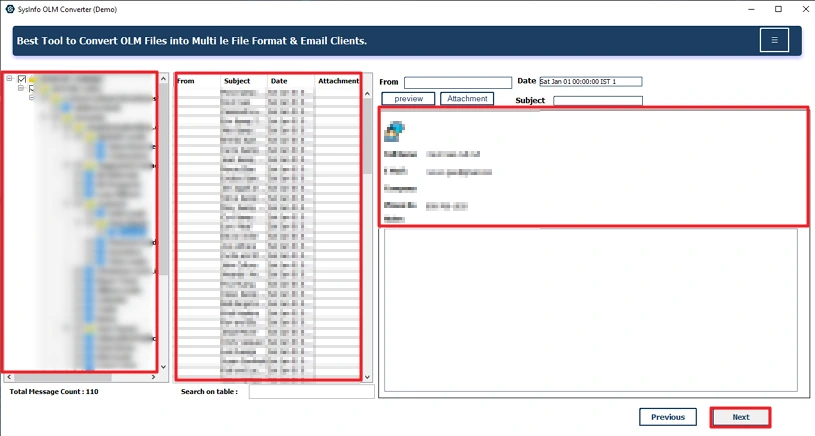
- Thereafter, choose ICS as the file format.
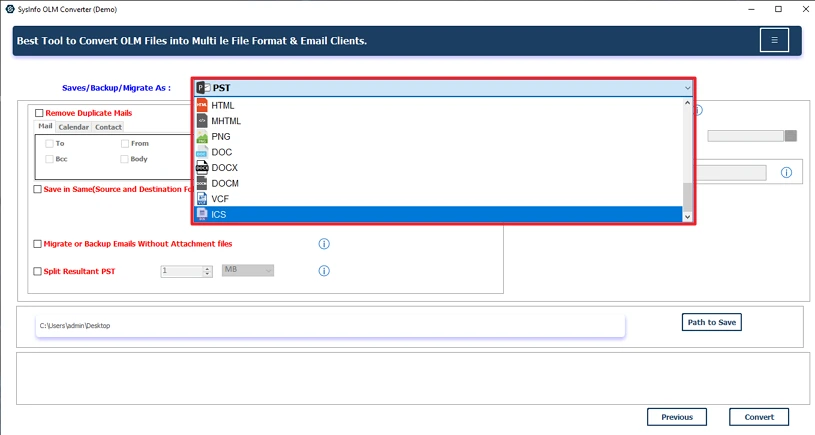
- Finally, apply filters, set the path to save, and hit Convert.
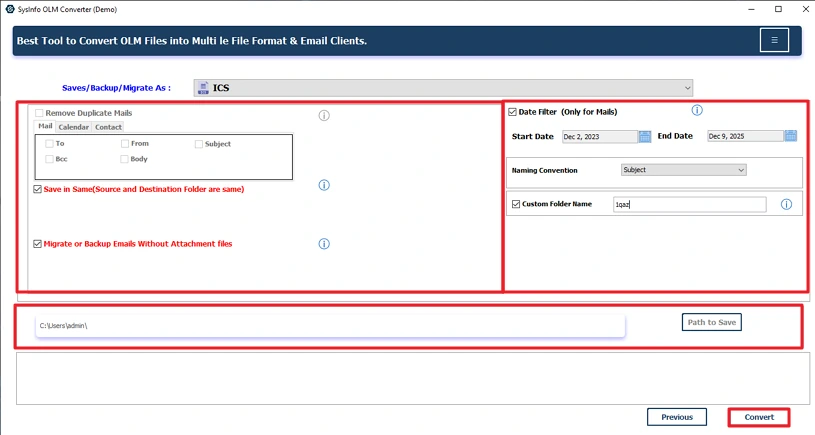
Successful User Case:
Sarah used to manually convert her OLM files to ICS, but found it very slow and error-prone. After consideration, she opted for our advanced OLM Converter Tool, which results in ICS Files of all her calendar data in several simple Steps. Within minutes, Sarah was able to import all of her schedules into Google Calendar and keep her team organized and scheduled!
Related Post: Open OLM File in Excel
Conclusion
To conclude, using the manual method would work well if you only had a few files to convert OLM to ICS. But if you have many files to manage, using a reliable OLM File Converter Tool will provide you more accurate and faster way to complete the conversion while maintaining accurate records and structure. Moreover, it helps to convert your OLM files to many more email clients and file formats.
Frequently Asked Questions
Q1: Can I export multiple OLM calendars to ICS at once?
Ans: Yes, OLM Converter lets you export multiple OLM calendars to ICS at once, saving time and effort compared to Outlook’s manual single-calendar export.
Q2: Can I convert Mac OLM to ICS manually?
Ans: You can manually convert Mac OLM to ICS using Outlook for Mac’s export feature, but it only allows exporting one calendar at a time, which can be slow for multiple calendars.
Q3: Which is the best tool to convert OLM to ICS easily?
Ans: MailConverterTools OLM Converter offers a fast, reliable, and user-friendly way to convert the OLM files to ICS, supporting bulk conversion and preserving all calendar details accurately.
Q4: Can I convert OLM files to ICS without accessing Outlook for Mac?
Ans: Yes, you can convert an OLM file to ICS without accessing Outlook by using OLM Converter, which works independently on both Mac and Windows systems for smooth conversion.
About The Author:

Meet Amit, an experienced SEO expert and content planner. He uses his creativity and strategy to create content that grabs attention and helps brands reach their goals. With solid skills in digital marketing and content planning, Amit helps businesses succeed online.
Related Post