-
Written By Amit Chandel
-
Updated on January 27th, 2026
Best Way to Convert OLM to VCF/vCard for Contact Migration
Sia Query: I’ve got my contacts saved in an OLM file from Outlook for Mac, but my new email service only supports VCF. How can I convert the file without losing contact details?
VCF files can be used across most email services and devices. This makes them a practical option for sharing or moving contacts between different platforms. If you need to convert OLM to VCF format, this blog will help you do that. We’ll cover the manual method as well as a simpler approach using MailConverterTools OLM Converter Tool. Before getting into the steps, we’ll first go over the basic differences between OLM and VCF formats.
Reason to Convert OLM Contacts to vCard
- vCard (VCF) files work with almost all email services and devices, unlike OLM files, which are limited to Outlook for Mac.
- vCard files are widely accepted for contact sharing and backups.
- OLM files can’t be opened on Windows or most non-Mac platforms, while vCard files can.
- vCard keeps contact details like phone numbers, emails, and addresses intact during transfer.
- It helps users switch email platforms without manually re-adding contacts.
How to Convert OLM to VCF/vCard Manually?
You can move contacts from an OLM file to a vCard by doing it manually. Just keep in mind, Outlook for Mac needs to be installed first. Without it, this won’t work. Once that’s done, follow the steps below.
Steps to Convert OLM to vCard
- First, import the OLM file into Outlook for Mac.
- Then, open Outlook for Mac on your system.
- After that, move to People or Contacts.
- Thereafter, select the contacts you want to convert OLM to .vcf.
- Afterwards, right-click on the selected contacts and choose Export to vCard, if the option is available.
- Further, if that option doesn’t appear, simply drag and drop the selected contacts into any folder on your Mac.
- Finally, the contacts will be saved in vCard (.vcf) format.
Limitations:
- If contacts are few, okay. If there are many, it gets slow. Very slow.
- Most times, you export contacts in small chunks. One by one sometimes.
- No bulk option. No automation. You do everything yourself.
- Sometimes the Export to vCard option just doesn’t appear. No warning. Nothing.
- After exporting, you still have to open files and check details manually.
Professional Method to Convert OLM to VCF Format
When you look at everything, using a dedicated MailConverterTools OLM to vCard Converter is the easiest way to handle the conversion without any hassle. It’s especially useful for businesses that need to convert OLM contacts to VCF format for CRM imports. It’s a practical tool for anyone who wants a simple answer to the question, “How do I convert an OLM file to vCard?”
Steps to Convert Mac OLM to VCF
- Firstly, download the OLM Converter Tool.
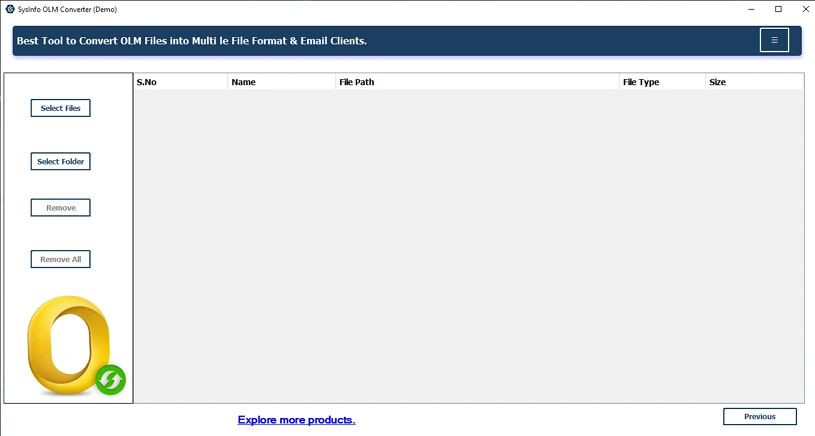
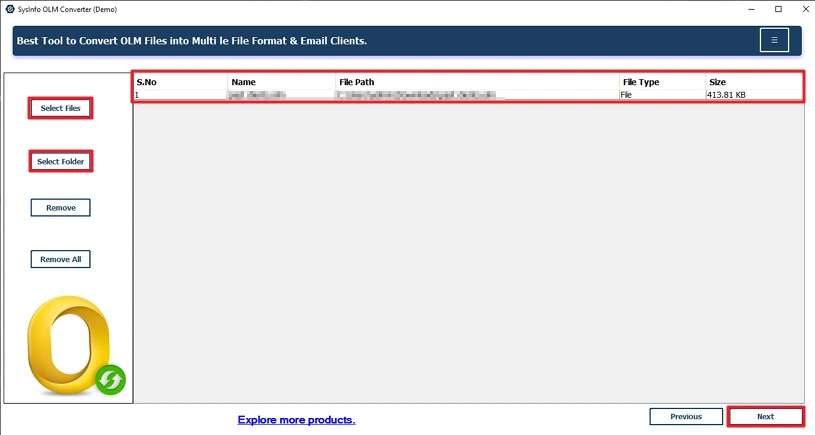
- Then, add your OLM files and click Next.
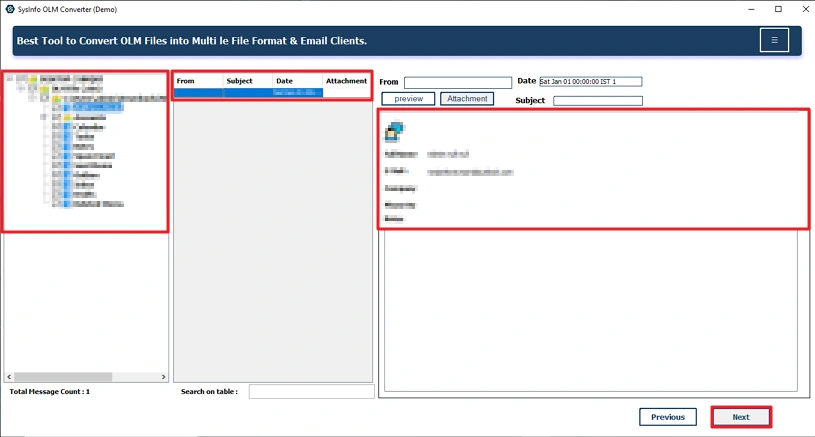
- After that, preview and select your OLM files and click Next.
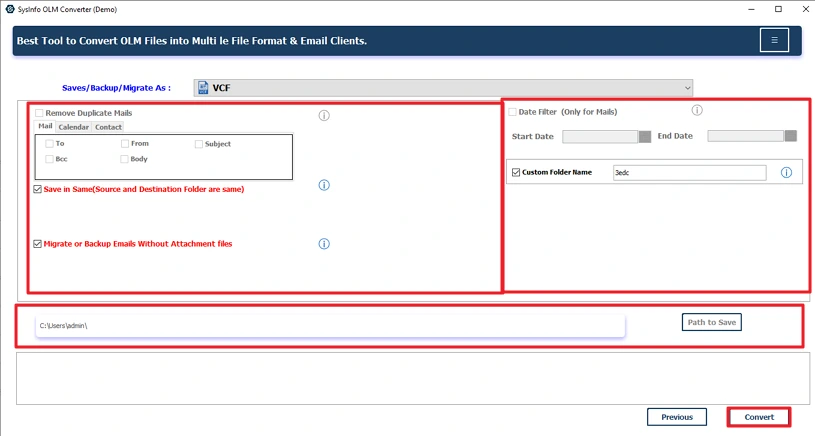
- Thereafter, choose the VCF file format.

- At last, apply the required filters, set the path, and click Convert.
Successful User Case:
James had been using Outlook for Mac for years and never thought much about his contacts. Everything sat inside one OLM file. Then came the switch. New job. New system. His new email platform only accepted VCF files. No Outlook for Mac anymore.
At first, he tried figuring out the manual way. Didn’t go far. Too many contacts. Too much time. So he used the MailConverterTools OLM Converter instead. Added the OLM file, chose VCF, and let it run. That’s it.
All contacts showed up the same. Names, phone numbers, and email IDs. Nothing missing. No rework. No stress.
Also Read: Convert OLM to Text(TXT)
Conclusion
Alright, so converting OLM to VCF? You’ve got some ways to do it. The manual method to convert OLM to VCF? Fine if you only have a few contacts and some extra time. But when the list gets big, well, it drags. Slow and annoying. That’s when a good converter tool really helps. Saves time, cuts down mistakes, and makes things easy. Want it quick and painless? Then a converter’s the best bet.
Frequently Asked Questions
Q1: Can I Convert Mac OLM to VCF without Outlook for Mac?
Ans: Yes, you can convert a Mac OLM file to VCF with the manual method and by using the professional OLM Converter Tool.
Q2: Will all contact details remain intact after converting OLM to vCard?
Ans: There is no guarantee with the manual approaches that your data will remain intact. But using MailConverterTools OLM Converter Tool makes sure that no data will be changed or altered during the process.
Q3: Which is the best way to convert OLM to VCF for contact migration?
Ans: Using a professional tool such as MailConverterTools OLM Converter is the best way to convert your data. This tool offers multiple features and filters that allow you to customize your output.
Q4: Is it safe to convert Mac OLM to VCF using third-party tools?
Ans: The MailConverterTools OLM Converter is a reliable and secure utility to convert OLM files to VCF format. It stores zero user data in their server and provides the best results.
About The Author:

Meet Amit, an experienced SEO expert and content planner. He uses his creativity and strategy to create content that grabs attention and helps brands reach their goals. With solid skills in digital marketing and content planning, Amit helps businesses succeed online.
Related Post