-
Written By Amit Chandel
-
Updated on February 11th, 2026
How to Convert PDF to TXT in Bulk (Step-by-Step Guide)
User Query:- I am a content writer, and I received a lot of PDF files that I can edit and want to change them to TXT format. It helps me to change and edit content easily. What is the fastest solution for this?
PDF keeps the layout fixed, and Fonts, spacing, and design stay the same on any device. That’s great for sharing documents. But editing a PDF is not always easy. If you only need the text, a TXT file makes more sense. TXT files are simple. They contain plain text with no formatting. Because of that, they are lightweight and easy to use with different tools and software. In this blog, I’ll explain how you can convert PDF to TXT. We’ll cover both the manual way and the use of the MailConverterTools PDF Converter Tool.
Common Reasons to Convert Edited PDF into TXT
- It is hard to edit a PDF file directly. Converting it to TXT makes editing easier.
- Sometimes I only need the text, not the design or images. TXT gives just the written content.
- Text files open quickly on any computer. No special software is needed.
- TXT files are smaller in size. They don’t take much storage space.
- Many tools and programs work better with plain text.
- When doing research or analysis, plain text is simpler to handle.
Traditional Methods to Convert PDF to TXT Format
You can get text out of a PDF, but the process isn’t quick. This way is okay if you don’t have many PDFs.
Method 1: Convert PDF File to TXT Using Adobe Acrobat Reader
- Firstly, open your PDF file in Adobe Acrobat Reader.
- After that, click on File > Save As Other > Text.
- Furthermore, choose a folder where you want to save the file.
- Finally, click the Save button.
Method 2: Extract PDF to Text Using Google Docs
- Firstly, go to Google Drive and upload a PDF file.
- After that, right-click on the file and choose Open with > Google Docs.
- Thereafter, the file will open, and the text will become editable.
- Lastly, click on File > Download > Plain Text (.txt).
Limitations of Manual PDF to TXT Methods
- The process takes a lot of time, especially if you have many PDF files.
- Formatting often breaks. Line spacing and text order may not stay the same.
- There is no control over how the text is extracted or saved.
- Errors can happen, and you may need to clean the text manually after conversion.
Pro Method to Convert PDF File to TXT with Attachments
If you don’t want to deal with manual steps, you can use the MailConverterTools PDF Converter Tool. It converts PDF files into other formats without much effort. The data stays the same during conversion. The tool also has an option to import PDF to Office 365. This helps when you need to move PDF data into your Office 365 account. It is a simple way to handle PDF conversion without doing everything manually.
Steps to Convert PDF to TXT
- Firstly, download the PDF Converter Tool.
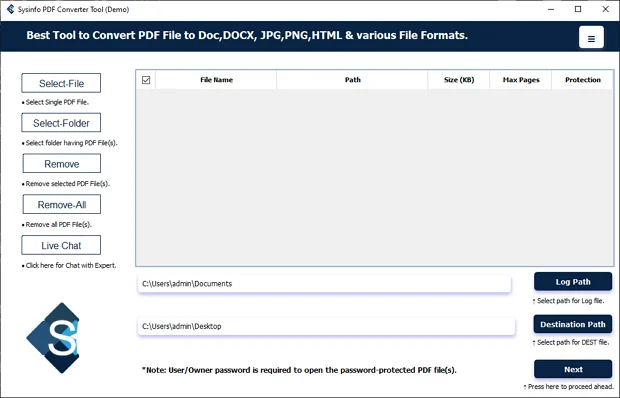
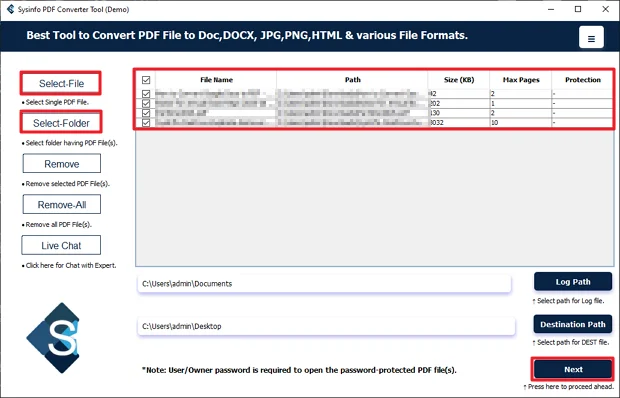
- Then, add the PDF files and click Next.
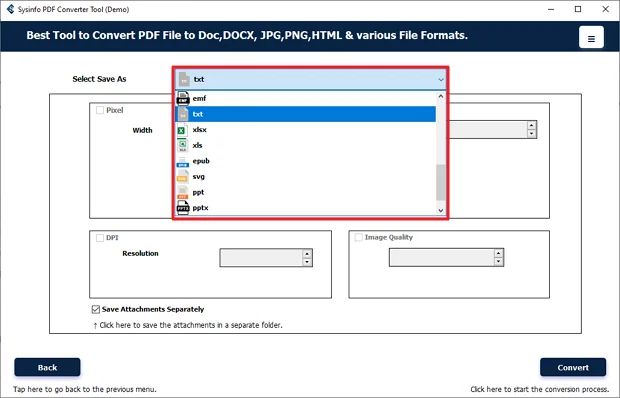
- After that, choose the TXT format.
- Lastly, apply filters and click Convert.
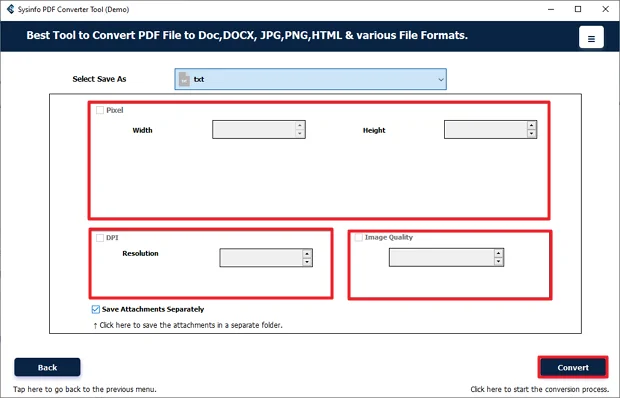
Real World Example:-
A research analyst had several PDF reports that needed to be reviewed and analyzed. Instead of manual methods, they used MailConverterTools PDF Converter to convert the PDF files into TXT format, including the attachments. This gave them editable text files that were ready for analysis. The task was completed much faster, and all the required data was available without missing details.
Conclusion
To conclude, if you have limited files to convert PDF to TXT format. Then, using the manual methods is reliable, but if it increases the conversion time will also increase. Sometimes the text also needs fixing after conversion. In that case, using a PDF converter tool makes things easier. It handles the files faster and keeps the text in proper order. This is helpful if you regularly work with reports or large numbers of documents.
Frequently Asked Questions
Q.1 Is it safe to convert PDF to TXT without losing data?
Ans: Yes, it can be safe if you use the right method. Manual ways may sometimes disturb the text order or spacing. If you use the MailConverterTools PDF Converter, the text stays in proper structure during conversion.
Q.2 Can I convert multiple PDF files to TXT format in bulk?
Ans: Manual methods do not support bulk conversion properly. With the MailConverterTools PDF Converter, you can add multiple PDF files at once and convert them all together.
Q.3 How can I convert PDF File to TXT without any technical skills?
Ans: You do not need technical knowledge. The tool has simple steps. Install it, add your PDF files, choose TXT as the format, and click Convert.
Q.4 Which is the best tool to extract PDF to text?
Ans: MailConverterTools PDF Converter is a practical option. It converts PDF files to TXT and other formats. It is useful for users who deal with regular or bulk PDF conversions.
About The Author:

Meet Amit, an experienced SEO expert and content planner. He uses his creativity and strategy to create content that grabs attention and helps brands reach their goals. With solid skills in digital marketing and content planning, Amit helps businesses succeed online.
Related Post