-
Written By Amit Chandel
-
Updated on December 30th, 2025
Best Way to Convert VCF to Word Document in One Click
Victor’s Query:
It is very difficult to access hundreds of VCF files, so I want to convert my VCF file to Word. So I can keep it as an official record and documentation. What is the best solution to convert my contact file in readable format?
A VCF file is used to store the contact information of users. But it may be difficult to represent these details in a readable format. To easily view, edit, print, and share data, users always prefer to convert VCF to Word. This blog covers the most effective solutions to save VCF data into DOC. We will understand here the manual way and the use of the professional VCF to CSV Converter Tool for the best outcomes.
Why do Users Want to Convert VCF to DOC?
- VCF files open in contact apps or email clients, which makes it difficult to view all contact details at once. A DOC file shows the information clearly on a single page.
- Users often need to update contact names, numbers, or addresses. Editing a Word document is much easier than modifying VCF files manually.
- Many users need contact details for reports, records, or official documents. DOC files fit better into professional documentation than VCF files.
- VCF files are not designed for printing. Converting them to DOC helps users create clean, printable contact lists for meetings or offline use.
- To open VCF files, users usually need specific software. DOC files can be accessed on almost any system without extra tools.
DIY Methods to Convert VCF to Word
Users who prefer not to use third-party tools can try the following manual techniques to convert VCF contact files into a Word document. These methods work best for small contact lists and basic editing needs.
Method 1: Convert vCard to Word Using Microsoft Word
- Firstly, go and find the VCF file on the computer, right-click, and hit Open With -> More->Word.
- Then, do any edits if required, and go to the File tab.
- Thereafter, click Save As, choose a folder, and select the file type to Word Document (*.docx).
- Finally, hit the Save button and convert them into Word.
Method 2: Convert VCF file to Word Using Microsoft Excel
- Firstly, open the VCF file in Notepad and save it as a TXT.
- Then, launch Microsoft Excel and go to File -> Open -> Browse.
- Change the file type option to All Files and select the saved TXT file.
- When the Text Import Wizard appears, choose Delimited and click Next.
- Choose your delimiter (: or =), hit the Next button, and Finish. Then, edit and copy the data as you need.
- Thereafter, edit or arrange the contact details inside Excel as needed.
- Further, copy the formatted data and paste it into a new Word document.
- Finally, use Save As to store the file in DOCX format.
Limitations:
- These methods will not work if you have a large number of files.
- The methods can lead to errors due to repetition.
- Moreover, the manual process is slow and time-consuming because of repetition.
Best & Reliable Method to Convert VCF to Word
The MailConverterTools VCF Converter Tool is the best utility to convert your vCard file into Word format. This tool allows you to convert multiple VCF files into Word format. Also, it provides results in minimum time and ensures that the data is unchanged after the conversion. In its free demo version, you can convert your 50 VCf files into Word format. This tool helps to create well-organised contact directories.
Steps to Transfer vCard to Word:
- First, download and start the VCF Converter Tool.
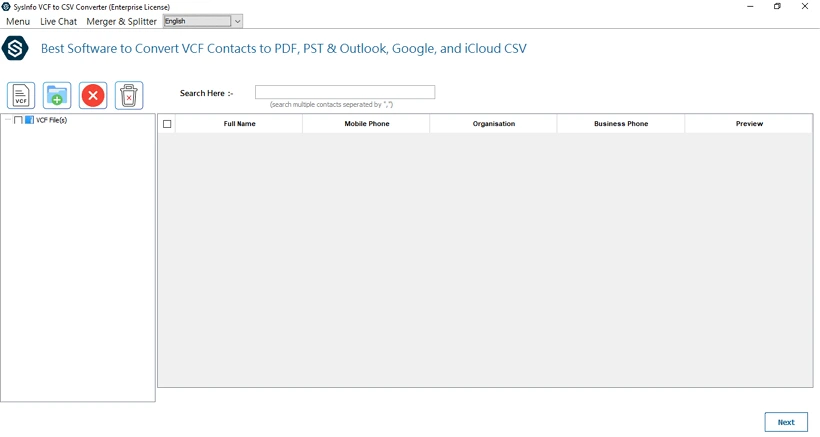
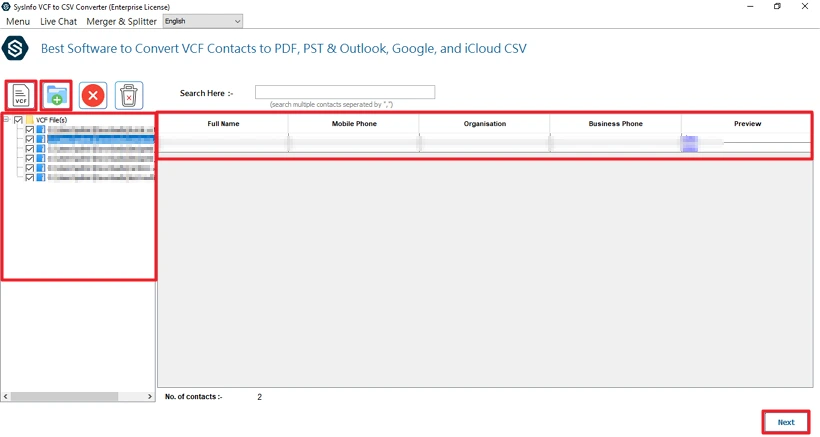
- Then, add your VCF files or folder and click the Next button.
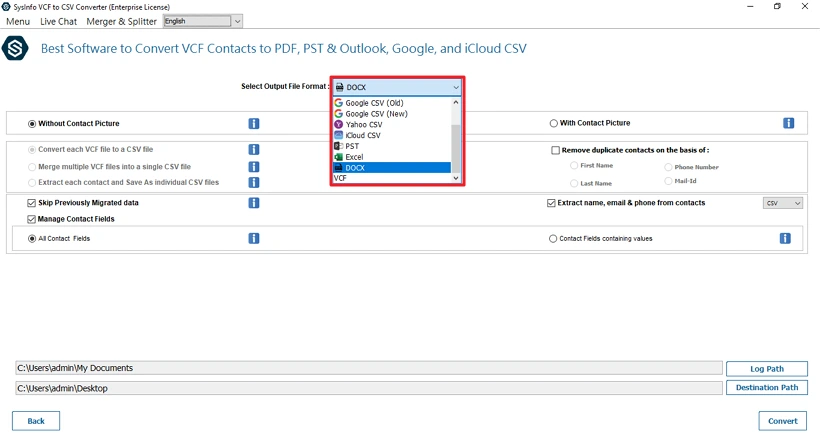
- After that, choose the DOCX file format to convert to Word.
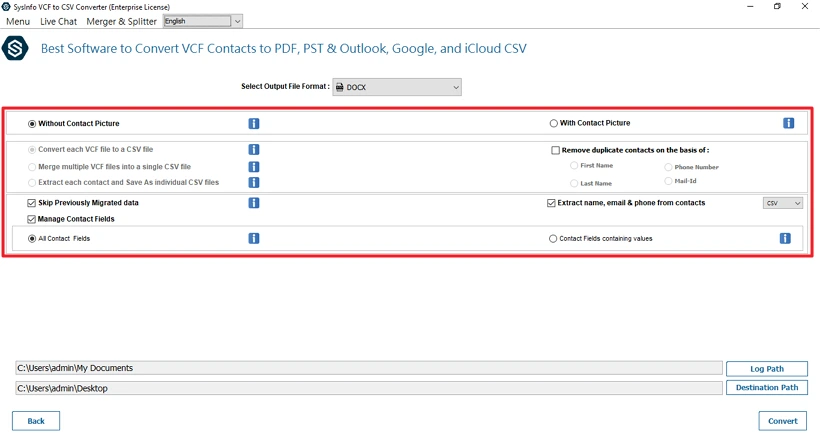
- Thereafter, apply the important filters and features.
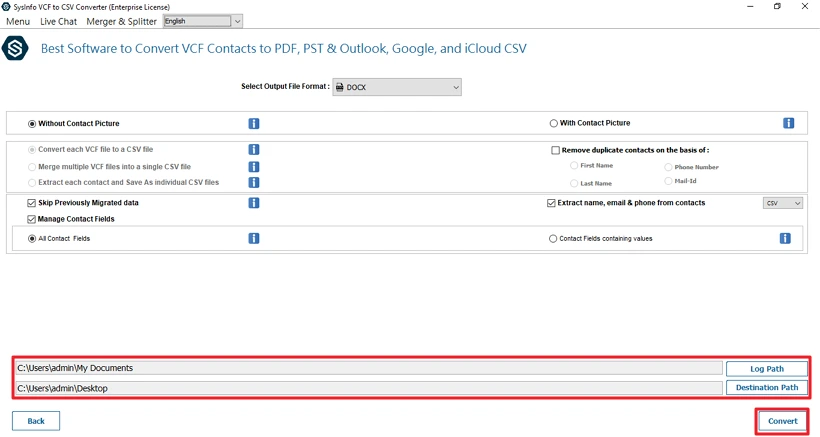
- Finally, set the path to save the file and click Convert.
Successful User Case:
A client was handling hundreds of contacts that were stored in VCF format, collected from multiple sources. He wants to convert them in a easy to share and readable format. The client uses the manual methods but finds them ineffective. Then he used our VCF Converter Tool, which helped him to easily convert hundreds of files in simple and readable Word format while maintaining the data integrity.
Conclusion
To conclude, we learned about several ways to convert a VCF file into a readable Word format. If you choose the manual method to convert VCF to Word, then it will only be useful for a limited number of files. If you want to convert multiple files, the professional utility is the best solution. The utility provides accurate results, with no error, and in minimal time. Moreover, our technical team is 24*7 available to assist you if you get stuck in any problem.
Frequently Asked Questions
Q1: How can I convert vCard to Word document easily?
Ans: The VCF Converter Tool is easy to use and allows users to convert their vCard file into a Word document. This tool make sue to secure your data without any loss.
Q2: Can I open a VCF file directly in Microsoft Word?
Ans: Yes, you can easily open a VCF file in Microsoft Word. For this, you just need to click on the Open with option to open your VCF file. This works well when you do not have a lot of contacts in your VCF file.
Q3: Which is the best tool to convert VCF file to Word?
Ans: The MailConverterTools VCF Converter Tool is one of the best solutions available. It supports bulk conversion, maintains contact formatting, and ensures accurate results with minimal effort.
Q4: Will the formatting remain intact after converting VCF to Word?
Ans: When using manual methods, formatting may not remain intact. However, the MailConverterTools VCF Converter Tool preserves the original contact structure and presents data in a clean and readable Word document.
Q5: Is it possible to convert VCF to DOC with formatting like tables?
Ans: Yes, it can be done using an automated VCF Converter Tool. This utility enables the conversion of VCF files into DOCX format with their formatting.
About The Author:

Meet Amit, an experienced SEO expert and content planner. He uses his creativity and strategy to create content that grabs attention and helps brands reach their goals. With solid skills in digital marketing and content planning, Amit helps businesses succeed online.
Related Post