-
Written By Amit Chandel
-
Updated on February 25th, 2026
Export AOL Email Folders to Hard Drive – Quick Guide
User Query: Is there an easy and reliable way for me to save all my AOL email folders to my hard drive? because I am concerned that I may lose my email data.
AOL Mail is a free email service from AOL to manage emails. But user faces many issues with AOL or just feel unsure. That’s why backing up your AOL emails to your computer can be a smart move. In this blog, we’ll go over some easy ways to export AOL email folders to hard drive online and also talk about the MailConverterTools AOL Backup Tool.
Why Save AOL Email to Computer Hard Drive?
- You never know when an account might stop working or ask for verification again. Having a copy on your computer just feels safer.
- Mailboxes get full over time. Old emails and heavy attachments can slow things down, so moving them offline helps clear space.
- Some emails are too important to leave only in the cloud — things like receipts, documents, or personal files.
- If your internet is down, you can’t check webmail. But if emails are saved on your hard drive, you can still open them.
- It simply gives peace of mind. A backup means you’re not depending on just one place to store everything.
Manual Method to Export AOL Email Folders to Hard Drive
The first method is the simple way most people try first. You’re basically using the print feature. The second method is a bit different. It saves the email in text format first.
1) Save AOL Email to Hard Drive Using the Print Option
- Firstly, log in to your AOL Mail account.
- Then, open the email you want to save.
- Click on the More option at the top of the message.
- From the list, choose Print Message.
- A preview window will open. In the Destination section, select Save as PDF instead of a printer.
- Click Save.
- Choose where you want to store the file on your hard drive and press Save again.
2) Backup AOL Emails Using the “View Message Source” Option
- Firstly, sign in to your AOL Mail account.
- Then, open the email you want to download.
- Click on the More option.
- Select View Message Source from the drop-down menu.
- The email’s source code will open in a new window.
- Further, press Ctrl + S on your keyboard to save the file.
- Thereafter, choose a location on your computer and click Save.
- After saving, go to that file and change its extension from .txt to .eml so it can be opened normally.
Limitations
- No option to download entire folders together.
- Print method only saves emails as PDF.
- Folder structure is not preserved.
- Attachments may not save properly.
- The View Source method shows raw code, which can be confusing.
- File names are not saved by subject.
- Time-consuming for large mailboxes.
Quick Way to Export AOL Email Folders to Hard Drive
If you don’t want to take chances with your important emails, in that case, using a proper backup tool makes things easier. The MailConverterTools AOL Backup Tool is one option people use to save their whole mailbox without missing anything. It can back up the inbox, sent items, deleted emails, and other folders. You can use this tool to transfer AOL email to Gmail, or one more reference for those who want to migrate AOL to Office 365.
Steps to Backup AOL Emails to Hard Drive
- Download the tool and log in with AOL credentials.
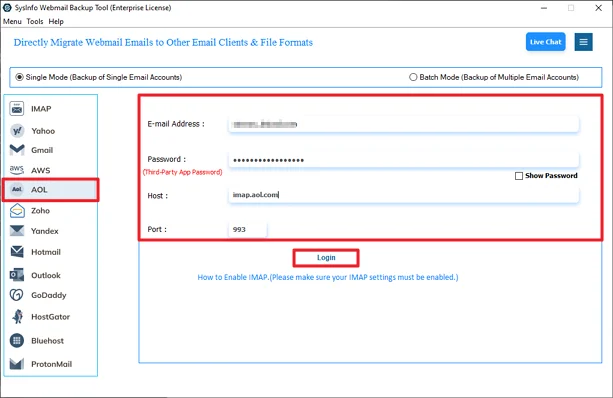
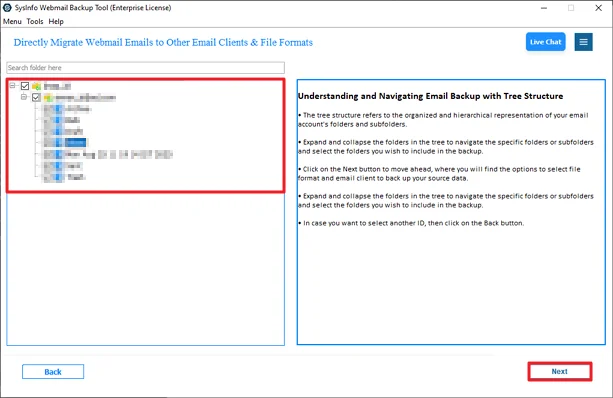
- Then expand the tree, select the files, and click Next.
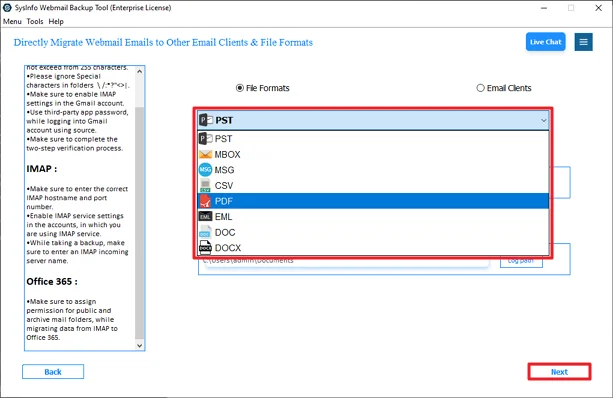
- Further, choose the format for backup.
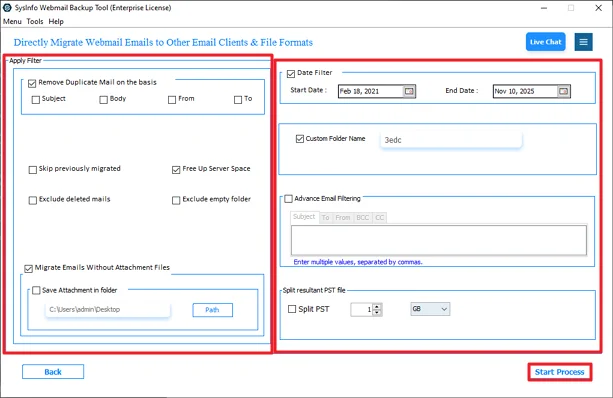
- Lastly, use the filters and click Convert.
Successful User Case
Sydney Morris, a freelance consultant from Canada, had been using AOL Mail for years to handle client conversations and invoices. One morning, she got locked out of his account because of a security check. That’s when it hit her— all his important emails were sitting only in webmail.
Later, she used the MailConverterTools AOL Backup Tool to download all her folders at once, including the inbox, sent items, and old client records. Within a short time, everything was saved safely on her computer with the folder structure intact.
Now, even if she faces login problems again, she knows her important data is secure on her system.
Conclusion
There are two ways to export AOL email folders to hard drive. Through manual procedures, and with the help of a professional tool. The manual methods may not be very time-consuming; however, they require some technical knowledge to complete. Saving emails individually is also not a very exciting experience. The AOL Backup Tool will save time and make it easier to back up all your email accounts at once with minimum effort on your part.
Frequently Asked Questions
Q.1 Which Software Can Export AOL Email Folders to a Hard Drive Easily?
Ans: The MailConverterTools AOL Backup Tool is one option that can do this easily. It lets you back up complete AOL folders without saving emails one by one.
Q.2 What is the most efficient way to save AOL emails to a hard drive in bulk?
Ans: If you have a large mailbox, using a backup tool is a quicker way. Manual methods only save one email at a time, which takes a lot of effort. A professional tool can export entire folders together.
Q.3 How can I backup AOL emails to a hard drive if I don’t have technical skills?
Ans: In that case, using a dedicated backup tool is simpler. You just log in, select the folders, choose a format, and start the process. It avoids the complicated steps involved in manual methods.
Q.4 Can I Safely Save AOL Email to a Computer Hard Drive?
Ans: Yes, you can. You can either use the manual methods, like Print or View Message Source for a few emails, or use a backup tool.
About The Author:

Meet Amit, an experienced SEO expert and content planner. He uses his creativity and strategy to create content that grabs attention and helps brands reach their goals. With solid skills in digital marketing and content planning, Amit helps businesses succeed online.
Related Post