-
Written By Amit Chandel
-
Updated on March 14th, 2026
How to Import MBOX to Yandex Mail – Tried & Tested Methods
User Query: “I’ve got a few old email backups saved as MBOX files. Now I’m using Yandex Mail, and I want those emails there too. The problem is, I can’t find any direct option to upload MBOX files into Yandex.
Sometimes people switch email services but still have old mailbox backups saved as MBOX files. The issue is that Yandex Mail doesn’t really support importing MBOX files directly. So if you try to import MBOX to Yandex Mail, nothing happens. Because of that, you usually need another method to transfer emails to your Yandex account. In this blog, we’ll go through a simple approach and the advanced MailConverterTools MBOX Converter Tool to transfer emails from an MBOX file to Yandex Mail.
Common Reasons to Migrate MBOX File to Yandex Mail
- Sometimes people switch email services and need their old MBOX emails available inside their new Yandex account.
- A lot of users prefer keeping all their old conversations in one place instead of checking multiple email clients.
- Yandex Mail works smoothly in browsers and mobile apps, so accessing old emails becomes easier from anywhere.
- Some email programs that use MBOX files stop being used, so users migrate data before removing them.
- Businesses often move emails to Yandex Mail to centralize communication and manage team accounts more easily.
- Users may want a secure cloud mailbox instead of keeping important MBOX email files stored locally.
- Importing MBOX data to Yandex Mail also helps create an online backup of important emails and attachments.
Manually Import MBOX to Yandex Mail Using Thunderbird
If you want to open your MBOX emails in your Yandex Mail account, you can use Mozilla Thunderbird. It’s a free method, but you’ll need to do a few manual steps.
Steps to Import MBOX File to Yandex Mail
- Open Thunderbird on your computer.
- Click New Account -> Add Mail Account.
- Enter your Yandex Mail login details and finish the setup.
- Wait until all Yandex folders sync in Thunderbird.
- Go to Add-ons and install ImportExportTools NG.
- Right-click a folder -> ImportExportTools NG -> Import MBOX file.
- Select your .mbox file and import it.
Limitations
- It relies on the ImportExportTools NG add-on to load MBOX files.
- Large MBOX files may slow down Thunderbird during the import.
- Sometimes the folder structure changes slightly after syncing with Yandex Mail.
- Slow internet can delay the email syncing process.
Advance Solution to Import MBOX to Yandex Mail Quickly
If you want an easier way, you can try the MailConverterTools MBOX Converter. It is a simple program that helps you move MBOX emails so they can be used in a Yandex Webmail account. The tool lets you load one MBOX file or several files together. It also shows a preview of the emails before you start the conversion. You can use this tool to import MBOX to Thunderbird, and you can read this blog to import MBOX to AOL Mail.
Steps to Transfer MBOX to Yandex Mail
- Download the MBOX Converter Tool.
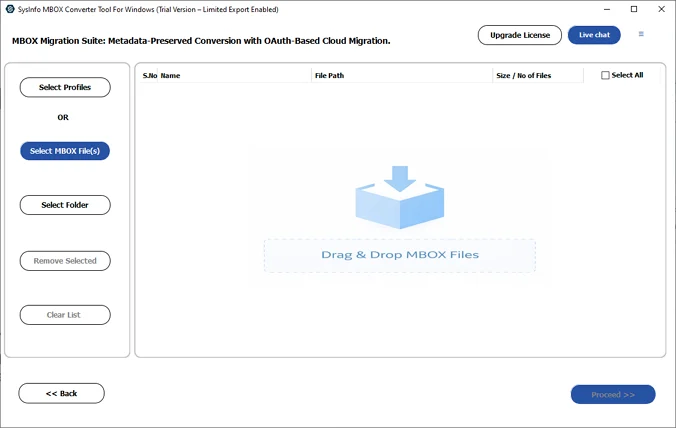
- Add the MBOX files and click Proceed.
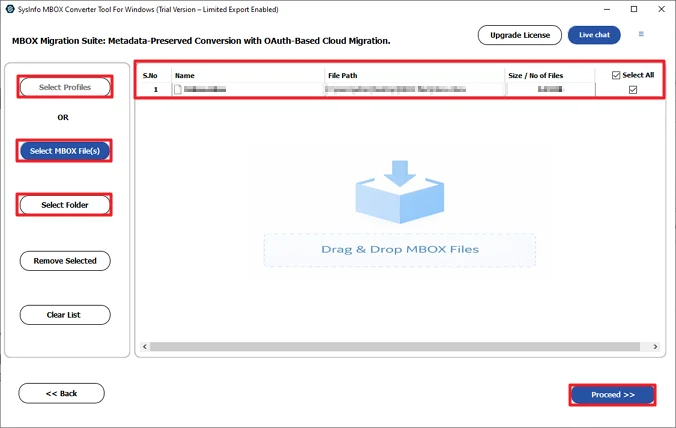
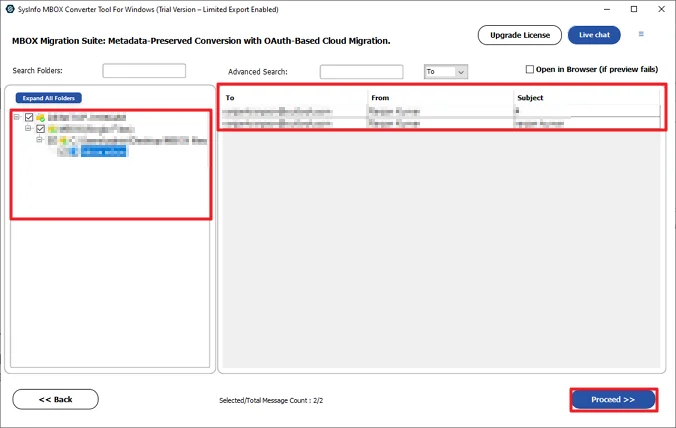
- Further, preview and select the files and hit Proceed.
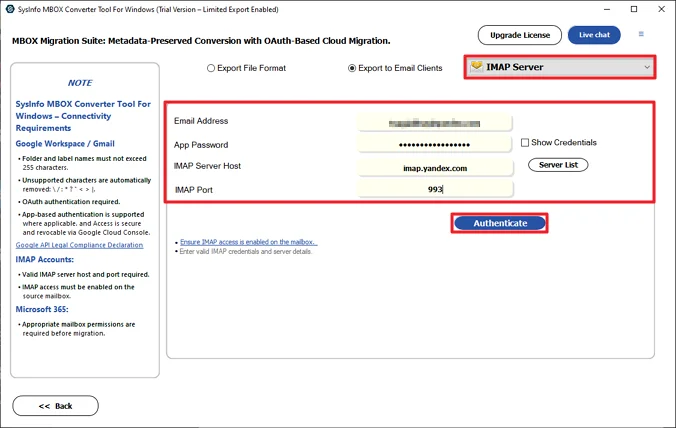
- Choose IMAP and authenticate with Yandex credentials.
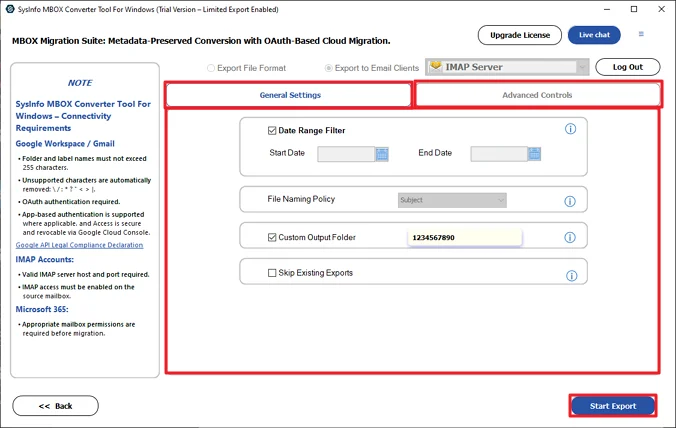
- Lastly, use the available filters and click Start Export.
Successful User Case
A small team had several old email backups stored as MBOX files from their previous mail client. After moving to Yandex Mail, they needed those emails in the new account, but couldn’t upload MBOX files directly.
They first tried the manual method, but it was slow because there were many files. Later, they used MailConverterTools MBOX Converter to add the MBOX files and connect their Yandex account through IMAP. After the export, all emails appeared in their Yandex mailbox very quickly with no error.
Conclusion
Moving MBOX emails to Yandex Webmail is not very complicated once you know the steps. You just need to follow the right method to get the emails into your account. In this blog, we shared two different ways to import MBOX to Yandex Mail. One is a manual approach, and the other uses the MailConverterTools MBOX converter Tool. The user can choose what suits their needs; limited files can be handled manually, but for enterprise-level migration, using the tool is a good choice.
Frequently Asked Questions
Q.1 What is the easiest way to import MBOX to Yandex Mail?
Ans: The easiest way is to use the MailConverterTools MBOX Converter. It allows you to load MBOX files and transfer them to your Yandex account through the IMAP option in a few steps.
Q.2 Is it possible to import multiple MBOX files to Yandex Mail at once?
Ans: Yes. With the MailConverterTools MBOX Converter, you can add several MBOX files together and export them in one process. This helps when you have multiple mailbox backups.
Q.3 Is it safe to import MBOX files to Yandex Mail?
Ans: Yes, the process is generally safe if you use a reliable method. The MailConverterTools MBOX Converter keeps the folder structure and lets you preview emails before starting the export.
Q.4 Is there a free method to import MBOX to Yandex Mail?
Ans: Yes. You can do it manually using Mozilla Thunderbird with the ImportExportTools NG add-on. However, this method requires more steps and may take time.
About The Author:

Meet Amit, an experienced SEO expert and content planner. He uses his creativity and strategy to create content that grabs attention and helps brands reach their goals. With solid skills in digital marketing and content planning, Amit helps businesses succeed online.
Related Post