-
Written By Amit Chandel
-
Updated on February 16th, 2026
Quick Solution to Easily Import MSG to Zoho Mail
Archived emails don’t lose their value simply because the platform was changed. When teams and organizations shift from Outlook to Zoho Mail, the MSG format represents a compatibility issue. While Zoho Mail is effective for all modern formats, it doesn’t directly support the MSG format. Therefore, it requires more careful consideration when you import MSG to Zoho Mail. The question is how? With an efficient freeway and a reliable MSG Converter Tool for direct, quick, and simplified import.
“ I am Miller K Jack, Project Coordinator of a Finance firm, and have around 8,000+ MSG files across multiple project folders. We are currently working on the Zoho Mail, and I need to move those MSG files into my Zoho account. Being from a non-technical background, I am not aware of this migration. Suggest to me the ideal ways that can ensure no data loss happens during the import.”
Why is it Significant to Convert MSG Files to Zoho Mail?
Generally, users need to upload MSG files to Zoho Mail due to the following reasons:
- Migrating from a desktop client to a cloud-based email client
- Accessing archived and legal email records with ease
- Importing MSG emails shared by clients across departments
- Centralizing emails from multiple profiles to a single platform
- Reducing dependency on MS Outlook to access mail messages
- Using admin controls for improved collaboration and data access
- Maintaining compliance and legal requirements within industry standards
- Zoho Mail is much more affordable than G Suite or Office 365.
|
Note: Zoho Mail directly supports the EML/MBOX format or IMAP connection for emails, and not Outlook-specific MSG. |
Which Ways Import MSG to Zoho Mail Quickly?
A simple manual method is available for free import. However, it has some limitations that you should be aware of, especially when handling many MSG files at once. Alternatively, there is an expert, trusted, and verified professional software built for MSG to Zoho Mail migration with no hassle and data risks. Explore them below.
Conventional Way to Import MSG Files to Zoho Mail
Follow these easy steps to freely import your Outlook emails directly into the Zoho inbox:
- Start Microsoft Outlook and log in to your profile.
- Next, drag and drop MSG emails from Outlook to a folder on the PC.
- After that, rename the .msg file to .eml.
Note: Edit Settings in File Explorer to display file extensions.
- Later, open your Zoho Mail account on the web with the correct credentials.
- Furthermore, go to its Settings and click on Import/Export.
- Finally, click Import Emails, upload the EML, and complete the MSG import.
Quick Tip: If you want a more direct solution and are comfortable with IMAP settings. Then, configure your Zoho and Outlook accounts together and use the drag-and-drop option to upload MSG files.
|
Zoho IMAP Settings:
|
Loopholes of the Method:
- Outlook is a must, and you need technical skills
- No batch automation and folder structure preservation
- Unscalable and time-intensive, with data risk
Comprehensive Way to Import MSG to Zoho Mail
For admins, legal teams, and most enterprises, having a scalable solution for migration is a must to avoid hampering data. MailConverterTools MSG Converter is one such solution that provides bulk data conversion without size limitations in a single go. Additionally, it keeps the structure maintained, data fidelity intact, and attachments preserved without any downtime. Moreover, it ensures a safe, fast, and error-free migration with its user-friendly interface that works on both Windows and Mac OS.
|
Want a more customized and cost-effective import without software installation? You can request the One-Time Service from our technical experts 24*7! |
Quick Steps to Open MSG File in Zoho Mail
- Launch the dedicated software on your OS and click Next.
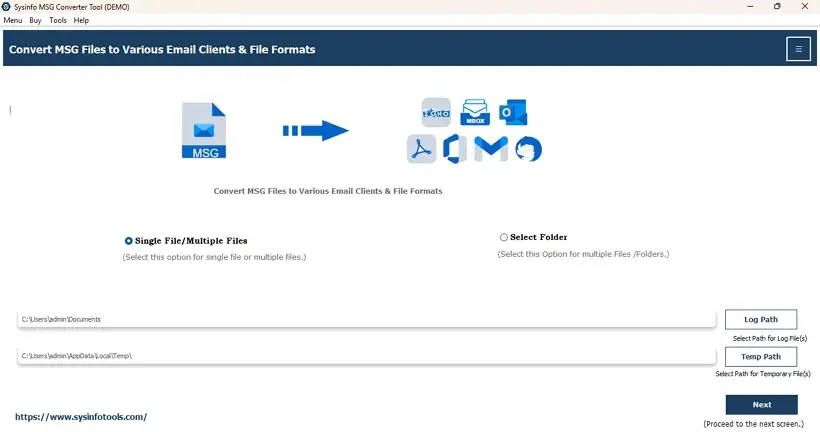
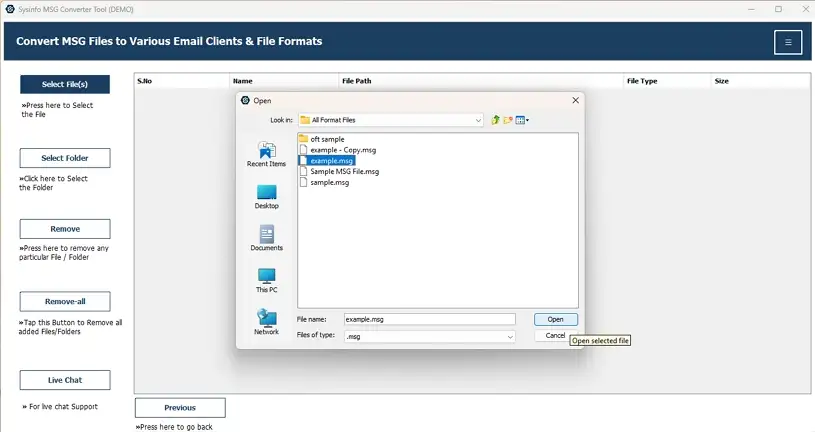
- Then, press Select File or Select Folder to upload MSG emails and click Next.
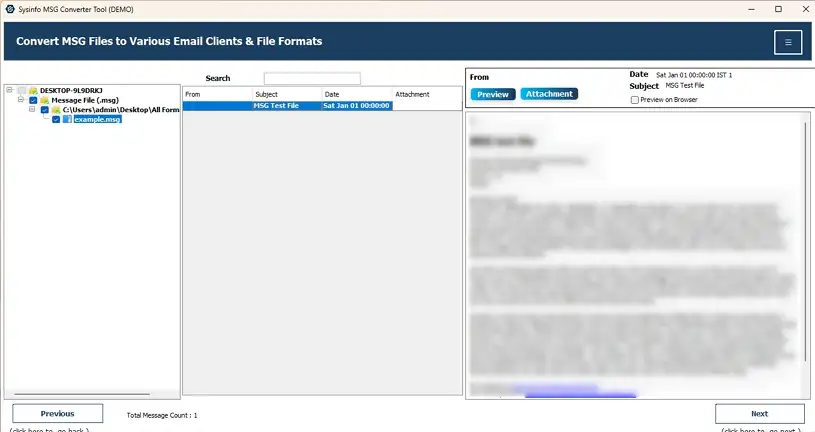
- Further, choose the folders after preview from the tree and click on Next.
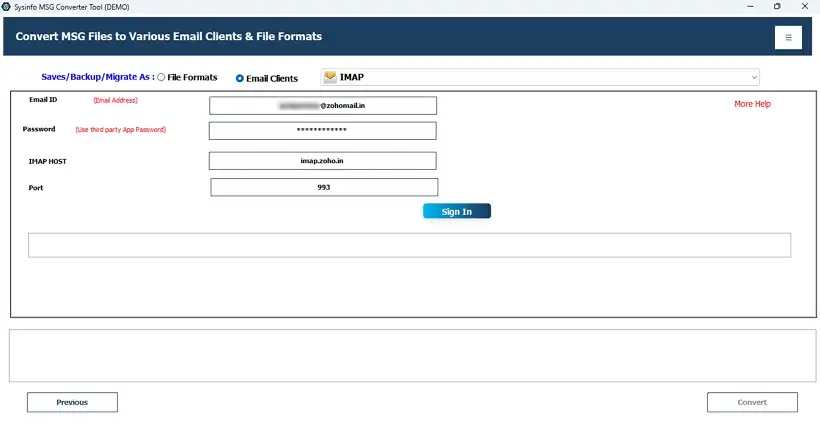
- After that, select IMAP from email clients and enter Zoho credentials.
- Finally, use the filters from the software and click Convert to open data.
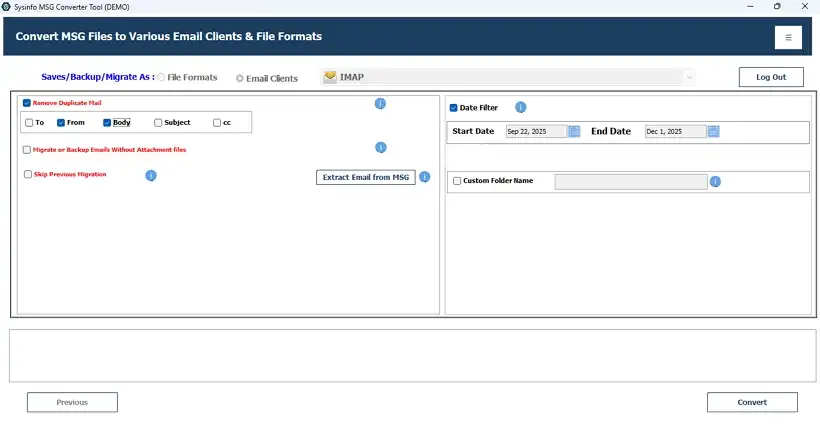
That’s how easy it is to complete the MSG to Zoho Mail import with the software. What’s better is that this excellent software has some advanced features like duplicate removal, date filter, etc. And you can download the Demo Version to migrate 50 MSG files per folder at no cost.
Real World Case:
A Saas startup migrating from Outlook to Zoho Mail has years of archived data stored in MSG files across shared drives. Team members didn’t have Outlook access and thus, cannot perform the manual import. The IT team decided to use the automated MSG Import Tool and completed the data transfer in minimal time with 100% accuracy and zero loss. They were able to continue the business operations effortlessly and on time.
Relevant post – Import MSG Files into Thunderbird
Conclusion
Import MSG to Zoho Mail is a critical task to ensure that you have a backup of your crucial emails even if Outlook is not available. This blog discussed both a manual and a professional approach for the migration. The free method is suitable, but only when you have a few MSG files of less than 10 GB. But if you have higher MSG volumes with large attachments, then it is best to use the expert tool. The latter provides you with speed, reliability, accessibility, and data fidelity with no loss.
Frequently Asked Questions
Q1. Can I directly upload MSG files to Zoho Mail?
Ans. Yes, you can directly upload MSG files using the IMAP transfer manually or with the MSG Converter Software.
Q2. Can I import MSG files to Zoho Mail without Outlook?
Ans. Yes, to open MSG file in Zoho Mail without Outlook, use the MSG Converter Tool. It supports MSG files from any Outlook version and requires no installation.
Q3. Can I import MSG to Zoho Mail using IMAP settings?
Ans. Yes, you can configure Zoho Mail in Outlook with the IMAP settings and drag and drop emails. But it may result in loss, so it’s better to use the professional tool for the import via IMAP.
Q4. How long does the migration process take?
Ans. The manual method generally takes upto a few hours to days, depending on the email size, mailbox volume, and IMAP connectivity. With the expert MSG File Converter, you can reduce the import time to a large extent.
Q5. Is there any best tool to import MSG to Zoho Mail?
Ans. The best tool to convert MSG files to Zoho Mail is the MailConverterTools MSG File Converter. It has all the essential advanced capabilities and makes the process quick and straightforward without losses.
About The Author:

Meet Amit, an experienced SEO expert and content planner. He uses his creativity and strategy to create content that grabs attention and helps brands reach their goals. With solid skills in digital marketing and content planning, Amit helps businesses succeed online.
Related Post