-
Written By Amit Chandel
-
Updated on February 17th, 2026
Complete Guide to Migrate Yahoo Mail to Zoho Mail Securely
User Query: I am using Zoho now, but before I used Yahoo Mail. In Yahoo, I have lots of important emails stored. Can someone suggest a straightforward way to transfer Yahoo Mail to Zoho?
Switching email accounts always sounds easy at first. Then you remember how much stuff is actually sitting in your inbox. Old conversations, attachments, and contacts add up fast. If you’re planning to migrate Yahoo Mail to Zoho Mail, you probably just want a clear way to get it done. In this blog, we’ll look at two simple ways to handle it. One is a manual approach, and the other uses the MailConverterTools Yahoo Mail Backup Tool to make the process quicker.
Common Reasons to Migrate Yahoo Mailbox to Zoho Mail
- Getting tired of constant ads in Yahoo Mail and wanting a cleaner inbox.
- Looking for better control over privacy and account settings.
- Wanting email features that work better for business or team use.
- Preferring a simpler and less cluttered interface.
- Finding it easier to manage mailbox storage with flexible plans.
- Using other Zoho apps and wanting everything in one place.
How to Migrate Yahoo Mail to Zoho Mail with Manual Methods?
There’s no direct option to shift emails straight from Yahoo Mail to Zoho Mail. So the practical way is to use an email app like Outlook or Thunderbird.
Steps to Migrate from Yahoo Mail to Zoho
- Firstly, open Outlook and go to File, then click on Add Account.
- Then, enter your Yahoo email ID and password.
- Also, make sure the account is set up using the IMAP Server.
- After that, go back to File and click Add Account again.
- Thereafter, enter your Zoho Mail account details and set it up using IMAP.
- Afterwards, you’ll see their mail folders listed separately.
- Furthermore, select the emails you want to move, and drag and drop them into the matching Zoho folders.
- Lastly. Outlook will sync everything in the background.
Things to Keep in Mind to Move Yahoo Mail to Zoho Mail
- Turn on IMAP in Yahoo settings before connecting the account.
- You may need to generate an app password for Yahoo.
- This method moves only emails, not contacts or calendar.
- Large mailboxes can take longer to sync.
- The folder structure may need a slight adjustment after the transfer.
Limitations
- Only emails are transferred. Contacts and calendars won’t move.
- There’s a chance of duplicate emails if syncing gets interrupted.
- You must keep Outlook running until syncing is fully complete.
- Folder structure may not be copied the same.
- Requires stable internet throughout the transfer.
Advanced Method to Migrate Yahoo Mail to Zoho Mail
The MailConverterTools Yahoo Mail Backup Tool is the smartest way to migrate email. It avoids the manual limitations and provides various features and filters. You can use this tool to easily migrate Yahoo Mail to IMAP servers. It provides accurate results without losing any data in a very short time. Additionally, you can take reference from here to migrate Yahoo Mail to G Suite.
Steps to Transfer Yahoo Mail to Zoho Mail
- Firstly, download the tool and select the mode.
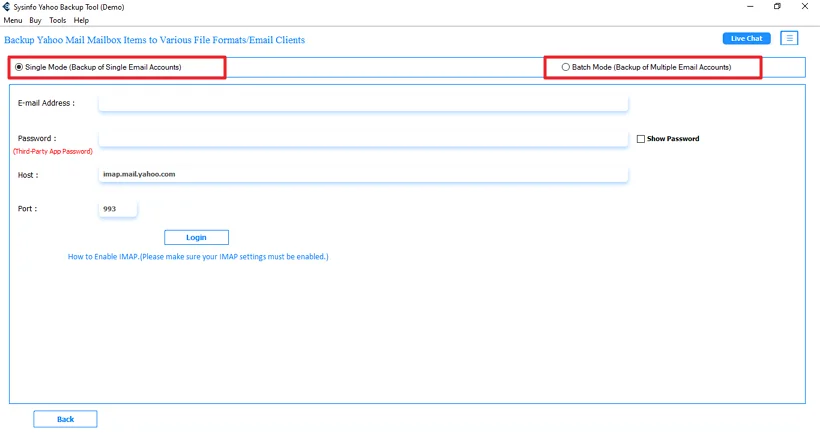
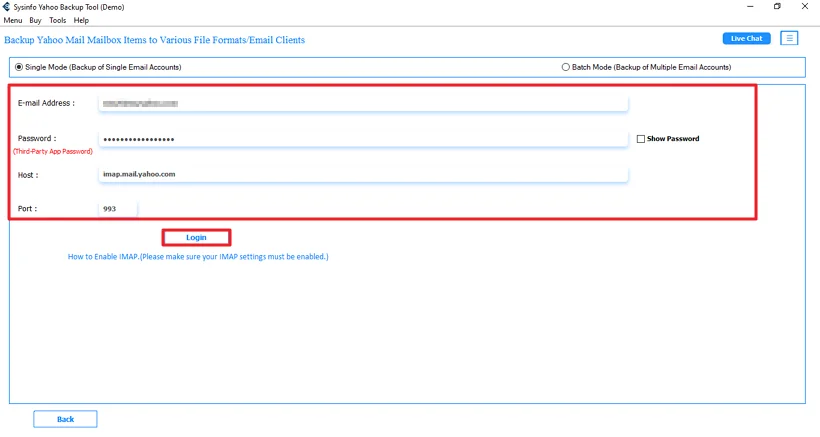
- Then, log in with Yahoo credentials.
- Afterwards, choose and preview files and click Next.
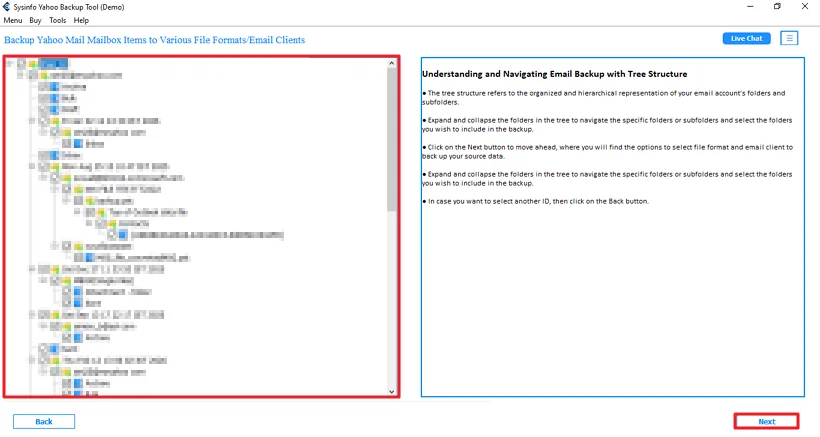
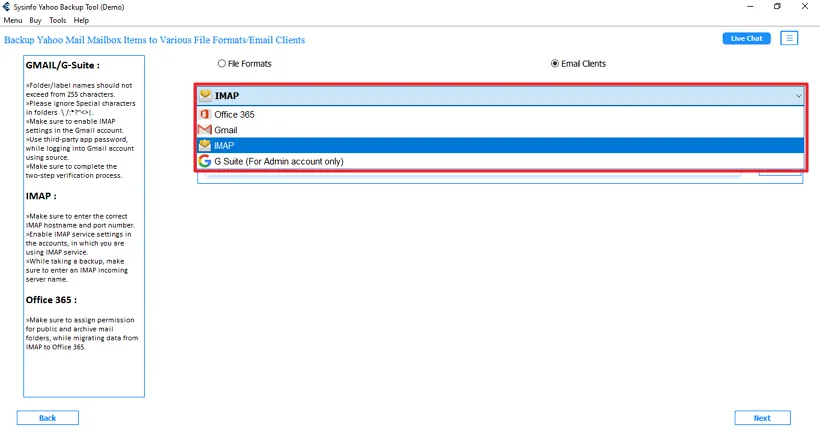
- Further, choose IMAP and click Next.
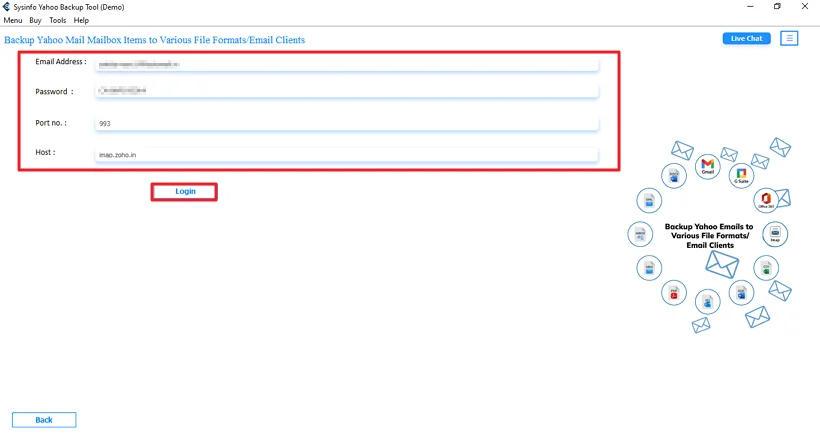
- Thereafter, log in with Zoho Mail details.
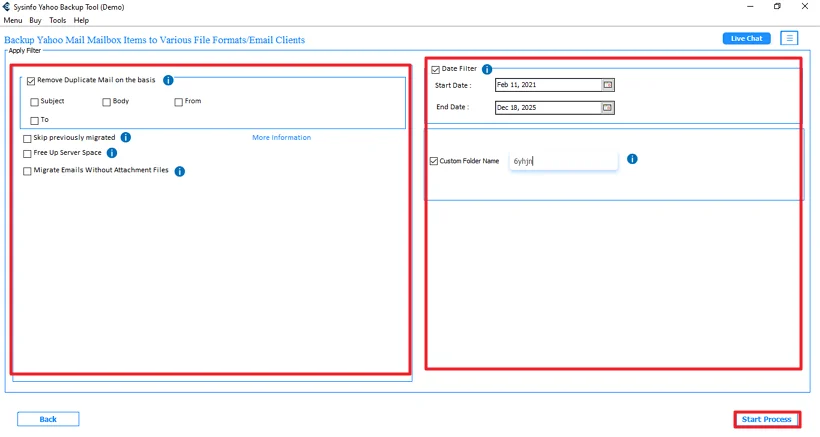
- Finally, apply filters and click the Start Process.
Successful User Case
Sam runs a small marketing agency, but when his team shifted to Zoho Mail from Yahoo, he needed all that old data to be moved safely.
He first tried the manual Outlook method, but it was slow and took hours to sync. Some folders didn’t appear properly, and he couldn’t afford to waste more work time.
So he used the MailConverterTools Yahoo Mail Backup Tool instead. He logged in, connected his Zoho account through IMAP, and started the transfer. By the next day, all his emails and attachments were available in Zoho without any missing data. It saved him time and a lot of frustration.
Conclusion.
To conclude, the manual method does work, but it can take time to migrate Yahoo Mail to Zoho Mail. Using the MailConverterTools Yahoo Mail Backup Tool can make the job easier. And if you’re dealing with a lot of data or running a business account, a one-time migration service can save you from the headache and keep everything running smoothly.
Frequently Asked Questions
Q.1 Is it secure to migrate Yahoo Mail to Zoho Mail?
Ans: Yes, it can be secure if you follow the right method. If you use the MailConverterTools Yahoo Mail Backup Tool, the process stays direct between accounts and reduces the chances of data loss or sync issues.
Q.2 Can I transfer multiple Yahoo Mail accounts to Zoho Mail at once?
Ans: With the manual method, you’ll have to add and move each account separately, which can take time. The MailConverterTools Yahoo Mail Backup Tool makes it easier to handle multiple accounts without repeating the entire process again and again.
Q.3 Which tool is best to transfer Yahoo Mail to Zoho Mail instantly?
Ans: The MailConverterTools Yahoo Mail Backup Tool is the simple option. It connects directly to IMAP servers like Zoho Mail and moves the data without the drag-and-drop process.
Q.4 Do I need technical skills to move Yahoo Mail to Zoho Mail successfully?
Ans: If you use the MailConverterTools Yahoo Mail Backup Tool, the steps are straightforward, and you just need to log in and follow the on-screen instructions.
About The Author:

Meet Amit, an experienced SEO expert and content planner. He uses his creativity and strategy to create content that grabs attention and helps brands reach their goals. With solid skills in digital marketing and content planning, Amit helps businesses succeed online.
Related Post