-
Written By Amit Chandel
-
Updated on December 29th, 2025
Simple Solution to Extract Email Addresses from PDF Files
Santner’s Query: As a marketing expert, I need to extract the emails from the PDF files. Right now, I have a lot of PDFs to extract emails from. Does anybody have a solution to extract emails from my multiple PDF files?
PDF files are often used for invoices, resumes, customer forms, email campaigns, and sales records, so they naturally contain a lot of email addresses. The main problems start when you want to extract email from PDF. Manually, the process is very slow and irritating to go through hundreds of PDF files. This guide covers all the possible ways to extract email from PDF using manual and professional PDF Extractor Pro Tool.
Why Users Want to Extract Email ID from PDF?
- Firstly, searching for email addresses inside PDF files by hand can be very tiring, especially when the document has many pages.
- Most PDFs contain email IDs that are later needed to contact customers, clients, or business partners.
- Many users extract email addresses to run email campaigns or stay in touch with their audience.
- Storing all collected email IDs in one place makes future work much simpler and faster.
- Copying and pasting emails manually often causes spelling mistakes or missed addresses.
- Old invoices, forms, and reports still have useful contact details that should not go to waste.
- Additionally, when there are multiple PDF files, extracting email IDs in bulk saves a lot of effort and time.
Manual Method to Extract Email Addresses from PDF
The manual process described below works if the PDF is text-based. This manual method does not support the PDF that are because it contains images, not text.
Steps to Export Email Address from PDF
- Start by opening the PDF file in Adobe Reader or any web browser.
- Next, use Ctrl + F on Windows or Cmd + F on a Mac to search within the file.
- Finally, enter the “@” symbol to quickly locate email addresses.
- The tool will highlight all places where email IDs appear in the document.
- Thereafter, carefully select each email address and copy it using right-click or Ctrl + C.
- At last, paste the copied email IDs into Notepad or an Excel sheet to save them for later use.
Limitations:
- This method works only with text-based PDF files and completely fails for scanned PDFs.
- Manually searching email addresses becomes very slow when the PDF has many pages.
- The copy and paste process has chances of missing or copying the incorrect email.
- This process is not ideal for many PDF files.
- Moreover, you can’t extract emails in bulk using a manual method.
Simple Steps to Extract Email Addresses from PDF Files
Manually going through many PDF files or documents is annoying and time-consuming. Therefore A dedicated professional tool like PDF Email Extractor is useful for such scenarios. The advanced tool can handle bulk PDF files without any change in accuracy and results. Moreover, you can use this tool on any of these OS, such as Windows, Linux, and Mac.
Steps to Extract Email Addresses from Multiple PDF Files
- To begin with, download and open the PDF Email Extractor Tool on your computer.
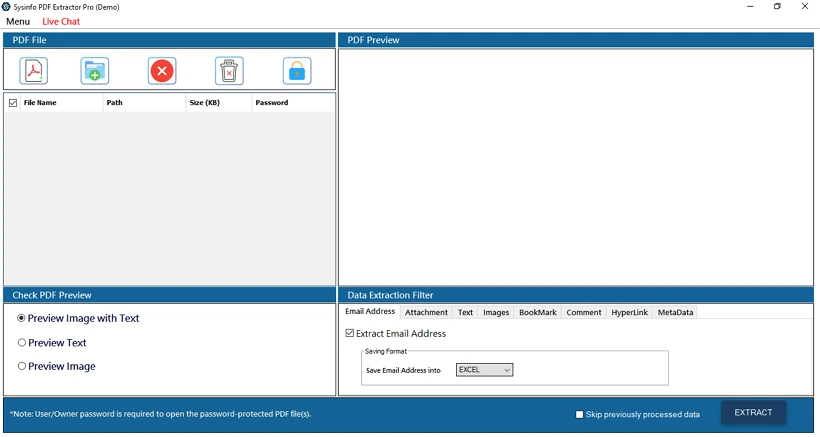
- Then, add the PDF file or files from which you want to collect email addresses using the available add icons.
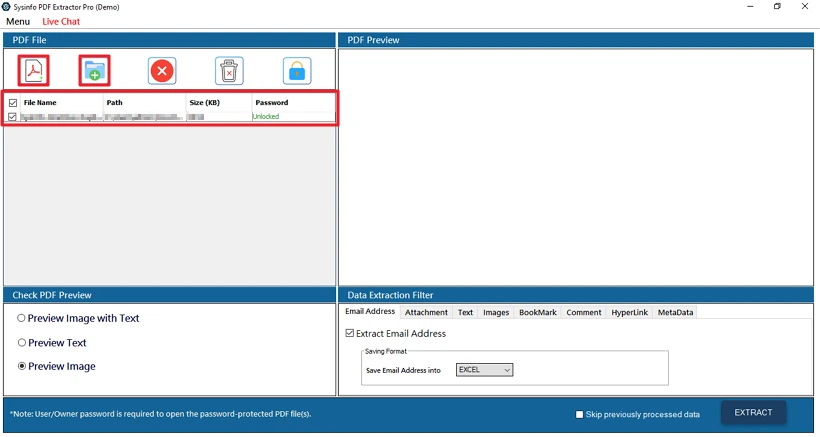
- After that, once the files are loaded, select a preview option to view and verify the PDF content.
- Thereafter, from the Data Extraction Filter section, choose Email Addresses.
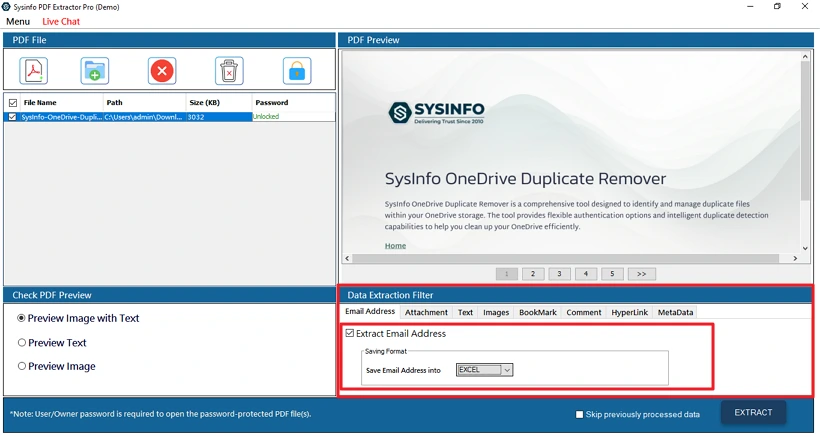
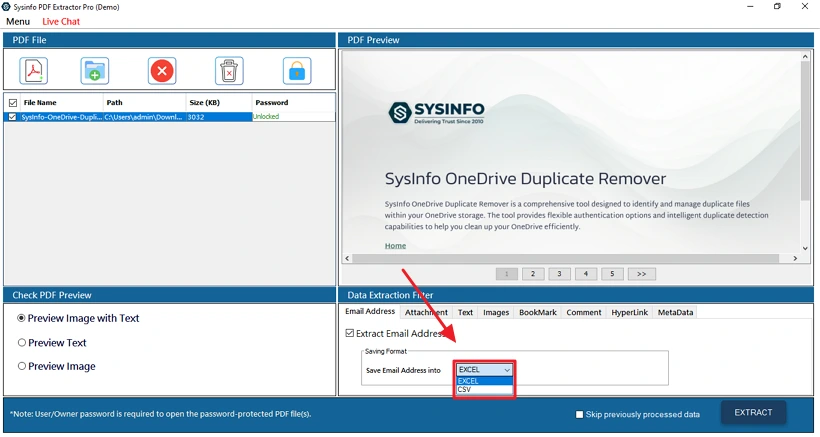
- Afterwards, select Excel or CSV as output format, and apply the filters according to your needs.
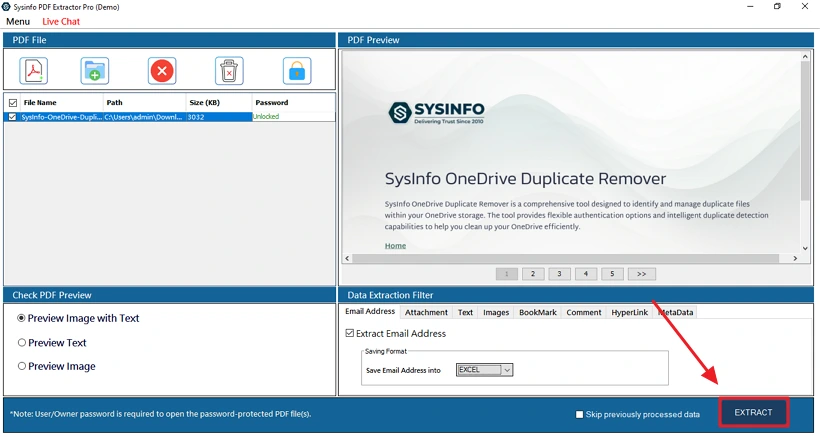
- Finally, you have to click Extract to start the process.
Successful User Case:
An enterprise needed to gather hundreds of email addresses that were saved across many PDF files. To save time and avoid doing it manually, they chose the MailConverterTools PDF Email Extractor tool. This tool lets them add multiple PDFs at once, even scanned ones, and quickly pulls out all the valid email addresses. The results were neatly organized into an Excel sheet.
Conclusion
This blog covers possible solutions to extract email Addresses from PDFs. We discussed the manual and the professional solution by using the PDF Exporter Tool. The manual method to extract email by copying and pasting can take many hours. This manual method can lead to missing important information; using a professional tool is a good choice. The tool provides faster, safer, and more accurate results from multiple PDF files in a single process.
Frequently Asked Questions
Q1: How to extract email addresses from a PDF document?
Ans: There are two ways to extract the email addresses. You can use the manual methods or perform the process efficiently with the PDF Email Extractor Tool.
Q2: How long does it take to extract email ID from PDF?
Ans: It depends on the way you choose to extract emails; for large files manual method can take a lot of time. The automated tool to extract email is the best choice. Additionally, it allows you to handle a large number of PDF files without errors.
Q3: Can I extract email addresses from multiple PDFs at once?
Ans: If you want to extract emails from many files to save your time and effort. Then, you should go with the MailConverterTools PDF Exporter Tool. Because this tool can process multiple files in a single go.
Q4: Do I need technical knowledge to export Email Address from PDF files?
Ans: If you are using the manual method, then you should have some technical knowledge. But fora professional tool, you don’t need to have that much technical knowledge. It offers an easy-to-use interface and a demo version to its users.
Q5: Is there any best tool to extract Email Addresses from PDF File?
Ans: The MailConverterTools PDF Email Extractor is the best tool to extract emails. It can manage multiple files and provide correct results in minimal time.
About The Author:

Meet Amit, an experienced SEO expert and content planner. He uses his creativity and strategy to create content that grabs attention and helps brands reach their goals. With solid skills in digital marketing and content planning, Amit helps businesses succeed online.
Related Post