-
Written By Vikas Bajpai
-
Updated on March 31st, 2026
Transfer Sympatico Email to Gmail Without Data Loss (Guide)
User Query: Eddy has a bunch of important emails in his old Sympatico account, and now he wants to move everything over to Gmail to make things easier. The only thing he’s worried about is making sure all his emails transfer properly without anything getting lost along the way.
Many people are still using old Sympatico email accounts, but it’s not a practical option. Whether you’re working in an office or freelancing, your emails matter. And if they’re stuck in an outdated account, it can be frustrating. In this blog, we’ll go over some simple ways to transfer Sympatico Email to Gmail. Additionally, we will use the MailConverterTools IMAP Backup Tool to make things easier.
Quick Answer: Import Sympatico Emails into Gmail
You can move Sympatico emails to Gmail using Gmail’s built-in import feature or an IMAP-based tool. The manual method is free but can be slow and may miss some data. If you want a smoother and more complete transfer, using the MailConverterTools IMAP Backup Tool is a simpler option.
Why Do Users Move Sympatico Emails into Gmail?
- Sympatico looks like it hasn’t been updated in years, and honestly, Gmail just feels nicer to use.
- Spam emails pile up way faster on Sympatico, while Gmail catches most of them before you even see them.
- Nobody wants to juggle three different email tabs. Gmail lets you pull everything into one spot.
- Trying to find a two-year-old email on Sympatico is difficult. Gmail’s search actually works well.
- Most people are already living inside Google Drive, Docs, and Calendar, so Gmail is just the obvious choice.
- Checking Sympatico on your phone is a frustrating experience. Gmail handles mobile way better.
- If Sympatico ever closes for good, you don’t want to lose everything. Gmail feels like a safer long-term home.
Manual Method to Transfer Sympatico Email to Gmail
You can also try Gmail’s own import option to bring your Sympatico emails in. Here’s how it usually goes:
Manual Steps to Connect Sympatico Email to Gmail Inbox
- Open your Gmail account and go to Settings, then click on See All Settings.
- Move to the Accounts and Import tab and scroll a little down.
- Click on Import Mail and Contacts.
- Enter your Sympatico email address and click Continue.
- Just follow the steps that show up on your screen.
- Pick what you want to move, like emails or contacts.
- Finally, click on Start Import and let it finish.
Limitations
- It may take a long time if you have a large number of emails.
- Sometimes the import stops in between and needs to be started again.
- Not all folders or labels come in the same way as the original account.
- You might see duplicate emails after the import is done.
- Attachments can get missed or not open properly in some cases.
- It needs a stable internet, or the process may fail halfway.
- You don’t get much control over how emails are moved or organized.
- It may not work properly with older or inactive Sympatico accounts.
Professional Method to Transfer Sympatico Email to Gmail
The MailConverterTools IMAP Backup Tool is used to move Sympatico emails to Gmail in one go. It can transfer multiple emails at the same time. The folder structure stays the same after the move. Emails and their data remain as they are. The tool works on its own, so you don’t need any extra setup. It uses secure login (OAuth) to connect email accounts. It runs on both Windows and Mac systems, including older versions.
Steps to Migrate Sympatico to Gmail
- Download the IMAP Backup Tool.
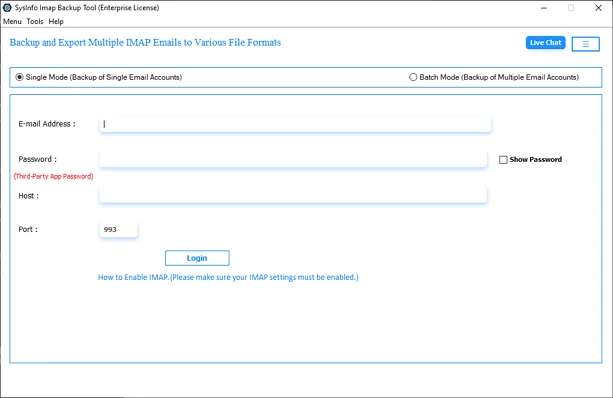
- Then, log in with Sympatico credentials.
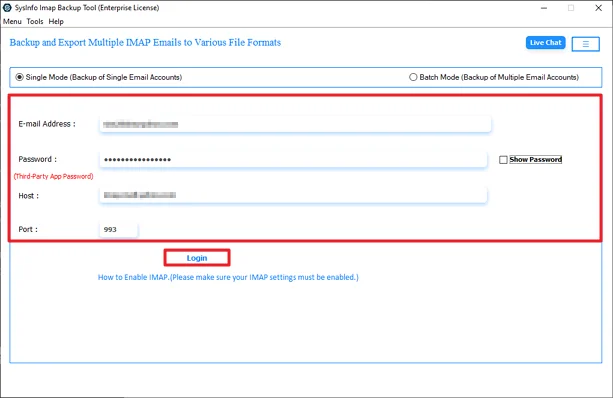
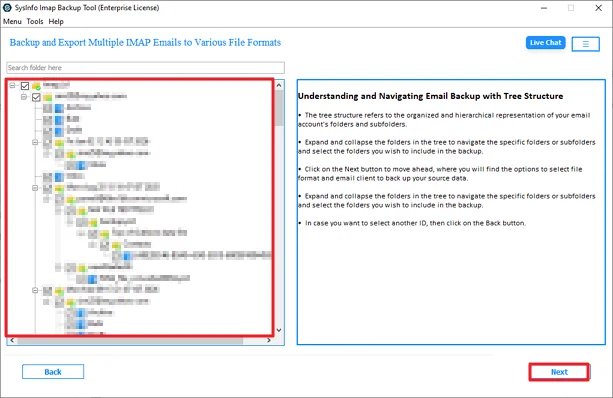
- Preview & select folders to migrate and hit Next.
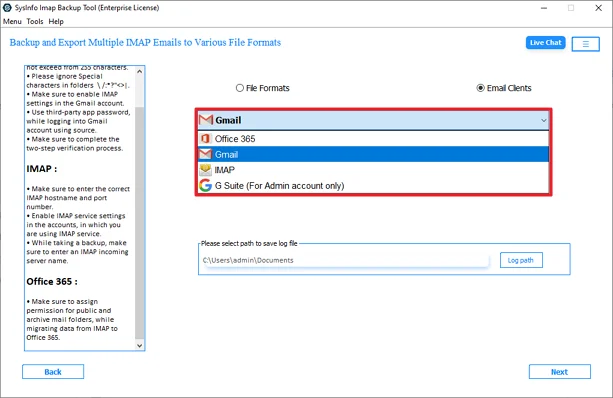
- After that, select Gmail from the email clients list.
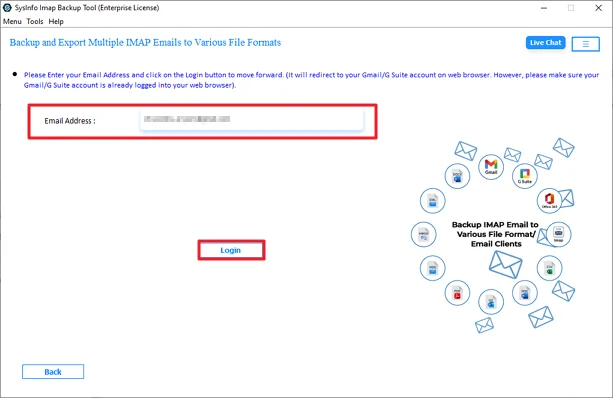
- Further, log in with your Gmail credentials.
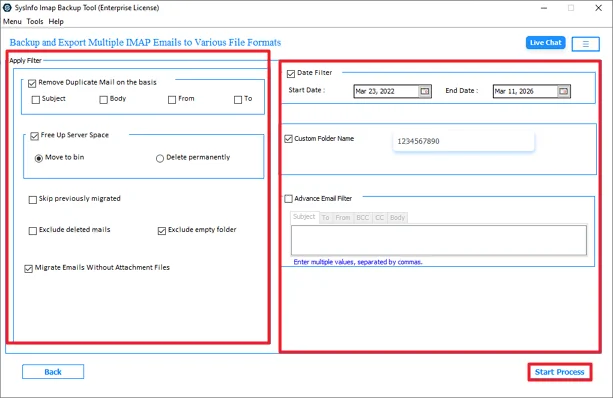
- Lastly, apply filters and click Start Process.
Successful User Case
Daniel had an old Sympatico account that he tried to migrate to Gmail, but some emails didn’t show up properly. It also took longer than he expected. Later, he used the MailConverterTools IMAP Backup Tool. He logged in, picked the folders, and started the process. Everything moved to Gmail without any missing emails. Now, Daniel uses Gmail only and doesn’t have to deal with his old account anymore.
Conclusion
This blog covered a few ways to transfer Sympatico Email to Gmail without much trouble. The manual method can work, but it takes time and doesn’t always go as expected. Some limits can make things harder. Because of that, many users go with a tool like the IMAP Migration Tool. It just makes the process easier and handles everything in one place.
Frequently Asked Questions
Q.1 Is it safe to transfer Sympatico email to a Gmail account?
Ans: Yes, it is generally safe. Gmail’s import option is secure, and the MailConverterTools IMAP Migration Tool uses OAuth login, so your account details stay protected during the process.
Q.2 Can I migrate Sympatico to Gmail on a Mac, or is the process Windows-only?
Ans: You can do it on both. The manual method works in any browser, and the MailConverterTools IMAP Migration Tool supports both Windows and Mac systems.
Q.3 Do I need technical knowledge to transfer Sympatico emails?
Ans: Not really. The manual steps are simple to follow, and the IMAP Migration Tool just needs basic login and a few clicks.
Q.4 Is there a free way to transfer Sympatico email to Gmail?
Ans: Yes, you can use Gmail’s built-in import feature for free. The tool is another option if you want an easier process.
About The Author:

Vikas Bajpai is a results-driven SEO expert and content strategist with a strong passion for building impactful digital experiences. He specializes in crafting data-backed content plans that boost visibility, engage audiences, and drive measurable growth. With deep expertise in search engine optimization, keyword strategy, and content marketing, Vikas helps brands strengthen their online presence and achieve long-term success.
Related Post