-
Written By Vikas Bajpai
-
Updated on April 28th, 2026
Transfer Virgin Media Mail to Gmail Quickly & Safely (2026)
User Query: I’ve got several Virgin Media mailbox folders packed with emails, and the manual methods keep breaking due to size limits and sync problems. What’s a safe way to transfer Virgin Media EMails to Gmail without messing up attachments or email formatting?
Moving your email archive to a new provider requires careful handling. When you transfer Virgin Media Mail to Gmail, large mailboxes often stall during the upload process. Nested folders lose their hierarchy, and Attachments drop during background sync. Most of these failures trace back to legacy server limits and manual export routines. A controlled workflow keeps your data intact. We outline manual client pairing for light loads and a dedicated IMAP Migration Software for bulk migration.
Prerequisites for a Successful Email Transfer
Before you start to Migrate Virgin Media Email to Gmail, take a minute to set the following things up properly.
- Access to your Virgin Media email account.
- Gmail account with free space available.
- Reliable internet connection.
- Ensure both sets of login details are correct.
- Your system needs an email client or a dedicated tool ready for configuration.
- Create a local copy of important messages before starting the migration.
How to Export Virgin Media Emails to Gmail Manually?
Many users choose manual methods for migration to avoid paid tools. You can migrate Virgin Media emails manually, but the steps need accurate execution. The workflow connects both accounts, so Gmail imports Virgin Media messages automatically.
Steps:
- Begin with Gmail open and Settings accessed via the gear menu.
- Then go to Accounts and Import and select Add a mail account.
- Next, input your Virgin Media address when the configuration window loads.
- Choose POP3 once you reach the protocol selection screen.
- After entering the server details, verify the incoming port requirements.
- Finally, click Connect to initiate sync when all fields are validated.
This will begin the process to transfer Virgin Media Mail to Gmail, but it may take time for larger mailboxes.
Can You Use Forwarding to Move All Your Emails?
You can use forwarding to move your Virgin Media emails, but this method works only for new emails. As this method forwards incoming new emails, it makes it unsuitable for old emails.
Steps to Move Virgin Media Mail to Gmail:
- At first, log in to your Virgin Media email account.
- After that, go to Email Settings and look for the Forwarding section.
- Further, you need to add your Gmail address along with the app password.
- Turn on Email Forwarding to start redirecting emails to your new inbox.
- As the last step, save the changes before you exit the settings panel.
What Problems Can Occur With Manual Transfer?
- Old emails are not transferred using either the POP3 or the forwarding method.
- You need the right incoming server info and some familiarity with email setup for POP3.
- Only incoming emails get forwarded. Existing archives require a separate export.
- There is no control over folders, structure, or selective migration.
- Small configuration mistakes can cause sync or forwarding failures.
- Neither method ensures full mailbox migration or data backup.
What Is the Best Automated Method for Email Migration?
MailConverterTools IMAP Migration software is the go-to solution to transfer Virgin Media mail to Gmail. It provides advanced features inside the software that help move data quickly without much hassle. The tool is highly useful for businesses that value their time and resources, as it is able to handle enterprise-level migration.
Steps to Operate the Tool:
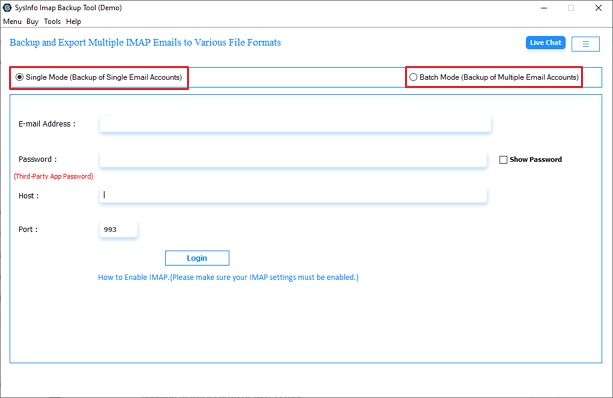
- Download the MailConverterTools IMAP Backup tool on your system and choose the mode from Single or Batch.
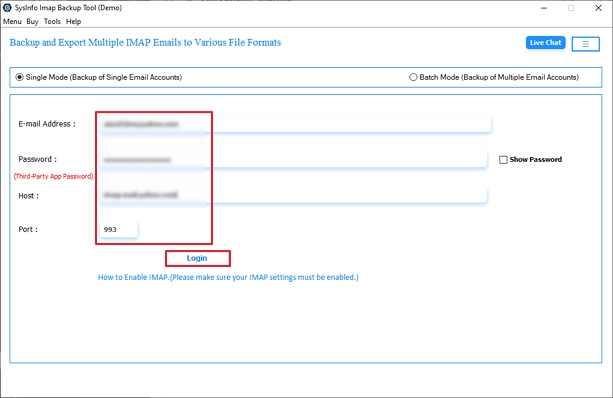
- Then, enter your Virgin Media login details or add users through a CSV file in batch mode.
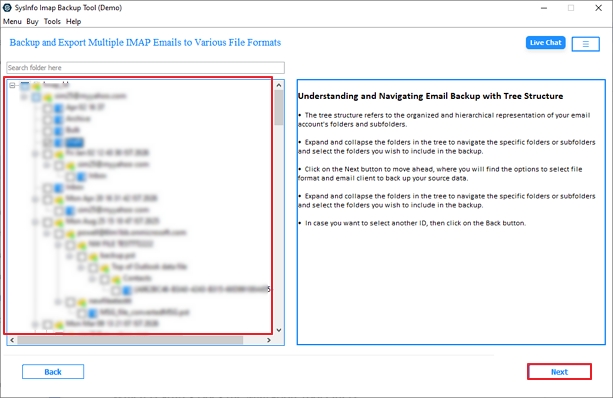
- Further, you can preview the mailbox in a tree structure and select the files or folders you want to migrate. Hit Next.
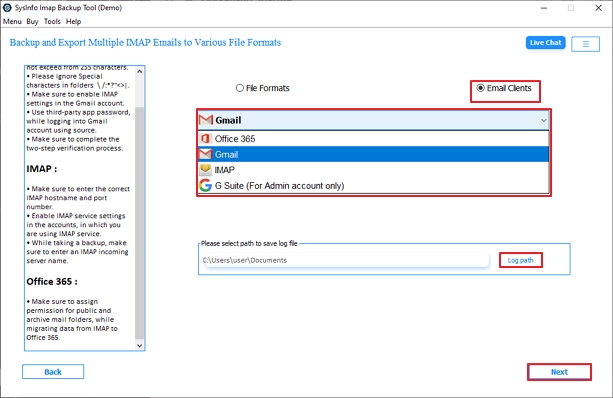
- Then, in the email client options, choose Gmail and specify the path to save the log file. Press Next to continue.
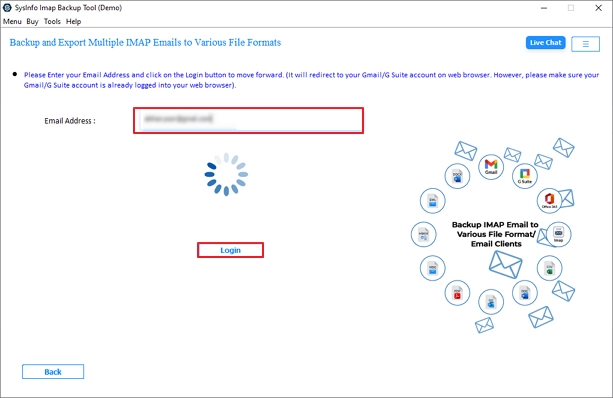
- In the next tool panel, log in with your Gmail credentials.
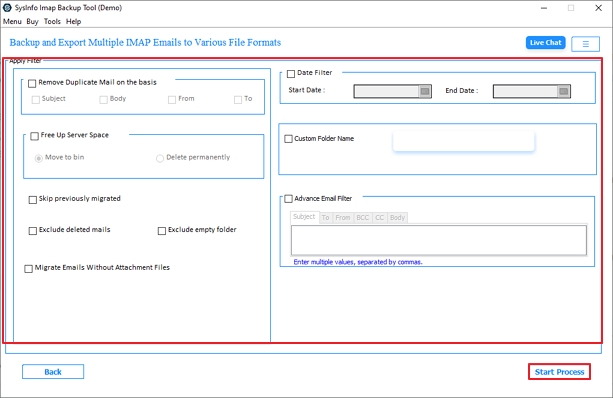
- Finally, pick from the filters to help you with the process, and click on the Start Process to migrate Virgin Media email to Gmail.
Key Features of The Software
- The software allows direct migration of Virgin Media emails to Gmail without needing manual setup or extra steps.
- Preserves original email structure, including folders and subfolders.
- It maintains attachments and metadata during the entire migration process.
- Offers advanced filters to opt for selective export, such as a date range filter.
- Capable of handling multiple large files with minimal downtime or no data loss.
- It is widely compatible with Windows and Mac OS and offers a demo version for trial.
What Happens During a Real Email Migration Case?
A case involved transferring nearly 10,000 emails and 5 GB of data from Virgin Media to Gmail. The inbox contained important work conversations and old attachments. While the migration seemed challenging at first, it was completed smoothly with the MailConverterTools IMAP Migration tool. Today, the user manages everything in Gmail with faster search and no broken email structure.
Final Words
Manual methods usually sound easy, but they don’t hold up with real data. It struggles with large mailboxes and often needs technical setup. Old emails also don’t always transfer properly.
The MailConverterTools IMAP Migration Software is a more stable option to transfer Virgin Media Mail to Gmail. It keeps everything organized, supports bulk transfer, and avoids common sync issues.
Frequently Asked Questions
Q.1 How can I transfer Virgin Media mail to Gmail without technical skills?
Ans. You can use the MailConverterTools IMAP Migration Tool to directly migrate Virgin Media emails to Gmail. It removes manual setup steps and makes the process simple for non-technical users.
Q.2 Is it safe to transfer Virgin Media emails to Gmail?
Ans. Yes, using the MailConverterTools IMAP Backup Software ensures safe migration. It preserves email structure, attachments, and prevents data loss during the transfer process.
Q.3 How long does it take to move all emails to Gmail?
Ans. The time depends on mailbox size, but the MailConverterTools IMAP Migration Tool speeds up the process with optimized bulk migration handling.
Q.4 Can I bulk migrate multiple Virgin Media accounts to Gmail simultaneously?
Ans. Yes, the MailConverterTools IMAP Backup Software supports bulk migration, allowing multiple Virgin Media accounts to be transferred to Gmail in one go.
About The Author:

Vikas Bajpai is a results-driven SEO expert and content strategist with a strong passion for building impactful digital experiences. He specializes in crafting data-backed content plans that boost visibility, engage audiences, and drive measurable growth. With deep expertise in search engine optimization, keyword strategy, and content marketing, Vikas helps brands strengthen their online presence and achieve long-term success.
Related Post