-
Written By Amit Chandel
-
Updated on December 8th, 2025
Quick Guide to Migrate Hotmail to Zoho Mail Easily
A few months back, Matthew, a financial consultant, realized that his old Hotmail inbox was more like a complex code where nothing was easy to find. It contains multiple invoices, client threads, and contact drafts, where searching for old legacy emails seemed impossible.
He wanted a clean, organized, and unified mailbox space like Zoho Mail, and thus, he decided to migrate Hotmail to Zoho Mail. If you have ever been in a similar position and need to move your emails. Then, this blog outlines simple free solutions and an efficient Hotmail Backup Software that perfectly aligns with your migration needs with no loss.
Why is it Important to Migrate Hotmail Emails to Zoho Mail?
Below are all the major reasons for the Hotmail to Zoho Mail migration as specified by the users:
- Ad-free and privacy-centered email client with no pop-ups and cookies, simply a clean inbox.
- Better organization and control over all folders, labels, and archive policies in your mailbox.
- Unified workspace with integrated mail, calendar, contacts, and docs under one space.
- Clean and free mailbox management, ideal for freelancers, small teams, or anyone with multiple identities.
- Stronger and robust data security with proper privacy policies and conditions.
- Free and affordable premium plans suitable for all individuals and businesses.
- Consolidating historical data archives into a modern, manageable system.
Absolute Methods to Migrate Hotmail to Zoho Mail
This section discusses two major ways of migrating Hotmail emails to Zoho. It includes:
- Manual Method: Using the IMAP as a mediator with full control in your hands. But some limitations may prevail.
- Professional Tool: Through a reliable, trustworthy, verified, and dedicated software for more ideal results.
Classic Way to Transfer Hotmail Emails to Zoho Mail
The following process for IMAP manual configuration will work for a small mailbox or a subset of folders being transferred. Steps are:
- First, enable IMAP support for your Zoho Mail account.
- Then, use a mail client that supports IMAP (Thunderbird, Apple Mail, or Outlook). Here, we choose Thunderbird.
- Now, from the Menu, select the Add Account option and click Add Mail Account.
- After that, connect to your Hotmail Account and the Zoho Account within the IMAP account.
- Use these Configuration Settings for Hotmail and Zoho:
- Source Host Name: mail.outlook.com
- IMAP Port Number: 993 (SSL)
- Target Host Name: imap.zoho.com
- IMAP Port Number: 993 (SSL)
- Wait until both Hotmail and Zoho accounts have been added to the mail client.
- Later, drag and drop folders from the Hotmail inbox to the Zoho inbox. Or copy and paste emails one by one as desired.
Note: The time taken to synchronise will depend on the volume of emails being transferred and the speed of the internet connection.
Modern Way to Migrate Hotmail to Zoho Mail
If you have many years’ worth of email in more than one Hotmail email account to migrate. Then, use the MailConverterTools Hotmail Email Backup Software to quickly and effectively migrate emails, contacts, calendars, and more without hassle. Moreover, take advantage of these ultimate features of the versatile software:
- Bulk migration of many email accounts at once with no mailbox size limits.
- Maintains the same hierarchy of folders and all email metadata (date, time, sender, recipient, received attachments).
- Ability to use filtering criteria for mailbox data, duplicates, and attachments.
- Requires no effort and completes the migration in a few steps with full accuracy.
Note: An email archive is often regarded as a company’s valuable business document. Therefore, if you need to move Hotmail to Zoho Mail quickly, this software is the best. Its authentication process is very easy and secure because the software uses OAuth for sign-in directly from the browser. All you need to ensure is that your mail is logged in beforehand. Also, no database is maintained, so your credentials are yours and safe.
Quick Steps to Migrate Hotmail to Zoho Mail
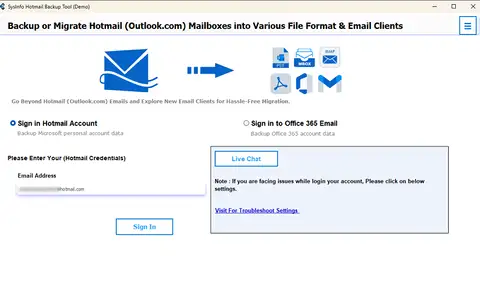
- Launch the Hotmail Backup Software and enter your credentials to sign in.
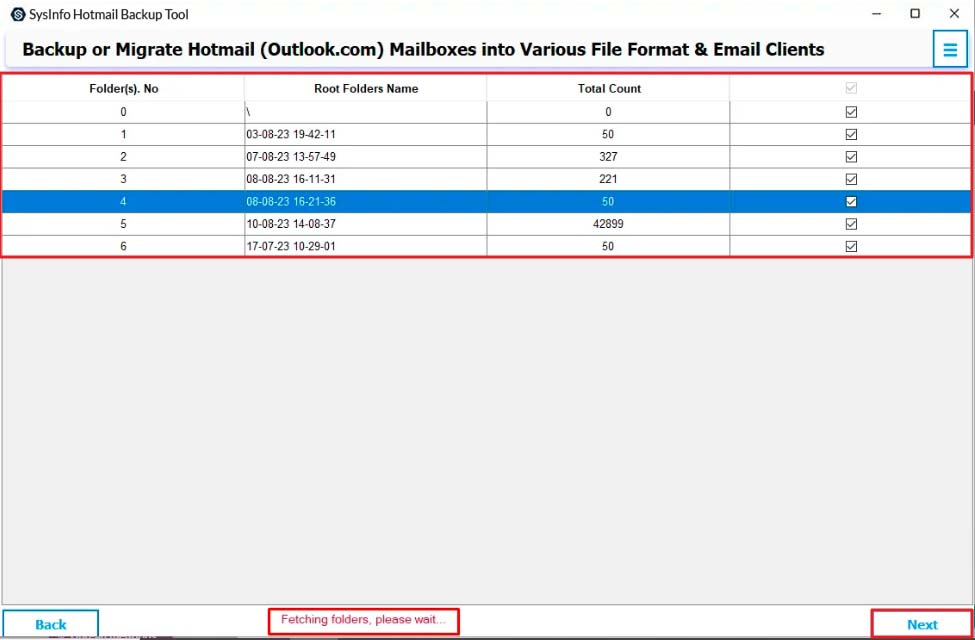
- Then, the folders will be loaded, pick those to move, and click Next.
- After that, select the Zoho Mail option from the list and enter your credentials.
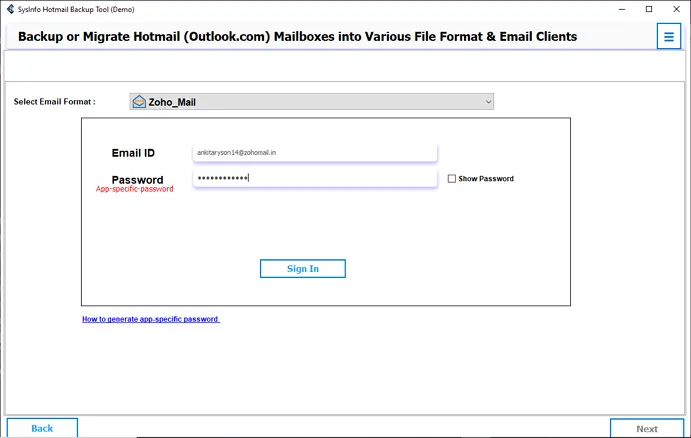
- Complete the sign and choose the filters from the software. Tap Next.
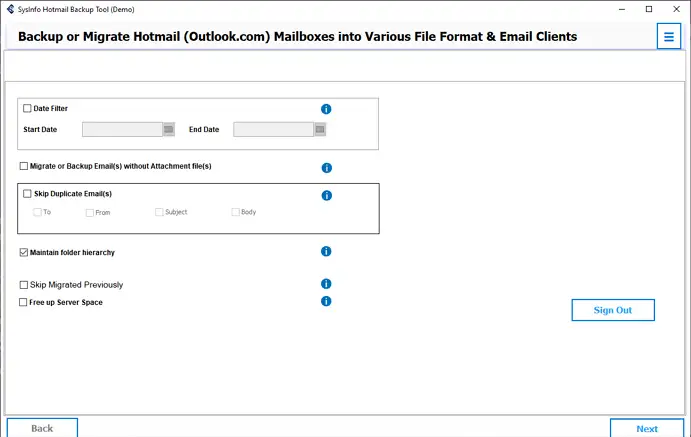
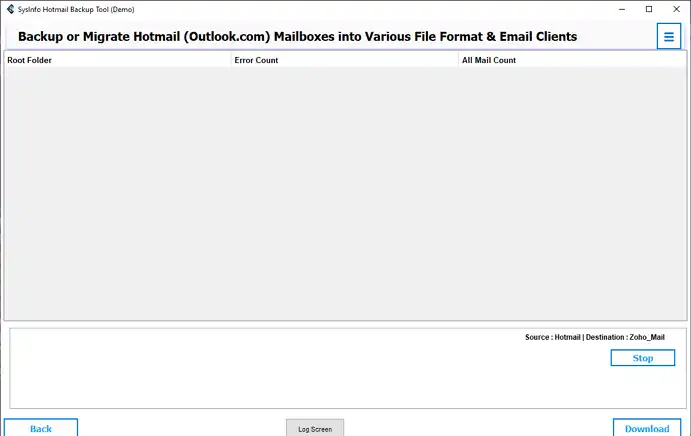
- In the end, click Download to complete the Hotmail to Zoho Mail migration.
Real Life Scenario:
An organization having more than 500 Hotmail mailboxes wanted to switch to Zoho Mail after a drastic system failure. They were too concerned about their crucial mailbox data, and manually migrating so many mailboxes seems like a big task with a lot of effort and chaos. So, they used the Hotmail Email Backup Software and completed the process to migrate Hotmail emails to Zoho Mail in minimal time with full accuracy and zero loss.
Which Method to Choose for Hotmail to Zoho Mail Migration?
Though both methods are suitable and trusted by many users. There are some particular scenarios when you should opt for a particular solution.
Manual Methods:
|
Pros:
|
Cons:
|
Professional Software:
|
Pros:
|
Cons:
|
Also Read: Transfer Hotmail Emails to Another Account
Conclusion
Migrate Hotmail to Zoho Mail to ensure business continuity and have email access for your legacy Hotmail mailboxes consistently. With the manual method, moving a few emails is fine, but if you have bulk email mailboxes, go for the automated tool. It specializes in Hotmail migrations and makes the process effortless and time-saving.
Frequently Asked Questions
Q1. Can I migrate multiple Hotmail emails to Zoho Mail at once?
Ans. Absolutely, but do it using an automated MailConverterTools Hotmail Backup Tool. The manual (IMAP) method only migrates one email account at a time, but the tool allows for batch transfers.
Q2. Which is the best tool to migrate Hotmail to Zoho Mail safely?
Ans. If you have an email account size (over 2-3 GB) or for multiple accounts being migrated, the MailConverterTools Hotmail Backup Software is a reliable and validated solution.
Q3. Can I transfer Hotmail Emails to Zoho Mail on Mac?
Ans. Definitely, for macOS users, popular clients that support IMAP are Thunderbird and Apple Mail. Also, the Hotmail Email Backup Tool works swiftly and speedily on all macOS.
Q4. How long does the migration process take?
Ans. The amount of time required depends on the size of your email account. From minutes to over an hour with the manual method. And in a minimal time with the professional software.
About The Author:

Meet Amit, an experienced SEO expert and content planner. He uses his creativity and strategy to create content that grabs attention and helps brands reach their goals. With solid skills in digital marketing and content planning, Amit helps businesses succeed online.
Related Post