-
Written By Amit Chandel
-
Updated on January 27th, 2026
How to Convert CDR File to JPG Without Losing Image Quality
Norain Query: I have a few design files saved in CDR format from CorelDRAW. I just want a simple way to turn these CDR files into JPG images. It allows everyone in my team to view or share them easily with no hassle.
This kind of situation isn’t rare. A lot of people get CDR files even though they’ve never used CorelDRAW. Installing heavy software for a few files doesn’t always make sense. That’s why this blog goes over a few ways to convert CDR files to PDF. We’ll also talk about managing multiple files at once using the MailConverterTools CDR Converter Tool, so your designs stay clear and usable without extra hassle.
Convert CorelDRAW File to JPG – Benefits
- To open the JPG files, you don’t need CorelDRAW or any other application to be installed.
- JPG files upload faster and use less space because it is lighter than CDR files.
- It really doesn’t matter what someone is using — Windows, Mac, or even just a phone. JPG works everywhere.
- These files are good when you’re sending final designs, previews, or samples to clients or teammates.
- Since JPGs aren’t made for editing, it also helps avoid unwanted or accidental changes.
- JPG is accepted almost everywhere online, so uploading to websites or social platforms is never an issue.
Traditional Approach to Convert CDR File to JPG Format
If you already have CorelDRAW installed, using its export option is honestly the simplest way to do this. You don’t need anything extra. Just follow the basic steps below.
Method 1: Convert CDR to JPG using CorelDRAW
- Firstly, open your CDR file in CorelDRAW.
- Then, select what you want to export and go to File -> Export.
- Thereafter, from the list of formats, choose JPG.
- After that, you can adjust image size, quality, and color settings.
- At last, save the file to any folder on your computer.
Method 2: Change CDR to JPG with Corel PhotoPaint
- First, open Corel PhotoPaint and load your CDR file.
- Further, double-click the file so it opens properly.
- Then click File -> Save As.
- From the file type options, select JPG/JPEG.
- Choose the image quality and save the file.
Limitations
- The method is practical for a small number of files, but it becomes slow when converting many CDR files.
- Export settings such as resolution and image quality need to be adjusted manually for each file.
- Incorrect export settings can result in reduced image quality.
Smart Approach to Convert CDR File to JPG Easily
When you have a lot of CDR files, exporting them one by one doesn’t really work. This MailConverterTools CDR Converter Tool lets you convert multiple CDR files at the same time. It also gives a few options to choose how the files should be converted. The output stays organized, and the design structure is not disturbed. The software is easy to use and runs on both Windows and Mac without causing data loss during conversion.
CDR File Convert to JPG: Simple Steps
- Firstly, download the CDR Converter Tool.
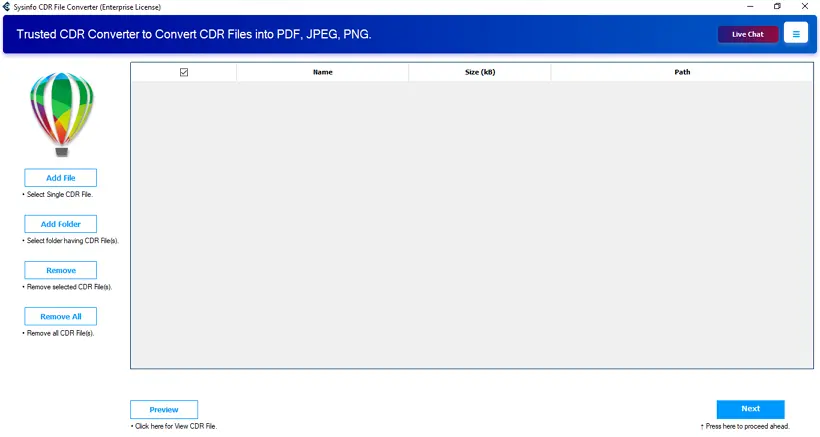
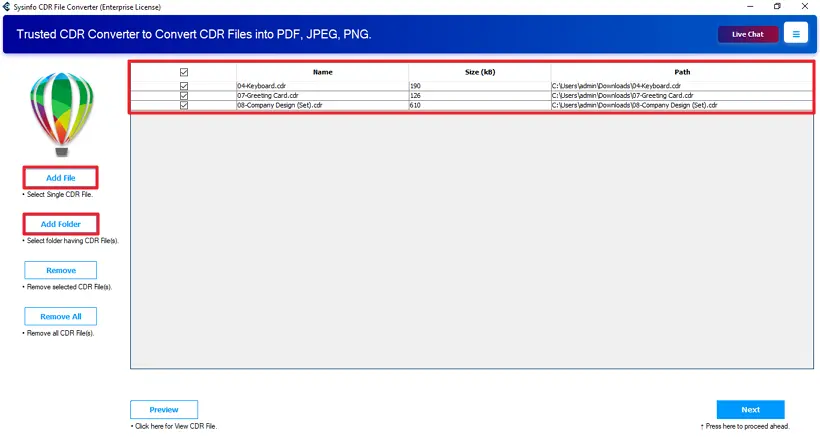
- Then, add your single/multiple CDR files and click Next.
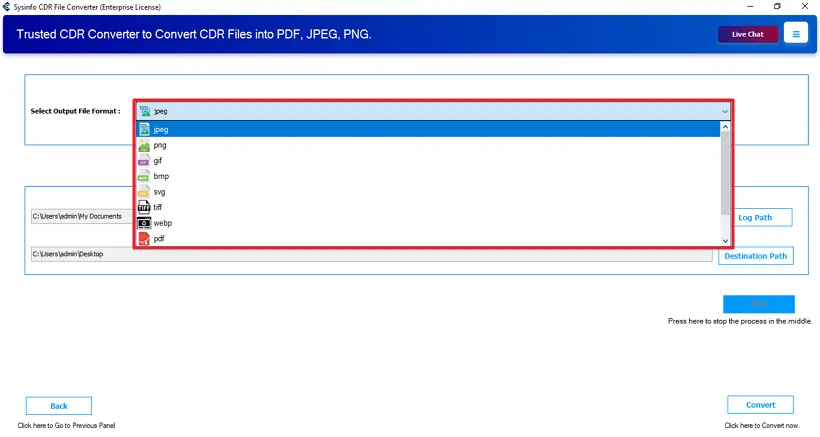
- Further, choose the JPG file format.
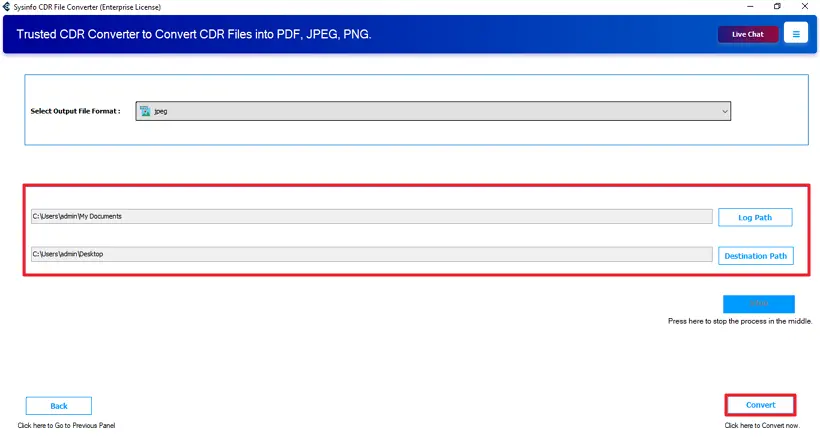
- Lastly, set your destination path and click Convert.
Successful User Case :
A creative team handling regular client work found it difficult to share their design files smoothly. Most of their artwork was saved in CDR format, which caused problems when clients tried to view the files. Sending previews back and forth took extra time, and there was always a concern that converting files might affect how the designs looked.
They later started using MailConverterTools CDR to JPG Conversion Tool to handle the task. Instead of working on files one at a time, the team processed everything together. This helped speed up their workflow and kept the image quality consistent.
Conclusion
To wrap things up, free options like exporting through CorelDRAW or Corel PhotoPaint work well when you’re dealing with just one CDR file. But as the workload grows or when you need the same output quality every time, these methods can feel limiting. For businesses that need to convert CDR file to JPG without opening CorelDRAW again and again. Using a dedicated tool like the CDR Converter Tool by MailConverterTools can help save time and avoid unnecessary delays.
Frequently Asked Questions
Q1: Is CorelDRAW required to convert CDR files to JPG?
Ans: If you are using manual ways to convert a CDR file into the JPF format, then CorelDRAW is required. But if you are using the professional MailConverterTools CDR Converter, then you don’t need the CorelDRAW application.
Q2: How to convert multiple CDR files to JPG at once?
Ans: The MailConverterTools CDR Converter Tool allows you to convert multiple CDR files at once. It does not affect the design and the layout of the file.
Q3: Is it possible to convert CDR to JPG on Mac OS?
Ans: yes the smart utility called CDR Converter by MailConverterTools is available for MacOS and Windows OS.
Q4: Is it safe to use third-party tools to convert CDR to JPG?
Ans: Using the MailConverterTools CDR Converter Tool is totally secure and safe. It makes sure that no layout and formatting will be affected during the conversion process.
About The Author:

Meet Amit, an experienced SEO expert and content planner. He uses his creativity and strategy to create content that grabs attention and helps brands reach their goals. With solid skills in digital marketing and content planning, Amit helps businesses succeed online.
Related Post