-
Written By Amit Chandel
-
Updated on February 10th, 2026
Thunderbird Not Responding? Quick Fix for Windows 10/11
User Query:- Thunderbird isn’t working properly, and this is the first time I’ve encountered an issue like this. This application is working slowly and creating frustration. How do I get out of it and back up my data easily?
When you have a lot of emails from too many years in your mailbox, then sometimes you encounter that your Thunderbird not responding. Your application may open slowly, and you may experience issues while working. Some manual ways can be used to handle these issues. In addition, we have MailConverterTools Thunderbird Backup Tool that helps to take a backup and secure your data.
Why Your Thunderbird is Not Working?
- Emails with large attachments take up extra space and affect performance.
- The Thunderbird profile folder can get damaged after long use.
- Using an outdated version of Thunderbird often leads to bugs and freezes.
- Some add-ons or themes may not work well anymore.
- An unstable internet connection can cause Thunderbird to hang.
- Mailbox files become too large when they are never cleaned.
- Antivirus or security software may block Thunderbird by mistake.
Manual Fixes to Deal with Mozilla Thunderbird Not Responding
The first thing that every user needs to do is identify the main cause. Here, we will identify and resolve the issue through some manual techniques. Follow the steps attentively to tackle the issue.
Method 1: Open Thunderbird in Safe Mode
- Firstly, close Thunderbird completely.
- Then, hold the Shift key and open Thunderbird.
- At last, when the option appears, click Continue in Safe Mode.
Method 2: Check your internet connection
- Firstly, open a browser and visit a few websites.
- After that, restart your Wi-Fi or router.
- Then, try using the internet on another device.
- Finally, check if your email server is having issues.
Method 3: Update Thunderbird
Thunderbird failed to connect because running an old version can lead to bugs and performance problems.
- Open Thunderbird.
- Go to Help > About Thunderbird.
- Let it check for updates.
- Install the update if available and restart the app.
Method 4: Rebuild MSF index files
These files help Thunderbird load emails faster. If they get corrupted, Thunderbird can slow down or crash.
- Close Thunderbird fully.
- Open it again and go to Help > More Troubleshooting Information.
- Click Open Folder under Profile Folder.
- Find and delete files ending with .msf.
- Restart Thunderbird so it can rebuild them.
Limitations
- These steps don’t always solve the problem.
- The issue may come back after some time.
- Finding the exact add-on causing trouble can take a lot of time.
- There’s a risk of messing up files if the steps are done wrong.
- Manual fixes don’t protect your emails from data loss.
- Large mailboxes stay slow even after trying these methods.
- Not helpful if the profile is badly damaged.
- Needs repeated effort whenever Thunderbird freezes again.
Comprehensive Solution: Thunderbird Not Responding
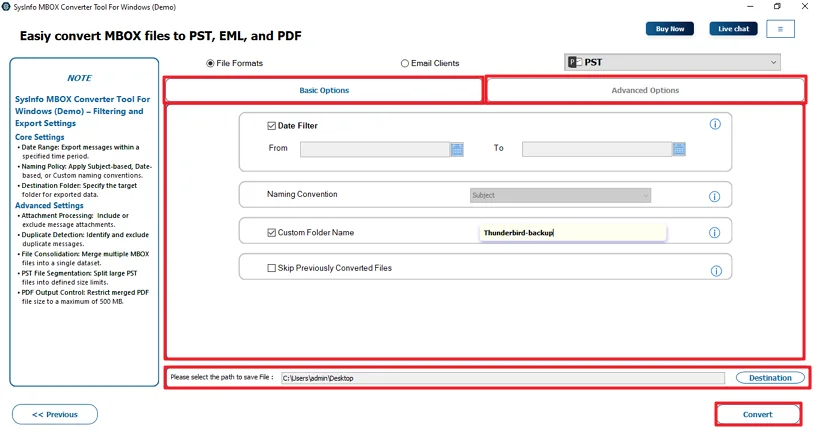
The MailConverterTools Thunderbird Backup Tool helps you save your Thunderbird emails in a safe place. It lets you back up emails into different file formats and even move them to other email apps. You can check your emails first and pick only the folders or messages you want to back up. It also skips duplicate emails on its own. There’s a date filter too, so you can back up emails from a specific time period instead of everything at once.
Advance Steps: Thunderbird Not Working After Update
- Firstly, download the Thunderbird Backup Tool.
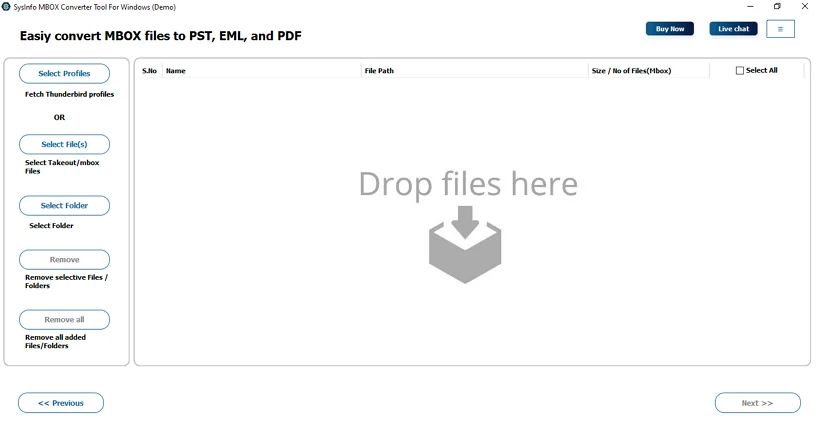
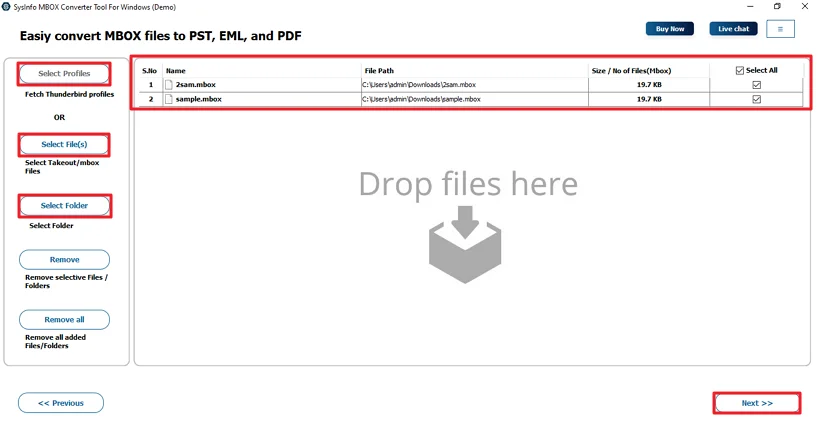
- Then, add the MBOX files or load your Thunderbird profile.
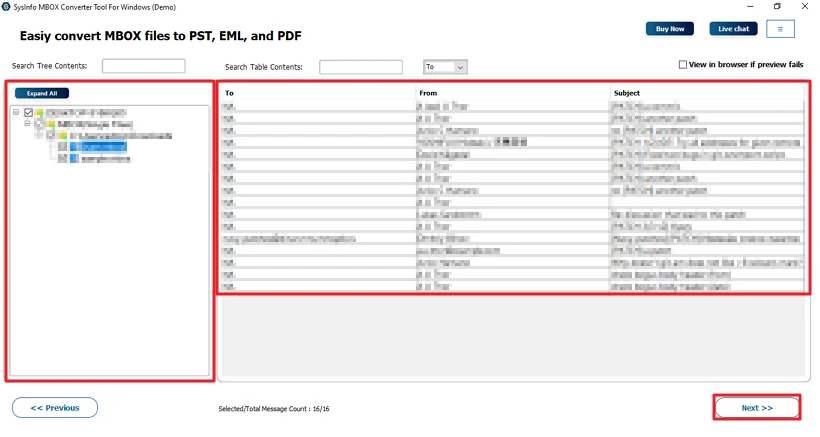
- After that, preview and check files, and click Next.
- Afterwards, choose the desired file format.
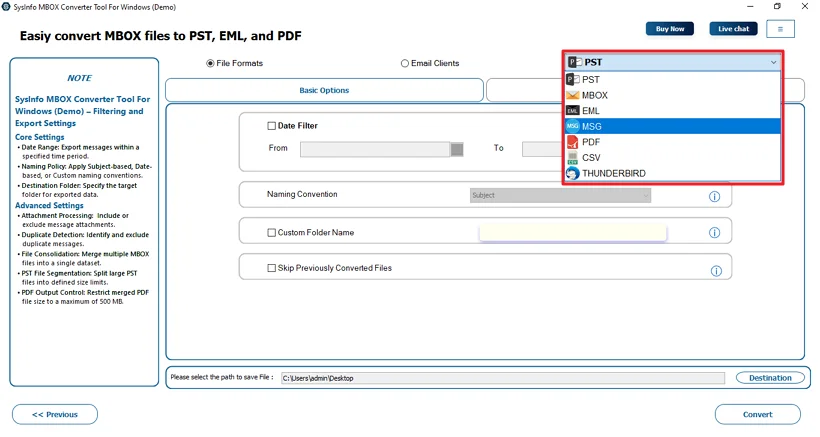
- Finally, use the filters, decide the path to save, and click Convert.
User Feedback
Conclusion
To conclude, the issue “Thunderbird Not Responding” is important to resolve if your work depends on it. The problem comes because of some reasons that can be handled manually through the described ways. But it is important to have a backup; using a professional tool is the best choice to keep your data safe. It can handle data in bulk and provides accurate and faster results.
Frequently Asked Questions
Q.1 Why is Thunderbird not responding on Windows 10 or Windows 11?
Ans: This usually happens when the mailbox gets too large or the app has been running for a long time. Sometimes, add-ons, antivirus software, or a weak internet connection also cause it to freeze on Windows 10 or 11.
Q.2 How to Fix Mozilla Thunderbird Not Responding Issue Without Losing Data?
Ans: You can start by using manual methods, but before trying anything risky, it’s a good idea to back up your emails. The MailConverterTools Thunderbird Backup Tool makes it easier to save all your data safely.
Q.3 Can I Fix Thunderbird Not Working Issue Without Technical Knowledge?
Ans: Yes. Using a tool like the MailConverterTools Thunderbird Backup Tool is simpler. It has a clear interface and guides you through the backup process.
Q.4 Is there any best tool to fix Thunderbird Failed to Connect on Windows?
Ans: The MailConverterTools Thunderbird Backup Tool helps you secure your emails, remove duplicates, and export data easily. Once your data is safe, you can troubleshoot connection issues.
About The Author:

Meet Amit, an experienced SEO expert and content planner. He uses his creativity and strategy to create content that grabs attention and helps brands reach their goals. With solid skills in digital marketing and content planning, Amit helps businesses succeed online.
Related Post