-
Written By Vikas Bajpai
-
Updated on June 13th, 2026
Import EML to ProtonMail Without Technical Skills (2026)
“I exported over 7,000 emails from my Tutanota account and received a folder containing individual .eml files. Our enterprise team has now shifted to ProtonMail for secure communication, but I cannot locate a direct import option within ProtonMail to load these EML files. What is the most reliable and structured method to import EML to ProtonMail without data loss?”
¬ Oliver Dubois, Monaco
This creates a significant challenge for users managing thousands of emails at scale. As there is no direct option to import EML files in ProtonMail, and manual migration methods to migrate EML emails to Proton Mail involve multiple steps and carry risks of data loss. Folder structure and metadata integrity can also be compromised during the process. The MailConverterTools EML File Converter Tool offers a reliable solution for batch migration of EML files to ProtonMail. It preserves all email attributes and folder hierarchy throughout the entire migration process.
Email Clients That Export Emails in EML Format
The MailConverterTools EML Converter Tool supports EML files exported from a wide range of enterprise and personal email clients, ensuring seamless migration to ProtonMail.
| Mozilla Thunderbird | Microsoft Outlook | Windows Live Mail | Apple Mail | Zimbra Desktop |
| SeaMonkey Mail | eM Client | Opera Mail | Lotus Notes | Others |
When a User Needs to Import EML to ProtonMail?
- Business transitions from Tuta Mail to ProtonMail and holds thousands of exported .eml files.
- User moving from Apple Mail needs to preserve email threads and attachments in ProtonMail.
- An organization retiring Zimbra Desktop requires the migration of all folders to ProtonMail.
- A user archiving emails from Outlook Express wants to restore them inside ProtonMail.
- A professional shifting from eM Client needs to import the complete mailbox data into ProtonMail.
- Team decommissioning Lotus Notes requires a structured transfer of all emails to ProtonMail.
- User consolidating accounts moves emails from Mailbird into a single ProtonMail account.
- The company transitioning from Postbox needs to migrate all department emails to ProtonMail.
Manual Method Challenges to Transfer EML Files to ProtonMail
- Users must rely on third-party IMAP bridge configurations, which require advanced technical knowledge.
- The ProtonMail Bridge application is available only for paid subscribers, limiting access for free users.
- Configuring IMAP settings manually increases the risk of authentication errors and connection failures.
- Migrating large volumes of EML files through manual methods leads to significant time consumption.
- No progress tracking or error reporting is available during manual EML import attempts.
- Users with 7,000 or more EML files face an unmanageable workload when relying on manual approaches.
- Manual migration carries a high risk of duplicate emails appearing across folders after transfer completion.
- Enterprise teams handling sensitive or compliance-critical emails cannot afford data loss during manual migration.
Secure Migration Solution to Import EML to ProtonMail
The MailConverterTools EML Converter Software is a professional-grade solution designed for enterprise users. The tool handles bulk migration of thousands of EML files in a single process, eliminating the need for manual intervention at every step. Also, it offers many key features like date range filter, remove duplicate option, skip previous migrated items, and more. Moreover, it allows users to import EML to IMAP and other email clients and file formats.
Steps to Import EML Files to ProtonMail
- Download the EML File Converter Tool.
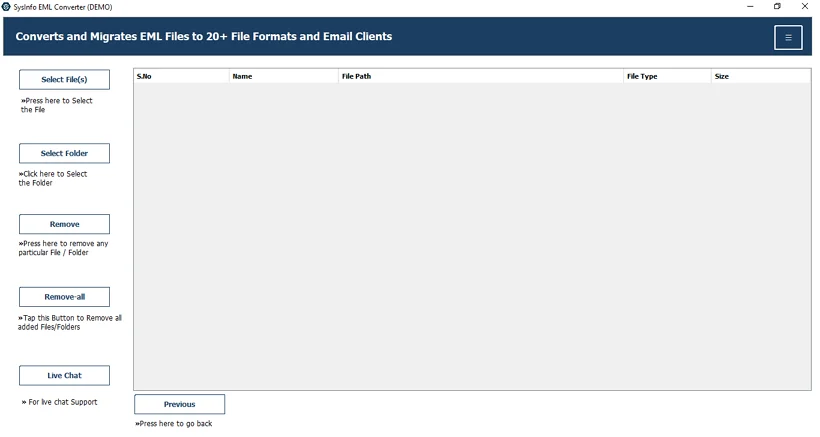
- Then, add the EML files and folders and press Next.
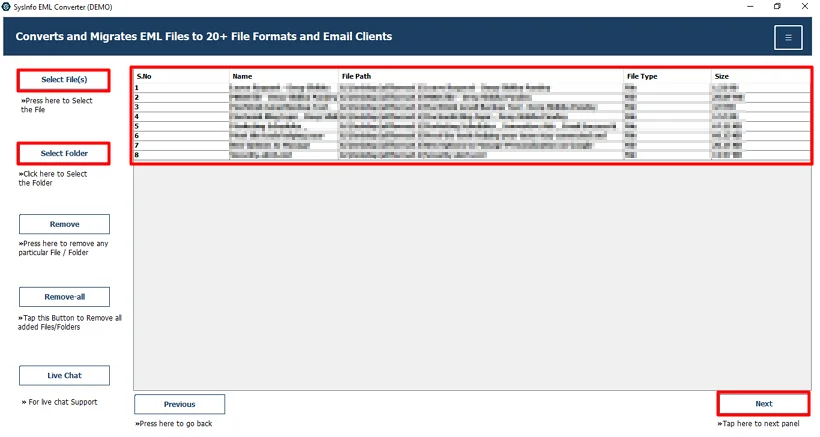
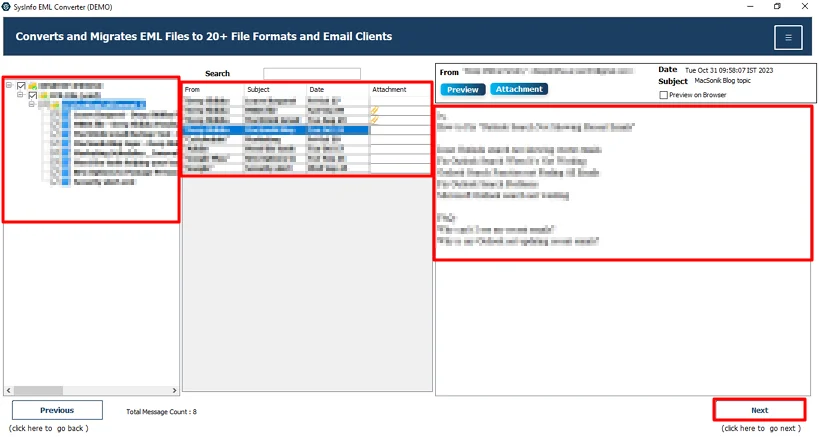
- After that, preview and select files and hit Next.
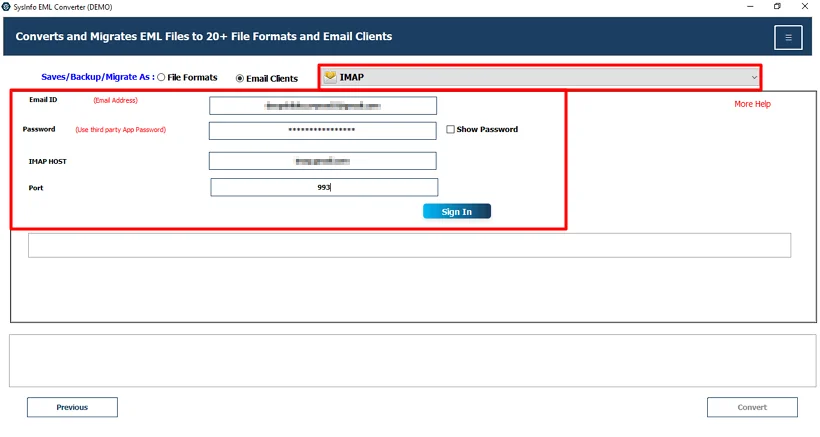
- Thereafter, choose IMAP and use Proton Mail credentials to sign in.
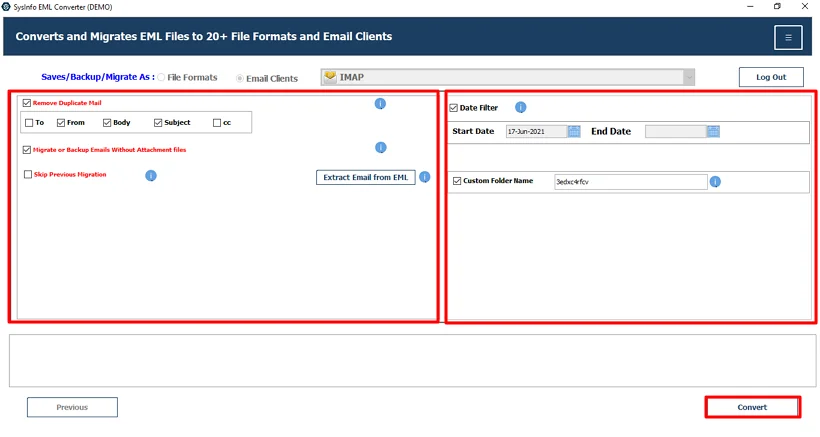
- Lastly, apply useful filters and click Convert.
Enterprise Migration from Tuta Mail to ProtonMail Using EML Converter Tool
Marcus Heller, an IT administrator, needed to migrate 7,400 EML files exported from Tuta Mail to ProtonMail. Preserving client correspondence, attachments, and timestamps was a legal requirement for the firm. ProtonMail offered no direct option to upload EML files to Proton Mail, and manual IMAP configuration was too complex for the tight transition timeline. Marcus used the MailConverterTools EML File Migrator Tool to load the entire EML folder. The tool completed the transfer with full preservation of folder structure, metadata, and attachments, allowing the firm to complete its enterprise migration with zero data loss. Later, Marcus used this tool to import EML to Yandex Mail and back up his EML file to other file formats.
Wrapping Up
The need to import EML to ProtonMail has become increasingly common across industries. Manual methods present significant technical barriers, data loss risks, and folder structure issues that are not acceptable at an enterprise scale. The MailConverterTools EML Converter Tool provides a structured, reliable, and accurate solution for completing this migration. It supports bulk processing, preserves all email attributes, and works with EML files exported from 40+ email clients. Organizations requiring a secure and efficient migration to ProtonMail can rely on this tool for a complete and error-free transfer.
Frequently Asked Questions
Q.1 Which is the best tool to import EML files to ProtonMail?
Ans: MailConverterTools EML Converter Tool is one of the most reliable solutions for importing EML files into ProtonMail. It supports bulk migration, preserves folder hierarchy, maintains email metadata, and transfers attachments without modification. The software also provides advanced features such as date filters, duplicate removal, and selective migration options.
Q.2 Can I upload EML files directly to Proton Mail?
Ans: No, ProtonMail does not provide a direct option to upload or import standalone EML files into a mailbox. Users typically need to use Proton Mail Bridge with an email client or a professional migration tool that supports IMAP-based import to transfer EML files into Proton Mail.
Q.3 Can I bulk import multiple EML files to ProtonMail?
Ans: Yes, you can bulk import multiple EML files to ProtonMail using a specialized migration tool. Solutions like the MailConverterTools EML Converter Tool allow users to add entire folders containing thousands of EML files and migrate them in a single operation.
Q.4 Do I need technical knowledge to move EML files to ProtonMail?
Ans: Not necessarily. Manual migration methods often require IMAP configuration, authentication setup, and email client integration, which can be challenging for non-technical users. Professional EML migration tools simplify the process with a guided interface.
Q.5 Can I import EML files to ProtonMail for free?
Ans: Free methods may be available through email clients and Proton Mail Bridge, but they often involve multiple manual steps and may not be practical for large-scale migrations.
Q.6 Is it safe to import EML files to ProtonMail?
Ans: Yes, importing EML files to ProtonMail is safe when performed using a trusted migration solution. A professional tool preserves email content, attachments, sender and recipient information, timestamps, and folder structure while minimizing the risk.
About The Author:

Vikas Bajpai is a results-driven SEO expert and content strategist with a strong passion for building impactful digital experiences. He specializes in crafting data-backed content plans that boost visibility, engage audiences, and drive measurable growth. With deep expertise in search engine optimization, keyword strategy, and content marketing, Vikas helps brands strengthen their online presence and achieve long-term success.
Related Post