-
Written By Vikas Bajpai
-
Updated on June 9th, 2026
How to Convert PDF to EPUB Safely & Easily (2026 Guide)
“I manage a large digital library for our organization, and we need to convert hundreds of PDF documents into EPUB format so our team can access them across e-readers and mobile devices. Is there a reliable tool that can convert PDF to EPUB in bulk while preserving the original formatting, fonts, and embedded images?”
~ Santiago Benítez
Organizations managing large volumes of digital content always struggle to distribute PDF files across e-readers and other devices. EPUBs offer better readability and device compatibility, making conversion a practical necessity for modern enterprises. However, maintaining formatting integrity, embedded images, and font consistency during conversion remains a key challenge. The MailConverterTools PDF-to-EPUB Converter Software addresses these demands by supporting batch processing, layout preservation, and structured output. Additionally, we will cover here the step-by-step guide of a free solution and a professional utility to save PDF to EPUB. This guide explores how enterprises can streamline their document workflows with an efficient, accurate conversion solution.
Who Needs to Convert PDF File to EPUB?
- Students and researchers reading on eReaders and mobile devices.
- Authors and publishers distributing eBooks.
- Professionals accessing reports and manuals on the go.
- Readers seeking a more flexible reading experience.
- Visually impaired users require accessibility features.
- Libraries and educational institutions are sharing digital content.
- Anyone wanting content that adapts to different screen sizes.
Comparison Table Between PDF and EPUB
|
Feature |
|
EPUB |
|
Format Type |
Fixed-layout document |
Reflowable digital book format |
|
Device Compatibility |
Requires a PDF reader or browser |
Natively supported on most e-readers |
|
Image Handling |
Images are fixed within the layout |
Images scale according to screen size |
|
File Size |
Generally larger |
Comparatively smaller and optimized |
|
Metadata Support |
Basic metadata support |
Rich metadata for cataloging and search |
|
DRM Support |
Supported via Adobe Acrobat |
Supported via Adobe Digital Editions |
|
Best Use Case |
Print-ready and formal documents |
Digital publishing and e-reader distribution |
Standard Manual Technique to Convert PDF to EPUB
You can use Google Docs to convert a PDF file into EPUB format without installing any additional software. Make sure you are signed in to your Google account before starting.
Steps to Transform PDF to EPUB
- Open Google Drive and click New > File Upload.
- Select the PDF file from your computer and upload it.
- Right-click the uploaded PDF and choose Open with > Google Docs.
- Once the file opens in Google Docs, click File > Download.
- Select EPUB Publication (.epub) from the download options.
- The EPUB file will be downloaded to your computer automatically.
Limitations of the Manul Method
- Layouts and tables may break after conversion.
- Scanned PDFs may not convert properly.
- Large files can take more time to process.
- An internet connection is necessary.
- Output quality depends on the original PDF.
- Not ideal for sensitive documents.
- Manual editing may be needed after conversion.
High-Performance Solution to Convert PDF to EPUB
The MailConverterTools PDF Converter Tool is built for both technical and non-technical users for batch conversion of multiple PDF files. Users can export PDF content into a wide range of formats. For spreadsheet needs, the convert PDF to Excel feature accurately maps tabular data into XLS and XLSX files. Similarly, the convert PDF to TXT option extracts plain text content cleanly for downstream processing. Moreover, the software runs across all Windows versions from legacy builds through Windows 11. A Demo Version is available for evaluation, offering a few free conversions before committing to the full license.
Steps to Convert PDF file to EPUB
- Download the PDF Converter Software.

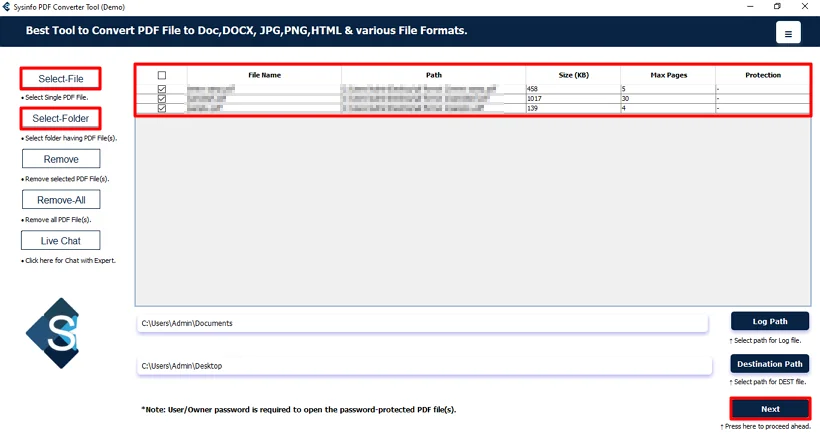
- Thereafter, browse, select, and add the PDF files and click Next.
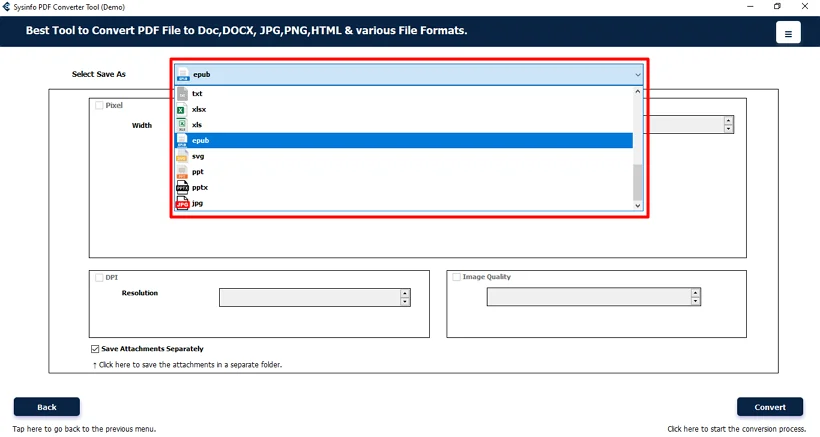
- Afterwards, choose the EPUB file format from the list.
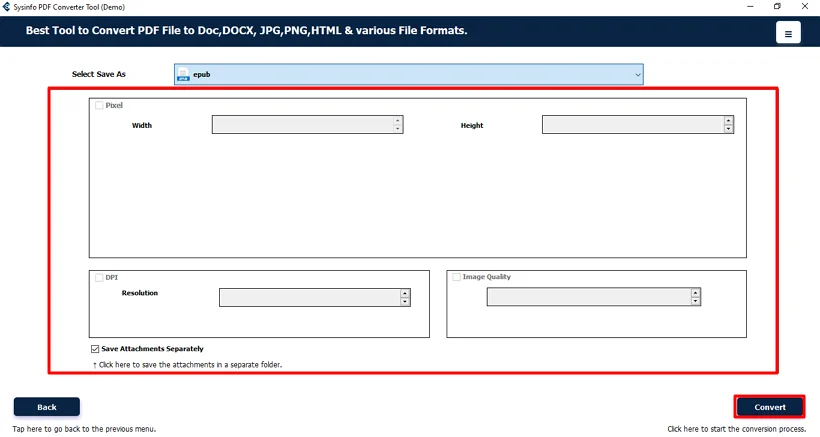
- Finally, apply the available filters and click Convert.
Case Study: Global Publishing House Streamlines E-Reader Distribution
Bennett & Harlow Publishing manages over 4,000 titles annually. They have struggled with manual PDF to EPUB conversion using online tools. The process resulted in broken layouts, misaligned fonts, and lost embedded images.
After deploying the MailConverterTools PDF to EPUB Converter Software, the team began processing entire manuscript batches simultaneously. This conversion tool cut down the conversion time by over 70%. Formatting remained intact, and password-protected documents were handled without disrupting the workflow.
Within the first month, Bennett & Harlow redirected editorial staff toward higher-value tasks and achieved consistent e-reader compatibility. The tool became a permanent fixture in their digital publishing pipeline.
Last Word
Converting PDF files to EPUB makes sure that content reaches users across every device and platform. While manual methods introduce formatting gaps and volume limitations. On the other hand, MailConverterTools PDF to EPUB Converter delivers the accuracy, batch capability, and format flexibility that enterprise environments demand. A professional tool is a dependable choice to convert PDF to EPUB for teams prioritizing layout preservation, data integrity, and operational efficiency. Evaluate its capabilities firsthand through the available Demo Version before full deployment.
Frequently Asked Questions
Q.1 Which tool is best for convert PDF to EPUB?
Ans: The MailConverterTools PDF Converter Tool is an effective solution for converting PDF files to EPUB format. It supports batch conversion while preserving document formatting, images, and overall structure.
Q.2 Is it safe to convert a PDF file to EPUB?
Ans: Yes, converting PDF files to EPUB is generally safe when using a trusted conversion method. It allows you to make documents more accessible across e-readers and mobile devices while preserving content.
Q.3 Can I convert a PDF file to EPUB on Windows and Mac?
Ans: Yes, PDF files can be converted to EPUB on both Windows and Mac systems using MailConverterTools PDF Conversion Software. Be sure to check the software’s system requirements before use.
Q.4 Can I convert a PDF file to EPUB for free?
Ans: Yes, free methods such as Google Docs can be used to convert PDF files to EPUB. However, they may have limitations related to formatting accuracy, file size, and batch conversion.
Q 5 Can I convert a PDF to EPUB without technical skills?
Ans: Yes, the MailConverterTools PDF Converter Tool is designed with a user-friendly interface, allowing both technical and non-technical users to convert PDF files to EPUB in just a few simple steps.
Q.6 How can I improve the quality of a PDF to EPUB conversion?
Ans: Using a well-structured PDF with selectable text, clear formatting, and properly embedded images usually produces better EPUB output. Complex layouts may require additional editing after conversion.
About The Author:

Vikas Bajpai is a results-driven SEO expert and content strategist with a strong passion for building impactful digital experiences. He specializes in crafting data-backed content plans that boost visibility, engage audiences, and drive measurable growth. With deep expertise in search engine optimization, keyword strategy, and content marketing, Vikas helps brands strengthen their online presence and achieve long-term success.
Related Post