-
Written By Amit Chandel
-
Updated on February 19th, 2026
Best Way to Export Thunderbird to PST with Attachments
User Query: I never do any conversion or migration, but this time I need a simple solution to convert Thunderbird to PST. I don’t have such technical knowledge. Does anyone have step by step solution?
A lot of us use Thunderbird because it’s free. But the problem starts when you decide to switch to Outlook, and Thunderbird doesn’t offer a direct option to export to a PST file. In this blog, we’ll go over the manual method to export Thunderbird to PST and also use the MailConverterTools MBOX Converter Tool. This blog helps both technical and non-technical users to easily export their files to PST format.
Reasons to Export Thunderbird emails to Outlook PST
- Better compatibility with company systems that mainly use Outlook.
- Create a proper backup file in PST format for safety.
- Keep all emails stored in one single file.
- Use Outlook’s built-in features like calendar and contacts in one place.
- Manage and archive large amounts of old emails more easily.
- Keep everything organized inside the Microsoft environment.
Manual Method to Export Thunderbird to PST Manually
Here is a basic way you can try if you don’t want to use any software. The method works, but it needs a little patience.
Steps to Convert Thunderbird Emails to PST
- Firstly, open Mozilla Thunderbird and select the emails or folders.
- Then, right-click and choose Save As, and they will be saved as EML files.
- Further, open Microsoft Outlook and create a new folder.
- After that, simply drag and drop the saved EML files.
- Lastly, you can later export as a PST file. Once they are inside Outlook.
Limitations
- You can’t move large mailboxes at once. It becomes very slow with bulk emails.
- Emails may lose formatting or attachments during the process.
- Folder structure is not always maintained properly.
- Not practical for business or large-scale migration.
- There is a risk of duplicate emails after syncing.
Best Approach to Export Thunderbird to PST with Attachments
You can use the MailConverterTools MBOX Converter Tool to avoid the difficulties. It lets you import MBOX emails directly into your account without doing everything manually. The smart utility helps you to backup Thunderbird data and also use it to import MBOX to iCloud and many other email clients with no hassle.
Steps to Migrate Thunderbird Emails into PST
- Firstly, download the MBOX Converter Tool.
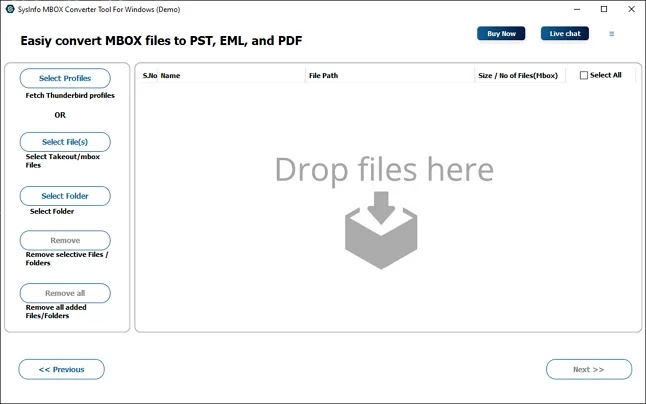
- Then, add the MBOX file or load your Thunderbird profile and press Next.
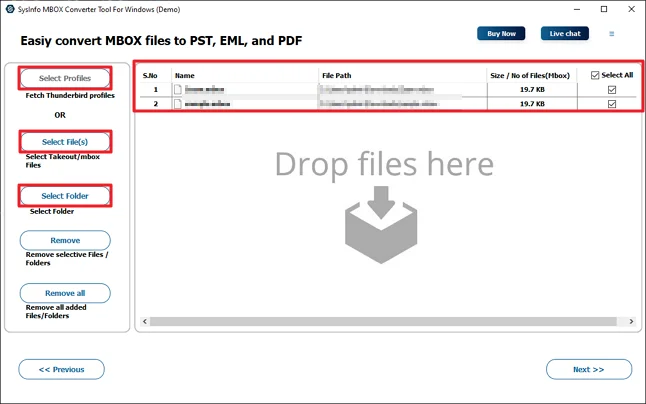
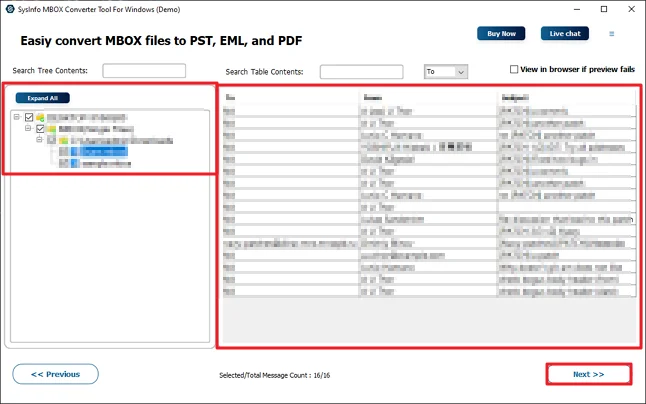
- After that, open and choose files and click Next.
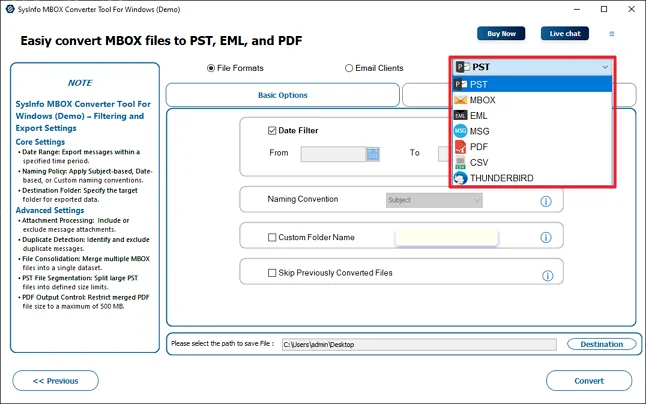
- Thereafter, choose the PST file format.
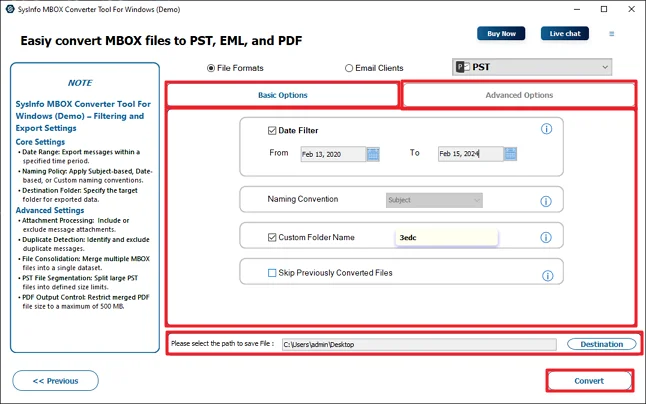
- Finally, use the given options, set the path, and hit Convert.
Successful User Case
Richard works in a small accounting firm. For years, he used Thunderbird for handling client emails. It was free and worked fine for him. He never really thought about changing it. Recently, his company shifted everything to Microsoft Outlook.
At first, he tried the manual way. It worked, but only for a small number of emails. He had years of client conversations with attachments. Doing it one by one was taking too much time. He also noticed some folders were not arranged the same way.
After that, he decided to try the MailConverterTools MBOX Converter Tool. He downloaded the demo version first, just to see how it works. The steps were simple. He loaded his Thunderbird profile, selected the folders, chose PST as the output format, and started the process. Within some time, all his emails were converted into a PST file. Attachments were there. Folder structure looked the same. He then opened the PST file in Outlook without any issue.
Conclusion
To conclude, if you switched to Outlook and want to export Thunderbird to PST, then you have two ways here. You can use the manual methods that we discussed or the professional tool. Manual ways need extra steps, time, and effort. For simple and error-free export, using the smart utility will be the best choice. The tool also offers some exclusive features for better results.
Frequently Asked Questions
Q.1 Do I need technical knowledge to export Thunderbird to PST?
Ans: Not really. If you use the MailConverterTools MBOX Converter Tool, the process becomes much simpler. You just load the file, choose PST, and start the conversion.
Q.2 Can I convert Thunderbird to PST on Mac and Windows?
Ans: Yes. Thunderbird works on both systems, and you can export the MBOX files from it. The converter tool also supports loading Thunderbird data and converting it to PST format. Just make sure you are using a compatible version of the tool for your system.
Q.3 How can I safely convert Thunderbird Emails to PST without data loss?
Ans: To avoid the manual limitations, using the MBOX Converter Tool is a safer option. It keeps attachments and folder structure during the conversion process.
Q.4 What is the best way to migrate multiple Thunderbird mailboxes into PST at once?
Ans: Manual methods are not practical for bulk migration. The better way is to use the MBOX Converter Tool, as it allows you to load complete Thunderbird data and convert multiple mailboxes to PST in one go.
About The Author:

Meet Amit, an experienced SEO expert and content planner. He uses his creativity and strategy to create content that grabs attention and helps brands reach their goals. With solid skills in digital marketing and content planning, Amit helps businesses succeed online.
Related Post