-
Written By Amit Chandel
-
Updated on March 16th, 2026
How to Import PST to Postbox Email Client (Complete Guide)
User Query: I’m trying to move from Outlook to Postbox. I just want to move my emails without losing attachments or messing up the data. Is there any simple way to get PST emails into Postbox?
Many users later realize their old emails are stored in a format the new app doesn’t support. That’s exactly what happens with Outlook and Postbox. Outlook keeps emails in PST files, while Postbox can’t read them directly. Because of this, moving emails isn’t as straightforward as people expect. In this blog, we’ll look at a couple of practical ways to import PST to Postbox, including a manual workaround and also using the MailConverterTools PST Converter Tool.
Why Migrate Emails from PST to Postbox?
- Access to Old Emails: Many important messages are stored in PST files. Migrating them to Postbox helps users keep access to past conversations, attachments, and records.
- Better Search and Organization: Postbox has good search and sorting options. After moving PST emails, it becomes easier to find messages or attachments quickly.
- Handling Multiple Email Accounts: Postbox makes it simple to manage different email accounts together. Users often move PST data so they can check everything from a single dashboard.
- Reducing Dependence on PST Files: PST files mainly work inside Outlook. Moving the emails to Postbox makes the data easier to manage in a different email environment.
- Keeping Attachments and Email History: Migration ensures old attachments, replies, and email threads stay available even after switching email clients.
Manual Approaches to Import PST to Postbox Email Client
There is a manual method that is proven to provide the best results with 0 cost. You need to execute each step accurately without any mistakes.
1) Import Outlook PST to Postbox on Windows
- Firstly, open Thunderbird.
- Further, go to More Menu -> Add-ons & Themes.
- Then, search for ImportExportTools NG and install it.
- Now go to Menu -> Tools -> Import and choose Import from Outlook.
- After that, select the PST file you want to load into Thunderbird.
- Right-click it and choose ImportExportTools NG -> Export Folder -> As MBOX file.
- Finally, open Postbox, go to File -> Import -> Mail Messages, and select the exported MBOX file.
Limitations
- Large PST files can make the process slow or sometimes stop in the middle.
- Some emails or attachments may not transfer properly.
- Folder structure can change during the conversion.
- It’s not very easy for users who are not familiar with technical steps.
Best Way to Import PST to Postbox Email Client
If you need to get your PST emails into Postbox, the MailConverterTools PST Converter Tool can help. It works with big PST files, even really large ones, and changes them into MBOX files that Postbox can open. It keeps the folders, attachments, and other email info the same. You can pick which folders to convert, and it can ignore duplicates.
Steps to Import Outlook Emails from PST to Postbox
- Firstly, download the PST Converter Tool.
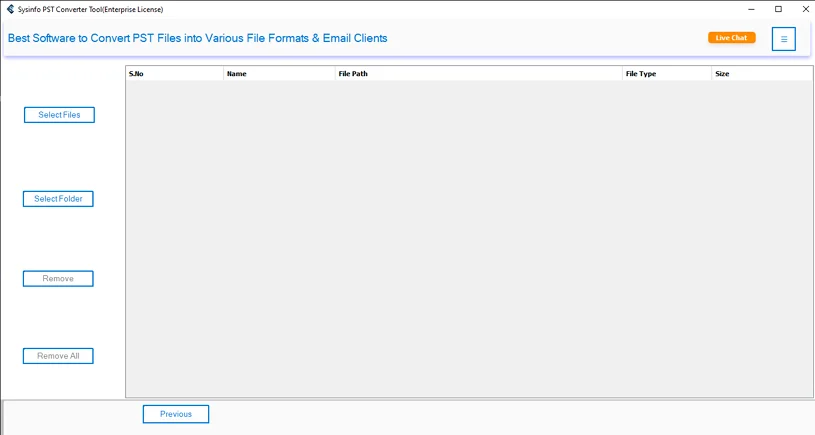
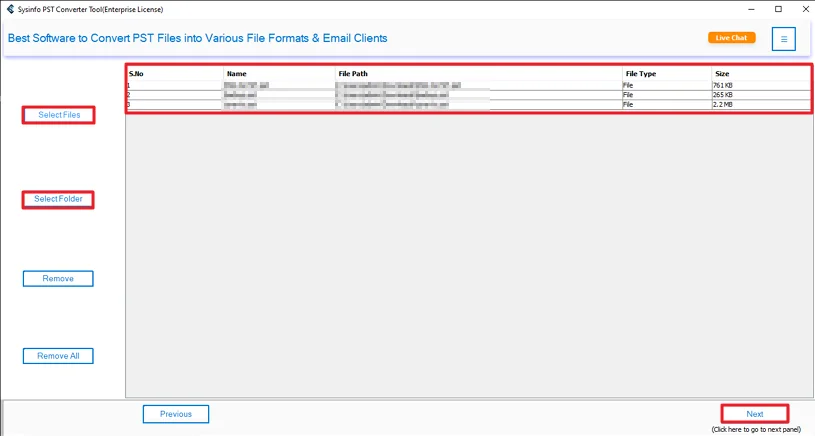
- Then, add the PST files and click Next.
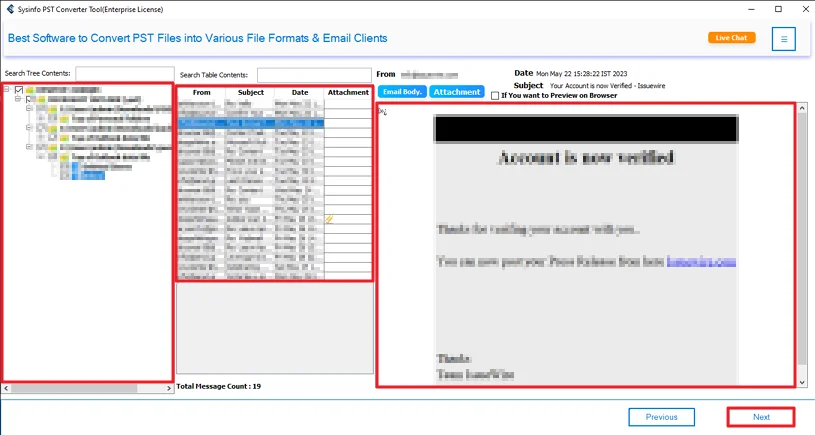
- Preview and select files and hit Next.
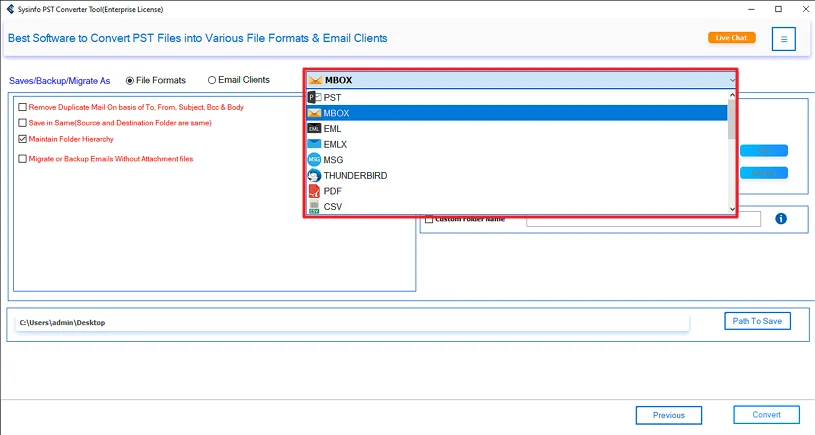
- Further, choose the MBOX file format.
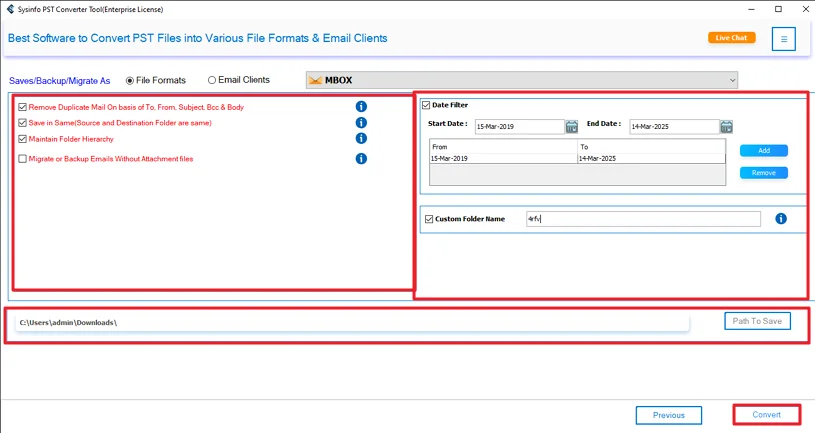
- Lastly, apply filters, choose a path, and click Convert.
Successful User Case
User: Marco, a freelancer.
Problem: Marco had years of emails in PST files and wanted to switch to Postbox. He didn’t know how to open PST files there.
Solution: He tried the manual Thunderbird method, but it was slow. Then he used the MailConverterTools PST Converter Tool to export Outlook PST to Postbox.
Result: All emails, folders, and attachments were moved safely. The process was faster, and nothing was lost. Marco could start using Postbox with everything ready.
Relevant post: Export Outlook Calendar to ICS
Conclusion
In this blog, we looked at a few ways to import PST to Postbox. The manual method using IMAP can work if your mailbox is small. But there’s a chance some emails or attachments could get lost. Using a PST converter tool makes things easier. It moves all your emails, folders, attachments, and other info safely into Postbox without much hassle.
Frequently Asked Questions
Q.1 Does Postbox support Outlook PST files directly?
Ans: No. Postbox cannot open PST files on its own. You need to convert them to a format that it can read, like MBOX.
Q.2 Outlook is not installed. Can I still import PST to Postbox?
Ans: If you want to use the manual method, Outlook is required. But with the PST Converter Tool, you don’t need Outlook. The tool can convert PST to MBOX directly.
Q.3 Is there any risk of losing emails during the PST to Postbox import process?
Ans: Using the manual method, there’s a small risk that some emails, attachments, or folder structures may not transfer correctly. The MailConverterTools PST Converter Tool preserves everything safely.
Q.4 Is it safe to use third-party tools to import PST to Postbox?
Ans: Yes. The MailConverterTools PST Converter Tool handles this task. They keep emails, folders, attachments, and metadata intact, and make the process easier and faster.
About The Author:

Meet Amit, an experienced SEO expert and content planner. He uses his creativity and strategy to create content that grabs attention and helps brands reach their goals. With solid skills in digital marketing and content planning, Amit helps businesses succeed online.
Related Post