-
Written By Amit Chandel
-
Updated on January 13th, 2026
Quick Guide to Export Outlook Calendar to ICS File
Philips Query: “I’m switching from Outlook to Google Calendar. However, I am having problems syncing up with Google Calendar correctly. How do I export my Outlook Calendar to an ICS file?”
Many users encounter challenges when switching between different email and calendar platforms. Since most of our daily planning depends on digital calendars, having your schedule available everywhere is essential. If you’re switching from Microsoft Outlook to Google Calendar, Apple Calendar, or another service, the process to export Outlook Calendar to ICS file helps keep all your events synced and easy to access. In this guide, you’ll learn simple free methods to move your calendar, along with a faster and more reliable option using a MailConverterTools PST Converter Tool.
Why do User Save Outlook Calendar in ICS?
- ICS files work on almost every calendar platform, making your Outlook schedule easy to use anywhere.
- They provide a quick way to back up your important events and meetings.
- Ideal for teams using different systems, such as Outlook on Windows and iCal on Mac.
- Helpful for keeping an offline copy of your calendar for safety.
- Useful when transferring data from a PST file to Apple Mail or other applications.
Manual Methods to Export Outlook Calendar to ICS
Exporting your Outlook calendar to an ICS file helps you move your events to other apps or keep a backup. Outlook lets you do this from both the desktop app and the web version, but each method has a few limits you should know before you begin.
Method 1: Import Outlook Calendar to ICS (Desktop App)
This option works in Outlook 2016, 2019, 2021, and Microsoft 365.
- Firstly, open Outlook and switch to the Calendar view.
- Then, select the calendar you want to export.
- After that, go to File > Save Calendar.
- When the Save As window appears, choose where you want to store the file.
- In Save as type, pick iCalendar Format (*.ics).
- If you need to adjust the date range or details, click More Options.
- Click OK, then Save. Your calendar will be exported as an ICS file that you can import into any compatible calendar app.
Note: Only one Outlook calendar can be exported at a time using this method.
Method 2: Convert Outlook Calendar to ICS via Outlook Web
- To begin with, open your browser, go to Outlook.com, and sign in.
- Then, select the Calendar option from the left panel.
- After that, choose the specific calendar you want to export.
- Click Share, then select Publish Calendar.
- Set the permission to Can view all details and copy the ICS link provided.
- At last, you can paste this link into another calendar app or browser to access your calendar wherever you need it.
Limitations:
- Outlook Web lets you export only published or shared calendars, so full calendar export isn’t always possible.
- Both desktop and web methods offer very limited control over what data gets exported.
- Large calendars or ones containing heavy attachments may not export properly.
- A small error during the process can lead to missing or incomplete calendar data.
Quick Method to Export Outlook Calendar to ICS
The PST File Converter is a handy option when you need to extract calendars from multiple or orphaned PST files. It works without Outlook, quickly saving your calendar data in ICS format while keeping all details and attachments intact. The tool supports bulk export, which saves a lot of time and removes the risk of data loss. You can also try the free demo first to export a few calendars and see how well the tool works before buying.
Steps to Export Calendar from Outlook to ICS
- Download and run the PST Converter Tool.
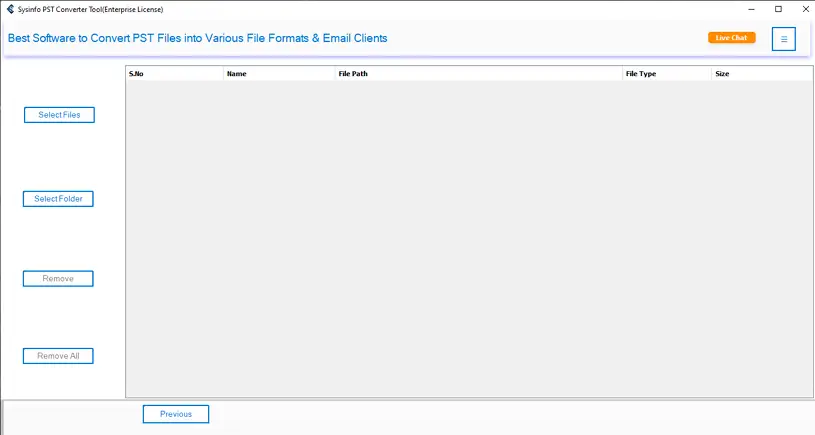
- Then, select the PST file/folder and hit Next.
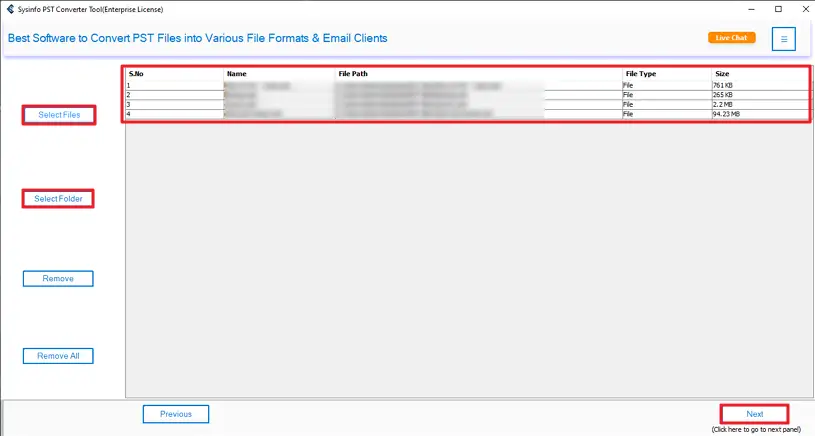
- After that, preview and select files and click the Next Button.
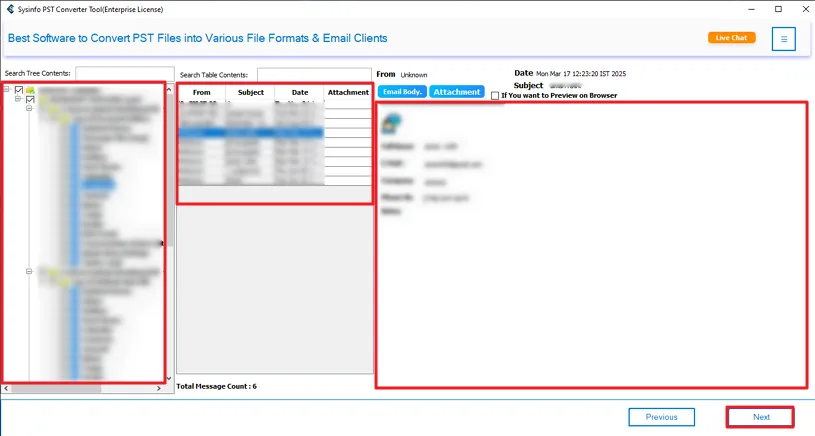
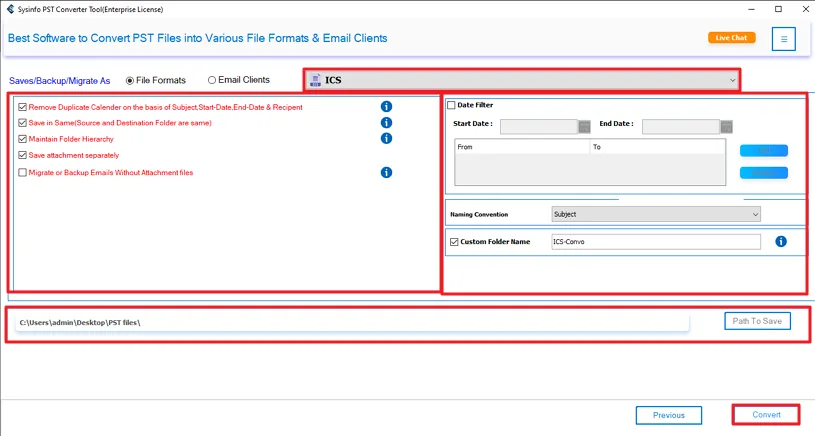
- Finally, choose ICS format, use filters, and click Convert.
Successful User Case:
Philip had to shift his Outlook calendars to Google Calendar, but the manual export kept messing up his recurring meetings and time zones. He tried the PST Converter Tool out of frustration, and it handled everything in one go. All his events came through cleanly, and he was able to get back to work without any hassle.
Conclusion
The process to export Outlook Calendar to ICS file gives you a quick and easy way to make sure your schedule is available all the time. For small amounts of data, exporting your calendar manually is an efficient way. But when exporting calendars larger than 5 GB in PST format, it is best to use a dedicated PST to ICS conversion utility. This utility speeds up the conversion process and greatly increases the reliability of the result.
Frequently Asked Questions
Q1: How do I save Outlook Calendar to ICS manually?
Ans: Open Outlook, go to Calendar, then choose File > Save Calendar. Select the ICS format, pick your save location, and save. The file can be imported into most calendar apps.
Q2: Can I export multiple Outlook calendars to ICS at once?
Ans: No, Outlook only lets you export one calendar at a time. For multiple calendars, using a PST to ICS converter tool is the easiest way to export them in bulk.
Q3: Will exporting to ICS preserve reminders, attachments, and notes?
Ans: Manual ICS export usually keeps event details but may lose reminders, attachments, or notes. A dedicated PST Converter Tool does a better job of preserving all calendar data.
Q4: Is there any best tool that exports Outlook Calendar to ICS File?
Ans: Yes, a professional MailConverterTools PST Converter is the best option. It exports calendars quickly, keeps all details intact, and supports bulk export without needing Outlook installed.
About The Author:

Meet Amit, an experienced SEO expert and content planner. He uses his creativity and strategy to create content that grabs attention and helps brands reach their goals. With solid skills in digital marketing and content planning, Amit helps businesses succeed online.
Related Post