-
Written By Amit Chandel
-
Updated on March 13th, 2026
Import EML to Yandex Mail Without Data Loss (Easy Guide)
User Query: “I’ve got a bunch of EML files saved on my computer, and now I want to move them into my Yandex Mail account. The problem is that Yandex doesn’t really accept EML files directly. Is there any simple way to import EML files into Yandex Mail safely?”
Introduction: EML files are often used to save single email messages, so it’s pretty common to end up with a lot of them on your system. The tricky part comes when you try to move those emails into Yandex Mail. In this blog, we’ll go through a couple of easy ways you can try to import EML to Yandex Mail without messing up your data. We’ll also mention the MailConverterTools EML Converter Tool that can make the process a lot smoother if you don’t want to deal with manual steps.
Common Reasons to Open EML File in Yandex Mail
- Many people switch to Yandex Mail and want their old EML emails added to the same inbox.
- Opening EML files in Yandex Mail makes it easier to read old emails from anywhere.
- Some users keep email backups in EML format and later want them stored in Yandex Mail.
- Having EML emails inside Yandex Mail makes searching and managing messages much simpler.
- When changing email services, users often need to bring their saved EML messages along.
- Keeping EML emails in Yandex Mail helps avoid storing important messages only on a computer.
- Sometimes colleagues send emails as EML files, and users want them inside their mailboxes.
- Importing EML files into Yandex Mail keeps the email content, attachments, and details together.
Manual Approach to Import EML to Yandex Mail
If you don’t want to install any third-party software, you can try a manual method. It lets you import EML files and then move them to your Yandex Mail account through IMAP.
Simple Steps to Import EML Files to Yandex Mail
- First, install Mozilla Thunderbird on your computer.
- Next, add your Yandex Mail account using IMAP in Thunderbird.
- Then, install the ImportExportTools NG add-on.
- After that, create a Local Folder and import the EML files there.
- Now, drag those emails to the Yandex IMAP folder.
- Finally, wait a bit for sync, and the emails will appear in Yandex Mail.
Limitations
- If your internet or IMAP sync is slow, the emails may take a while to appear.
- In some cases, attachments or formatting may not look the same after transfer.
- You also need the ImportExportTools NG add-on before you can import EML files.
- Emails have to be moved manually between folders, which can feel repetitive after a while.
- When dealing with thousands of EML files, the whole process can become hard to manage.
Quick Method to Import EML to Yandex Mail Without Data Loss
The professional MailConverterTools EML Converter Tool can make the process easier. It lets you upload EML files to Yandex Mail using IMAP login details. The tool connects to your account and transfers the emails directly. It can also import EML to Thunderbird if needed. During the process, it usually keeps the email content, attachments, and basic details the same. The tool interface is simple and able to import EML to Zoho Mail and other email clients.
Steps to Import Multiple EML Files to Yandex Mail
- Firstly, download the EML Converter Tool.
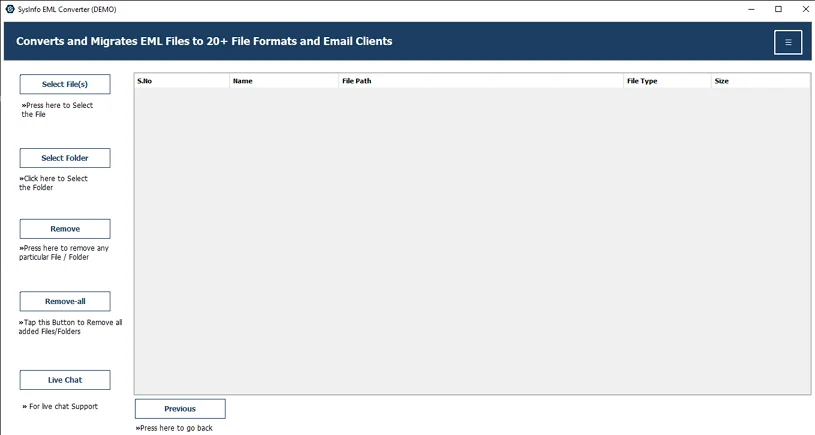
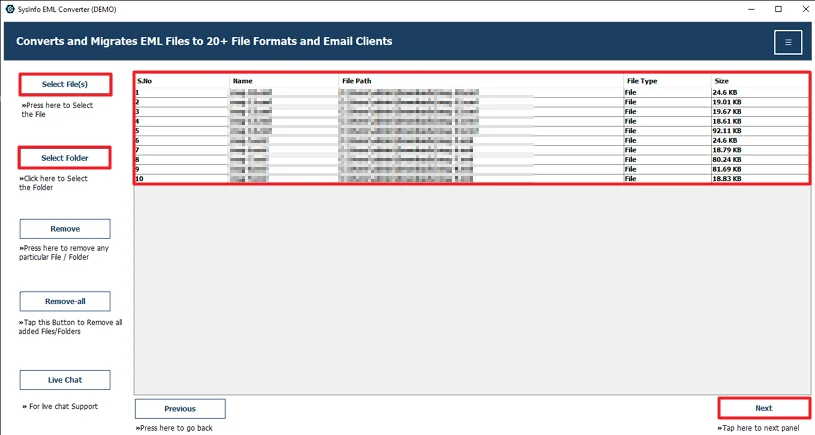
- Then, add the EML files and click Next.
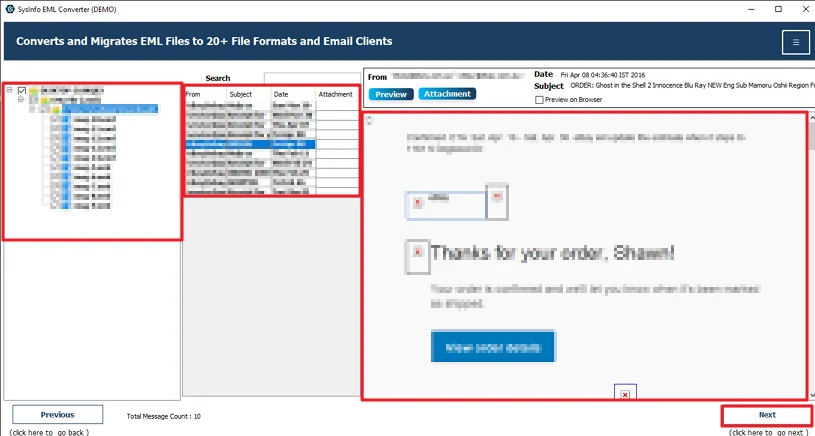
- Select and preview the files and hit Next.
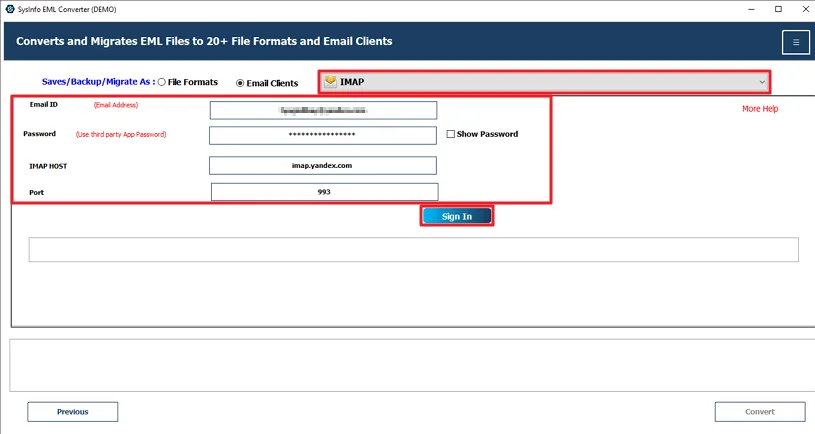
- Choose IMAP and sign in with your Yandex credentials.
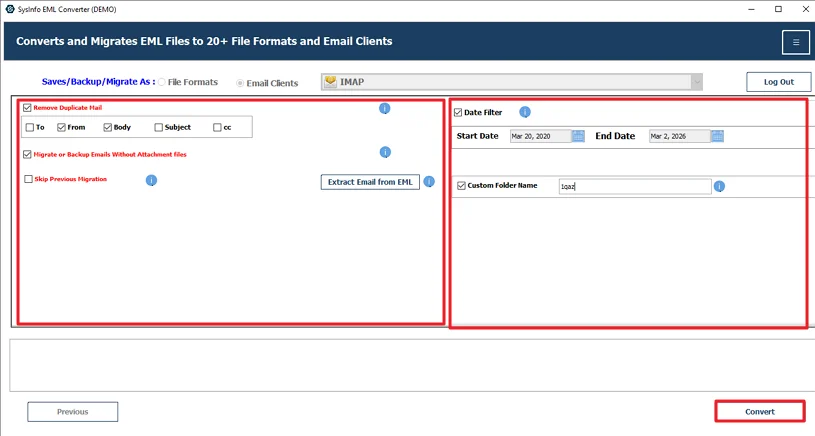
- Finally, apply filters and hit the Convert button.
Real World Example
One consultant working in the legal field had years of client emails saved as EML files on their computer. Over time, it became difficult to check those emails while working from different locations. They wanted all those messages available inside Yandex Mail so everything stayed in one place.
To handle this, they used the MailConverterTools EML Converter Tool and moved the files into their Yandex account. The emails were transferred along with their attachments, and the transfer EML to Yandex Mail finished much faster than doing it manually. In the end, all the old emails were accessible in the Yandex mailbox without much effort.
Conclusion
To wrap it up, the process to import EML to Yandex Mail isn’t very straightforward. Yandex doesn’t support direct uploads. The manual method is there, but it mostly works when you only have a few files. It also takes time and has a few limitations. If you want a simpler way, using an EML converter tool can make things easier. It helps move multiple emails without doing everything manually.
Frequently Asked Questions
Q.1 What is the easiest and safest method to import EML to Yandex Mail without data loss?
Ans: The easiest way is to use the MailConverterTools EML Converter Tool. It connects to your Yandex Mail account using IMAP and transfers the EML files directly. This way, the emails move to the mailbox without needing manual steps.
Q.2 Can I import multiple EML files into Yandex Mail at once?
Ans: Yes, you can import multiple EML files at the same time using the MailConverterTools EML Converter Tool. The software allows you to add many EML files together.
Q.3 How can I transfer EML emails to Yandex Mail while keeping attachments intact?
Ans: You can do this by using the EML Converter Tool mentioned in the blog. It transfers the emails through IMAP login and usually keeps the details the same during the process.
Q.4 Can I open EML files in Yandex Mail without technical knowledge?
Ans: Yes. The MailConverterTools EML Converter Tool has a simple interface, so most users can follow the steps without technical skills.
About The Author:

Meet Amit, an experienced SEO expert and content planner. He uses his creativity and strategy to create content that grabs attention and helps brands reach their goals. With solid skills in digital marketing and content planning, Amit helps businesses succeed online.
Related Post