-
Written By Amit Chandel
-
Updated on March 10th, 2026
How to Import OLM to IMAP Without Data Loss or Corruption
User Query: “Over time, I received many OLM files from different users. Managing them locally is becoming difficult. I want to import those OLM files into an IMAP. Is there a way to open OLM files in IMAP?”
Moving Outlook data from Mac to another email platform often sounds straightforward, but it usually isn’t. The challenge appears when you have an OLM file and need to upload it to an IMAP-based email account. Since OLM files are specifically created for Outlook for Mac, they don’t open or import directly into other email services. In this blog, we will explain two ways to import OLM to IMAP server. First, we will look at the manual approach, and then we will discuss a quicker option using the MailConverterTools OLM Converter Tool.
Why Import OLM File to IMAP Server?
- IMAP allows you to access the same emails from different devices.
- Keeping emails on IMAP makes switching email services easier later.
- Emails stored on IMAP stay saved on the mail server, not just locally.
- Even if your system crashes, your emails remain available online.
- IMAP also makes it easier for teams to work with shared mailboxes.
Manual Method to Import OLM to IMAP Using Outlook for Mac
The manual method works if Outlook is already set up, but it can take time since emails must be moved step by step.
Steps to Import OLM Emails to IMAP
- Firstly, open Microsoft Outlook for Mac.
- Go to Tools and select Accounts.
- Click + (Add Account) to add your email account.
- Then, sign in using your IMAP email credentials.
- Afterwards, ensure IMAP is enabled for the account.
- Thereafter, select the IMAP account from the Outlook sidebar.
- Further, create a new folder (for example, OLM Emails).
- Drag emails or folders from the OLM mailbox into that folder.
- Outlook will start syncing the emails to the IMAP server.
Limitations
- The process can be slow for large OLM files.
- A stable internet connection is required for syncing.
- Sync interruptions may cause some emails to be skipped.
- Large attachments may take longer to upload.
- Repeating the process can create duplicate emails.
- The folder structure may change after syncing.
- Not practical for bulk or multiple mailbox migrations.
Advanced Method to Import OLM to IMAP Without Data Loss
To simplify the process, many users prefer using the MailConverterTools OLM Converter Tool. This tool allows you to work with OLM files more easily and transfer mailbox data without going through the lengthy manual process. You can use this tool for multiple purposes, like you can use it to import OLM to Gmail. Additionaly mac user can use this to import OLM to Apple Mail.
Steps to Transfer OLM Files to IMAP
- Firstly, download the OLM Converter Tool.
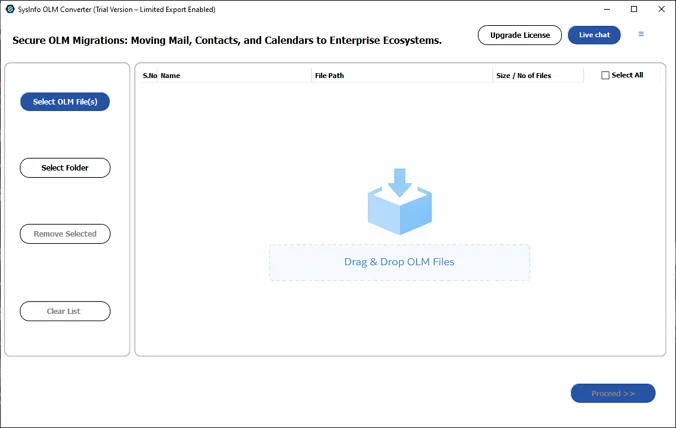
- Add the OLM files and click Proceed.
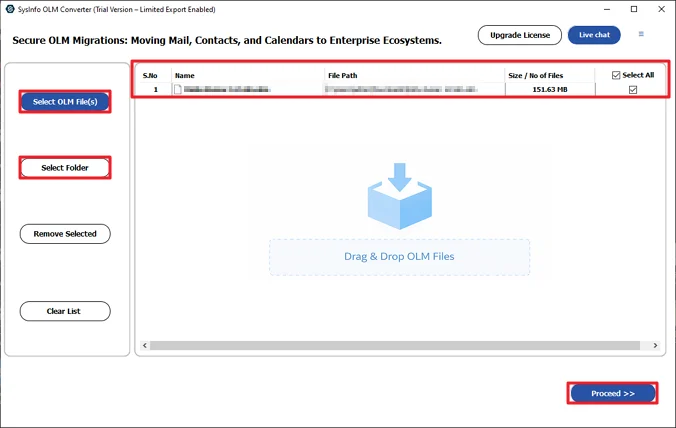
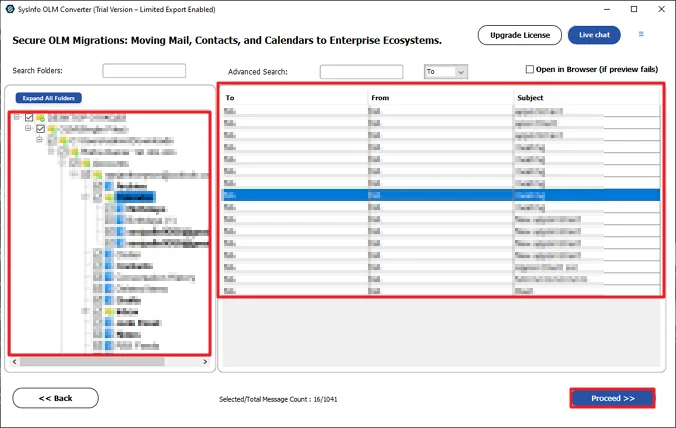
- Preview and select files, and click Proceed.
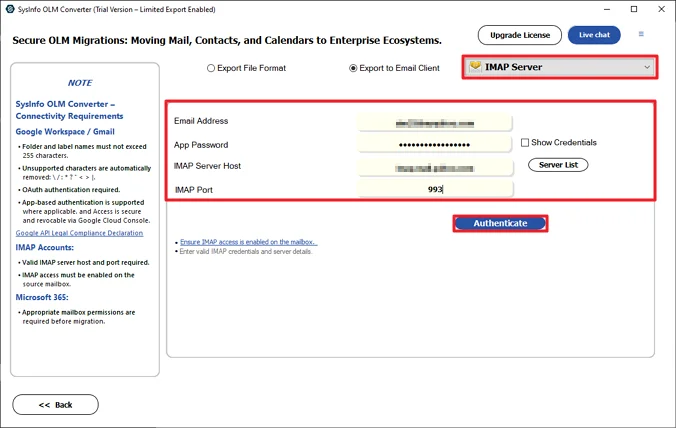
- Choose IMAP and log in with credentials.
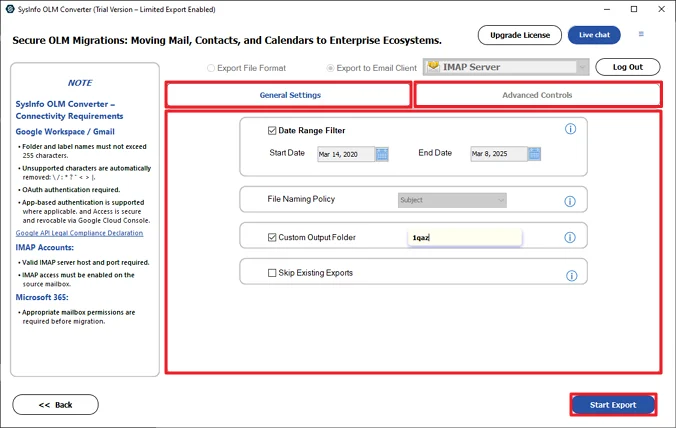
- Lastly, apply filters and click Start Export.
Successful User Case
William, an IT administrator, had several OLM files from different Mac users. When his company moved to an IMAP mail server, he first tried the manual method, but syncing folders took too long, and some data didn’t upload correctly.
He then used the MailConverterTools OLM Converter Tool to upload OLM to IMAP. After adding the OLM file and selecting IMAP, the emails were uploaded to the server with the folder structure and attachments intact.
Conclusion
If you only have a small OLM mailbox, you can use the manual method to import OLM to IMAP. In the case where you have a huge number of files, using an OLM to IMAP tool can make things easier. It moves the emails directly, keeps folders in place, and saves a lot of time. For people handling many mailboxes, it’s usually the simpler option.
Frequently Asked Questions
Q.1 Which is the Best Tool to Import OLM to IMAP?
Ans: The MailConverterTools OLM Converter Tool is a practical option for importing OLM files to an IMAP account. It allows you to load OLM files, preview the data, and upload emails directly to the IMAP server without going through the manual drag-and-drop process.
Q.2 Is It Safe to Import OLM Emails to IMAP?
Ans: Yes, it is safe when the process is done correctly. Using a reliable tool helps keep the original emails, folder structure, and attachments intact during the transfer to the IMAP server.
Q.3 Is It Possible to Upload OLM Files to IMAP in Bulk?
Ans: Yes. With the MailConverterTools OLM Converter Tool, you can add multiple OLM files and upload them to an IMAP account. This makes it easier to handle large amounts of mailbox data at once.
Q.4 What Advantages Does a Professional MailConverterTools OLM Converter Provide?
Ans: A professional tool simplifies the whole process. It lets you preview OLM data, upload emails directly to IMAP, apply filters, and keep folders and attachments organized. This saves time compared to doing everything manually.
About The Author:

Meet Amit, an experienced SEO expert and content planner. He uses his creativity and strategy to create content that grabs attention and helps brands reach their goals. With solid skills in digital marketing and content planning, Amit helps businesses succeed online.
Related Post