-
Written By Amit Chandel
-
Updated on December 11th, 2025
Best Way to Migrate Hotmail(Outlook.com) to IMAP Server
Marcus Kim Query:
I need to move my company’s emails from Hotmail to our new IMAP server for better control, but I’m worried about data loss and employee downtime during the transition. Is there a way to complete this migration safely and seamlessly without losing any critical messages?
You have been using Hotmail for your business communication for a very long time. However, now your marketing team is experimenting, and they are looking for a few key features, such as Email tracking, Ticketing systems, & Team inboxes. Moreover, Hotmail fails to provide these. On the other hand, other email clients come with multiple features like email tracking, ticketing systems, & team inboxes. However, to utilize these different features of the email client, you need to connect your Hotmail account to an IMAP server. Therefore, the best way to boost your marketing team will be to migrate Hotmail to IMAP.
Thus, in this blog, we will cover the most secure ways to move your Hotmail account data into the IMAP server. This blog will cover the manual & professional Hotmail Backup Tool step by step in detail. Before that, we will learn why many businesses keep their email data in an IMAP Account.
Why Businesses Migrate Outlook.com to IMAP?
IMAP (Internet Message Access Protocol) is the standard protocol for synchronizing emails across multiple devices. Moreover, it ensures that all actions (reading, deleting, organizing) are reflected on the mail server and all connected clients. Here are the niche reasons a business might rely on IMAP:
- Cost Control: Using basic, inexpensive IMAP hosting instead of a full Microsoft 365 license.
- Server Independence: To add to this, a need to host email on a highly specific, non-Microsoft server environment.
- Niche Operational Needs: Highly specific scenarios where only basic email access without contacts/calendars is required.
- Intermediary Step: Additionally, using IMAP as a temporary protocol during a complex migration process to Outlook.com
These were a few reasons to migrate. Next, we will divide this migration into 02 sections:
- Premigartion Checklist
- Migration Prep (Migration Methods)
Checklist to Migrate Hotmail to IMAP (Premigration)
- Enable 2FA on the Hotmail account
- To continue, generate an App Password in security settings
- Clean up the mailbox (delete unnecessary emails)
- Export Hotmail Mailbox as a backup
- Save important emails locally (PST/MBOX)
- Plus, note down email rules/filters
- Verify the destination account has enough storage
- Schedule migration during off-peak hours.
Most Secure Ways to Transfer Hotmail Emails to IMAP
Now that we have completed the prerequisites to import your Hotmail emails. Atto this stage, we will walk you through the different ways to perform this migration in a step-by-step guide.
Way 1. Migrate Hotmail to IMAP with IMAP-Supported Email Client
This method works best when you have a very small amount of Hotmail Data. Here, we will use IMAP-supported email clients as a bridge (Outlook, Mozilla Thunderbird, Apple Mail, Windows Mail).
- Open your preferred IMAP-supported email client.
- Then, navigate to →Account Settings &
- Once done, choose IMAP as the incoming mail protocol.
- Further, enter your Hotmail login details (email & app password if 2FA is enabled).
- And, use the following IMAP configuration settings:
(Here, we have used Outlook as the IMAP-supported Email Client.)
-
- Incoming Server: imap-mail.outlook.com
- Port 993 and Encryption SSL/TLS
-
- Outgoing Server: smtp-mail.outlook.com
- Port 587 and Encryption STARTLS
- Once the account is added, all Hotmail emails will start syncing to the IMAP client.
Now, you can move/copy emails into any folder or IMAP server you want. This free method for Outlook.com to IMAP migration requires no third-party tool. However, it is very slow for large mailbox synchronisation and requires a stable internet connection. Moreover, users have limited control over selective migration.
Note: If you want to use other IMAP-supported email clients for this migration, here are the IMAP configurations below:
IMAP Configuration Settings Chart to Migrate Hotmail to IMAP
|
Email Service |
IMAP Server |
IMAP Port |
IMAP Security |
SMTP Server |
SMTP Port |
SMTP Security |
|
Outlook / Hotmail / Live.com |
imap-mail.outlook.com |
993 |
SSL/TLS |
smtp-mail.outlook.com |
587 |
STARTTLS |
|
Gmail |
imap.gmail.com |
993 |
SSL/TLS |
smtp.gmail.com |
587 |
STARTTLS |
|
Yahoo Mail |
imap.mail.yahoo.com |
993 |
SSL/TLS |
smtp.mail.yahoo.com |
587 |
STARTTLS |
|
Zoho Mail |
imap.zoho.com |
993 |
SSL/TLS |
smtp.zoho.com |
465 / 587 |
SSL/TLS or STARTTLS |
|
iCloud Mail |
imap.mail.me.com |
993 |
SSL/TLS |
smtp.mail.me.com |
587 |
SSL/TLS |
|
AOL Mail |
imap.aol.com |
993 |
SSL/TLS |
smtp.aol.com |
587 |
STARTTLS |
|
Proton Mail (via Proton Mail Bridge) |
127.0.0.1 (Bridge) |
1143 |
STARTTLS
|
127.0.0.1 (Bridge) |
1025 |
STARTTLS |
|
cPanel / Hostinger / Shared Hosting IMAP |
mail.yourdomain.com |
993 |
SSL/TLS |
mail.yourdomain.com |
465 / 587 |
SSL/TLS or STARTTLS |
|
FastMail |
imap.fastmail.com |
993 |
SSL/TLS |
smtp.fastmail.com |
465 / 587 |
SSL/TLS or STARTTLS |
Way 02. Migrate Hotmail Emails to IMAP with Email Migration Settings
This method is designed to directly move your Hotmail.com data to another email provider (Zoho, Gmail via IMAP, Hostinger, ISP mail, or business IMAP servers) via IMAP. Here we will use the new email’s Admin Panel for Outlook.com to IMAP migration.
- Firstly, log in to your new email service.
- To proceed further, go to its Admin Panel or Migration settings.
- After that, select the IMAP migration option.
- Now, put your Hotmail email address and app password.
- Thereafter, add Outlook IMAP server details.
- Further, choose the data/ folder to move to another Email Client.
- To start migration, click OK.
This is a direct way for IMAP-to-IMAP transfer. In continuation, you can do bulk migration with this process. However, it is very time-consuming and technical. Moreover, some hosting providers limit IMAP bandwidth & require admin access for business accounts.
Way 03. Migrate Outlook.com to IMAP in Minutes
MailConverterTools Hotmail Backup Software is the most recommended way to move your Hotmail data to IMAP. Especially for a large mailbox, multiple accounts, or no technical experience. This tool is built with multiple latest filters to ease your migration process. Post migration, you can get a detailed log report of your migration that helps you to audit your data.
Simplified Steps to Migrate Hotmail to IMAP
- Launch the backup tool as an administrator.
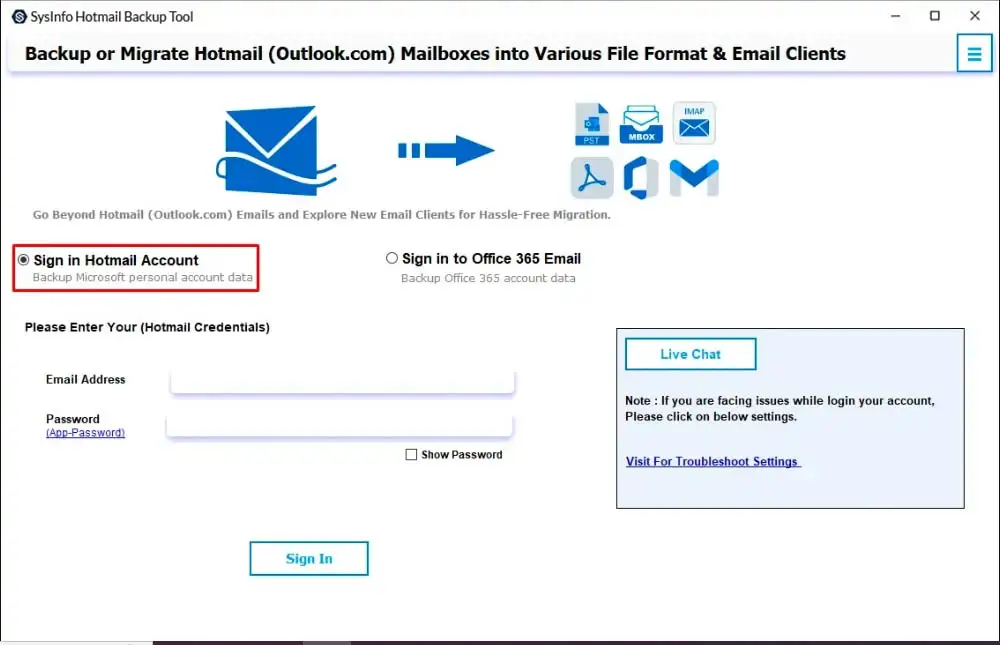
- Thereafter, enter your Hotmail credentials to access your source mailbox.

- To continue, choose the specific emails or folders you want to back up.
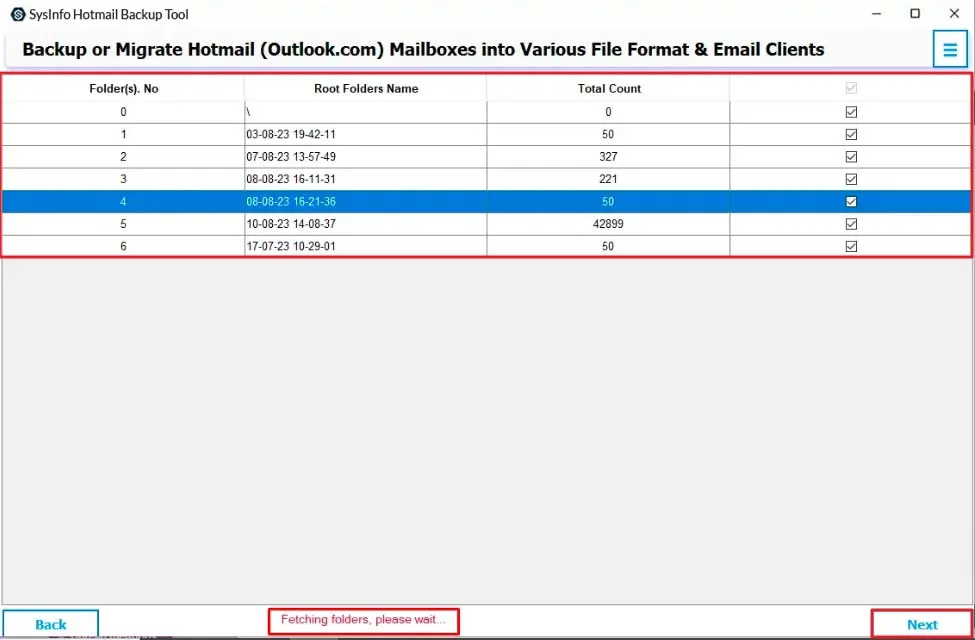
- After that, select IMAP and sign in securely with your Email client details.
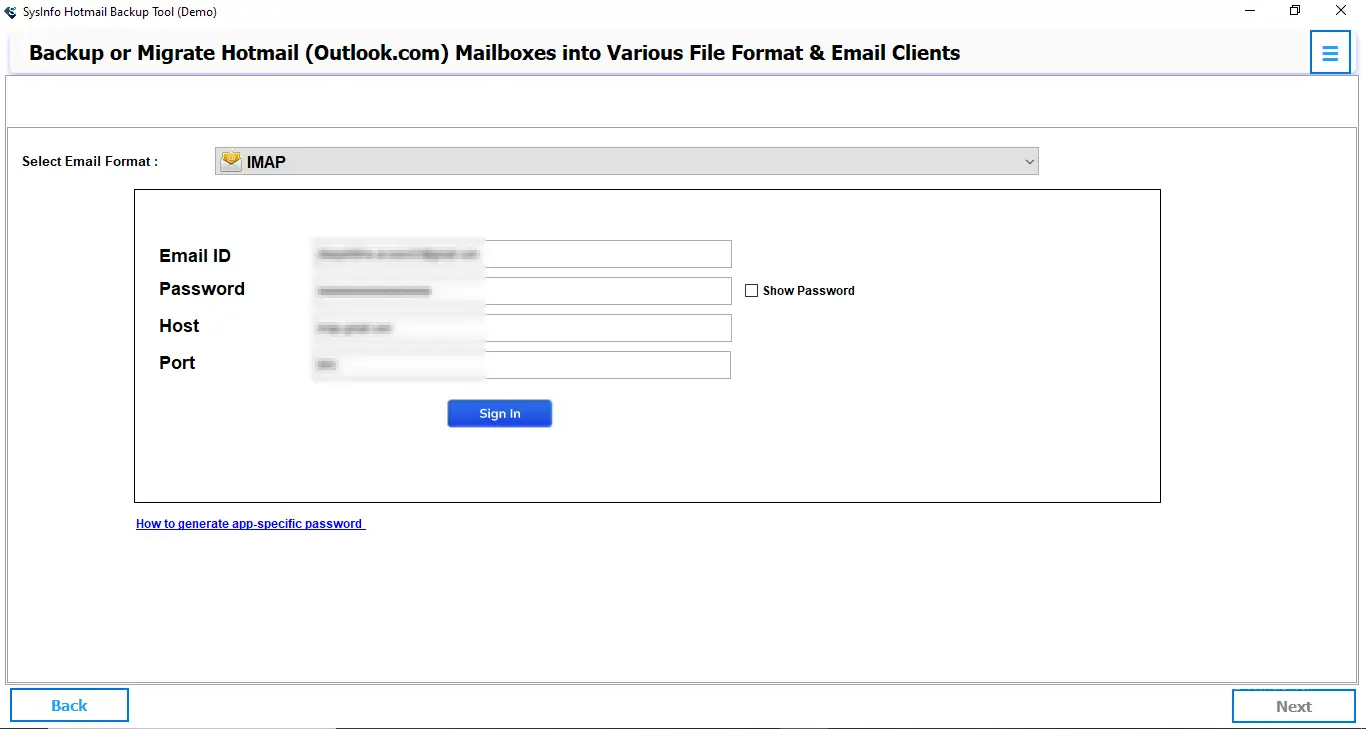
- Now, apply any required filters, then click Next.
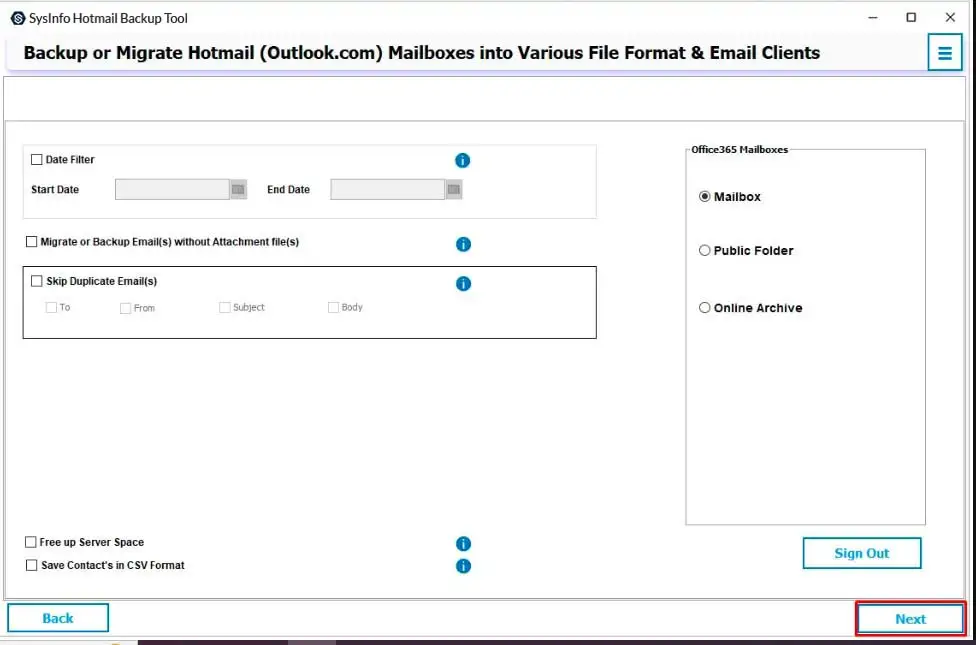
- Lastly, press Ok to start the migration to the IMAP Account.
With these 06 simple steps, you have effortlessly migrated your Hotmail email data to any desired IMAP server. In addition to IMAP, this powerful utility allows users to Transfer Emails from Hotmail to Gmail and many other email clients directly. Besides that, this tool allows you can effortlessly export Hotmail Emails to PST, PDF & other file formats to save the Hotmail data locally.
Strategic Verdict
It is a critical business decision to choose an appropriate migration pathway. Because the process to migrate Hotmail to IMAP directly impacts data governance, operational resilience, and resource allocation. While native methods offer basic functionality, they introduce significant execution risk and hidden costs that are incompatible with enterprise-scale initiatives.
However, for a secure, efficient, and accountable migration, the dedicated enterprise tool represents a superior strategic investment. Moreover, it provides a controlled environment that ensures data integrity, regulatory compliance, and minimal business disruption.
FAQs
Q1: How do I migrate multiple Hotmail accounts to an IMAP server?
Ans: The MailConverterTools Hotmail Backup Tool allows batch processing. Connect each source account securely. Select your target IMAP server. Perform a centralized, simultaneous transfer.
Q2: Will my email attachments migrate when moving Hotmail to IMAP?
Ans: Yes, attachments migrate fully. A quality tool preserves the complete email structure. This includes all files, metadata, and folder organization intact.
Q3: Is it safe to migrate Outlook.com to IMAP manually?
Ans: Not for business data. Manual methods are prone to errors. They risk data loss and incomplete transfers. They also lack security audits and encryption.
Q4: Which is the best tool to Migrate Hotmail to IMAP?
Ans: MailConverterTools Hotmail Backup Software is the best tool to migrate Hotmail to IMPA. It ensures security with encryption. It offers speed, detailed reporting, and hassle-free bulk migration.
About The Author:

Meet Amit, an experienced SEO expert and content planner. He uses his creativity and strategy to create content that grabs attention and helps brands reach their goals. With solid skills in digital marketing and content planning, Amit helps businesses succeed online.
Related Post