-
Written By Amit Chandel
-
Updated on March 28th, 2026
Convert OLM to PST: No Attachments Lost (Step-by-Step Guide)
User Query: I’ve got some OLM files from my Mac, but now I need to open them in Outlook on Windows. I found out that Windows uses PST files instead, and honestly, I’m a bit confused about how to convert them without messing anything up. Is there an easy way to do this?
OLM files are primarily for Mac Outlook, while PST files work on Windows. That’s why people need to convert OLM to PST. This conversion process may seem tricky, but once you know it, it becomes very easy. In this blog, we’ll go through a few simple manual methods and use the professional MailconverterTools OLM Converter Tool to help you without too much hassle.
Export OLM to PST: Quick Answer
If you want a quick way to convert the OLM to PST, you’ve got two options. You can try the manual methods to move emails step by step. But if you want a quick and reliable way for this conversion, then you should use the MailConverterTools OLM Converter Tool. You just add the OLM file and convert it to PST in a few clicks. It saves time and keeps your emails and folders in place in most cases.
Common Reasons to Convert Mac Outlook OLM to PST
- Moving from Mac to Windows, and needing emails to work smoothly in Outlook without compatibility issues.
- Sharing mailbox data with teammates or clients who mostly use Outlook on Windows systems.
- Keeping a backup of important emails in PST format for easier access and long-term storage.
- Opening old Mac Outlook data on a Windows PC when the original device is no longer available.
How to Convert OLM to PST Using Manual Methods?
These methods can work, but they need a bit of patience and may not always give perfect results, especially if you have a lot of data. Still, if you just want a free way to try things out.
1) Add Your Mac Account in Outlook to Export OLM to PST
- Firstly, start Outlook on Windows, and then click File.
- Hit Add Account and sign in with the same email you used on Mac.
- Give it a few minutes so all emails sync properly (this part can take time).
- Once everything shows up, go back to File and open Account Settings.
- You can restart Outlook if things look stuck or incomplete.
- Now, File > Open & Export > Import/Export.
- Choose Export to a file, then select Outlook Data File (.pst).
- Pick the folders or full mailbox you want to save.
- Choose where to save the PST file and finish the process.
2) Drag & Drop to Convert OLM File to PST
- Open Outlook on your Mac and select a few emails you want to move.
- Drag them to your desktop; they’ll usually save as EML files.
- Move those files to your Windows system (USB, drive, anything works).
- Open Outlook on Windows and create a new folder for these emails.
- Now drag those EML files into that folder. Sometimes it works, sometimes it doesn’t.
- If they open fine, you can later export that folder to a PST using Import/Export.
Limitations
- These methods don’t really convert OLM files directly, so the whole process feels a bit roundabout.
- Some emails or attachments might not show up properly after moving them.
- The drag-and-drop trick doesn’t always behave the same way on every system.
- Folder structure can get messy or change during the transfer.
- Handling a large number of emails this way quickly becomes tiring and time-consuming.
- You need both Mac and Windows access, which not everyone has available.
- It often takes a few tries to get everything in place without missing anything.
Comprehensive Solution to Export OLM to PST Simply
You can use the MailConverterTools OLM to PST Converter Tool to avoid the difficulties with manual methods. It’s a simple way to move your OLM data into PST format. The tool lets you load your OLM file and convert it directly. It keeps emails, attachments, and folders as they are in most cases. There’s no strict file size limit, so larger files can also be handled. Additionally, you can use this tool to convert OLM to MSG and many other files. If you want to use OLM files in Thunderbird, you can convert OLM to MBOX as well.
Steps to Convert OLM to PST Without Outlook
- Download the OLM Converter Tool.
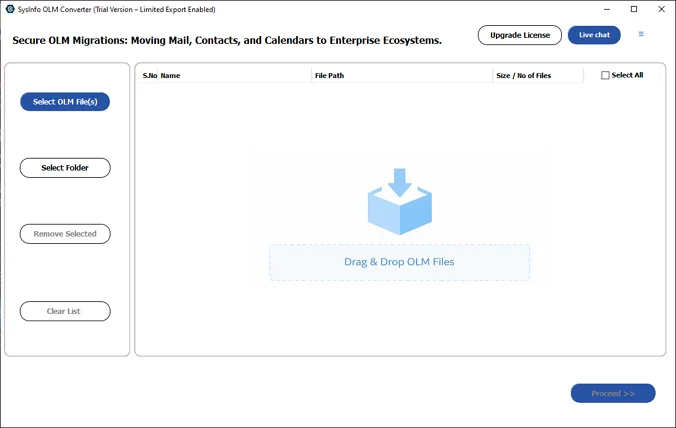
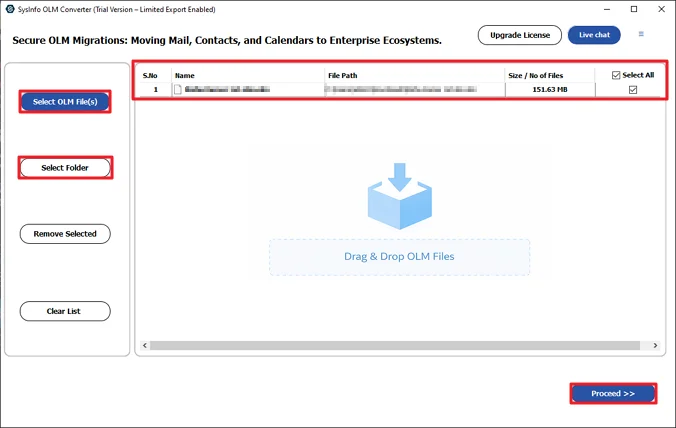
- Then, add the OLM files and click Proceed.
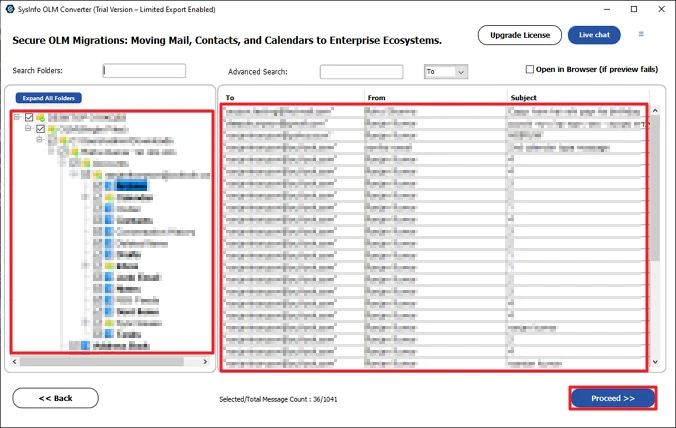
- Preview and select files to convert and click Proceed.
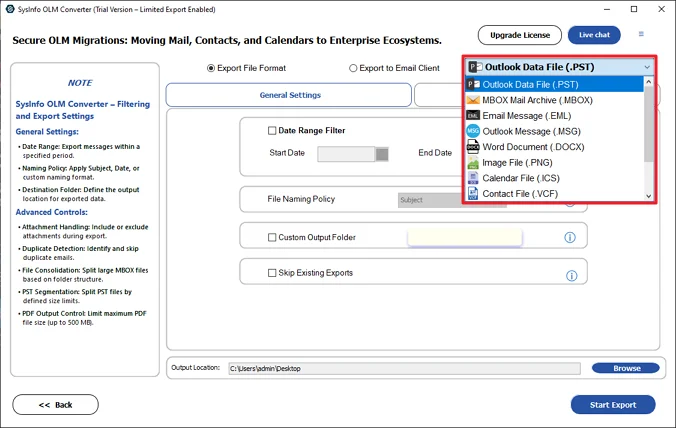
- Choose the Outlook PST file format from the list.
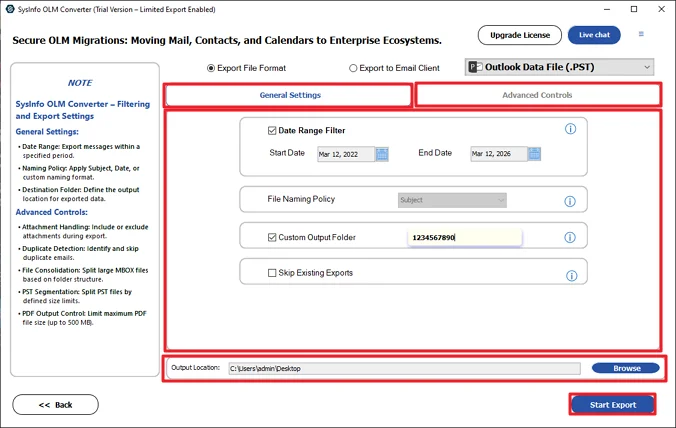
- At last, apply filters, set the path, and click to Start Export.
Successful User Case
I had some old OLM files on my Mac that I needed on my Windows laptop. I first tried doing it manually, but honestly, it didn’t go well. The emails took a long time to sync, and a few of them just didn’t show up. Even some attachments were missing, so I kind of gave up on that way.
After that, I tried the MailConverterTools OLM to PST Converter. The steps were pretty simple. I added the file, saw the preview, and ran the conversion. It finished without any issues.
When I opened the PST file in Outlook on Windows, my emails were there in the same folders. Attachments were also fine this time. It just felt easier compared to what I was trying before.
Conclusion
To sum it up, you can convert OLM to PST using the manual method or a professional tool. The manual way works, but it takes time and involves a few extra steps between Mac and Windows. If you don’t want to deal with all that, using the MailConverterTools OLM Converter Tool is a lot simpler. It does the job in a few clicks and usually keeps your emails, contacts, and other data in place.
Frequently Asked Questions
Q.1 What is the best tool to convert OLM to PST?
Ans: You can use the MailConverterTools OLM to PST Converter Tool. It lets you add OLM files and convert them to PST without going through manual steps.
Q.2 Can I convert corrupted OLM file to PST?
Ans: The tool can handle OLM files and convert their data, but the results with corrupted files can vary. You can try adding the file and check what data gets recovered during preview.
Q.3 Can I convert multiple OLM files to PST in batch?
Ans: Yes, the MailConverterTools OLM Converter Tool allows you to add more than one OLM file and convert them together instead of doing it one by one.
Q.4 Is there a free way to convert OLM to PST?
Ans: You can try manual methods for free, like syncing your account or using drag and drop. But they take time and may not always give complete results.
About The Author:

Meet Amit, an experienced SEO expert and content planner. He uses his creativity and strategy to create content that grabs attention and helps brands reach their goals. With solid skills in digital marketing and content planning, Amit helps businesses succeed online.
Related Post