-
Written By Amit Chandel
-
Updated on January 27th, 2026
Best Way to Convert OST to DOC in Simple Steps
King-Shuk-Miller Query:
“Hi, I am from China and have been accumulating OST archives for a long time now. Since my Outlook profile is cluttered, and my OST emails are crucial, I wish to save OST emails to DOC format for easy access even after I clear the data. Suggest to me simple and efficient ways for the conversion without any losses.”
OST (Offline Storage Table) files are bound with the Outlook and Exchange profiles. They contain the data of the Exchange mailboxes and function as their cache replica, accessible offline. However, they are not directly accessible outside the MS Outlook environment. Thus, users demand to convert OST to DOC format when they need to present email records as readable data across platforms. This blog provides a glimpse of both the manual method and a professional OST to PST Converter for this OST to DOC conversion.
Top Reasons Why Users Choose to Convert OST File to DOC
To optimize the workflow and communications, one must perform this file format change without any hassle. Word DOC provides numerous benefits over the OST format, such as:
- Can be stored, edited, printed, and shared without email client dependencies.
- Useful for legal, compliance, and long-term archival documentations for future use.
- Provides offline access and readability of data without Outlook.
- Readable, editable, and shareable email records with support for various applications.
- Helpful to non-technical users, stakeholders, and other concerned individuals for getting email information.
- Preservation of contextual clarity that is easier to review than raw files.
|
Convert OST to Word DOC: Challenges
|
How Individuals Convert OST to DOC for Free?
Users with a few OST emails manually convert data into DOC format directly through MS Outlook. The steps are:
- Open an active Outlook account with the profile containing OST emails.
- Then, select the email that you want to save as a Word DOC file.
- Further, choose it, go to the File tab, and click the Save As option.
- Pick the HTML or TXT format from the file types list.
- Next, pick a location to store, give the file a name, and click Save.
- Afterward, open the HTML or TXT file with Microsoft Word.
- Edit the changes, if any, and go to File and press Save As.
- Finally, select DOC format, pick a location, and click Save.
That’s how you convert emails from OST to DOC successfully. But this method has some limitations.
Why Not Use the Manual Approach?
Though this process is easy and free, it has the following cons:
- You need to repeat the steps for multiple files.
- Cannot perform bulk conversion in a single go.
- You require Outlook installed with an active profile.
- Time-consuming and error-prone with inconsistent formatting.
- Provides no advanced filter options for duplicates or attachments.
How Enterprises Convert OST to DOC Effortlessly?
Since there are difficulties with the OST file and the manual method has limitations too, it is better to use the MailConverterTools OST to PST Converter Software. This smart tool enables bulk conversion for large OST emails without the need for Outlook installation. Additionally, it has great support for all Outlook versions and can handle orphaned OSTs too. Moreover, it is equipped with unique features and filter options, ideal for all individuals, IT admins, business professionals, and enterprise users.
Tip: If you want to convert OST to Word with advanced customizations but without software installation, avail the One-Time Service.
Furthermore, check out the working of this software to learn how quickly and smoothly it functions. If satisfied, later download its Demo Version first for evaluation and conversion of upto 50 emails per folder at no cost.
Also Read: Convert OST to Text(TXT)
Best Way to Convert OST File to DOC
- Launch the OST to DOC Converter Tool and click Next.
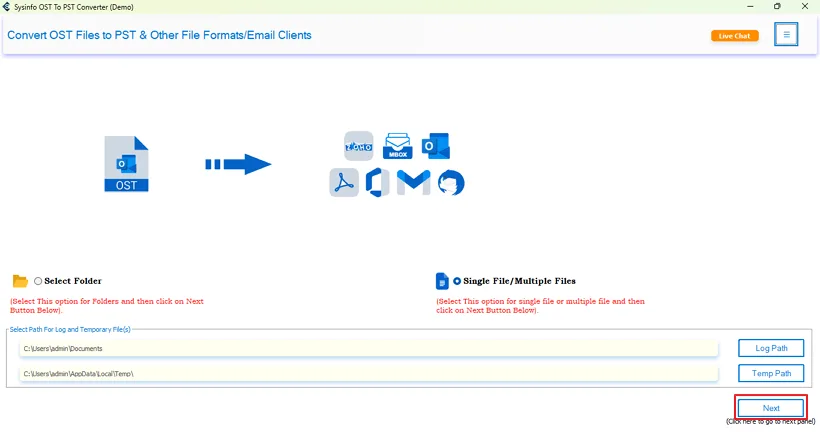
- Then, import your OST files into the software with Select File and tap Next.
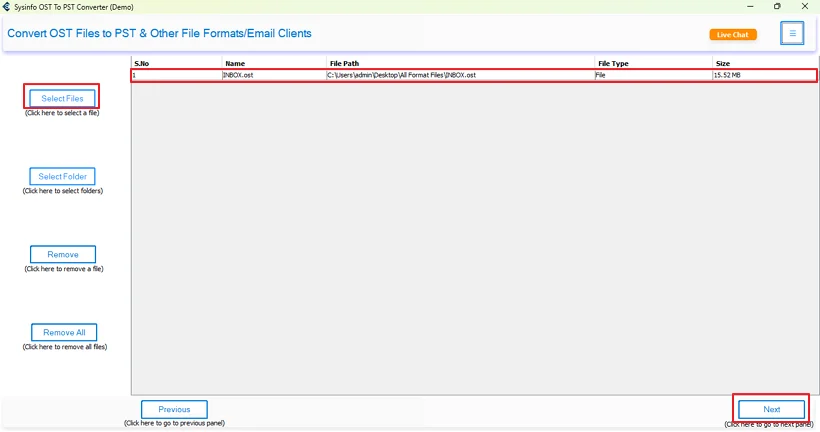
- After that, expand the tree view, select folders, preview them, and tap Next.

- Later, choose the DOC format from the list and apply the provided filters.
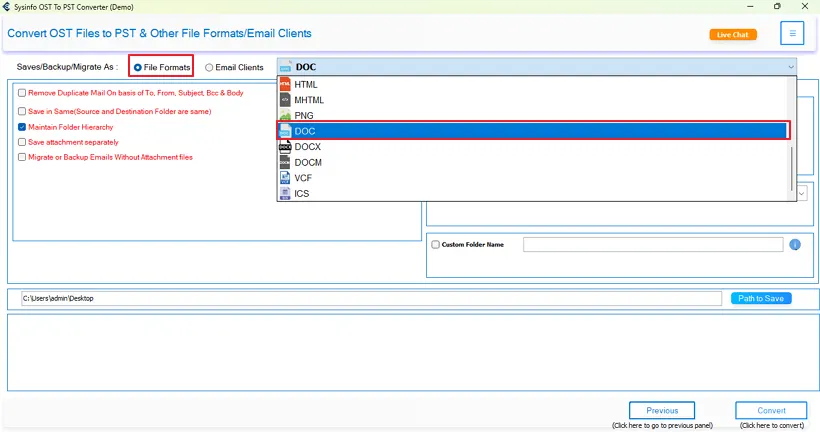
- In the end, specify a Path to Save Word file and tap Convert to finish.

Why Prefer Tool to Convert OST to DOC?
The tool specified here offers numerous benefits, such as:
- Remove duplicates from OST emails
- Allows migration with or without attachments
- Enables selective folder conversion within a specified date range
- Option to bulk convert single or multiple OST emails of any size
- Requires no Outlook and has many other saving format options
- Maintains folder hierarchy and preserves formatting and metadata
Client Testimonials
“We needed a secure and flexible way to convert multiple OST mailboxes into Word DOC for internal audits. The conversion process with OST File Converter was straightforward, preserved original email formatting, and worked even without Outlook. It significantly reduced our manual effort and time for the conversion.”
-Michael Martinez, IT Administrator
“Our team was dealing with orphaned OST files after an Exchange crash. The decision to directly convert emails from OST to DOC with the OST to PST Converter Tool helped us retain critical communication records in a readable and shareable form. The bulk processing capability and easy-to-use interface made it practical for large datasets with attachments.”
-Sophia Anderson, System Manager
Conclusion
When you need your email data to be accessible, scalable, shareable, and legally presentable. Then, you must convert OST to DOC either with the manual method or the professional OST to DOC Conversion Tool. The former one is suitable only when you have a few emails and no deadline. But the latter one is suitable in all situations and helps you perform conversion with precision, no loss, and zero Outlook dependency. Isn’t it worth it, and also, you get expert support 24*7. What else is required to ensure business operations continuity for the long tenure?
Frequently Asked Questions
Q1: Can I convert OST File to DOC without Outlook installed?
Ans. Yes, using the MailConverterTools OST to PST Converter Software, you can perform the conversion without Outlook installed.
Q2. Is there a manual way to save OST email to a DOC file?
Ans. You can first save OST emails as HTML or TXT file by Outlook and then, later, as DOC with Word.
Q3. Can I convert multiple OST emails to DOC in bulk?
Ans. Yes, the OST to PST File Converter Software allows you to perform bulk OST to DOC conversion without restrictions.
Q4. Will the email formatting be preserved when converting OST to DOC?
Ans. Save OST emails to DOC manually will compromise the formatting. However, with the specialized software, it is kept intact as the original email.
Q5. What if my OST file is corrupted or not opening?
Ans. First, use an OST Recovery Tool to fix your OST file if it is corrupted or not opening.
Q6. Which is the best tool to convert OST to DOC easily?
Ans. The best tool for the conversion is none other than the OST to PST Converter by MailConverterTools. It has all the essential features and works flawlessly to convert large OST emails in no time.
About The Author:

Meet Amit, an experienced SEO expert and content planner. He uses his creativity and strategy to create content that grabs attention and helps brands reach their goals. With solid skills in digital marketing and content planning, Amit helps businesses succeed online.
Related Post