-
Written By Amit Chandel
-
Updated on December 25th, 2025
Best Way to Transfer Email from GoDaddy to Gmail Account
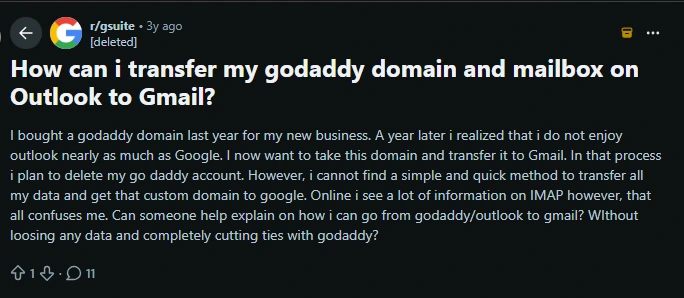
Many people transfer email from GoDaddy to Gmail because Gmail is free, while GoDaddy costs money. But moving your emails from GoDaddy to Gmail isn’t always simple. This article explains step-by-step how to move your emails and attachments without any hassle. You can use manual methods or try a special tool called GoDaddy Email Backup Tool to make the process easier.
Why User Transfer GoDaddy Email to Gmail?
- GoDaddy email costs money every month, but Gmail is free for most users. That’s a big reason why folks want to switch.
- Gmail gives you way more storage than GoDaddy. When your GoDaddy inbox fills up, emails can bounce back.
- If you use Google Drive, Calendar, or Docs, Gmail fits right in. It makes handling everything from one place much easier.
- When your GoDaddy mailbox is full, you might miss important emails. Gmail’s bigger limits help keep that from happening.
- Gmail works on any device and supports lots of apps, so you can check your email on the go without trouble.
- Since lots of people use Gmail for personal email, switching business mail there makes things simpler by keeping it all in one place.
Manual Approaches to Transfer Email from GoDaddy to Gmail
Users can move their emails manually without extra software. Here are two common ways to do it:
Method 1: Import Emails Using Gmail’s Built-In Feature
Gmail offers an easy tool called “Import Mail and Contacts” that lets you bring your GoDaddy emails into your Gmail account in one go. Here’s how to use it:
Steps to Import GoDaddy Email to Gmail:
- To begin with, log in to your Gmail account.
- Then, click the gear icon in the top-right corner and select See all settings.
- Thereafter, go to the Accounts and Import tab.
- Find the Import mail and contacts section and click Import from another address.
- After that, enter your GoDaddy email address and click Continue.
- Provide your GoDaddy login details and enter the GoDaddy POP server information.
- Choose what you want to import: emails, contacts, or both.
- Finally, click Start Import to begin the process.
Method 2: Forward Emails from GoDaddy to Gmail
If you only need to move a few emails, forwarding them manually might be quicker. Here’s what to do:
Steps to Migrate GoDaddy Email to Gmail:
- Firstly, log in to your GoDaddy email account.
- Then, open the email you want to send to Gmail.
- Click on the Forward button.
- After that, type your Gmail address in the recipient field.
- At last, hit Send to forward the email.
Limitations:
- When you use Gmail’s import feature, it only copies your emails and contacts one time; it won’t keep your accounts connected or synced after that.
- Any new emails arriving in your GoDaddy inbox won’t show up automatically in Gmail once the import is done.
- If you have a lot of emails, the import process can take quite a while to finish.
- Sometimes, slow internet or interruptions can cause the import to pause or fail before everything’s moved.
- Forwarding emails by hand is a slow process, especially if you have a bunch of messages to transfer.
Simple Way to Transfer Email from GoDaddy to Gmail
The GoDaddy Email Backup Tool makes the migration process smooth and stress-free. It allows users to move their GoDaddy emails to Gmail without errors and keeps the original folder structure unchanged. The tool supports complete mailbox backups and offers multiple file format options, giving users more control and flexibility. It also avoids duplicate emails during repeated backups and includes useful features like freeing up space on the mail server.
Steps to Forward GoDaddy Emails to Gmail:
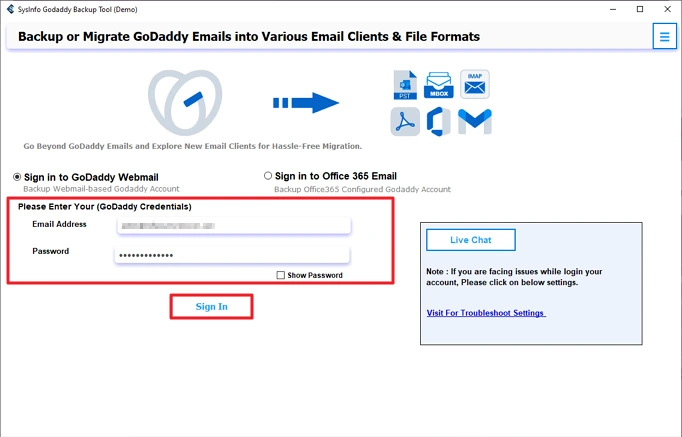
- Firstly, download the tool and log in with GoDaddy credentials.
- After that, choose the file to migrate and click Next.

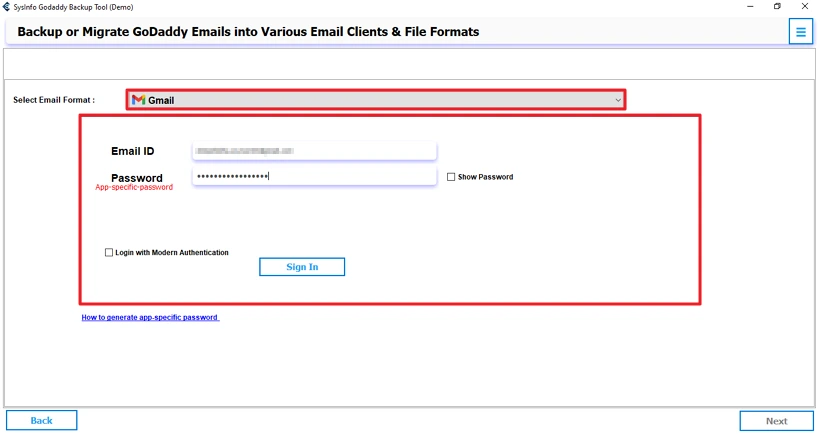
- Choose Gmail as an email client and log in with its credentials.
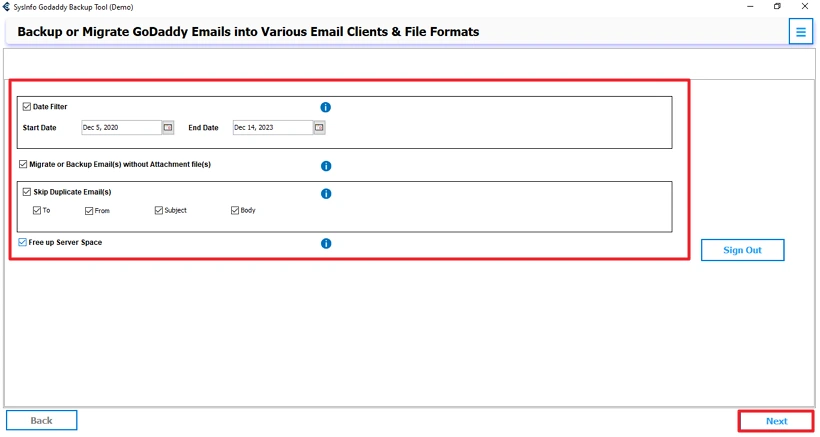
- Thereafter, apply the required filters and click Next to process.
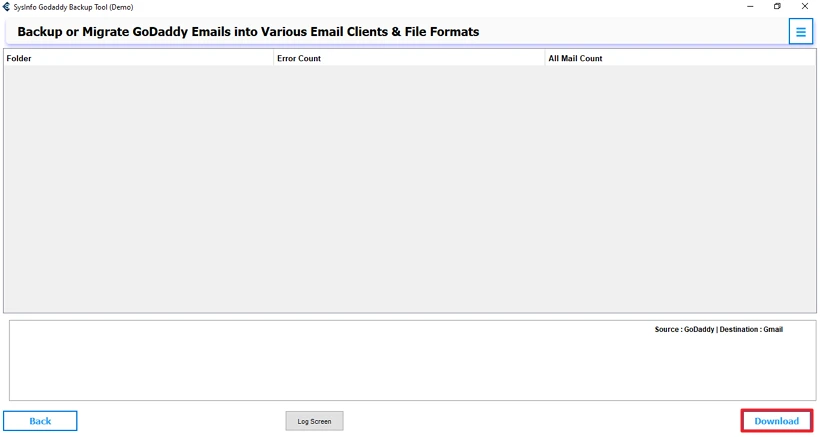
- Finally, click on the Download button.
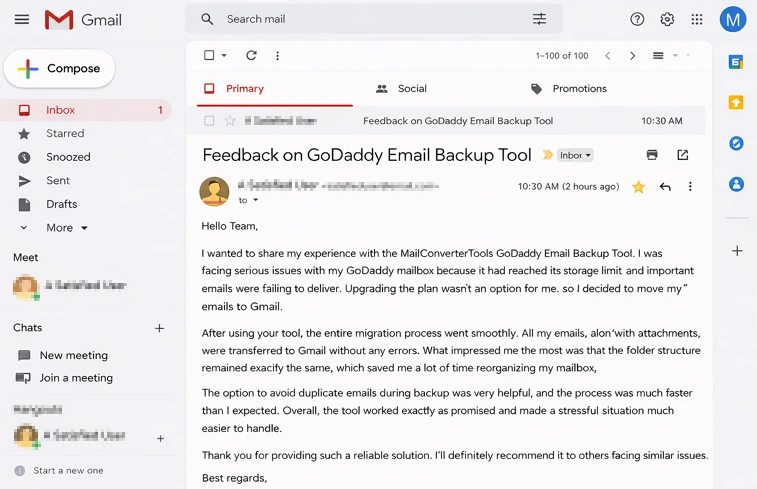
See What Our Users Said:
Conclusion
Transfer email from GoDaddy to Gmail helps you to manage storage space better. This guide provides the best way to migrate your GoDaddy emails to Gmail safely. You can choose the manual and professional methods according to your needs. If you have a limited number of files, then you can go with manual approaches. But if you want a fast, secure, and reliable way, then you should use the GoDaddy Email Backup Tool.
Frequently Asked Questions
Q1: Can I migrate GoDaddy Email to Gmail manually?
Ans: Yes, you can migrate GoDaddy emails to Gmail manually. Gmail provides an Import Mail and Contacts option, and you can also forward emails one by one. However, these methods work best only if you have a small number of emails and don’t need ongoing syncing.
Q2: Can I import GoDaddy Email to Gmail with Inbox folder only?
Ans: Yes, when using manual methods, Gmail mainly imports emails from the Inbox folder. Other folders or custom labels may not transfer properly. To migrate all folders with the same structure, using a professional tool is a better option.
Q3: Will I lose any data during the migration?
Ans: With manual methods, there is a risk of missing emails, attachments, or folder structure. Using a reliable tool like the MailConverterTools GoDaddy Email Backup Tool helps ensure that emails, attachments, and folders are transferred safely without data loss.
Q4: How long does it take to transfer GoDaddy email to Gmail?
Ans: The time required depends on the size of your mailbox and your internet speed. Manual imports can take several hours or even longer for large mailboxes. Automated tools usually complete the migration faster and more efficiently.
Q5: Do I need technical skills to perform GoDaddy to Gmail migration?
Ans: Basic technical knowledge is enough for manual methods, but the steps can still be confusing for some users. Professional tools are designed with a user-friendly interface, making them suitable even for non-technical users.
Q6: Which is the best tool to transfer email from GoDaddy to Gmail?
Ans: The MailConverterTools GoDaddy Email Backup Tool is one of the best options. It allows you to transfer complete mailboxes with attachments, keeps folder structure intact, avoids duplicate emails, and offers a smooth and secure migration process.
About The Author:

Meet Amit, an experienced SEO expert and content planner. He uses his creativity and strategy to create content that grabs attention and helps brands reach their goals. With solid skills in digital marketing and content planning, Amit helps businesses succeed online.
Related Post