-
Written By Amit Chandel
-
Updated on January 29th, 2026
Best Methods to Convert CDR to SVG for Vector Graphics
User Query: What makes CDR files hard to access in other programs, and will converting them to SVG make them usable everywhere? If yes, then if anyone has ways for that conversion, please share to me.
Accessing a CDR file outside its supporting platform is difficult. And it feels like converting CDR to SVG is the only option if you want to open a CDR file outside CorelDRAW. Working with design files can get annoying fast. In this blog, we’ll look at why people convert CDR to SVG, the basic ways to do so, and when using the MailConverterTools CDR Converter Tool actually saves time rather than creating more work.
Why People Convert CDR File to SVG?
- CDR is a Corel-only format, so most other software just doesn’t recognize it.
- CorelDRAW is paid software, and many designers or clients don’t use it.
- Sharing CDR files becomes a problem when the other person can’t open them.
- You can open SVG in browsers, design apps, and even simple editors.
- Different versions of CorelDRAW can also create problems.
- Websites support SVG directly.
Manual Method to Convert CDR to SVG Format Easily
If you already have CorelDRAW installed and only need to convert a few files. But it works best when you’re handling single files and ready for repetitions for each file.
Easy Steps to Export CorelDRAW File to SVG
- Open CorelDRAW on your computer.
- Load the CDR file you want to convert.
- Click on the File menu.
- Choose Save As from the list.
- Select SVG as the output format.
- Click Save to finish.
Limitations
- Files have to be saved one by one.
- Not practical for bulk conversions.
- Large or complex files may not export properly.
- Some design elements can change after saving.
- Older CorelDRAW versions may cause issues.
- No automation, everything is manual.
- Easy to make mistakes when repeating the steps.
Manual Vs Tool Method: CDR to SVG Conversion
|
Aspect |
Manual Method |
CDR Converter Tool |
|
Best for |
Mainly for one or two files, so it’s manageable |
However, better for multiple files or bulk conversion |
|
Software required |
Since CorelDRAW must be installed, it limits who can use it |
On the other hand, no CorelDRAW is needed |
|
Time and effort |
As the number of files grows, it takes much more time |
Meanwhile, it saves time by converting all at once |
|
Ease of use |
It’s simple for a few files, but repetitive for many |
Conversely, it’s easier for bulk tasks |
|
Risk of errors |
Therefore, there’s a higher chance of mistakes, especially with complex designs |
Whereas it offers lower risk and more consistent results |
|
Convenience |
Because each file requires manual steps, it can be tedious |
In contrast, it uses an automated process |
|
When to choose |
So, use this for quick, small jobs if CorelDRAW is available |
Otherwise, choose the tool for large batches or if you lack a CorelDRAW license |
Advance Method to Convert CDR to SVG for Vector Graphics
The MailConverterTools CDR Converter lets you convert many CDR files into SVG at the same time. The files stay the same after conversion, with no missing content. This tool is available for both the system, Windows and Mac systems. You can also open and view CDR files without CorelDRAW.
CDR Convert to SVG Using Tool
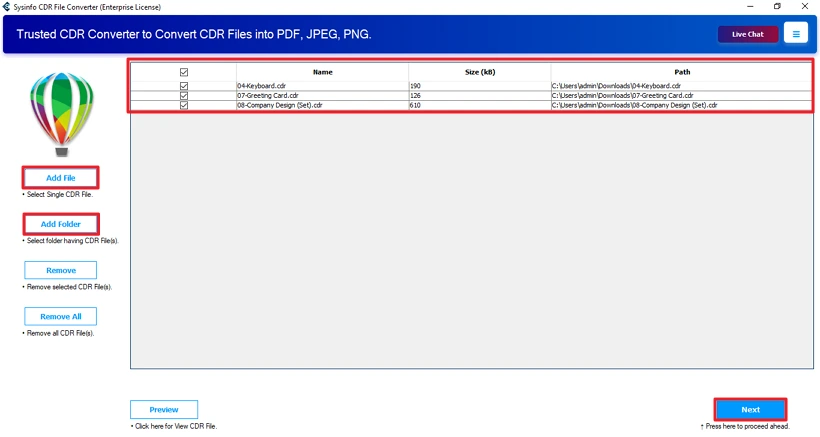
- Firstly, download the MailConverterTools CDR Converter Tool.
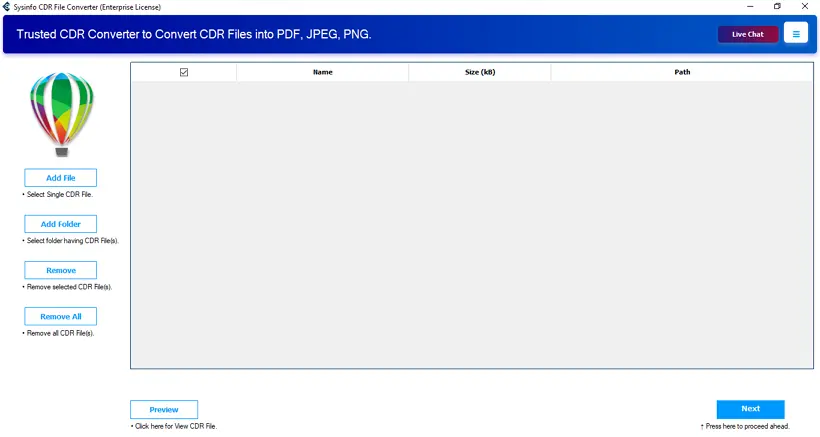
- Then, add your files in CDR format and hit Next.
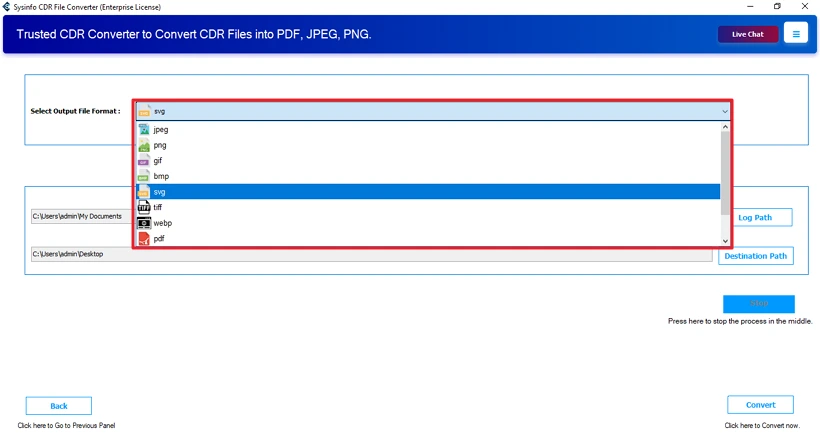
- Furthermore, choose SVG format.
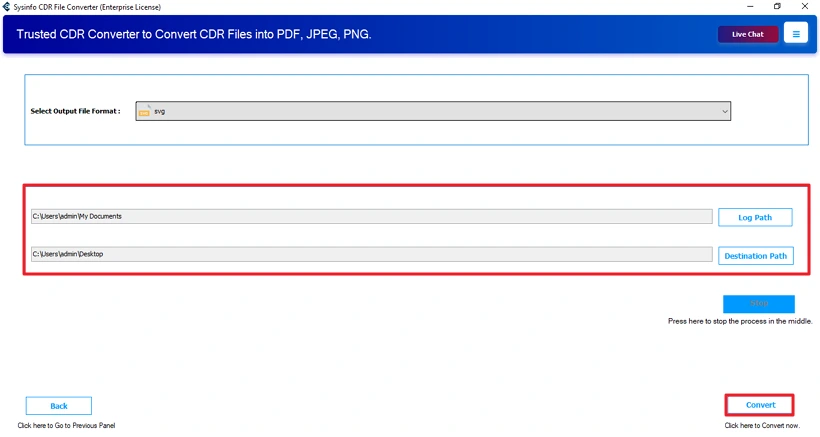
- Finally, set the path and click Convert.
Successful User Case :
A small design studio had a folder full of old CDR files. The problem was that most of their current team no longer used CorelDRAW. Manually converting each file wasn’t realistic.
They decided to try the MailConverterTools CDR Converter to handle everything at once. Using the tool, they added all the CDR files in one go and converted them to SVG in a single process. The designs stayed intact after conversion, with no missing elements or layout issues.
Conclusion
To conclude, converting CDR files to SVG makes things a lot easier in the long run. SVG files open almost everywhere and work better for websites. SVG gives you more flexibility in your tasks, no matter whether you are designing some graphics or need it for web projects. You can pick any method to convert CDR to SVG that feels easiest for you.
Frequently Asked Questions
Q1: Can I convert a CDR file to SVG without installing CorelDRAW?
Ans: yes by using the MailConverterTools CDR Converter, you can convert your CDR files without CorelDRAW. It maintains more efficiency in the results than the manual methods.
Q2: Can I batch convert multiple CDR files to SVG at once?
Ans: yes using a professional tool called CDR Converter by MailConverterTools, you can convert multiple CDR files at once. This tool does not harm the formatting and layout.
Q3: Are text and fonts preserved when converting CDR to SVG?
Ans: With the manual methods, you may lose the text and fonts. But a professional tool like MailConverterTools CDR Converter Tool preserves the image text and fonts.
Q4: Can complex gradients and transparencies be converted from CDR to SVG?
Ans: Manually, no, but using a smart utility, I would say yes. The professional tool can convert gradients and transparencies from CDR to SVG.
Q5: Which is the best tool to convert CDR to SVG?
Ans: Most professionals and experts advise using MailConverterTools CDR Converter Tool to convert your CDR file. It maintains efficiency and produces effective results.
About The Author:

Meet Amit, an experienced SEO expert and content planner. He uses his creativity and strategy to create content that grabs attention and helps brands reach their goals. With solid skills in digital marketing and content planning, Amit helps businesses succeed online.
Related Post