-
Written By Amit Chandel
-
Updated on February 5th, 2026
Complete Guide to Convert ICS to EML Files
User Query: Hi, I have a bunch of calendar files in Outlook saved as ICS. I want to turn them into EML files. I’m using both Mac and Windows. What’s the easiest way to convert the ICS file to EML?
A lot of people run into this problem when they try to use calendar files as email messages. ICS files are fine for events, but they’re not always easy to work with outside calendar apps. In this blog, we’ll look at a simple manual option and also talk about using MailConverterTools ICS File Converter to convert ICS to EML, if you want a quicker and cleaner result. The goal is to convert the files without losing any details and without encountering any errors.
Common Reasons to Convert ICS file to EML
- ICS files open only in calendar apps, which isn’t always convenient.
- EML files are easier to open in email programs.
- Converting makes it simple to share calendar details by email.
- EML files keep the information in a readable message format.
- Email platforms handle EML files better than ICS files.
- It helps store calendar events along with regular emails.
- Searching and managing files becomes easier after conversion.
DIY Approach to Convert ICS to EML File Easily
If there are just a couple of ICS files, you can handle them directly in Outlook without using anything extra. It’s okay for simple stuff.
Steps to Convert iCalendar to EML
- Start by installing and opening Microsoft Outlook on your computer.
- From the top menu, click File, then go to Open & Export.
- Choose the Import/Export option from the list.
- Select the option to import an iCalendar (.ICS) file.
- Browse your system and pick the ICS file you want to open.
- After the calendar entry loads in Outlook, go back to the File menu.
- Click Save As, choose EML as the file type, and save it to your system.
Limitations
- Some event info or formatting can look different after saving.
- Larger calendar files tend to cause issues during the process.
- After doing this a few times, Outlook may slow down or stop responding.
- Switching between Mac and Windows makes the whole thing more annoying than helpful.
Pro Method to Convert ICS to EML File Format Easily
The MailConverterTools ICS Converter to change calendar files into EML. It kept the basic stuff like dates, time, and location without any issues. You could also add multiple ICS files at once, which saved a lot of time since my calendar was pretty big.
The tool wasn’t complicated. This tool didn’t need any technical knowledge to use. Once the files were converted, they were easier to save and share through email apps. It’s not limited to EML either. You can convert ICS to Excel for a structured view.
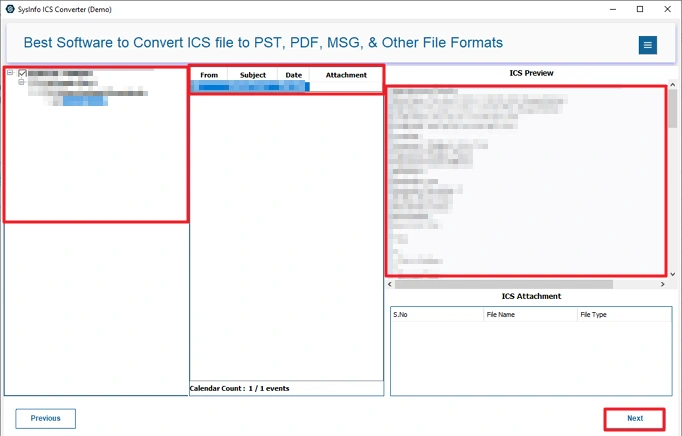
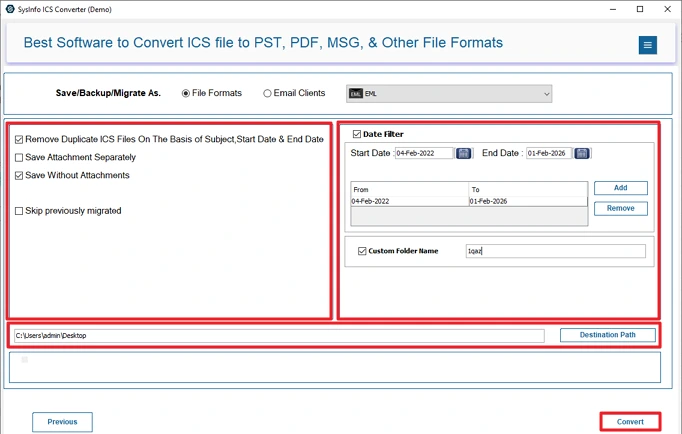
Before converting, you are able to preview the events to double-check them. There were options to filter events by date and remove duplicates, which helped keep things clean and organized.
Steps to Convert ICS Calendar file to EML
- Firstly, download the ICS File Converter Tool.
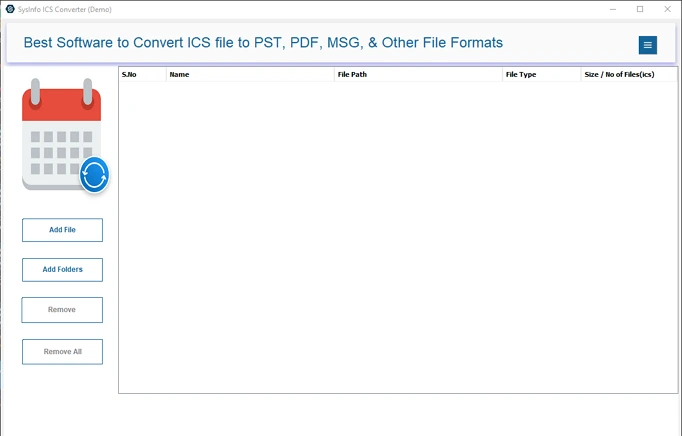
- Then, add your ICS files and hit Next.
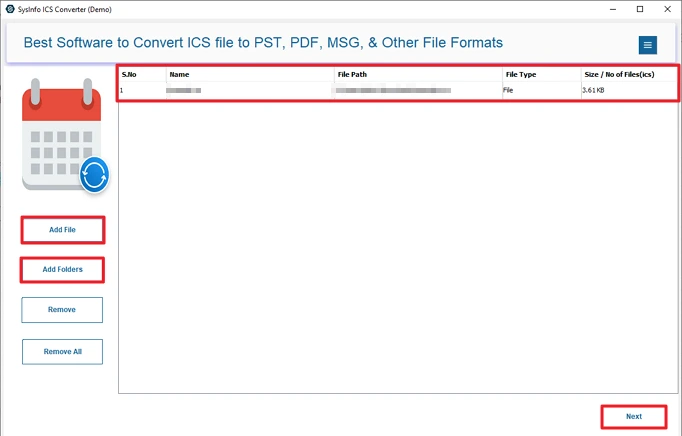
- Further preview files and select to convert, and press Next.
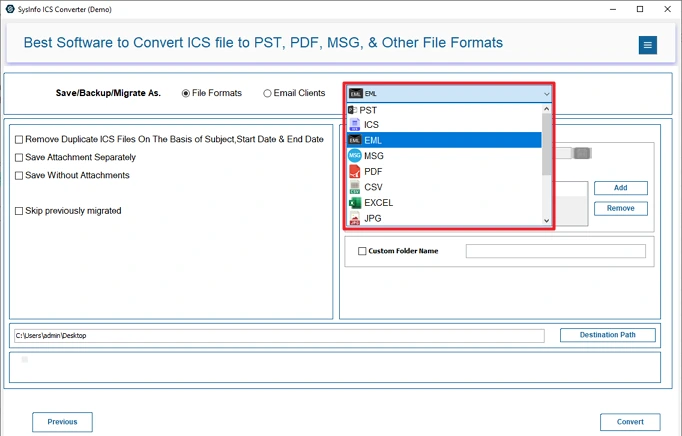
- After that, choose the EML file format.
- Lastly, apply filters, set the destination, and click Convert.
Note: If needed, convert ICS to CSV for easy tabular data handling of your calendar data.
Successful User Case:
Daniel works as an operations manager in a company. Over the years, his team saved a lot of meeting and schedule data as ICS files in Outlook. When they needed to share those events through email and archive them properly, the files became hard to manage.
At first, Daniel tried to export ICS to EML manually, but it took too long and didn’t work well when there were many events in one file. After that, he used the MailConverterTools ICS File Converter. It allowed him to add all the ICS files at once and convert them to EML without breaking the event details.
Dates, times, and locations stayed the same, and attachments showed up correctly in the emails. He also used the preview option to double-check the events before converting. The date filter helped him skip old entries he didn’t need anymore.
Conclusion
In conclusion, with this blog, we explained two methods to convert ICS to EML files. The manual method is effective for smaller files, because it takes too much time for the process. On the other hand, using a professional tool makes it simpler. It allows multiple file handling and provides smooth and accurate results without errors. You can ask for help and support from our team 24*7.
Frequently Asked Questions
Q1: Can I convert ICS files to EML without losing event details?
Ans: Yes, by using the MailConverterTools ICS File Converter Tool, you can convert your ICS files to EML without losing any data. This tool is good enough to provide enhanced, accurate outputs.
Q2: Is it possible to batch convert multiple ICS files to EML?
Ans: The MailConverterTools ICS File Converter allows you to convert multiple ICS files to EML format in a single process. Additionally, you can convert ICS to more formats and email clients.
Q3: Do I need an email client installed to convert ICS to EML?
Ans: If you are using manual methods, then you need to install it. But the smart utility does not need any extra application to be installed in your system.
Q4: Can I open converted EML files in Outlook or Thunderbird?
Ans: Yes, you can. Once the files are converted to EML, they open normally in email programs like Outlook and Thunderbird.
Q5: Are calendar attachments included during conversion?
Ans: Yes. MailConverterTools ICS File Converter keeps calendar attachments intact when converting ICS to EML, so you don’t lose any files that were attached to the events.
About The Author:

Meet Amit, an experienced SEO expert and content planner. He uses his creativity and strategy to create content that grabs attention and helps brands reach their goals. With solid skills in digital marketing and content planning, Amit helps businesses succeed online.
Related Post