-
Written By Amit Chandel
-
Updated on February 9th, 2026
How to Convert ICS to TXT on Windows and macOS
User Query: “Hello, I am Keren Gabon, and I want to list all of my Google and Apple Calendar agendas for more than 2 years in a simple and legible Text file. So far, I was only able to download their data in an ICS file. However, when I open it, the data is not represented clearly and thus is definitely not useful for me. Is there any converter tool or any other solution that can help change ICS to TXT without formatting or data loss in a quick, secure, and simplified manner?”
Calendar data is useful for all until it gets locked inside an ICS and is only accessible with specific calendar applications. Teams, businesses, and other users often need calendar data event, meetings, schedules, appointments, and other details for documentation or quick sharing. This is when they find the need to convert ICS to TXT, whether on Mac or Windows. This technical guide, therefore, focuses on the methods available for this conversion and provides an ICS Converter Tool to ensure smart and accurate conversions.
What are the Reasons to Convert iCalendar to TXT?
ICS (Internet Calendar Scheduling) files are created from all Apple, Google, Outlook, and other calendar applications. It is a standard format to store all records of crucial events, meetings, and more, but it is not human-readable. TXT (Text file), on the other hand, is lightweight and easy to understand, which makes data simply accessible from anywhere and everywhere.
The specific real-world scenarios for the ICS to TXT conversion are as follows:
- Preparing text records for compliance and legal audit purposes
- Reviewing calendar data without platform dependency
- To edit and annotate the event details manually as per the changes
- Share calendar data events with stakeholders and other non-tech users
- Archive calendar information in a simple and easily understandable format
- Schedule and create timely reports for analysis and investigation
- Keep data secure, portable, readable, and universally accessible in the long run
- Edit the raw event data and import it into CRM and other project management tools
Methods to Convert ICS to TXT on Windows & Mac
We will discuss the available manual and professional methods to perform the conversion in a smooth and proficient way. Below, both methods are discussed in detail along with the benefits and limitations of the same.
General Method to Convert ICS File to TXT
- Initially, locate the iCalendar file on your system.
- Then, right-click it and select any Text Editor application to open it.
- For Windows, you may use Notepad or Notepad++, and for Mac, use TextEdit.
- After it opens, review the calendar data and from File, click Save As.
- Finally, choose .txt as the saving format, pick a destination, and tap Save.
Loopholes of the Method:
- Cannot save multiple ICS files at the same time.
- Output TXT is raw, and formatting isn’t retained.
- Attachments and calendar data are unreadable.
- Manual clarity is still needed to access accurate data.
Top User Concerns:-
- What about the data integrity of my calendar events?
- Will my event details and meeting records remain secure, along with timestamps?
- Can I access the data offline even in remote areas?
- Is conversion possible on Windows 10 and macOS Catalina?
To address the following, check out the most appropriate solution below.
Smart Method to Convert ICS to TXT
While the manual method works at a small scale, when you have a large database, use the MailConverterTools ICS Converter for a streamlined conversion. It allows you to instantly save ICS files in TXT format, and you can even convert ICS to PST and other formats with this excellent tool. Additionally, it keeps the data safe and integrity preserved with the entire folder structure. Moreover, the software functions flawlessly and works across all Windows, Mac, and Linux OS.
Quick Steps to Convert ICS to Text
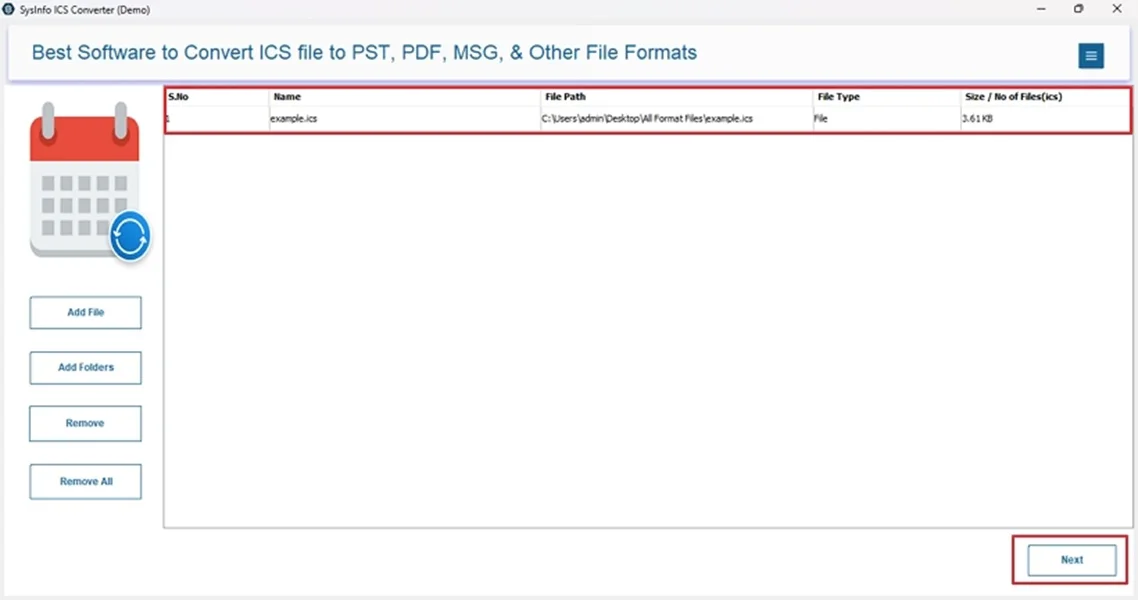
- Launch the ICS File Converter Tool and click the Add File button.
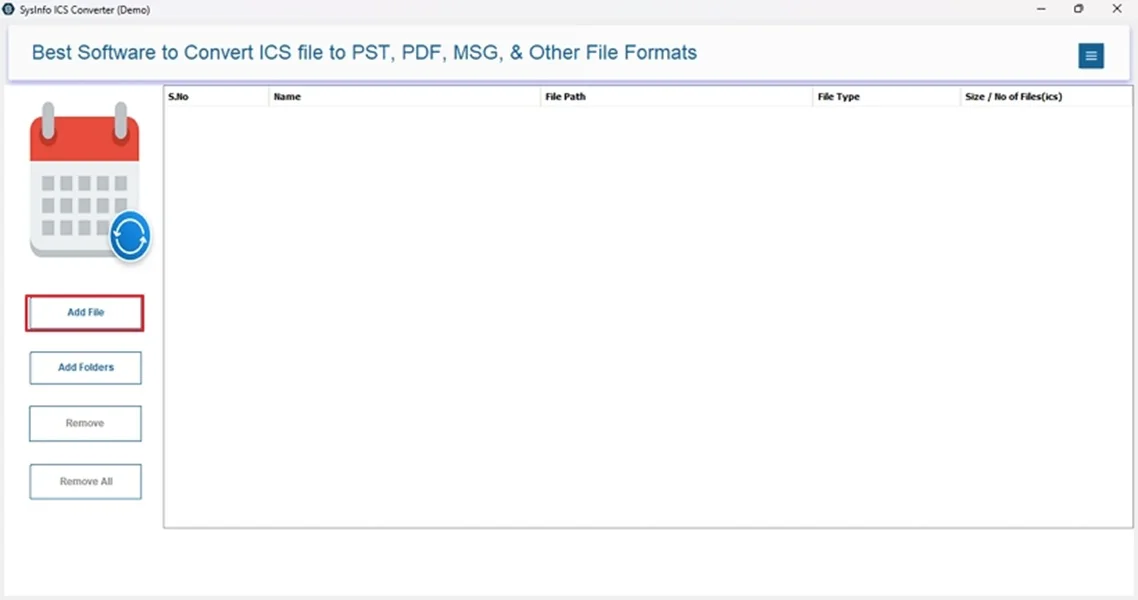
- Then, browse the PC and select your ICS files. Click Open >> Next.
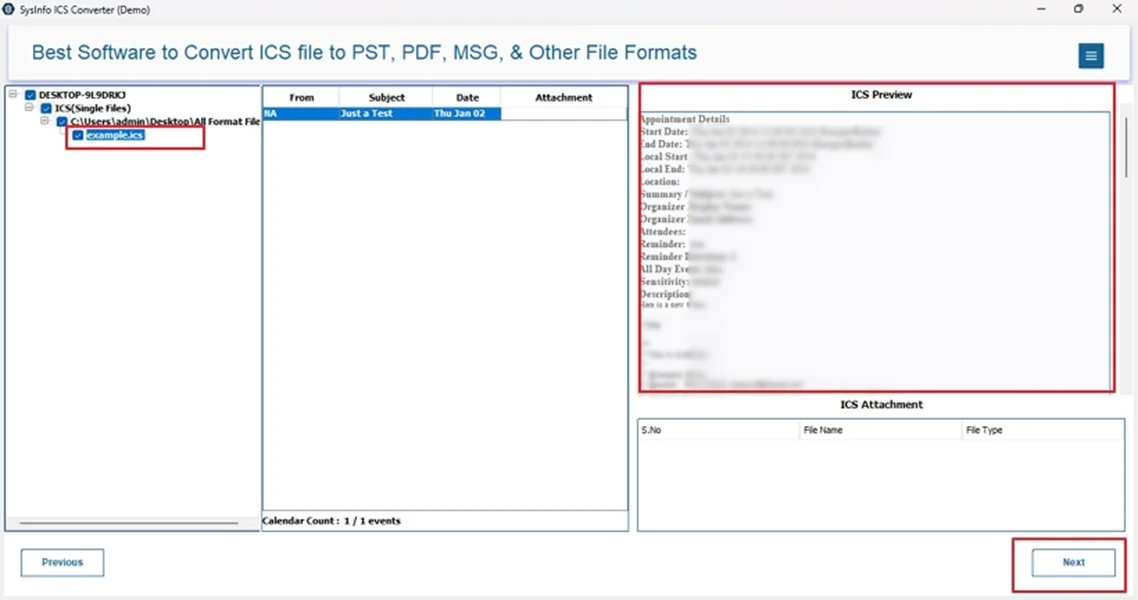
- Further, preview the files and select the folders. Click Next.
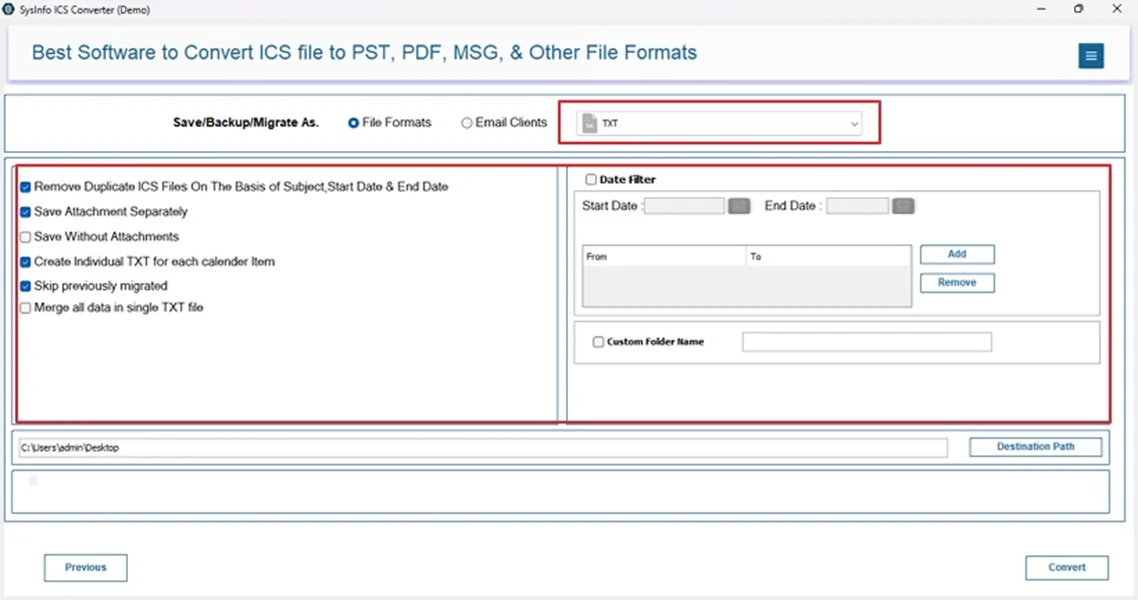
- Afterward, opt for the TXT file format from the list and apply filters.
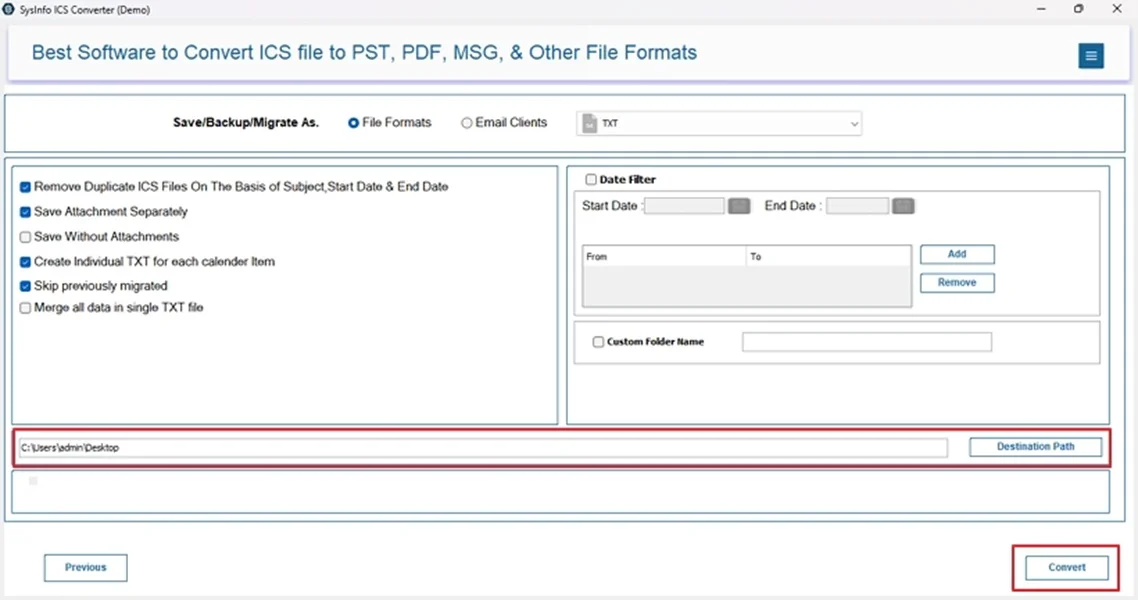
- At last, select a destination for the new file and click Convert.
Other Pros of ICS to TXT Converter Tool
- Batch processing with complete data fidelity
- Option to convert ICS to PDF and other formats/clients
- 24*7 Technical Support and 100% accuracy
- Demo Version for free conversion and evaluation
Real World Scenario:-
An operations team was involved in a dispute with a vendor, and they needed calendar records from 18 months’ worth of meetings in plain text format. The team was unsuccessful in exporting ICS files because the legal team could not open them.
Converting ICS files into TXT format with the MailConverterTools ICS File Converter Tool has enabled them with easy keyword searches of all events and undeniable verification of timestamps. Also, they received clean documentation to be presented during legal review.
Conclusion
ICS files are optimal for calendar data management, but are not flexible or portable. Thatswhy it is correct to convert ICS to TXT for more scalability and easy accessibility. In this guide, we learned all the conversion needs, challenges, and relevant methods. For a few ICS files, use the manual conversion approach. However, for bulk volumes where data integrity, security, and precision matter, use the ICS Conversion Tool. It will even save time, cost, and extra efforts that you need to put in manually.
Frequently Asked Questions
Q1: Can I convert ICS files to TXT without losing event information?
Ans: Yes, to perform the conversion without loss of sensitive and critical event information, use the dedicated converter tool. It is safe and ensures complete data integrity with zero loss.
Q2: Is it possible to batch convert multiple ICS files to TXT?
Ans: To batch convert ICS file to TXT, use the ICS Converter Software, as it has no size or count limitations and converts without hassle.
Q3: Are attachments included when converting ICS to TXT?
Ans: If you are converting iCalendar files into Text format with the specialized MailConverterTools ICS Converter, then yes.
Q4: Is the TXT file editable after conversion?
Ans: Yes. You can easily edit the TXT file after the edits as required based on the change of your events or meetings.
Q5: Does converting ICS to TXT require technical expertise?
Ans: With the manual methods, a little, but with the professional tool, no. It is actually quite easy to use the software because it is user-friendly.
About The Author:

Meet Amit, an experienced SEO expert and content planner. He uses his creativity and strategy to create content that grabs attention and helps brands reach their goals. With solid skills in digital marketing and content planning, Amit helps businesses succeed online.
Related Post