-
Written By Vikas Bajpai
-
Updated on May 22nd, 2026
Migrate Roundcube to New Server Easily with Quick Process
User’s Query: I need to migrate everything from Roundcube to a new server, which I have been using for a long time. I am not sure about the process to migrate the data without losing the folders, attachments, and other crucial files. Most methods to migrate Roundcube to new server are very technical and not secure for large level migration. Suggest a reliable and quick way to perform an enterprise-level migration.
Enterprises or personal users, no one wants to lose their data, folders, attachments, or anything. Most users find this confusing and risky, and are afraid to lose data, which is very common. Uses are mainly stuck with the server settings, mailbox syncing, and the account migration during the process. This blog comes up with the professional MailConverterTools IMAP Backup Tool to complete the process in fewer steps. Using the professional approach will make your migration easier, faster, and more manageable for single and multiple accounts.
What Happens When You Move Roundcube Mailbox to New Server?
If you think that Roundcube is an application, then you have to be correct. It is a webmail interface that allows you to manage the emails on your mail server through IMAP. Your important data, like email, folders, and attachments, is stored in a hosting server.
During this migration, you are transferring the data from the old mail server to the new one. It is very important to have a proper IMAP configuration to transfer Roundcube emails to New Server. The incorrect configuration will cause the sync failure and increase the chance of data loss.
Personal Roundcube settings, identities, plugins, address books, or preferences may not move automatically with the emails. In many cases, these settings need to be configured again after the migration is completed.
You may also need to update DNS and MX records so that new incoming emails start arriving on the new server instead of the old one.
Why is the Manual Method Not Suitable?
The manual method is not suitable for large mailboxes or for transferring multiple accounts. The biggest issue with it is that it is very slow and requires many configurations and technical knowledge.
There is always a risk of missing emails or incomplete synchronizations with an unstable internet connection. In these cases, you may see duplicate folders or repeated emails. Therefore, a small mistake in server settings can interrupt the migration because it depends on IMAP configuration
Additionally, to move with the manual method, you should know about IMAP, email clients, server ports, and other settings. You have to monitor the process manually to check if any errors occur. These limitations make the manual method not considered suitable for bulk or organizational-level migrations.
Complete Solution to Migrate Roundcube to New Server
Using a professional tool like MailConverterTools IMAP Email Backup Software is the best solution to accurately complete this migration. This tool is easy to use and helps to get the results in just a few steps. Additionally, it offers some tremendous features to use and enhance the final output. More than that, it can migrate RoundCube to Google Workspace, Office 365, IMAP to IMAP, and more. By using this tool, you can select the files to proceed through its preview panel.
Steps to Migrate Roundcube Emails to New Server
- Firstly, download and start the IMAP Email Backup Tool.
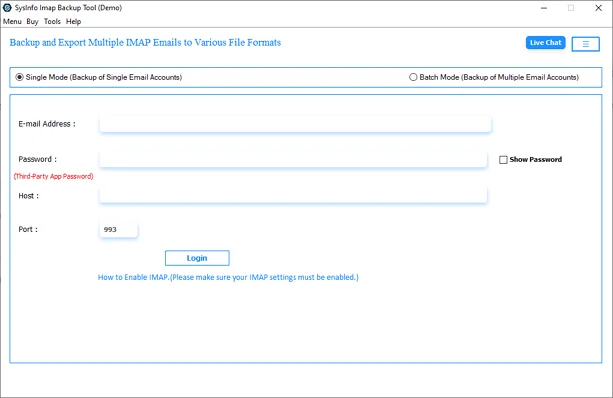
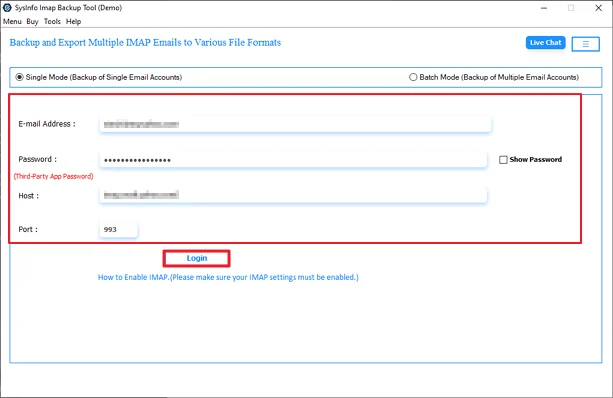
- Thereafter, log in with your Roundcube details and click Login.
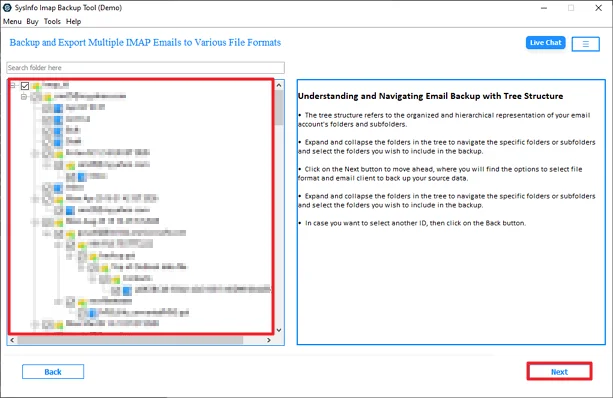
- After that, select the files from the tree structure and click Next.
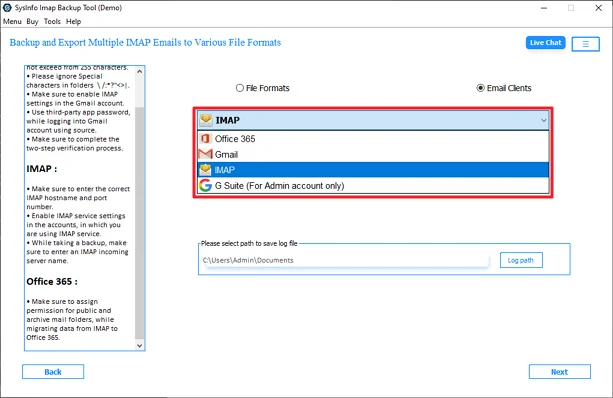
- Further, choose IMAP from the list and click the Next button.
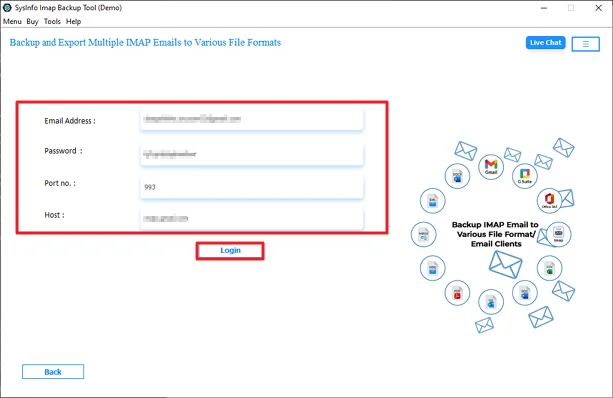
- Then, log in with the New Server credentials.
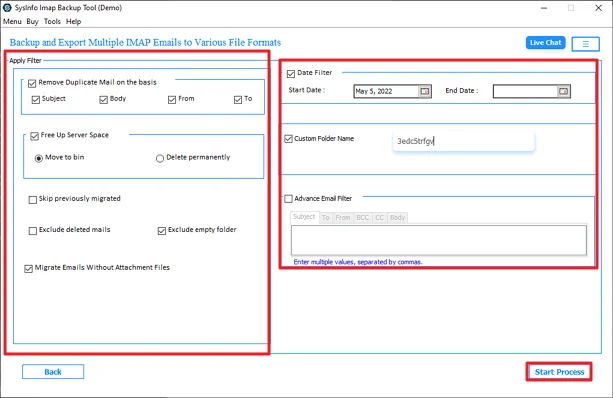
- Lastly, apply the required filters and click the Start Process.
How to Verify Emails After Migration
After the migration to a new server, first you need to go through the mailbox and confirm that everything came through properly. Users assume that the work is done once the migration process is completed. But skipping this step can lead to missing emails or sync issues that show up later.
You can start checking the folder count on both servers. Look specifically for the folders that matter most, like Inbox, Sent Items, Drafts, Trash, and any custom folders the user created. If a folder is missing on the new server, it is better to catch that now.
Once everything is right, go a step further and open a few emails at random from different folders. Do not just check whether they exist; actually open them. Make sure the content loads correctly, attachments are still there, and are downloadable. Some migrations move the emails but drop the attachments or scramble the formatting, and the only way to catch that is by opening the actual messages.
Final Words
It seems difficult to migrate Roundcube to New Server at first. Every user wants to keep their data safe, but the process of this migration is difficult. The manual method is technical and not considered for non-tech users. Even a small configuration mistake can cause synchronization problems or missing mailbox data. To overcome these limitations, we have discussed a smart way to migrate your file to a new server with complete security.
Frequently Asked Questions
Q.1 Is it safe to migrate Roundcube to a new server?
Ans: Yes, it is safe to migrate Roundcube to a new server if the migration is performed properly with correct IMAP settings and server configurations. Most risks happen because of interrupted synchronization, incorrect credentials, or unstable internet connections.
Q.2 Which is the best tool to migrate Roundcube to a new server?
Ans: The MailConverterTools IMAP Backup Tool is one of the reliable solutions to migrate Roundcube emails to a new server. It supports secure IMAP migration, bulk mailbox transfer, folder hierarchy maintenance, and migration to multiple platforms like Office 365, Gmail, and other IMAP servers.
Q.3 Can I migrate Roundcube to a new server without technical skills?
Ans: Yes, you can migrate Roundcube to a new server without advanced technical knowledge by using a professional migration tool. Manual methods usually require knowledge of IMAP configuration, server ports, and email clients, which can become difficult for non-technical users.
Q.4 Can I move Roundcube mailbox to a new server for free?
Ans: Yes, you can move a Roundcube mailbox to a new server manually using IMAP-supported email clients like Thunderbird or Outlook.
Q.5 Is it possible to migrate Roundcube to another hosting provider?
Ans: Yes, you can migrate Roundcube mailboxes to another hosting provider as long as both servers support IMAP access. Many administrators use IMAP synchronization tools or email migration utilities to move mailbox data between hosting servers safely.
Q.6 Can large Roundcube mailboxes cause migration problems?
Ans: Yes, very large mailboxes or folders with thousands of emails can slow down IMAP synchronization and sometimes cause server timeouts. Many administrators reported that Roundcube struggles with large folders because IMAP may continuously reload messages instead of properly caching them.
About The Author:

Vikas Bajpai is a results-driven SEO expert and content strategist with a strong passion for building impactful digital experiences. He specializes in crafting data-backed content plans that boost visibility, engage audiences, and drive measurable growth. With deep expertise in search engine optimization, keyword strategy, and content marketing, Vikas helps brands strengthen their online presence and achieve long-term success.
Related Post