-
Written By Amit Chandel
-
Updated on February 9th, 2026
Convert ICS to Word Documents Quickly & Accurately
Kelly Maverick:- “I have a few ICS files downloaded from Google Calendar, and I need to edit them before submitting for the final review. Hence, I need a suitable solution to convert ICS to .doc without any formatting issues or data loss, especially for complex data. Since my data is sensitive and confidential, I do not want to use any online converter. Is there any other method available for the conversion?”
Calendar files are excellent for scheduling, but not suitable for documentation or sharing. Also, tied to a particular calendar application, ICS files lack scalability, which is essential for wide data accessibility, readability, review, and archival. All these factors are readily available with the Word file, and thus, users like Kelly and others look for solutions to convert ICS to Word. To help them out, we have prepared this guide explaining all free solutions and a MailConverterTools ICS File Converter Tool for reliable compliance and record-keeping.
Primary Reasons to Convert iCalendar to Word
We all know that ICS are calendar files, short for Internet Calendar Scheduling, accessible online and offline. These store details of all important events, meetings, schedules, appointments, reminders, etc., but are not editable or transferable. On the other hand, a Word file is a document file that stores data structurally, is easily editable, and offers many more benefits, like:
- View of the calendar data in a readable and organized format
- Preserved event titles and descriptions, timelines, rules, locations, etc.
- Access to the iCalendar data for non-technical users and stakeholders
- Archived calendar events and schedules in DOC/DOCX format
- Edit and annotation options for the changes in the calendar
- Clean layout to share, archive, or print current and historical details
- Less storage consumption with lightweight Word files on the OS
Ultimate Ways to Convert ICS to Word Format
Here, we will study both the manual method and the dedicated professional tool, trusted and verified by experts for ICS conversion. These methods are easy to follow and work on both Windows and Mac OS. However, with the freeway come some unavoidable limitations, which are discussed below, too. You can go through them to find your perfect solution.
Easily Convert ICS File to Word for Free
You can use an online converter or a manual workaround to convert the calendar data. The steps for both are discussed here, along with their cons. Check them as follows:
1) Manually Save ICS to Word
- Open the ICS file with any Calendar application or Notepad.
- Then, set the Calendar view as desired and try to figure out the data.
- Once done, press Ctrl + A to select all and Ctrl + C to copy.
- After that, start Microsoft Word and open a blank document.
- Furthermore, press Ctrl + V to paste the copied calendar data.
- Edit and format it as desired and click File >> Save As >> DOC/DOCX.
2) Convert ICS to Word Online
- Open an online ICS to Word Converter Tool.
- Next, click Upload and load the iCalendar file.
- Choose the DOC/DOCX format to save the data.
- Lastly, tap Download to convert and save the file.
Loopholes of the Manual Methods
- It takes a lot of time to copy and paste calendar data.
- Both methods are unsuitable for bulk ICS conversion.
- You need a lot of effort and basic technical knowledge.
- The formatting is not preserved, and data can be missed or lost.
- Online converters pose a security and privacy risk to crucial data.
Flawlessly Convert ICS to DOC Word File
Even if a free solution is available, it has so many cons that you can overcome by downloading MailConverterTools ICS File Converter. This excellent software securely converts ICS files with complete data preservation and retained folder structures. Additionally, it supports batch processing, and you can even convert ICS to EML or other file formats of your choice without technical skills. Moreover, the software is very easy to use and has a Demo Version for free conversion of upto 50 calendar files.
Process to Convert ICS to Word
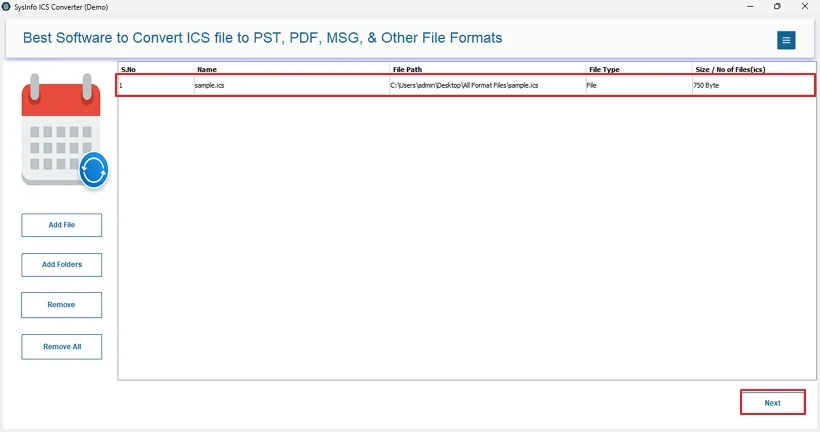
- Launch the ICS Converter and pick a button to add calendar data.
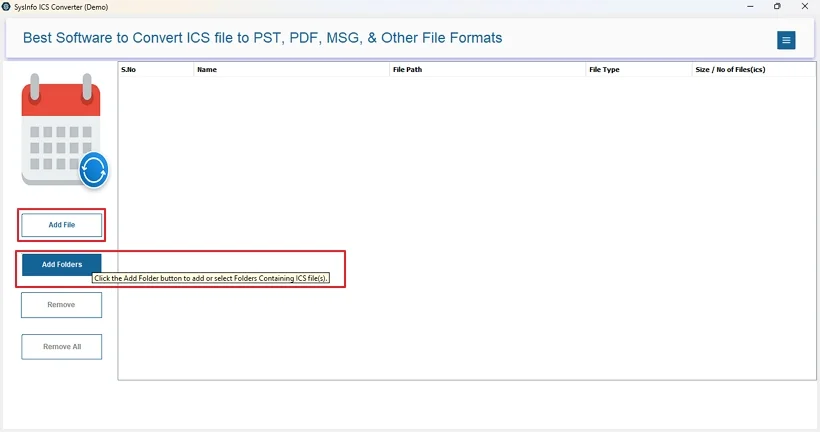
- Then, with the Add buttons, upload your iCalendar and click Next.
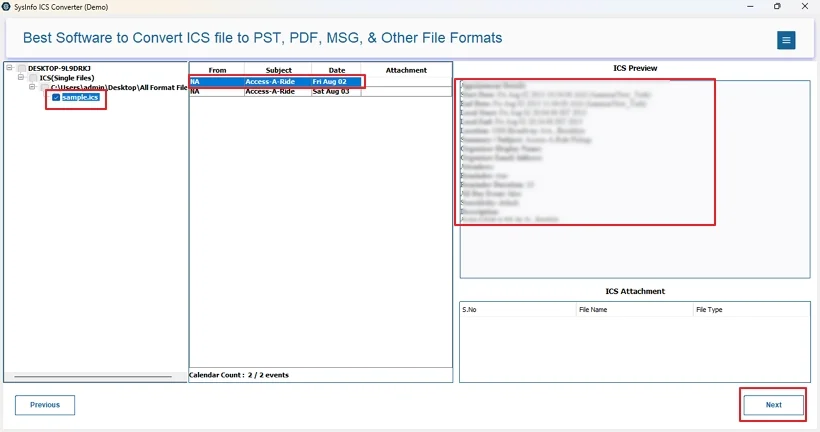
- Further, choose the folder from the tree after preview. Tap Next.
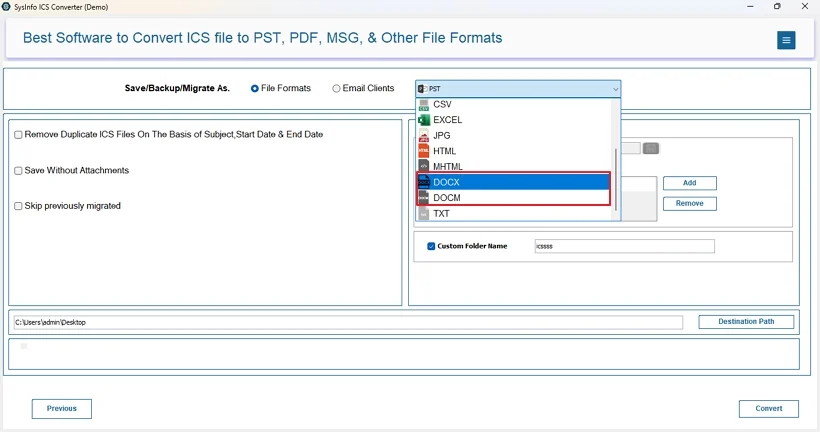
- After that, select the DOCX/DOCM file format and use the filters.
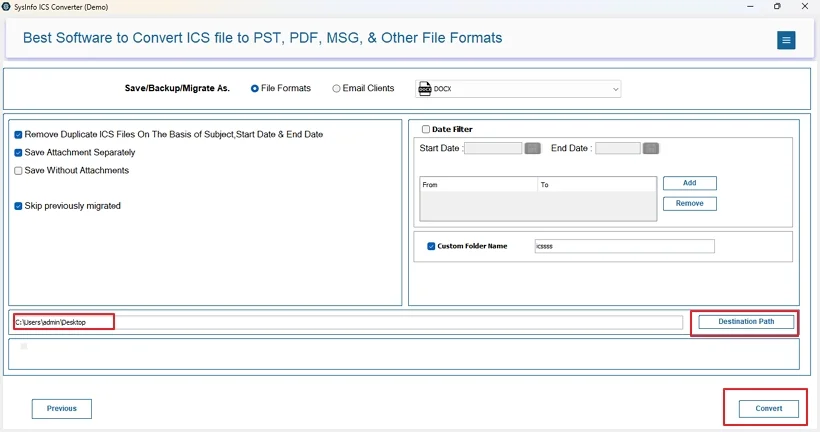
- Finally, with a Destination Path chosen to save, click Convert.
Why Professional ICS to Word File Converter?
- It has so many advanced features like duplicate removal, date range, save attachments, custom folder name, etc.
- Allows for bulk migration of ICS files from all calendar applications (Outlook, Google, or Apple).
- Is user-friendly, offers 24*7 technical support, and needs no application or expertise.
- Even functions on Linux OS and keeps confidential data 100% secure and preserved.
Real World Scenario Example:
A compliance officer at a consulting firm needed to archive weekly project timelines stored in ICS format. The files were exported from multiple calendar applications and were many in number. Since auditors cannot understand the ICS files, they needed them in a documented format like Word. The officer used the MailConverterTools ICS Conversion Tool and secured ICS to Word conversion in minimal time with accuracy and precision. Now, the calendar reports are accessible without platform dependency, and the audit went without hassle.
Conclusion
As ICS files are only built for internal calendar sharing and preserving calendar data, converting them to Word for documentation, archival, and other tasks is a good choice. It bridges the gap between calendar data and its readability, wide accessibility, and sharing. Manual methods work fine for one to two files, but fail when you have bulk ICS data. The professional ICS Exporter is the perfect solution for large enterprises, IT admins, and other individuals for a risk-free and effortless calendar data conversion.
Frequently Asked Questions
Q1: Can I convert ICS files to Word without losing event information?
Ans: Yes, the conversion can take place without any information loss using the dedicated converter tool.
Q2: Do I need Microsoft Outlook to convert ICS to Word?
Ans: No, you do not require Microsoft Outlook to convert iCalendar to Word if using the ICS File Converter Software.
Q3: Can multiple ICS files be converted to Word in bulk?
Ans: To convert ICS to DOC in bulk, use the MailConverterTools ICS Converter Tool. It has no file size or count limits and allows multiple conversions at once.
About The Author:

Meet Amit, an experienced SEO expert and content planner. He uses his creativity and strategy to create content that grabs attention and helps brands reach their goals. With solid skills in digital marketing and content planning, Amit helps businesses succeed online.
Related Post