-
Written By Amit Chandel
-
Updated on February 27th, 2026
How to Import PST to Yandex Mail Without Data Loss?
Jeena’s Question: I recently switched to Yandex Mail because it feels easier to manage. Now I need my PST files in Yandex Mail. What’s the simplest way I can use for this import?
Users migrating their email management systems from Outlook to Yandex Mail have become more common. However, there are still many challenges faced by users when migrating email content or when trying to import PST to Yandex Mail. In this blog, we’ll explain both the manual approach and a more practical alternative by using the MailConverterTools PST Converter Tool to avoid any errors or to maintain accuracy.
Why Do Users Import PST Emails to Yandex Mail?
- PST files only open inside Microsoft Outlook.
- Not everyone wants to keep Outlook installed just to access old emails.
- Yandex Mail can be accessed from any browser on any device.
- Users prefer keeping emails, contacts, and attachments in one online account.
- Managing email in the cloud feels more convenient than storing data locally.
- Yandex Mail is suitable for long-term email storage.
- People want to secure important emails stored in old PST files.
DIY Method to Import PST to Yandex Mail Using Outlook?
If Outlook is already installed on your system, you can transfer the emails yourself. Just make sure you go step by step.
Steps to Import PST File into Yandex Mail
- Firstly, open Outlook and click on File.
- Afterwards, select Open & Export > Import/Export.
- Then, choose Import from another file > Outlook Data File (.pst).
- Further, browse and open your PST file.
- Go back to File and open Account Settings.
- Click Add Account and enter your Yandex Mail email address.
- Choose Manual setup from Advanced options and select IMAP.
- Thereafter, enter your password and finish setting up the account.
- After that, drag and drop folders from the PST file into your Yandex Mail mailbox.
- Wait for Outlook to finish syncing, and your emails will appear in Yandex Mail.
Limitations
- Sync interruptions may cause missing emails.
- Not practical for bulk migrations.
- Attachments or email properties may not always transfer perfectly.
Smart Way to Import PST to Yandex Mail Without Data Loss
The manual method works, but it takes time. You have to set up accounts, move folders, and wait for syncing. If you are not used to Outlook settings, it can feel confusing. It’s also slow if the PST file is large. Another option is using MailConverterTools PST Converter. This tool lets you open a PST file on a Mac system. You can see the emails before moving them. It allows you to export the data to different email services; for instance, you can use this tool to import PST to Zoho Mail or also to import PST to Office 365.
Steps to Migrate PST to Yandex Mail
- Firstly, download the PST Converter Tool.
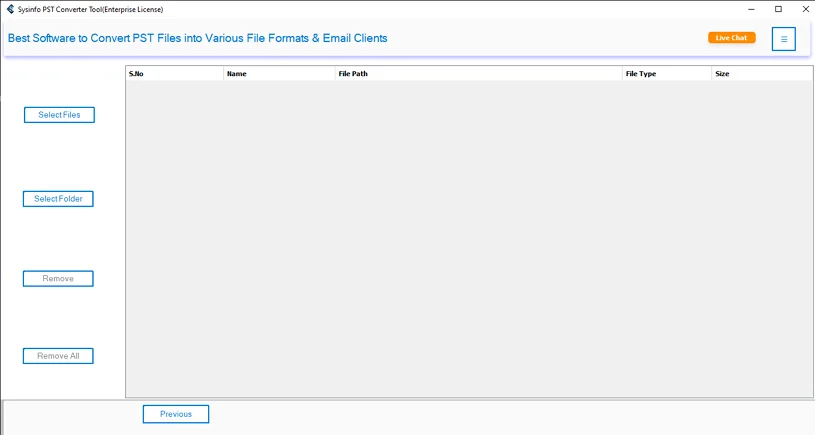
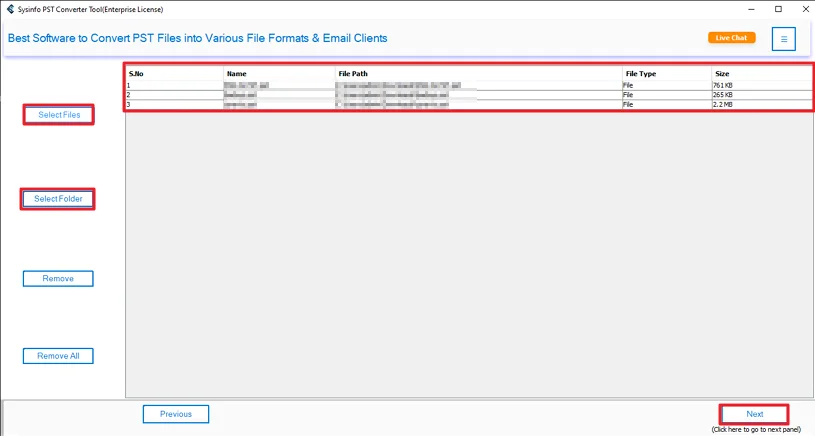
- Then, add the PST files and click Next.
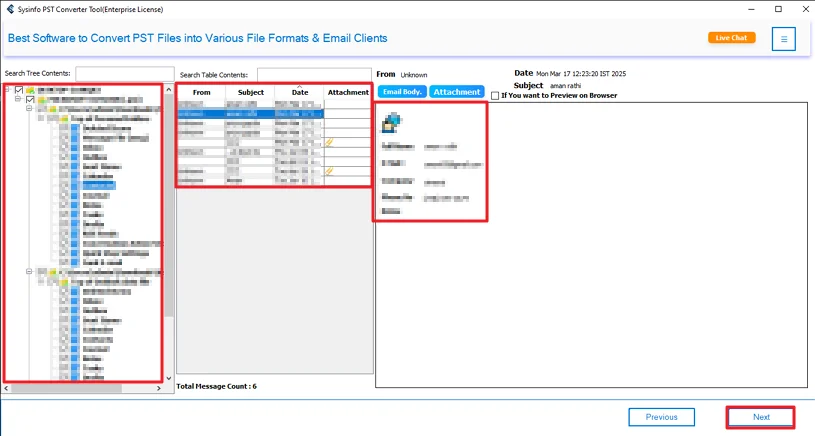
- Thereafter, preview and select PST files and hit Next.
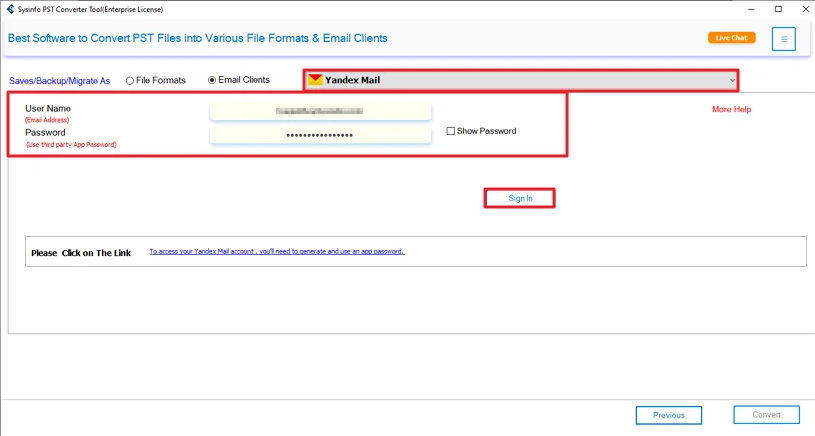
- Choose Yandex Mail and sign in with your details.
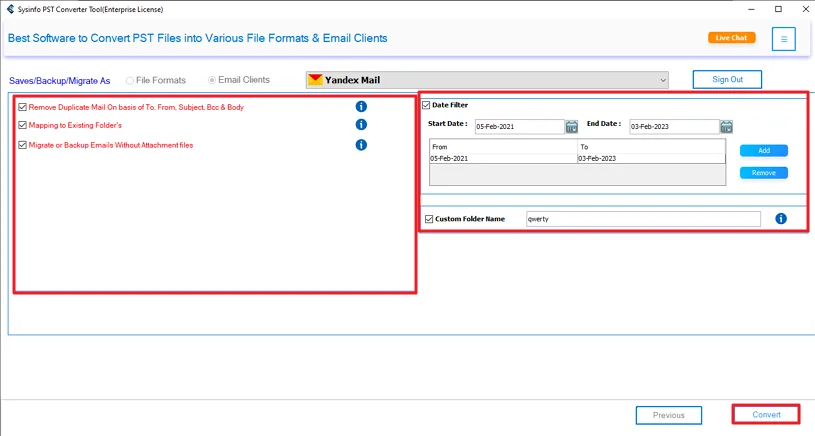
- Finally, use filters and click the Convert button.
Successful User Case:-
Michael Carter, a freelance consultant from the UK, when he moved from Outlook to Yandex Mail, had years of client emails saved in large PST files.
He used the MailConverterTools PST Converter to import Outlook PST to Yandex Mail. He added his PST file, checked the emails, signed into Yandex Mail, and started the process. The tool moved his emails and attachments without changing the folder structure.
In a short time, all his old emails were available in Yandex Mail. No missing data. No repeated work. It helped him switch platforms without interrupting his client communication.
Conclusion
To conclude, the methods above are used to import PST to Yandex Mail, which is important when a user shifts from Outlook to Yandex. Manual methods take time, and it’s not very practical. Using a PST converter tool is usually easier. It saves time and handles everything in one go. Your emails and attachments move together. If the file is small, a manual might work. If it’s large, a tool makes things simpler.
Frequently Asked Questions
Q.1 Which is the best tool to import PST to Yandex Mail?
Ans: The recommended option is the MailConverterTools PST Converter Tool. It allows users to open, preview, and move PST files directly to Yandex Mail without using the manual drag-and-drop method.
Q.2 Is it possible to import multiple PST files to Yandex Mail at once?
Ans: Yes. The blog mentions adding PST files inside the tool before starting the process. This means you can select and migrate more than one PST file during conversion.
Q.3 Can I import a PST file into Yandex Mail without technical skills?
Ans: Yes. The manual method requires proper setup in Outlook and can feel confusing. However, using the PST converter tool is simpler because you only need to add the file, sign in, and start the process.
Q.4 How long does it take to import large PST files to Yandex Mail?
Ans: The manual method can take a long time, especially for large PST files. Using the MailConverterTools PST converter tool is generally faster since it handles the transfer in one go.
About The Author:

Meet Amit, an experienced SEO expert and content planner. He uses his creativity and strategy to create content that grabs attention and helps brands reach their goals. With solid skills in digital marketing and content planning, Amit helps businesses succeed online.
Related Post