-
Written By Vikas Bajpai
-
Updated on May 27th, 2026
Import OLM to ProtonMail Without Losing Email or Attachments
User Query: I recently switched over to ProtonMail from Outlook for Mac. Now I have .olm files on my desktop with all my old emails, and I have no idea how to import them into ProtonMail. Is there any way to import OLM to ProtonMail without losing everything or messing up the folder structure?
Switching from Outlook for Mac to ProtonMail sounds simple until you realize ProtonMail does not directly accept .olm files. That leaves a lot of people stuck with their old emails going nowhere. This blog walks you through how to actually move your data across. Here, we will cover a manual method and the automated MailConverterTools OLM Converter Tool. Both options are explained in simple steps to get the OLM file in ProtoMail.
When Users Transfer OLM Files to ProtonMail?
- During the switch from Outlook for Mac to Proto Mail for better email privacy.
- To move the OLM mailbox to the secure cloud account.
- For easy access to OLM files on multiple devices through Proton Mail.
- When a user wants to reduce the dependency on OLM storage files, they can easily become inaccessible.
- To migrate the data of business and personal accounts to a GDPR-focused email service.
- Consolidating multiple Outlook mailbox backups into one Proton Mail account.
- Leaving Microsoft ecosystem services and adopting privacy-first alternatives.
Free Solution to Import OLM to ProtonMail Manually
If you want to import your OLM files to ProtonMail manually, then this method is the best fit as a manual solution. It is not a direct approach for this import, but it works well.
Working Guide to Manually Import OLM File to ProtonMail
- Launch Outlook for Mac and click File > Import.
- Thereafter, select Outlook for Mac Archive File (.olm) and browse the OLM file.
- Then, import the OLM mailbox into Outlook successfully.
- Now, open your browser and sign in to your ProtonMail account.
- Afterwards, click on Settings > See All Settings.
- Furthermore, navigate to the Import via Easy Switch section.
- After that, select New Import > Outlook as your email provider.
- Follow the on-screen instructions to connect your Outlook account with Proton Mail.
- Choose the mailbox data and start the migration process.
- Additionally, allow Easy Switch to export OLM file to ProtonMail.
Limitations of the Manual Method
- ProtonMail has no option to import OLM files directly.
- This process can be lengthy or time-consuming.
- In the manual process, you may lose the folder hierarchy.
- You have to configure Outlook properly to avoid errors.
- Internet interruptions may affect the migration process.
- Technical knowledge may be needed during account configuration.
Organizational Level Approach to Import OLM to ProtonMail
The MailConverterTools OLM File Converter Tool lets you add multiple OLM files at once. This tool will let you migrate emails with large attachments. Additionally, you can use this tool to import OLM to IMAP, Gmail, Office 365, and more. There is a free demo version available if you want to test it before buying. Demo version lets you save up to 50 emails per folder. Moreover, you can read this to import OLM to Yahoo Mail account in easy steps.
Steps to Move OLM into ProtonMail
- Download the OLM File Converter Software.
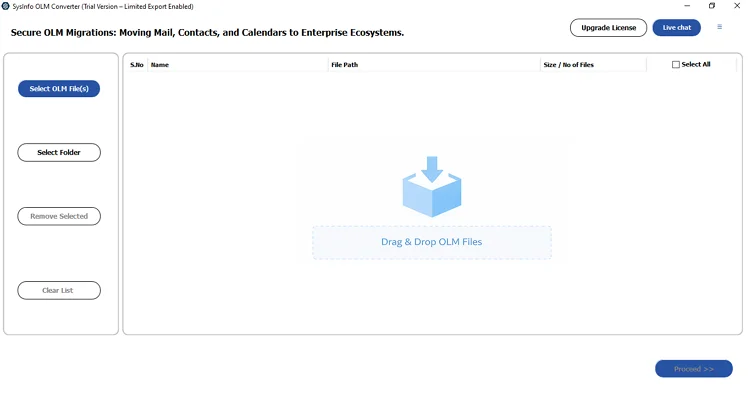
- Choose and add your OLM files and click Proceed.
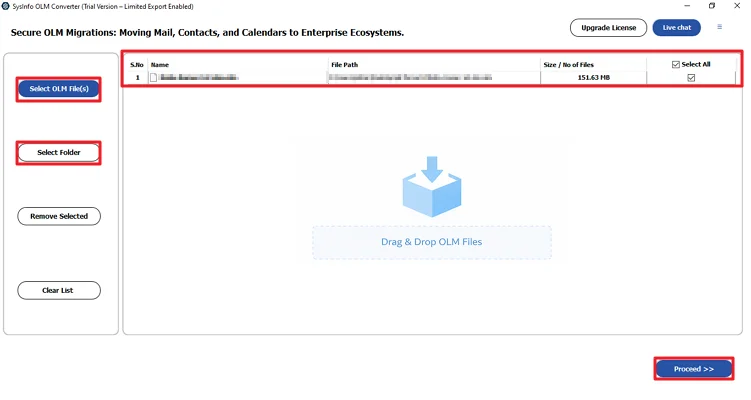
- After that, preview and select your files and click Proceed.
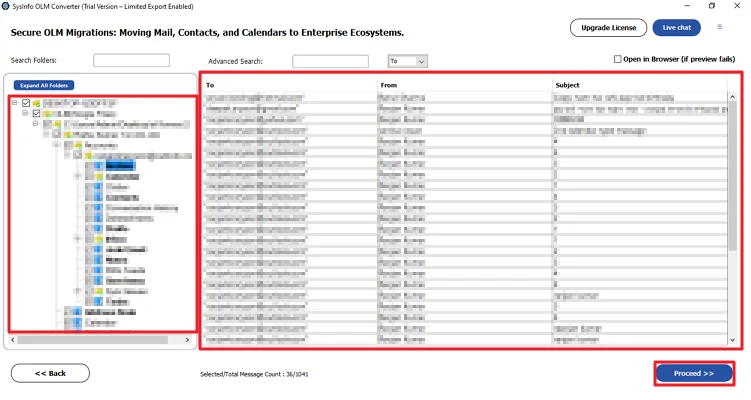
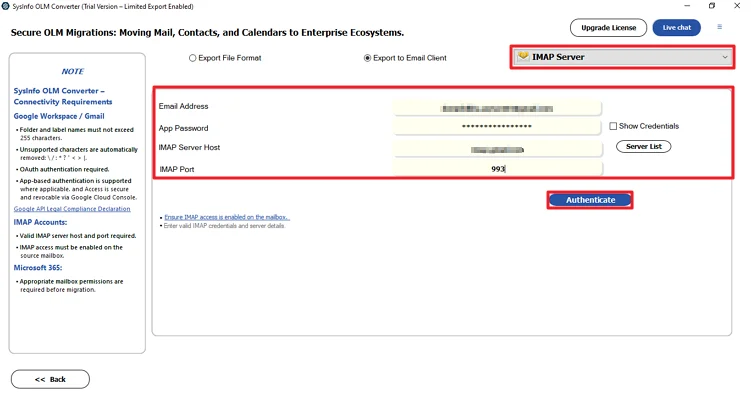
- Select IMAP as the destination and log in with ProtonMail credentials.
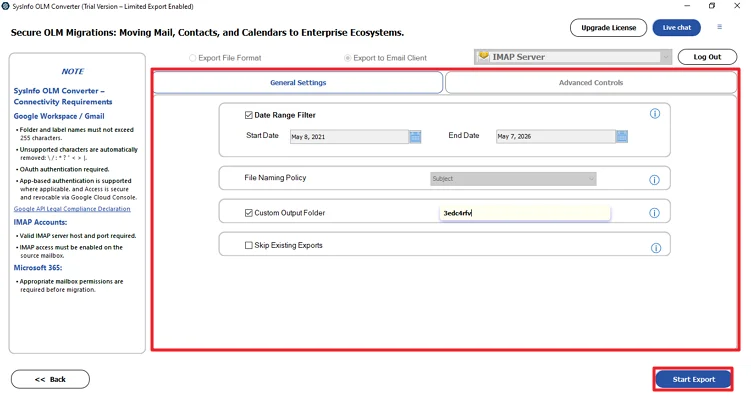
- Finally, apply the filters and click Start Process.
Successful User Case
A graphics designer was working with the OLM file from the last 5 years. Then he decided to switch to ProtonMail for further projects. But getting his OLM files there is not a direct process. The manual method he uses is a complicated and lengthy process. He migrated some files through manual methods, but migrating huge amounts of data manually is not possible.
After that, he decided to use a professional MailConverterTools OLM to ProtonMail Converter. This tool helps him to overcome the challenges that he was facing with the manual method. In minimal time, he was able to migrate his file with no data loss and manual errors.
Conclusion
To conclude, Users often find the process complicated because there is no option to import OLM to ProtonMail directly. But there are ways to import those files manually and through the professional tool. Both methods work well in different situations. For users looking for a faster and more reliable process, the automated solution is the simplified way to transfer OLM data without data loss.
Frequently Asked Questions
Q.1 Which is the best tool to import OLM to Proton Mail?
Ans: The MailConverterTools OLM Converter Tool is considered one of the most reliable solutions to import OLM files into Proton Mail. It supports bulk migration, preserves email formatting and folder hierarchy, and allows users to transfer emails directly through IMAP configuration.
Q.2 Is It Possible to Import OLM Files to Proton Mail Directly?
Ans: No, Proton Mail does not support direct OLM file imports. You first need to import the OLM file into Outlook for Mac and then use Proton Mail Easy Switch or an automated OLM migration tool to complete the transfer process.
Q.3 Will My Email Folders and Attachments Be Preserved During OLM Migration?
Ans: Yes, the Professional OLM Migration Tool preserves email folders, attachments, metadata, and mailbox hierarchy during the migration process.
Q.4 Can I Transfer Multiple OLM Files to Proton Mail in One Process
Ans: Yes, using a professional solution like the MailConverterTools OLM Converter Tool, you can add and migrate multiple OLM files simultaneously. This feature is particularly useful for organizations and users managing several Outlook for Mac archive files at once.
Q.5 Why is the Import option missing in the new Outlook for Mac?
Ans: Several users noticed that the “New Outlook” interface on Mac does not always include the OLM import feature. Users often switch back to Legacy Outlook mode to access the Import option.
Q.6 Are there size limitations when importing large OLM files?
Ans: Yes, very large OLM files may cause Outlook to slow down, crash, or display disk space errors during import. Users with 50 GB to 100 GB OLM files frequently report these issues
About The Author:

Vikas Bajpai is a results-driven SEO expert and content strategist with a strong passion for building impactful digital experiences. He specializes in crafting data-backed content plans that boost visibility, engage audiences, and drive measurable growth. With deep expertise in search engine optimization, keyword strategy, and content marketing, Vikas helps brands strengthen their online presence and achieve long-term success.
Related Post