-
Written By Vikas Bajpai
-
Updated on March 28th, 2026
How to Convert Outlook MSG to Windows Live Mail Easily
User Query: I have several Outlook MSG files that I need to open in Windows Live Mail, but I’m not sure how to convert them properly. Is there an easy way to import MSG files into Windows Live Mail without losing any email data?
To make MSG files more widely usable and take advantage of additional email features, many users choose to convert Outlook MSG to Windows Live Mail. This can be done either through a manual method or by using the dedicated MailCoverterTools MSG Converter Tool. In this blog, we’ll walk through why this conversion is useful and the different ways you can do it step by step.
Quick Answer
Windows Live Mail doesn’t support MSG files natively, which means you’ll need to convert them to EML format before you can use them. The straightforward route is opening each file in Outlook and saving it manually — but if you’re sitting on a large batch of emails, that process gets tedious fast.
A dedicated conversion tool like MailConverterTools MSG Converter helps a lot in these types of tasks. Instead of handling files one by one manually on your own, you can convert everything in a single pass using this advanced utility without hassle.
Why Import Outlook MSG File into Windows Live Mail?
- MSG files often need Outlook, so opening them elsewhere can be difficult for many users.
- Windows Live Mail gives a simple way to check emails without relying on Outlook setup.
- It becomes easier to go through messages when they are not saved as separate files.
- You can still use your old emails even if you are no longer using Outlook.
- Windows Live Mail keeps things straightforward, which helps in managing emails daily.
- Your emails stay accessible on other systems where Outlook is not available.
How to Convert Outlook MSG to Windows Live Mail Manually?
Before starting this method, it’s important to know that WLM does not support MSG files directly. That’s why you need to save them in EML format. This approach works well if you only have a few emails to convert.
Simple Steps to Import Outlook MSG to Windows Live Mail
- Open Microsoft Outlook on your system.
- After that, drag & drop the MSG files to any Outlook folder.
- Open the email you want to convert.
- Click on File, then choose Save As.
- Select EML as the file format and save it.
- Open Windows Live Mail and import the saved EML file.
Limitations
- You need Microsoft Outlook installed; this method will not work.
- It takes time if you have many MSG files to convert one by one.
- There is a chance of losing email formatting during saving.
- Attachments may not always be saved correctly in some cases.
- No option to convert multiple MSG files at once.
- The process can feel repetitive and tiring when dealing with large amounts of data.
- You have to import each file into Windows Live Mail manually.
Easily Convert Outlook MSG to Windows Live Mail
The MailConverterTools MSG Converter Tool helps you change MSG files into EML format for Windows Live Mail. It can handle multiple files at the same time, and the tool keeps the data the same after conversion. The tool is very simple to use, so you don’t need much technical knowledge. It also lets you convert MSG to EMLX formats if needed. Additionally, if you want to open a MSG file in a web browser, you can convert MSG to HTML as well.
Steps to Open MSG File in Windows Live Mail Client
- Download the MSG Converter Tool.
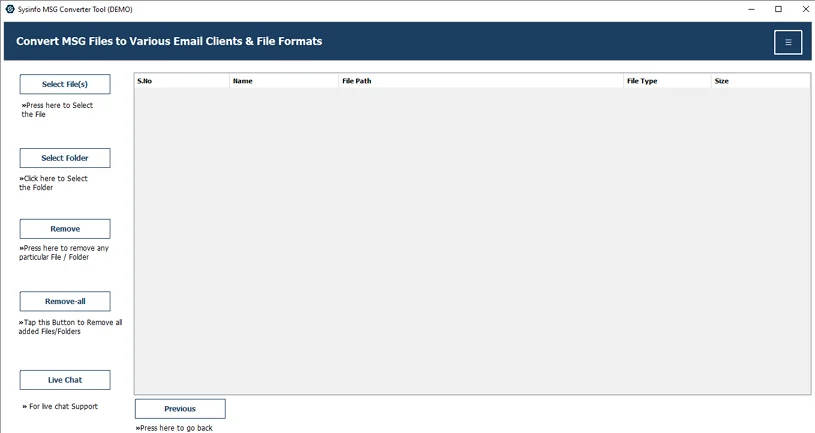
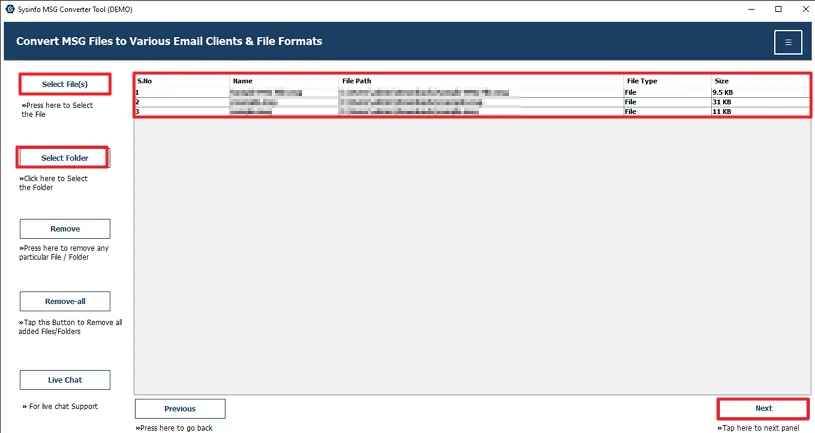
- Then, add the MSG files and click Next.
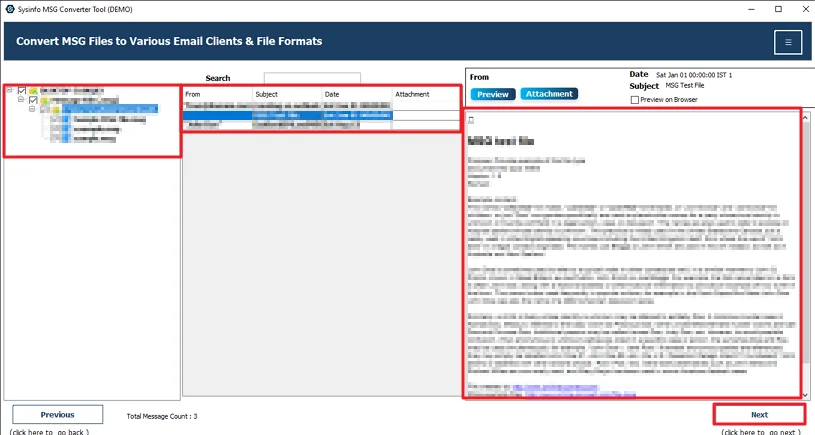
- After that, preview files and select them to convert, then hit Next.
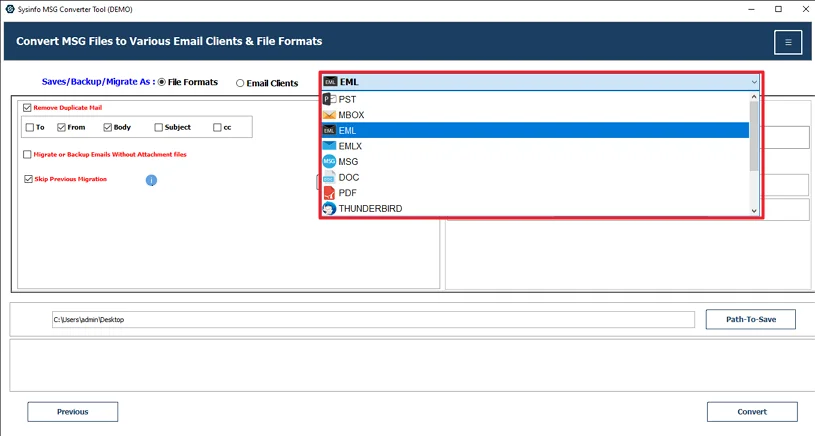
- Further, choose the EML file format.
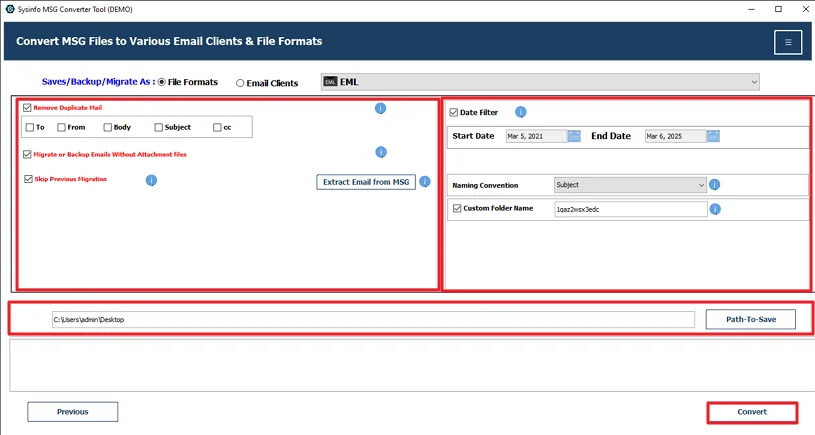
- Apply the files, set the desired path, and click Convert.
Successful User Case
Michael works at a small logistics company in Canada. They had years of old emails saved as MSG files from when they were using Outlook. Later, the team shifted to Windows Live Mail, and that’s when the issue came up. Those MSG files wouldn’t open in their new setup.
He first tried to transfer email messages from Outlook to Windows Live Mail
manually. He opened a few MSG files in Outlook and saved them as EML files. It worked, but it was slow. He had a large number of emails, and repeating the same steps again and again started taking too much time.
After that, he used the MailConverterTools MSG Converter. He added all the MSG files together and converted them into EML in one single process. Once done, he moved those files into Windows Live Mail and avoided the manual efforts.
Conclusion
In this blog, we looked at both the manual way and a tool to convert Outlook MSG to Windows Live Mail. The manual method works fine if you only have a few emails. But manual methods contain some limitations that create issues. Because of that, many people prefer using the MSG Converter Tool, especially when dealing with a large number of files.
Frequently Asked Questions
Q.1 Is it possible to manually convert MSG files to Windows Live Mail?
Ans: Yes, you can do it manually by saving MSG files as EML through Outlook, but if you have many files, tools like MailConverterTools MSG Converter can make the process easier.
Q.2 Does Windows Live Mail support opening MSG files directly?
Ans: No, Windows Live Mail cannot open MSG files directly. You need to convert them into EML format, either manually or by using a tool like MailConverterTools MSG Converter.
Q.3 Why do businesses convert Outlook MSG files to Windows Live Mail format?
Ans: Businesses convert MSG files to access emails without Outlook and manage them easily. Many also use tools like MailConverterTools MSG Converter to handle bulk data.
Q.4 Which users typically carry out MSG to Windows Live Mail conversion?
Ans: Users who no longer use Outlook or deal with multiple MSG files often perform this conversion, and some prefer tools like MailConverterTools MSG Converter to save time.
About The Author:

Vikas Bajpai is a results-driven SEO expert and content strategist with a strong passion for building impactful digital experiences. He specializes in crafting data-backed content plans that boost visibility, engage audiences, and drive measurable growth. With deep expertise in search engine optimization, keyword strategy, and content marketing, Vikas helps brands strengthen their online presence and achieve long-term success.
Related Post