-
Written By Vikas Bajpai
-
Updated on April 30th, 2026
Convert MBOX to Courier Mail Server (Zero-Hassle Method)
User Query: I am dealing with multiple MBOX mailboxes and need to move them to the Courier Mail Server. Manual techniques are leading to missing attachments and broken structure. Is there a secure and efficient way to handle this?
Stuck with MBOX files that your mail server won’t read? Most email platforms simply refuse to open MBOX data directly. That creates delays, data risks, and unnecessary frustration for users. To convert MBOX to Courier Mail, you need a method that actually works. This blog covers reliable manual approaches and the MailConverterTools MBOX Converter tool. Follow along and move your emails without losing a single file.
Key Checks Before You Export MBOX to Courier Mail
Sort these out first before you secure MBOX files into Courier Mail smoothly:
- Review MBOX file access before starting migration.
- Verify Courier Mail account status and capacity.
- Keep credentials accessible for tool authentication.
- Switch on IMAP for remote folder mapping.
- Use stable broadband to prevent transfer dropouts.
- Install MCT MBOX Converter and confirm application launch.
Hands-On Approach to Convert MBOX File to Courier Mail
The manual way involves Mozilla Thunderbird paired with IMAP sync. You should go through each step carefully to avoid any data loss:
- To begin with, download and launch Mozilla Thunderbird.
- Next, open the Menu, go to Account Settings, and click on Account Actions.
- Then, select Add Mail Account and enter your Courier Mail account details.
- After that, configure the IMAP settings and finish the setup process.
- Once done, install the ImportExportTools NG add-on.
- Now, restart Thunderbird to apply the changes.
- After that, create a new folder under Local Folders.
- Then, right-click the folder and choose ImportExportTools NG.
- Next, select the option to import individual MBOX files.
- After that, browse and select the MBOX files from your system.
- Finally, move the imported emails into your Courier Mail folder.
- In the end, Thunderbird will sync the data with the server via IMAP.
This completes the manual process to convert MBOX to Courier Mail. However, this approach unfortunately comes with several unavoidable limitations.
What Are The Shortcomings of Manual Methods?
- Manual exports take too long and demand technical troubleshooting skills.
- Team members without sysadmin experience miss critical configuration details.
- Large containers break during import when server limits block full uploads.
- Data loss or corruption can occur if any step is skipped.
- Thunderbird must be installed, which not everyone prefers.
- No built-in filters or customization options are available here.
These drawbacks make the manual method unreliable for many users. A professional tool is a much safer and smarter alternative.
How Can You Bulk Open MBOX File in Courier Mail?
The MailConverterTools MBOX Converter is the ultimate tool for this migration that helps to open MBOX in Courier mail. It handles any size MBOX file quickly, safely, and efficiently. Even a non-technical user can operate it without any confusion. It preserves the folder structure, metadata, and email attachments perfectly. Run this tool on any Windows OS version without compatibility issues. However, this guide covers MBOX to Courier mail conversion. You can explore another guide to convert MBOX to Doc.
Steps To Run The Tool:
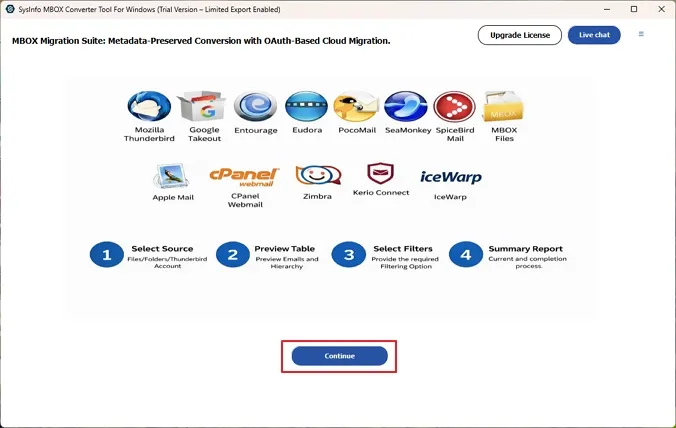
- At first, download and run the MBOX Exporter software on your PC. Hit Continue.
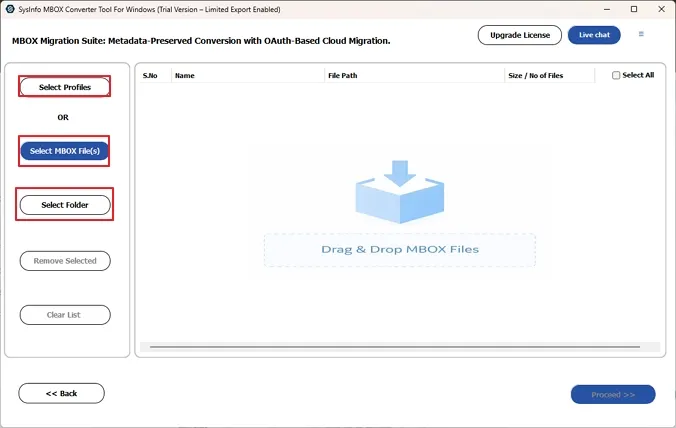
- Now, click on Select Profile to add the profile or Select Files/Select Folder to browse and add the files to the panel.
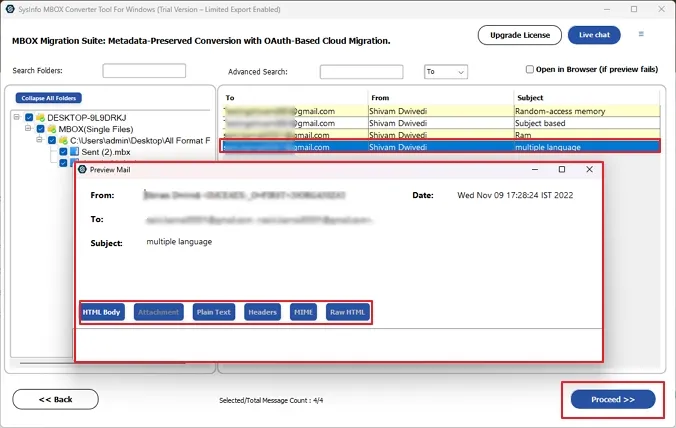
- Further, you can preview the content of added files and then select the files to convert.
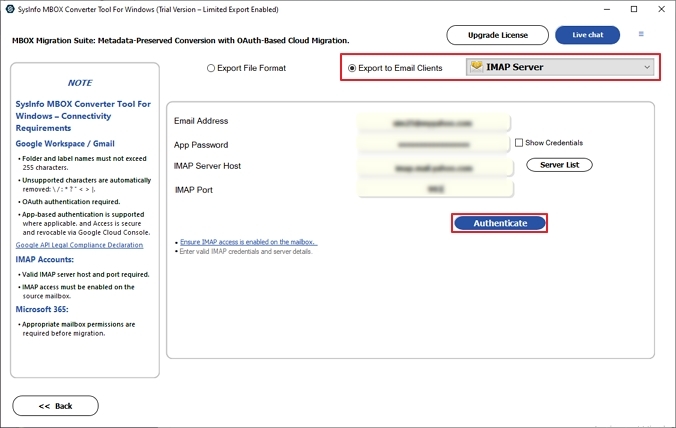
- After that, choose IMAP in the export to Email Clients option and login with the credentials.
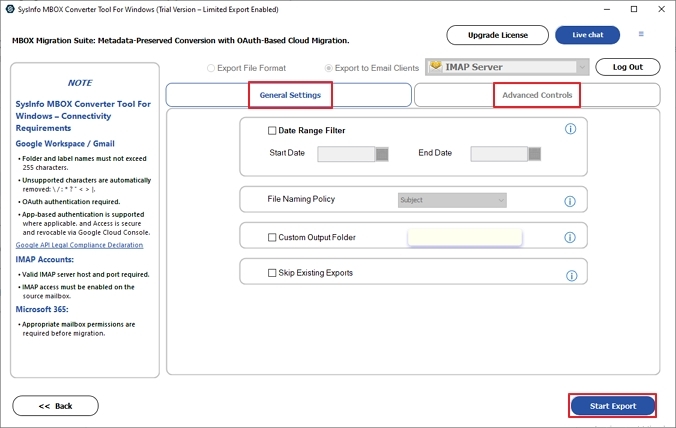
- Apply the basic or advanced filters as required and then click on Start Export.
What Are The Standout Features Of The Tool?
- Add single or multiple MBOX files in one go without restrictions.
- Allows users to convert MBOX to EML and other file formats with zero data loss.
- Maintains original folder structure and complete data integrity throughout.
- Supports export to Courier Mail, IMAP servers, and other formats.
- Remove duplicates, filter attachments, and select specific date ranges.
- Offers a free demo to convert up to 50 MBOX emails per folder.
Real Case Scenario
A small business was stuck with scattered MBOX files and no clean migration path. Thunderbird kept throwing sync errors, and folders came out completely broken. Large files took forever and still failed halfway through. They eventually tried MailConverterTools MBOX Converter, and everything processed smoothly. Migration finished quickly, folders landed perfectly, and zero emails went missing.
To Wrap Up
This blog walks through every practical way to convert MBOX to Courier Mail. Manual methods are free, but come with too many strings attached, honestly. One wrong step and your folder structure or emails pay the price. MailConverterTools MBOX Converter skips all that drama and handles the migration smoothly and hassle-free. The software helps to move even enterprise-level data and ensures data integrity. Go with whatever method matches your technical comfort and data volume.
Frequently Asked Questions
Q.1 Can I convert MBOX to Courier Mail without data loss?
Ans. Yes, with the MailConverterTools MBOX Converter, you can convert MBOX to Courier Mail without data loss. It preserves emails, attachments, and folder structure throughout the process.
Q.2 What is the best tool to convert MBOX to Courier Mail?
Ans. The MailConverterTools MBOX Converter is one of the best solutions. It offers secure, accurate, and direct migration to Courier Mail using IMAP.
Q.3 How long does it take to convert MBOX to Courier Mail?
Ans. The time depends on file size and internet speed. However, MailConverterTools MBOX Converter ensures fast processing with high accuracy.
Q.4 Can I convert multiple MBOX files to Courier Mail at once?
Ans. Yes, MailConverterTools MBOX Converter supports bulk conversion. You can migrate multiple MBOX files to Courier Mail in a single process.
Q.5 Is there a free method to convert MBOX to Courier Mail?
Ans. Manual methods exist but are unreliable and time-consuming. The MailConverterTools MBOX Converter provides a safer and more efficient solution for complete migration.
About The Author:

Vikas Bajpai is a results-driven SEO expert and content strategist with a strong passion for building impactful digital experiences. He specializes in crafting data-backed content plans that boost visibility, engage audiences, and drive measurable growth. With deep expertise in search engine optimization, keyword strategy, and content marketing, Vikas helps brands strengthen their online presence and achieve long-term success.
Related Post