-
Written By Amit Chandel
-
Updated on January 2nd, 2026
Simple Solution to Convert NSF to PST File in One Click
Henry’s Query:
I am planning to move to Microsoft Outlook from Lotus Notes. But all my important emails, and other details such as contacts, calendars, etc., are stored in an NSF file. Also, Outlook doesn’t support the NSF file format. How can I convert my NSF files to PST without errors?
There are many individual and professional users who are finding ways to save their Lotus Notes emails to Microsoft Outlook. But Lotus Notes saves emails in NSF format, which is not supported by Outlook. This makes it difficult to access the Outlook emails in Lotus Notes, but in this blog, we will make it possible to convert NSF to PST. One option is manual methods, and another is MailConverterTools Lotus Notes to Outlook PST Converter. We will cover both methods step by step in this blog.
Why do Users Want to Migrate NSF to PST?
- In a lot of offices, Lotus Notes is simply not used anymore. When the whole team moves to Outlook, it just makes more sense to follow the same setup.
- Outlook feels okay to work with. If someone already uses Word or Excel daily, they don’t need to learn much.
- NSF files don’t open in Outlook. Because of that, old emails just sit there, unused, inside Lotus Notes.
- Finding emails, opening folders, or searching messages usually feels simpler in Outlook.
- Some users still need past emails for work records or future reference.
- Switching to PST helps users manage everything in one place instead of two mail apps.
- PST files are simple to store, copy, or keep as a backup.
- Migration helps users move away from software that is slowly being phased out.
How to Convert NSF to PST Format Manually?
Here, we will discuss the step-by-step process of the manual method to move NSF to PST. This method is suitable if the user have limited number of files and enough time to migrate Lotus Notes to Outlook manually.
Step 1: Export NSF Emails to CSV format from Lotus Notes
- First, open Lotus Notes and go to File and click Export.
- Pick where you want to save the file and give it a name.
- Thereafter, from the file type list, select Comma Separated Value (CSV).
- Set the export options and click Export to save the CSV file.
Step 2: Import CSV File into Outlook
- Afterward, open Microsoft Outlook.
- Thereafter, click on File > Open & Export > and choose Import/Export.
- Choose the option to import from another program or file, then hit Next.
- After that, choose Comma-Separated Values and click Next.
- Furthermore, browse and select the CSV file exported from Lotus Notes.
- Finally, follow the on-screen steps to complete the import.
|
Note: There is a high chance that you will get errors or find difficulties to convert NSF File to PST with manual methods. Because manual methods have some limitations, listed below. |
Limitations:
- This method mostly handles email things, like contacts or calendar entries, which often don’t show up the way you expect.
- Attachments can be a problem. Some come through, some don’t, and a few may not open at all.
- Email layout usually changes. After import, messages may not look the same as they did in Lotus Notes.
- It takes time if the mailbox is big; the process feels slow and repetitive.
- For office or business use, this method often feels unreliable and incomplete.
Simple Way to Convert NSF to PST With Accuracy & Perfection
The advanced Lotus Notes to Outlook PST Tool is an effective utility to move NSF to PST. This tool supports bulk migration without any hassle. Additionally, it helps you convert the attachment, calendars, contacts, and other email items. It’s easy to use a GUI that allows you to convert Lotus Notes NSF file to Outlook PST file. Moreover, this utility is sufficient to remove encryption from Lotus Notes.
Steps to Move NSF files to Outlook PST
- Firstly, download and run our NSF to Outlook PST Converter Tool.

- Then, add your HCL Notes NSF file to convert.

- After that, check the folders and their structure in the preview panel and click Next.

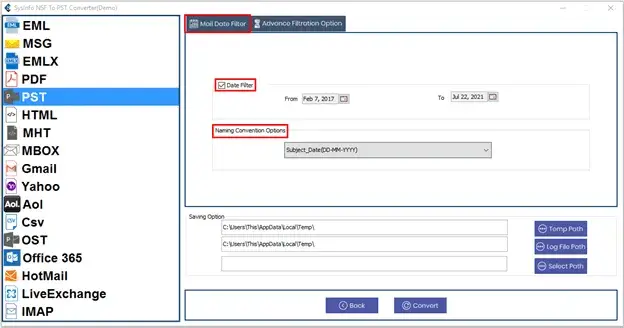
- Thereafter, select the PST as the saving option and apply necessary filters.

- Finally, set the path to save your file and click Convert.
Successful User Case:
A user from Melbourne needed to copy Lotus Notes Emails to Hard Drive because he is switching to Outlook. He contacted our team for the solution. We introduced him to our Lotus Notes to Outlook PST Converter Tool, which helps him to move their emails to his new Outlook email client. Also, helps him to copy their emails to the hard drive as an extra backup option. This helps him to access his old emails in Outlook. He is satisfied with our solution and with the outcomes of our smart utility.
Conclusion
To conclude, we learned about step by step process to convert NSF to PST. This helps us to access our emails from Lotus Notes to Outlook. We covered the manual and professional ways to convert files. Choosing the right option at the right time by understating you needs is important. Moreover, for batch processing, it is important to use an advanced utility to avoid manual errors and limitations.
Frequently Asked Questions
Q1: Can I convert NSF to PST manually?
Ans: Yes, you can convert your files manually by exporting NSF to CSV and then in Outlook. But it requires both applications in your system. If you want to convert a file without installing an email client, you can use our Lotus Notes Converter Tool.
Q2: What is the safest way to convert NSF to PST?
Ans: If you want to export only emails, you can use any way to convert. But for attachments, contacts, calendars, and other items with email, you should use the MailConverterTools Lotus Notes to Outlook PST Converter.
Q3: Can I convert multiple NSF files to PST at once?
Ans: With the help of Lotus Notes to PST Converter, you can convert multiple files at once without any errors.
Q4: Will converting NSF to PST affect my original NSF file?
Ans: The advanced tool does not affect your original NSF file. Because the advance tool like Lotus Notes Converter make sure that your data and folder structure remains the same.
Q5: How long does it take to migrate NSF to PST?
Ans: It totally depends on the way the user chooses to convert their file. Manual methods take a lot of time for batch processing. On the other hand, the professional tools process files in bulk in minimal time.
About The Author:

Meet Amit, an experienced SEO expert and content planner. He uses his creativity and strategy to create content that grabs attention and helps brands reach their goals. With solid skills in digital marketing and content planning, Amit helps businesses succeed online.
Related Post