-
Written By Vikas Bajpai
-
Updated on June 1st, 2026
Migrate Bluehost Email to Google Workspace Securely in 2026
User Query: Managing emails for my small business has now become difficult with Bluehost. Moving to a reliable email provider like G Suite will be best now for email management. But I have multiple accounts for which I need a trusted way to migrate files securely. Does anyone have any suggestions?
Many users encounter this because no one wants to lose their data. Handling multiple Bluehost accounts is not easy; it becomes confusing, time-consuming, and risky for management. To make email management easy and enhance productivity, users choose to migrate data to reliable platforms like Google Workspace. There are two ways that we will go through in this guide to migrate Bluehost email to Google Workspace. The manual method and the automated tool solution, using the MailConverterTools IMAP Backup Tool for smart data transfer.
Why Users Import Bluehost Email to Google Workspace?
- Google Meet, Docs, and Drive all connect directly to make teamwork faster.
- Bluehost email sometimes causes deliverability issues, and Google Workspace handles that far more reliably.
- Growing businesses need a more professional email setup that Bluehost simply was not built for.
- Google Workspace comes with stronger spam filters and security tools that most users genuinely need.
- Some users move simply to make managing more organized and less scattered.
Difference Between Bluehost Email and Google Workspace
|
Feature |
Bluehost Email |
Google Workspace |
|
Email Platform |
Basic web hosting email service |
Cloud-based business productivity suite |
|
Ease of Management |
Limited mailbox management features |
Advanced and centralized admin controls |
|
Storage Capacity |
Depends on the hosting plan |
Flexible cloud storage with scalable plans |
|
Collaboration Tools |
Not available |
Includes Gmail, Drive, Docs, Meet, Calendar, and more |
|
Spam Protection |
Basic spam filtering |
Advanced AI-powered spam and phishing protection |
|
Accessibility |
Mostly webmail-based access |
Access from web, desktop, and mobile apps |
Native Method to Migrate Bluehost Email to Google Workspace
Google Workspace offers a built-in Data Migration feature that helps users transfer Bluehost emails using IMAP settings. Before starting, make sure IMAP is enabled in your Bluehost account and keep your email credentials ready.
Steps to Move Bluehost Email to Google Workspace
- Firstly, log in to your Bluehost cPanel and enable IMAP access.
- Thereafter, open the Google Admin Console and go to Data Migration.
- Click Set Data Migration Up and choose Other IMAP Server as the migration source.
- Further, enter the following details:
- Server: mail.yourdomain.com
- Port: 993
- Security: SSL
- Now, enter your Bluehost email address and password.
- Then, click Connect and select the mailbox data you want to migrate.
- If needed, add users manually or upload a CSV file for bulk migration.
- Finally, click Start Migration to begin the process.
Drawbacks of the Manual Method
- Beginners may find this process confusing.
- This method is not suitable at the enterprise level.
- Syncing between may fail or miss emails during the migration.
- Migrating multiple accounts in bulk is difficult with this approach.
- Needs a continuous, stable internet connectivity.
IT-Grade Way to Migrate Bluehost Email to Google Workspace
The MailConverterTools IMAP Mail Backup Tool connects with the Bluehost email server and migrates data to Google Workspace. This utility is built to achieve the bulk migration without going through a single step-by-step process. It removes the manual involvement that reduces the chances of errors. With the same utility, the user can even migrate Bluehost email to Office 365. Moreover, you can back up any IMAP server emails to multiple file formats like PST, PDF, EML, MBOX, CSV, and many others.
Steps to Transfer Bluehost Email to Google Workspace
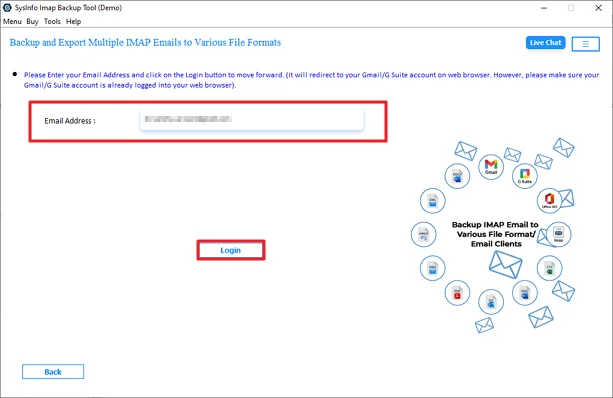
- Firstly, download the tool and log in with your Bluehost credentials.
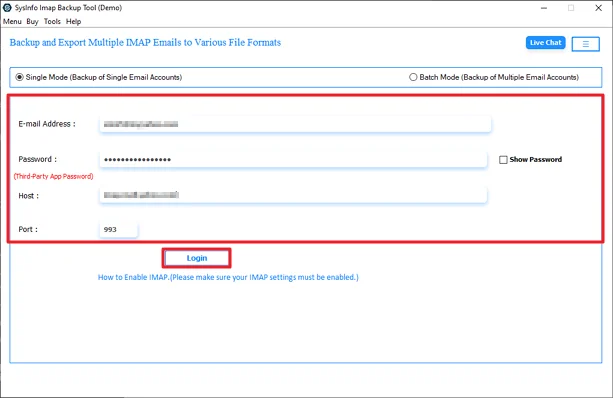
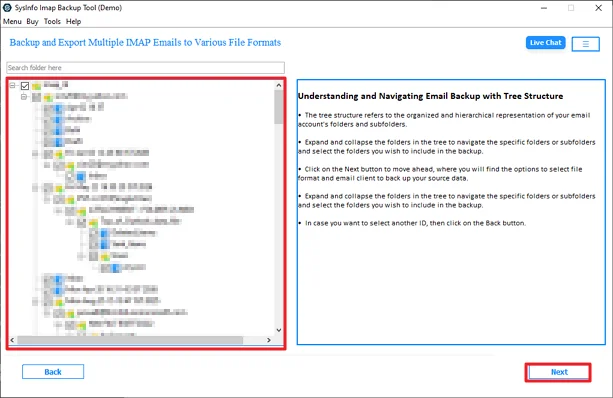
- Thereafter, preview and select files, and click Next
- After that, choose Google Workspace and click Next.
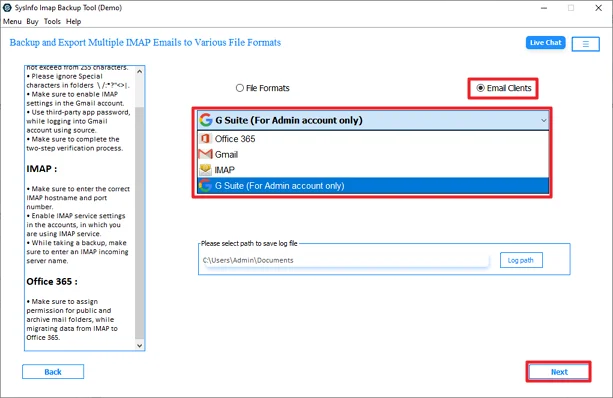
- Then, enter G Suite credentials and sign in with your details.
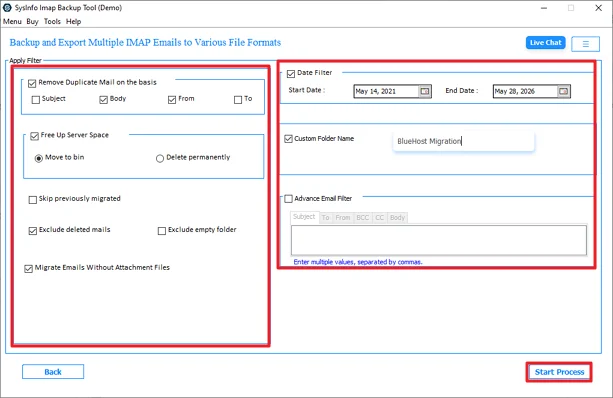
- Finally, check and apply filters and click Start Process.
Real User Case Study
Bluehost was used for daily communication in a digital marketing agency with 35+ employees. With the growth of the company, the team started facing multiple issues with Bluehost. Then, they planned to switch to G Suite to enhance their productivity and for better management.
First, the organisation goes with the manual method, but it becomes difficult to handle multiple files. To avoid any further errors or complications, they used the MailConverterTools IMAP File Migrator Software. This software helps them handle multiple accounts while keeping everything intact.
Conclusion
Organisations prefer Google Workspace for their day-to-day tasks because it has better manageable feature. You can go with the manual method if you have a few files to migrate Bluehost email to Google Workspace. However, for an enterprise-level migration, this becomes troublesome and time-consuming to manage. Here, the professional IMAP Migration Software simplifies the tasks through automation. This makes it a suitable option for businesses, administrators, and users handling important email data.
Frequently Asked Questions
Q.1 How do I migrate Bluehost email to Google Workspace?
Ans: You can migrate the Bluehost email to Google Workspace using Google Workspace Data Migration through IMAP settings. For a simpler and more automated process, users can also use the MailConverterTools IMAP Backup Tool.
Q.2 Can I Transfer Bluehost Emails to Google Workspace in Bulk?
Ans: Yes, the MailConverterTools IMAP Migration Tool supports bulk migration of multiple Bluehost email accounts to Google Workspace in a single process.
Q.3 Is There Any Support Available If I have issues during Bluehost to Google Workspace Migration?
Ans: Yes, users can contact the support team of MailConverterTools for technical assistance during the migration process.
Q.4 Is It Safe to Move Bluehost Email to Google Workspace?
Ans: Yes, it is safe when using a trusted solution like the MailConverterTools IMAP Backup Software. The software maintains mailbox data, folder hierarchy, and attachments during migration.
Q.5 Can I Import Bluehost Emails to Google Workspace Without Technical Knowledge?
Ans: Yes, the MailConverterTools IMAP File Backup Tool comes with a user-friendly interface that helps non-technical users migrate Bluehost emails easily.
Q.6 Does the Tool Offer an Easy-to-Use Interface for Importing Bluehost Emails?
Ans: Yes, the tool provides a simple interface with step-by-step options to make the Bluehost to Google Workspace migration process easier for all users.
About The Author:

Vikas Bajpai is a results-driven SEO expert and content strategist with a strong passion for building impactful digital experiences. He specializes in crafting data-backed content plans that boost visibility, engage audiences, and drive measurable growth. With deep expertise in search engine optimization, keyword strategy, and content marketing, Vikas helps brands strengthen their online presence and achieve long-term success.
Related Post