-
Written By Amit Chandel
-
Updated on January 9th, 2026
Import OLM to AOL Mail | Complete Migration Guide
Mitchel’s Query: I recently moved from Outlook for Mac to AOL Mail, but my important emails are still saved in OLM files. I need a reliable way to import them into AOL Mail without losing data.
Many users encounter difficulties when importing OLM files to AOL Mail after switching from Outlook for Mac. This is because AOL Mail does not support direct OLM file imports. This blog explains practical solutions to import OLM to AOL Mail, including step-by-step manual methods. Or an easier alternative using the MailConverterTools OLM Converter Tool for accurate and secure migration without data loss. Additionally, this blog will help you to get the best method according to your needs and expertise.
Why Import OLM files to AOL Mail?
- After leaving Outlook for Mac, users still need access to old emails saved in OLM files for daily reference.
- Many important messages, like office discussions, bills, and personal emails, are easier to manage inside one AOL Mail account.
- AOL Mail works directly in a browser, so emails can be checked anytime without installing Outlook again.
- Moving OLM emails to AOL Mail helps users avoid switching between different email platforms.
- It also keeps past email data safe, organized, and available for future needs such as audits or records.
How to Import OLM to AOL Mail Manually?
You can move your OLM emails to AOL Mail manually with the help of Outlook for Mac. This method uses the IMAP connection to upload emails to your AOL account.
Follow the Steps to Convert OLM to AOL Account
- Firstly, open Microsoft Outlook for Mac.
- Then, click on File > Import and choose the OLM file.
- After that, go to Tools and open the Accounts section.
- Thereafter, click the + (Add Account) and select Other Email or IMAP.
- Further, enter your AOL Mail login details:
- Incoming Server: imap.aol.com, Port 993, SSL enabled
- Outgoing Server: smtp.aol.com, Port 465, SSL enabled
- Afterwards, once the AOL account is added, it will appear in the Outlook folder list.
- Then, select the imported OLM emails and drag them into the AOL Mail folders.
- At last, allow Outlook to sync so the emails are uploaded to AOL Mail.
Limitations:
- Email properties such as read/unread status, flags, or timestamps may not always remain the same.
- Folder structure may not be transferred accurately and often needs manual verification.
- Not suitable for business users handling large or sensitive mailboxes due to a lack of automation and error handling.
Smart and Reliable Solution to Import OLM to AOL Mail
The MailConverterTools OLM Converter Tool is a quick and easy way to move your emails from Outlook for Mac to AOL Mail. It makes the whole process simple, so you don’t have to worry about losing any important messages. Besides AOL Mail, this tool can also help you transfer your OLM files directly into Zoho Mail and many other email services.
Steps to Upload OLM File into AOL
- Firstly, download the OLM Converter Tool.
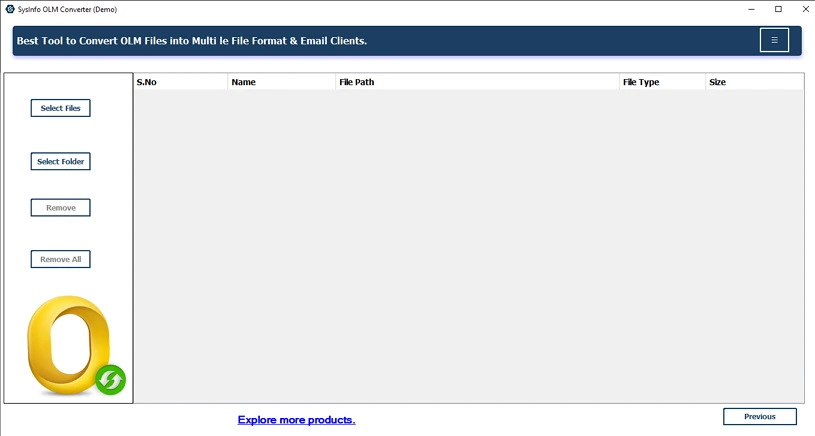
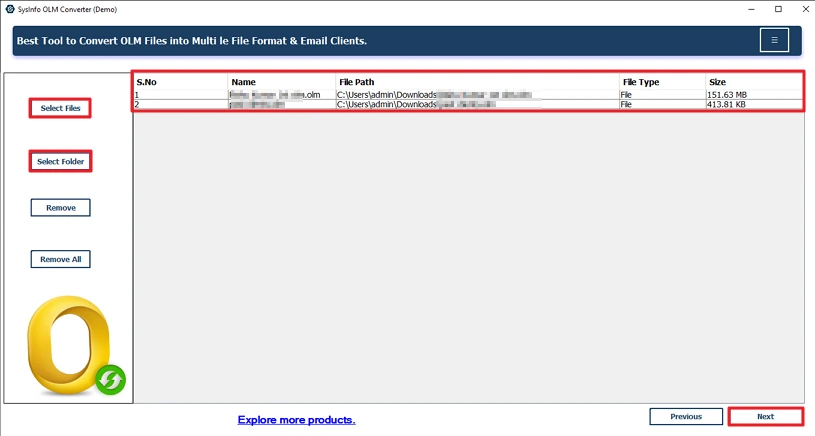
- Then, select and add OLM files or a folder and click Next.
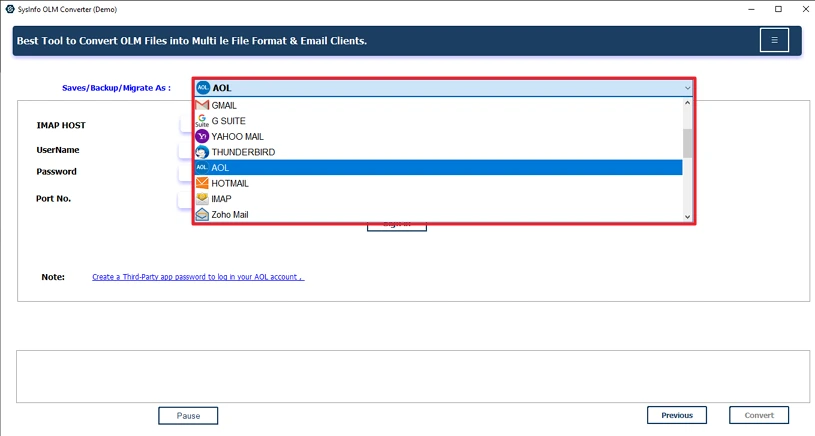
- After that, choose AOL as the saving option.
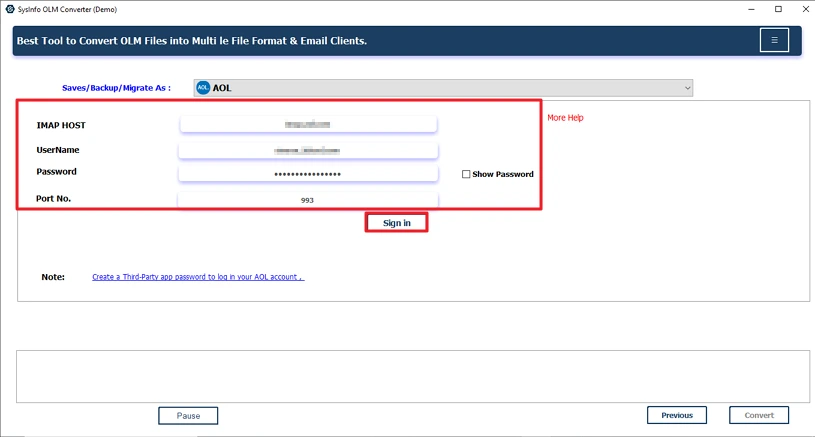
- Thereafter, log in with its credentials.
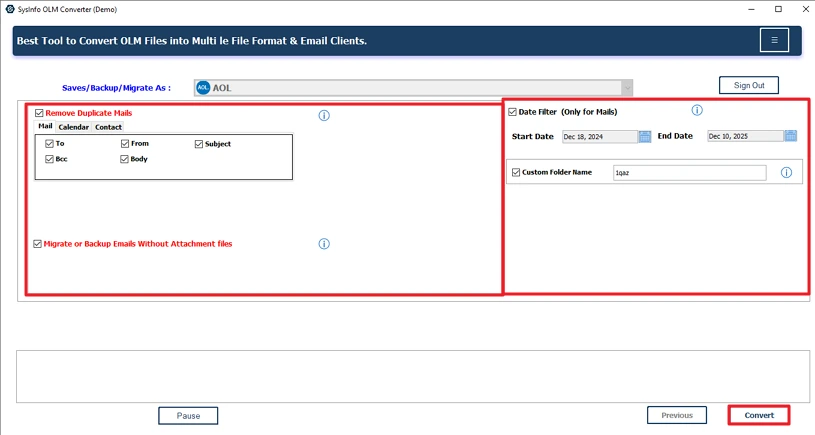
- Finally, apply filters and click Convert.
User Story:
After moving from Outlook for Mac to AOL Mail, I had to bring over my old emails from an OLM file. The manual process felt complicated and took forever. Then I tried the MailConverterTools OLM Converter Tool to transfer OLM Files to AOL. It was pretty straightforward — I just uploaded my file, picked AOL Mail, and logged in. After a little wait, all my emails showed up just fine. Now I can check them on any device, which is super convenient.
Conclusion
To conclude, whenever we import OLM to AOL Mail, our other content must be organized with the email. That makes sure that you can access your data from any device after the transfer. Manual methods exist and rare eliable, but it takes too much time to migrate. At that time, the advanced OLM Converter Tool is the best choice to get faster, safer, and more secure results.
Frequently Asked Questions
Q1: Which is the Best tool to Import OLM to AOL Mail?
Ans: The MailConverterTools OLM Converter Tool is the best if you want to import your OLM file to AOL. This utility is reliable, dependable, secure, and fast for your successful import.
Q2: How to import OLM files to AOL Mail directly?
Ans: You can use the manual methods to import, but it’s only effective for a limited number of files. For a large number of files, you should use the professional tool to avoid unwanted errors.
Q3: Is it possible to upload an OLM file into AOL Mail without Outlook?
Ans: Yes, it is possible with the MailConverterTools OLM Converter Tool to upload your OLM file to AOL without Outlook. This professional tool doesnot requires any external software. Additionally, provides the best results in very minimal time.
Q4: What mailbox data can be transferred from OLM to AOL Mail?
Ans: With the manual methods, you can only transfer the emails its doestnot transfer attachments and other items. But the professional OLM Converter Tool allows you to transfer attachments and other mailbox items with emails.
About The Author:

Meet Amit, an experienced SEO expert and content planner. He uses his creativity and strategy to create content that grabs attention and helps brands reach their goals. With solid skills in digital marketing and content planning, Amit helps businesses succeed online.
Related Post