-
Written By Amit Chandel
-
Updated on April 13th, 2026
How to Move IMAP Emails to AOL Mail on Mac and Windows
User Query: I’ve got a bunch of emails sitting in an IMAP account, and now I want them in my AOL Mail. Idk what the easiest way is there a simple way to do this?”
IMAP accounts are pretty common, and a lot of email services use them. But sometimes people decide to move their IMAP email to AOL Mail to keep their emails in one place. The tricky part is that AOL doesn’t really give a direct option to move emails from another IMAP account. So you have to rely on a manual setup or use a professional tool like MailConverterTools IMAP Backup Tool. In this blog, we’ll look at both ways to move IMAP emails to AOL Mail.
Why Transfer Emails from IMAP to AOL Mail?
- Some users move emails to AOL Mail so they can manage everything from one single account.
- AOL’s interface feels simpler for some people compared to handling multiple IMAP email accounts.
- Keeping emails in AOL helps users avoid checking different inboxes for personal or work messages.
- Many users shift emails when they stop using an old email service connected through IMAP.
- AOL Mail offers large mailbox storage, so people move older emails there for safer keeping.
- Moving IMAP emails to AOL helps when users change email providers but want old conversations saved.
- Some people transfer emails so they can access all messages from AOL on different devices easily.
- It also helps when users want to organize old emails in one place instead of scattered accounts.
Traditional Method to Move IMAP Email to AOL Mail
If you want to move emails using a built-in option. This works through POP settings and helps bring your AOL messages into Gmail automatically.
Simple Steps to Migrate IMAP to AOL Mail
- Firstly, log in to your Gmail account in a web browser.
- Afterwards, click the Gear Icon > See all settings > Accounts and Import tab.
- Then, under Check mail from other accounts > Add a mail account.
- Enter your AOL email address and click Next.
- After that, choose Import emails from my other account (POP3).
- Further, enter your AOL password.
- Add the POP Server: pop.aol.com and Port: 995.
- Then, enable Always use a secure connection (SSL).
- Click Add Account to finish the setup.
Limitations
- This method depends on POP settings, so it may not sync every folder from the AOL mailbox.
- It usually imports only inbox emails, while other folders may not appear in Gmail.
- The setup can feel a bit confusing for new users, especially when entering server details.
- Sometimes the email sync takes time, so messages may not appear in Gmail immediately.
- You must enter the correct AOL server settings; the connection may fail.
- It may not move very large mailboxes properly, especially if the account has many years of emails.
- If the connection stops, some emails might not transfer completely.
Professional Method to Move IMAP Email to AOL Mail
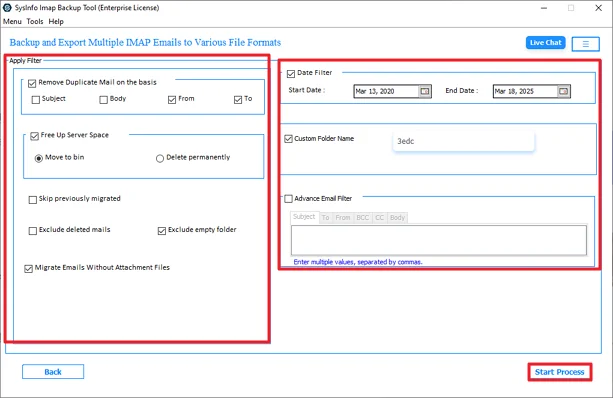
If you want a faster way to move IMAP emails, some people use the MailconverterTools IMAP Backup Tool. It lets you connect the IMAP account and start the migration in a few steps. The tool shows a preview panel, so you can check the emails before moving them. It also has options like removing duplicate emails or skipping already migrated messages. Besides AOL, it can also migrate IMAP to Yahoo Mail. The tool keeps the email data the same during the process. In addition, read this to export IMAP to MBOX.
Steps to Transfer Emails from IMAP to AOL Mail
- Download the tool and log in with IMAP credentials.
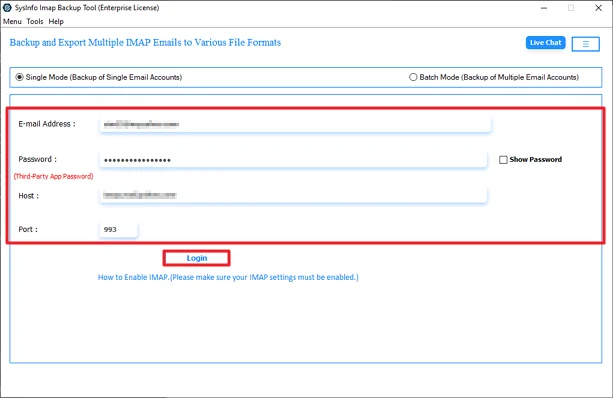
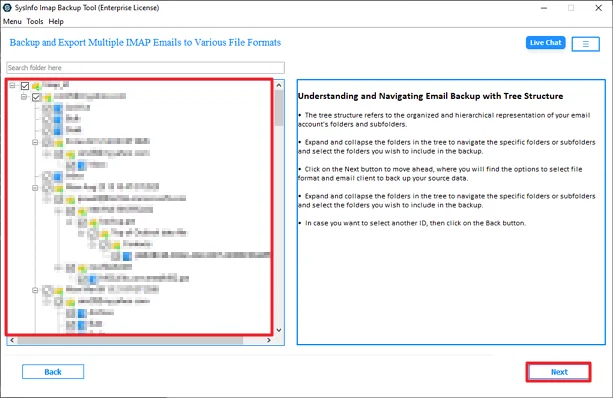
- Then, expand folders and choose to export and click Next.
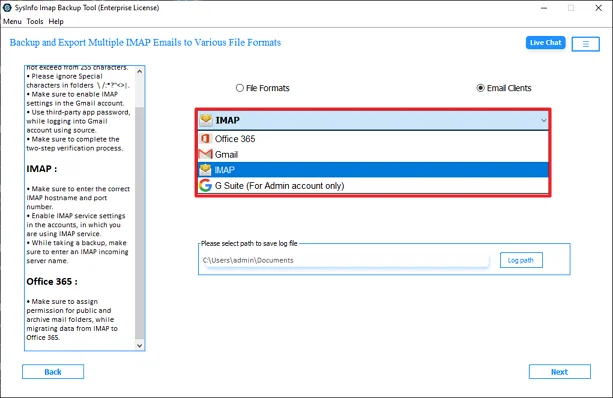
- After that, choose IMAP from the list.
- Further, enter AOL credentials to log in.

- At last, apply filters and click Start Process.
Real User Case:
Problem: A small business owner had many emails in an old IMAP account and wanted everything moved into AOL Mail to keep it in one place.
Action Taken: To handle the transfer, they used the MailConverterTools IMAP to AOL Mail Backup Tool and moved the mailbox folders and emails.
Outcome: The emails were transferred to AOL Mail, and the mailbox appeared there with the same folders.
Relevant post: Transfer Shaw Email to Gmail
Conclusion
In this blog, we talked about two ways to move IMAP email to AOL Mail. The manual method can work if you only have a small number of emails. But it may take more time. For large mailboxes, many people prefer using a migration tool because it handles multiple emails more easily. The tool can also help users who are not very technical.
Frequently Asked Questions
Q.1 What is the best tool to move IMAP emails to AOL Mail?
Ans: The MailConverterTools IMAP Backup Tool can be used to move IMAP emails to AOL Mail. It allows users to connect the IMAP account and start the migration in a few steps.
Q.2 How can I move IMAP emails to AOL Mail without technical skills?
Ans: You can use the MailConverterTools IMAP Backup Tool. It has a simple interface where you log in with your IMAP account, choose folders, add AOL credentials, and start the process.
Q.3 Is it safe to transfer emails from IMAP to AOL Mail?
Ans: According to the method described in the blog, using the migration tool helps move emails while keeping the folder structure and message data the same during the transfer.
About The Author:

Meet Amit, an experienced SEO expert and content planner. He uses his creativity and strategy to create content that grabs attention and helps brands reach their goals. With solid skills in digital marketing and content planning, Amit helps businesses succeed online.
Related Post