-
Written By Vikas Bajpai
-
Updated on June 12th, 2026
How to Transfer DreamHost to Gmail on Mac & Windows
“We have approximately 4,200 mailboxes to transfer DreamHost to Gmail across three regional offices. Our IT team requires a structured migration process that preserves folder hierarchy, email metadata, and attachment integrity. What is the most reliable method to transfer DreamHost email accounts to Gmail without data loss or extended downtime?”
¬ Layla Campbell, Russia
Organizations who needs to move DreamHost email to Gmail require an enterprise-grade approach. That approach will help them to preserve mailbox integrity across large-scale deployments. IT administrators can execute this migration through manual and professional approaches using the MailConverterTools IMAP Backup Tool. Each method supports metadata retention, folder structure preservation, and attachment fidelity across mailboxes ranging from individual accounts to enterprise deployments exceeding thousands of users.
Features of Gmail Application
- Gmail offers 15 GB of free storage to every individual account user worldwide.
- Multiple email accounts stay manageable from a single Gmail application interface.
- Powerful search filters retrieve specific emails from even the largest mailbox collections.
- Incoming emails are automatically sorted into the correct categories using labels and filter rules.
- Offline mode keeps email reading and composing functional even without internet access.
- Large files attach directly from Google Drive without consuming Gmail storage space.
- The Gmail mobile app runs all core features smoothly across Android and iOS.
Difference Between DreamHost and Gmail
|
Feature |
DreamHost Email |
Gmail (Google Workspace) |
|
Provider Type |
Web hosting company with email service |
Dedicated email and productivity platform |
|
Storage Capacity |
Unlimited storage on shared hosting plans |
15 GB free, up to 5 TB on enterprise plans |
|
Spam Filtering |
Standard server-level spam filtering |
Advanced AI-based spam filter blocking 99.9% threats |
|
Mobile Application |
No dedicated mobile application available |
Full-featured Android and iOS mobile applications |
|
Collaboration Tools |
No built-in collaboration or productivity tools |
Google Meet, Chat, Drive, Docs, Calendar integration |
|
Security Features |
Basic SSL encryption and account protection |
MFA, end-to-end encryption, advanced threat protection |
|
Custom Domain Support |
Supported through a DreamHost hosting account |
Supported via Google Workspace subscription plans |
Business-Oriented Solution to Transfer Dreamhost to Gmail
The MailConverterTools Email IMAP Migration Tool is a purpose-built, enterprise-grade utility designed to migrate and back up IMAP emails across multiple platforms with complete data integrity. IT administrators and organisations transferring DreamHost mailboxes to Gmail can rely on this tool. This utility is best for a structured, accurate, and efficient migration process. Before the steps to migrate DreamHost email to Gmail, let’s go through the key features of this smart utility.
Key Features of IMAP Email Backup Tool by MailConverterTools
- The tool supports batch migration through CSV import, allowing administrators to migrate multiple IMAP accounts simultaneously.
- The date range filter enables selective email migration, pulling only necessary emails within a specified timeframe without downloading the entire inbox.
- The tool includes a feature to remove duplicate emails from chosen IMAP folders during the migration process.
- An option to skip previously migrated emails prevents duplication and keeps the migration process clean and accurate.
- The tool features a self-instructive graphical user interface compatible with both technical and non-technical users.
- The tool delivers 100% accurate results and ensures the folder structure remains intact throughout the migration process.
- The free version of the IMAP Migration Tool allows users to back up 50 emails per folder before upgrading to the full version.
Steps to Migrate DreamHost Emails to Gmail with Attachments
Here we will see the step-by-step process of using the smart utility. This will help you to complete the process in very few steps without the manual configuration to connect DreamHost Email to Gmail.
- Firstly, download the tool and log in with DreamHost credentials.
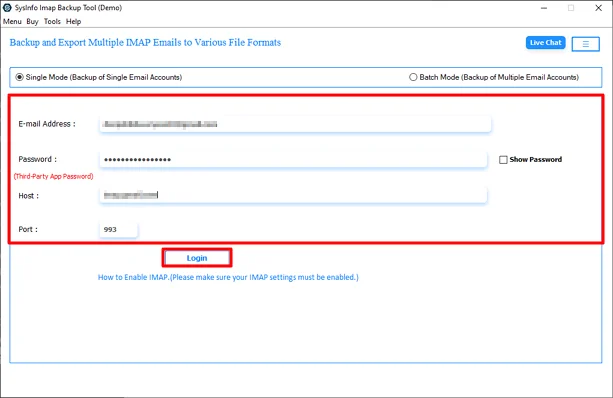
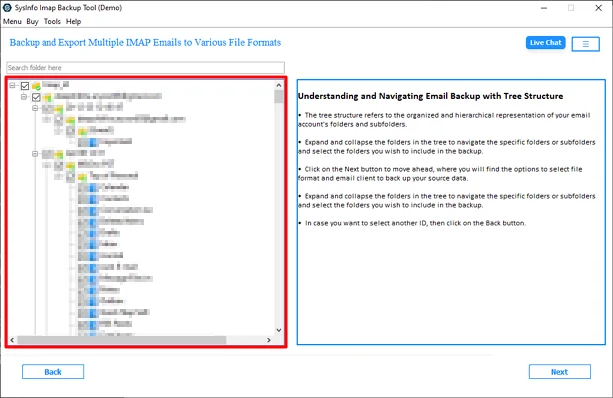
- Then, expand folders and select files or click Next.
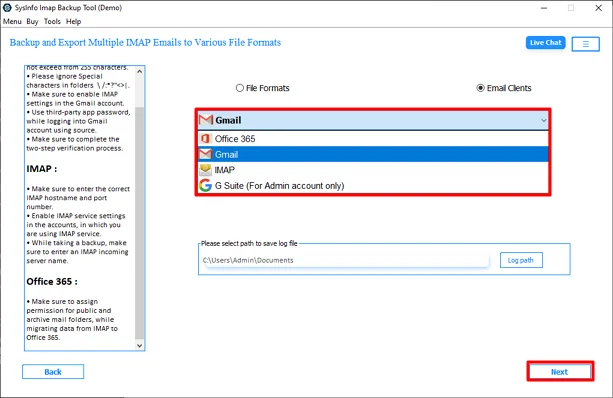
- After that, choose Gmail as the destination and click Next.
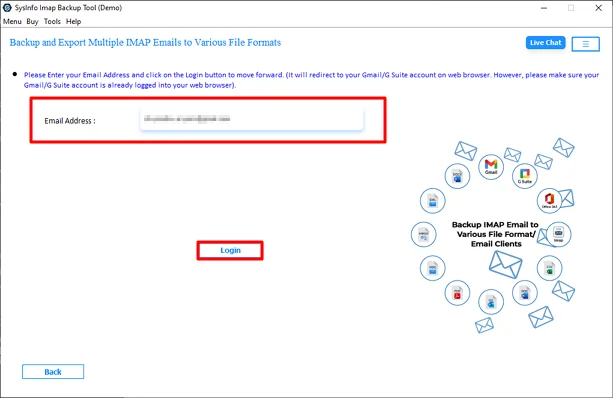
- Further, use Gmail credentials to log in.
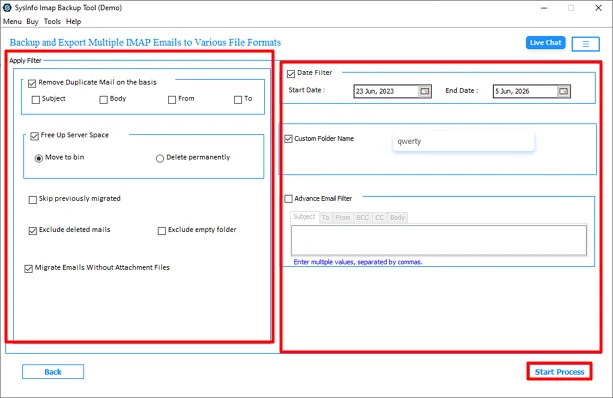
- Apply the filters & options and hit Start Process to begin.
Real-World Case Study
A Frankfurt-based digital media agency with branch offices in Amsterdam and Warsaw, migrated 2,100 DreamHost mailboxes totalling 3.1 TB to Gmail. The IT infrastructure team deployed MailConverterTools IMAP Migration Tool to transfer DreamHost to Gmail. CSV batch import processed all accounts simultaneously, maintaining folder hierarchy and attachment integrity throughout. The duplicate removal feature cleared 41,000 redundant email copies across shared project accounts. Post-migration, the team recorded a 47% increase in cross-office collaboration efficiency and a 58% reduction in IT helpdesk tickets.
Why Should Users Avoid the Manual Approach?
- Manual IMAP configuration handles only one mailbox at a time, increasing the total migration duration significantly.
- Large mailbox volumes exceeding 1 GB face frequent timeout errors during manual server-to-server transfers.
- Attachments exceeding Gmail’s size limits fail silently during manual migration without any error notification.
- Manual processes provide no built-in duplicate detection, resulting in thousands of redundant emails post-migration.
- IT administrators must monitor every manual transfer session continuously, consuming valuable operational hours.
- Manual migration carries a high risk of partial data transfer across large enterprise mailbox deployments.
End Note
Organisations need to transfer DreamHost to Gmail to gain access to an enterprise-grade communication platform built for scalability. Gmail delivers centralised administration, advanced threat protection, and deep productivity integration that DreamHost email cannot match at enterprise scale. The smart utility simplifies the entire process by handling bulk mailbox transfers, duplicate removal, & scheduled migration. IT teams across industries have executed large-scale migrations with zero data loss and measurable productivity gains.
Frequently Asked Questions
Q.1 Which Tool Is Best for DreamHost to Gmail Migration?
Ans: The MailConverterTools IMAP Migration Tool is one of the most reliable solutions for DreamHost to Gmail migration. It supports bulk mailbox transfers, preserves folder hierarchy, maintains email metadata and attachments, and offers advanced features such as CSV import, duplicate removal, and scheduled migration.
Q.2 Is It Safe to Migrate DreamHost Email to Gmail?
Ans: Yes, it is completely safe when using a professional migration tool. The software transfers emails through secure authentication protocols while preserving email properties, attachments, folder structures, and mailbox integrity throughout the migration process.
Q.3 How to Connect DreamHost Email to Gmail Without Technical Skills
Ans: Users can connect DreamHost email to Gmail by using an automated migration tool. Simply log in with DreamHost credentials, select Gmail as the destination, authenticate the Gmail account, and start the migration.
Q.4 Can I Move DreamHost Email to Gmail in Bulk?
Ans: Yes, the tool supports bulk migration of multiple DreamHost accounts using CSV file import. This feature allows organisations and administrators to transfer thousands of mailboxes simultaneously while maintaining complete data accuracy.
Q.5 Is There an Easy User Interface to Move DreamHost Emails to Gmail?
Ans: Yes, the software provides a user-friendly graphical interface designed for both technical and non-technical users. The step-by-step migration wizard simplifies the entire process and minimises the chances of configuration errors.
Q.6 Is 24/7 Support Available for DreamHost to Gmail Migration?
Ans: Yes, MailConverterTools provides dedicated technical support to assist users during the migration process. The support team helps resolve configuration issues, migration queries, and technical concerns to ensure a smooth transfer experience.
About The Author:

Vikas Bajpai is a results-driven SEO expert and content strategist with a strong passion for building impactful digital experiences. He specializes in crafting data-backed content plans that boost visibility, engage audiences, and drive measurable growth. With deep expertise in search engine optimization, keyword strategy, and content marketing, Vikas helps brands strengthen their online presence and achieve long-term success.
Related Post